Anthropic engineers 8x output. Here's the context engineering system behind it.

Anthropic engineers merge 8x more code per day than they did a year ago. The model didn't change. The hardware didn't change. The team size didn't change. What changed is what Claude sees before it starts working.
Most developers spend their time writing better prompts. Anthropic engineers spend their time building better context. That one shift is responsible for the entire 8x gap.
Anthropic's own research puts it directly: the quality of an AI agent is determined less by the model and more by the context you give it. Claude only sees what's inside the context window. Everything outside that window doesn't exist. Which means the entire job of a serious AI engineer is not writing clever prompts - it's making sure Claude has exactly the right information before it takes a single action.
That discipline has a name now. Context engineering. And it's replacing prompt engineering the same way prompt engineering replaced manual scripting two years ago.
Bookmark This and follow I'm Noisy, a developer with 4 years of experience. I build AI systems, automation pipelines and find ways to turn technology into real income.
Why your AI agent gives bad answers
Most people blame the model when an AI agent fails. Wrong file edited. Wrong assumption made. Obvious mistake that any developer would have caught.
The model is almost never the problem. The problem is missing context.
A prompt is one sentence. Context is the entire information environment Claude operates in. The difference between an agent that works and one that doesn't is almost always what's in that environment - not which model is running.
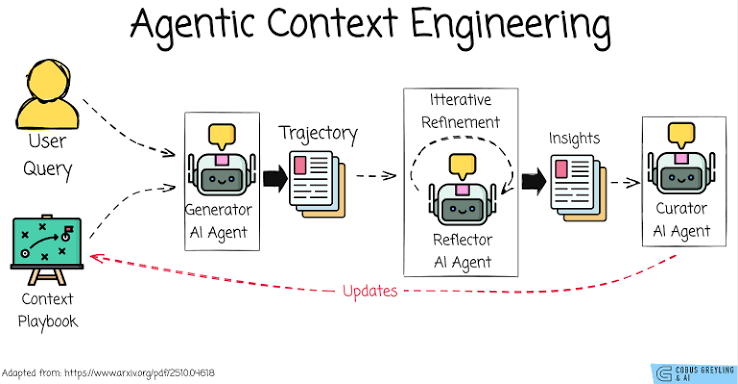
Anthropic describes it this way: LLM sees only what's in the context window. Context is the operating system for AI. Build it wrong and nothing works regardless of how capable the model is.
What context actually is
Most people think context means the text they paste before their question. That's one layer. A properly engineered context has seven components working together.
Every time Claude takes an action the context grows. Tool results come back. New files get read. The state updates. Claude sees the new context and decides the next action. This cycle is the actual mechanism of an agent - not the prompt, not the model, but the context that evolves with every step.
A bad agent breaks this cycle at step two. The context is incomplete so Claude makes assumptions. The assumptions are wrong so the output is wrong. Most developers fix this by rewriting the prompt. The actual fix is building the context correctly.
The three-layer context stack
Anthropic recommends thinking about context in three layers. Each layer serves a different purpose and gets loaded at a different point in the agent's work.
Global Context is the permanent layer. Identity, core rules, coding style, what the agent should never do. This never changes between sessions and never needs to be re-explained.
Project Context is the knowledge layer. Everything Claude needs to understand this specific codebase - the architecture, the patterns used, the decisions made and why, the things that went wrong before.
Task Context is the execution layer. The specific file being worked on, the current ticket, the immediate goal, the constraints that apply to this exact task.

Most developers only give Claude task context. The agent starts every session without global or project context and has to guess everything it doesn't know. Those guesses are where the mistakes come from.
AGENTS.md - the file that changes everything
https://docs.claude.com/en/docs/claude-code/memory
The most important single file in any serious Claude Code setup. Researchers have identified AGENTS.md as the new standard for AI coding agent context - it's now present in thousands of production repositories specifically because it works.
AGENTS.md is where project context lives permanently. Claude reads it automatically at the start of every session. After that it never needs to be told any of it again.
Every rule in this file is one mistake Claude will never make again. The longer the project runs the more specific and valuable AGENTS.md becomes - it's the accumulated knowledge of every error the agent made and every convention the team established.
The context stack that powers serious agents
The best AI engineers don't start a task by writing a prompt. They build a context stack - a structured sequence of information that loads before Claude takes a single action.
Compare what a well-context-engineered agent looks like versus the default:
The second agent is not smarter. It's better informed. The model is identical. The context is not.
Memory - the context that survives between sessions
Anthropic draws a clear distinction between the types of memory that feed context. Most agents only have one - the current conversation. That's why they start every session from zero.
Long-term memory is what makes an agent compound in value over time. Every session adds to it. Every mistake gets recorded. Every successful pattern gets stored. The agent that has been running on a codebase for six months knows things about that project that no prompt can replicate.
The practical implementation is a memory file - a markdown document outside the conversation that the agent reads at the start of every session and updates at the end.
Every session this file gets read. Every session it gets updated. The agent never forgets.
MCP - context from everywhere
Context doesn't only come from files in the repository. A production agent needs context from every system the team works in - the issue tracker, the error monitor, the documentation, the database, the communication tools.
Model Context Protocol is how Claude pulls context from external systems without custom integrations for each one.
An agent with MCP configured doesn't just see the code. It sees the ticket describing why this feature is needed, the Slack conversation where the architecture was decided, the Sentry error showing how users are hitting the bug and the database schema that the fix needs to respect.
That's complete context. Everything Claude needs to make the right decision without guessing.
The context engineering workflow
This is what a properly context-engineered task looks like from start to finish.
Instead of:
You give Claude:
Same task. Completely different context. The output is not incrementally better - it's categorically different because Claude is making decisions with full information instead of intelligent guesses.
The practical setup this weekend
Day 1 - Build the three-layer context stack. Write a global context file with identity and core rules. Create AGENTS.md with your project architecture, coding conventions and never-touch list. Set up a memory file that loads at session start and updates at session end.
Day 2 - Connect external context via MCP. Install the GitHub connector so Claude sees your issue tracker and PR history. Install the filesystem connector so it navigates the codebase efficiently. Add Slack or Linear if your team uses them for decisions.
Day 3 - Test the difference. Run the same task with your old prompt-only approach and with the full context stack. The output gap is where the 8x productivity comes from.
The shift that already happened
Prompt engineering was about finding the right words. Context engineering is about building the right information environment.
The best AI engineers at Anthropic don't spend time crafting clever prompts. They spend time making sure Claude has exactly the right knowledge, memory, files, rules and state before it takes a single action. The prompt is the last 1% of the work. The context is the other 99%.
An agent with perfect prompts and poor context makes intelligent mistakes. An agent with average prompts and complete context makes correct decisions. The model is the same. The information environment is not.
Context is the operating system for AI. Build it right and the 8x output gap stops being something that happens at Anthropic and starts being something that happens in your codebase.
Most developers will keep rewriting their prompts and wonder why the results don't improve. A few will spend one weekend building a proper context stack and never go back.
You build your own life - so choose the right path.
/ If this was useful - follow /
Prompts
Filesystem      |  local files, configs, codebases
GitHub          |  issues, PRs, commit history, CI results
Linear / Jira   |  tickets, priorities, project state
Slack           |  decisions made, context from discussions
Postgres        |  live data, schema, query results
Google Drive    |  docs, specs, meeting notes
Sentry          |  live errors, frequency, affected users
Step 1  |  load global context - identity, rules, style
Step 2  |  load project context - AGENTS.md, architecture, docs
Step 3  |  search memory for relevant past experience
Step 4  |  load relevant files for this specific task
Step 5  |  load current state - test results, recent changes
Step 6  |  define task goal with clear success criteria
Step 7  |  Claude acts with full information
Global context contains:
- Agent identity and role
- Coding standards and style rules
- Security constraints
- What to never touch or modify
- How to handle uncertainty
Goal
The export feature is blocking free-to-pro conversion.
See signal: /signals/export-too-hidden.md

Relevant files
src/features/export/ - current implementation
src/components/ui/Button.md - button patterns to follow
tests/features/export.test.ts - existing test coverage

Architecture constraints
Read AGENTS.md section: Export Rules
Never modify the billing integration directly

Success criteria
All existing tests pass
New tests cover the three export formats
PR opens with Linear ticket EXP-47 linked
No changes to src/payments/
# Project Memory

## Architecture decisions
- Chose Supabase over Firebase: real-time less critical, SQL queries needed
- Moved from REST to tRPC: type safety across full stack, June 2026

## What has worked
- Higher test coverage before refactoring prevents regression
- Breaking large PRs into feature flag releases reduces review time

## What has not worked
- Auto-generating migrations: schema drift caused production incident
- Parallel agent writes to same file: always use worktrees

## Recurring patterns
- Auth issues almost always trace back to middleware order
- Performance problems usually start in the database query layer
Bad agent:
Question → Claude → Answer
Claude guesses everything it doesn't know

Good agent:
Question
↓ search docs
↓ search memory
↓ read AGENTS.md
↓ read relevant files
↓ check current state
↓ Claude
↓ Answer built on complete information
Project context contains:
- README and architecture overview
- AGENTS.md with project-specific rules
- Folder structure and naming conventions
- Testing requirements and patterns
- Key dependencies and why they were chosen
Long-term memory   |  everything learned across all past sessions
Short-term memory  |  what happened earlier in this conversation
Working memory     |  what's in the context window right now
Task context contains:
- Current file and related files
- The specific goal for this session
- Recent changes and their outcomes
- Current test results
- Constraints specific to this task
Memory           |  what the agent knows from past sessions
Instructions     |  rules, constraints, coding style
Examples         |  how good output actually looks
Files            |  relevant code, docs, architecture
Previous actions |  what the agent already tried
Tool results     |  what searches and functions returned
State            |  where the task currently stands
Build the export feature.
What most people give Claude     |  a prompt
What Claude actually needs       |  knowledge, memory, files,
                                 |  rules, examples, tools,
                                 |  state, previous actions
User request
↓
Context built from all seven components
↓
Claude decides action
↓
Tool executes
↓
Result added to context
↓
Claude sees new context
↓
Next action
↓
Repeat until done
# AGENTS.md

## Architecture
Monorepo with Next.js frontend and Express backend.
All API routes live in /api. Never modify /legacy directly.

## Coding Rules
Never use axios. Always use fetch.
Every component: TypeScript, Tailwind, Server Actions.
No default exports except for pages.

## Testing
Vitest for unit tests. Playwright for E2E.
Run npm test before every commit.
Never disable a failing test - fix it or escalate.

## Git
Never commit directly to main.
Always open a PR with a clear description.
Link every PR to a Linear ticket.

## Never Touch
src/payments/ - any change requires human approval
src/auth/tokens/ - security review required
.env files - never read or modify
Global Context   |  always present, every session
Project Context  |  loaded at project start
Task Context     |  loaded for the specific task
Links
Related articles

How to Make Cloud 8x Smarter (Anthropic Engineers' Method)
Anthropic engineers merge 8x more code per day than they did a year ago. Nothing about the model, the hardware or the team changed. The only thing that moved is what Claude sees before it starts work…

Grok just became dangerous: 18 Repos that prove it.
Most people still think Grok is a chatbot bolted onto X.

HOW I WENT FROM $600/MONTH TO $14. ELON'S GROK + KIMI'S BRAIN
Follow & Bookmark this - I'm [@starmexxx](https://x.com/starmexxx), I track how AI tools are creating new income streams most people haven't heard of yet. This one is the entire build.