GROK BOT: HOW TO HAND YOUR ROUTINE TO A BOT IN 10 STEPS

Every AI tool you have used so far waits for you. You open it, you ask, it answers, you close it. The work still sits in your hands, the model just talks you through it.
Grok Bot inverts that. Bots get a persistent computer in the cloud: a browser, a file system, a terminal. A Bot signs into the tools you already use, clicks through them the way you would, and keeps going after you shut the lid.
Which means you stop prompting and start delegating. You stop building workflows and start describing a job in one sentence.
The product is barely two weeks into beta and it moves faster than the reviews about it. Everything below is checked against the documentation and the prices as they stand on August 20, and where something is promised but not shipped, that is said out loud.
Save this for the prompts, and follow the profile: @shmidtqq
What this actually is, in plain terms
A chatbot is a consultant on the phone. It can tell you where to click, but you do the clicking.
A coding agent in your editor is a contractor sitting at your machine. It does real work, but only inside code and only while you are there.
Classic automations are a conveyor belt. They do exactly what you wired up and stall the moment reality steps one inch off the diagram.
Grok Bot is a teammate with their own laptop. Its own browser, its own files, its own job description. It signs into the same services you use, keeps working after you close the lid, and comes back with the result.
Which gives you the real difference: it needs no API. No integration for a service? The Bot just opens the site and clicks like a person. That is why it picks up the work automations never reached: internal portals, ancient admin panels, supplier dashboards, everything that lives in a browser and has no connect button.

And the money question, because it is always the first one. Grok Bot is currently the most expensive entry ticket in the category, and the gap is not empty.
Claude Cowork spins up a sandbox for a session and tears it down when the session ends. The ChatGPT agent gets a virtual browser and a hard quota: forty runs a month on the regular plan, four hundred on the expensive one. Here the machine is always up, the logins stay signed in between jobs, you can keep up to fifty bots, and they fire on events, not just on a clock.
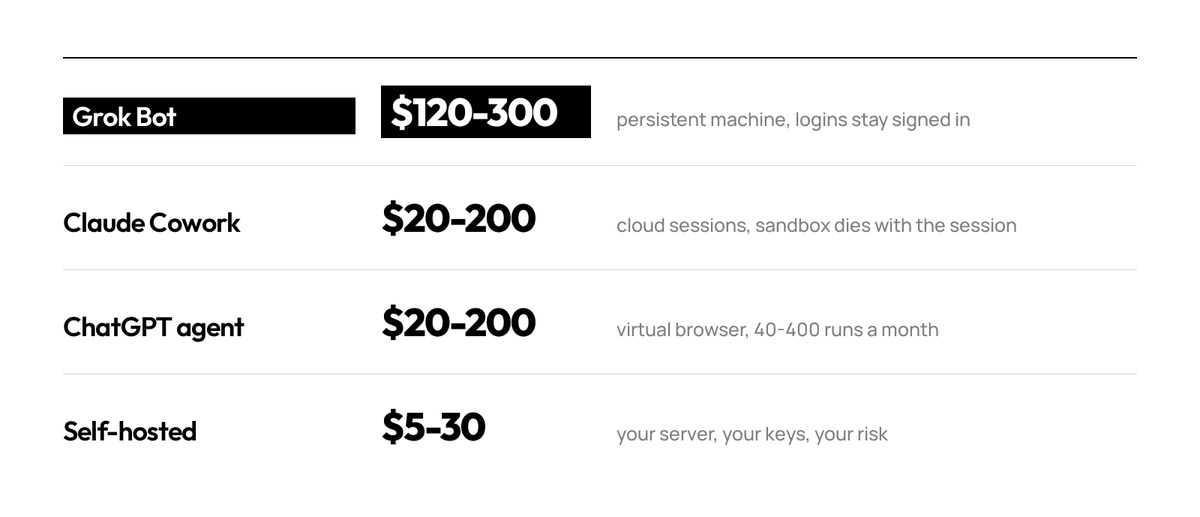
You are not paying for the model. You are paying for a machine that stays up, for the logins that stay signed in on it, and for Bots that click around the web instead of you.
01. Install it and hand over one real errand
Grok Bot is a desktop app, not a browser tab. That alone tells you what it intends to be.
There are clients for macOS (Apple silicon and Intel) and Windows (x64 and Arm64), plus iPhone on iOS 18 and later. There is no Linux desktop, stated plainly in the docs. No Android and no iPad either: mobile means iPhone.
You sign in with a Cursor account, not a Grok one. After the acquisition it is one ecosystem, and the privacy terms that govern the product are Cursor's. One trap for anyone on the legacy privacy mode: it blocks Grok Bot entirely.
Inside, it reads like a messaging client: named Bots on the left, a conversation on the right.
Every Bot has its own screen, and you can open it and watch the work happen: browser, files, terminal. Not a recording and not a report, a live picture where every click is visible.

About the trial. It is less a seven-day window than a usage credit that also happens to have a seven-day window. It is metered in agent steps and tokens rather than messages, so it burns fast: a couple of days of real experimenting will do it.
Hence the rule for day one: do not spend the credit on small talk. Give it something small and real, with a checkable result and no login anywhere.
Result:     one table of the 12 competitors on this page, with pricing tier
            and the single line each one uses as its main promise
Sources:    only the public pricing pages I list below
Limits:     do not sign in anywhere, do not fill any form
Delivery:   post the table in this chat and save it to /workspace/pricing.md
Checkpoint: show me the first 3 rows before you finish the rest
That is the official request shape from the docs: outcome, sources, constraints, deliverable, review point. The checkpoint is the underrated one. It turns "do this" into "do this and show me before you go further".
02. Give it a job title, not a prompt
This is the step that separates people who get value out of Grok Bot from people who bounce off it in a week.
A prompt is a request. A Bot is a role. It persists, accumulates memory, owns a domain, and gets better at that domain specifically because you keep coming back to the same thread.
So name it after a job someone could actually hold. Inbox Manager. Expense Manager. Talent Scout. Sales Outbound.
Creating one means filling three fields: a short name, one primary job, and a description of how it should work. That description is not decoration. It is where rules that must stay true forever live, not a one-off assignment.

Then you write its charter the way you would brief a new hire on day one: what it owns, what good looks like, and the part everyone skips, where its authority stops.
You are my Inbox Manager.

OWNS
Triage my inbox every weekday morning. Archive newsletters and receipts.
Draft replies to clients. Flag anything with a deadline, an invoice,
or a legal question.

GOOD LOOKS LIKE
Inbox at zero by 9am. Drafts sound like me: short, direct, four sentences max.
No "I hope this finds you well".

STOP LINE
Never send. Draft only.
Never archive anything from my accountant or my landlord.
Anything asking for money, credentials, or a signature goes to me untouched.

WHEN UNSURE
If you cannot undo it in under a minute, stop and ask.

LOG
At the end of each run, list: what you did, what you skipped, what you guessed.
That last block is the most useful line in the whole charter. A week of guesses is a ready made list of edits.
A Bot with a persistent computer and your logins acts while you sleep. Bots that ask about everything are useless. Bots that never ask are dangerous. The charter is where you draw that line once instead of worrying about it daily.
If you would rather not start from a blank page: the official catalog ships 56 role templates, from Bug Reproduction to Apartment Scout, and the community directory at botdirectory.ai has grown to roughly a hundred and seventy five charters from people actually running them.
03. Connect the tools once, and learn about the shared machine
Not a single plugin is enabled by default. That is the right default. Do not undo it in bulk.
On the count, by the way: reviews keep repeating a figure of a couple hundred connections, but it traces back to one secondhand mention. The official marketplace today carries about two dozen vendor plugins, and no official counter is published anywhere. Trust your own list, not somebody's number.
Connecting usually happens inside the conversation: mention a service, the Bot offers an authorization button, the whole thing takes about thirty seconds.

Now the detail this step exists for. Connections and sessions live at the account level, not the Bot level.
Word for word from the documentation:
"All of your Bots use the same persistent cloud computer. They share files, browser sessions, and app logins, which makes handoffs possible without repeating setup."
And right after it: "The computer is isolated to your account, not to an individual Bot."
Headlines across a good chunk of the coverage promise the opposite, that every Bot gets its own computer. It does not, and the docs flag it specifically: Bots get separate screens, but those are work surfaces, not security boundaries. The company itself calls this a real blast radius.
What follows from that. Connect Gmail once and every other Bot on the account uses the same connection, so your fifth Bot is productive in seconds. That is the upside. The downside is that the radius of any connection is every Bot you will ever create.
So connect what you actually need, enable plugins one at a time for a specific job, and switch them off when the job closes. And remember that deleting a Bot cleans up neither the files in the shared folder nor the live sessions.
If you want real separation between personal and work, that is two accounts, not two Bots.

04. Hand off the session, never the password
This is the mechanic that makes the whole thing work on tools with no API, which is most of the software inside a real company.
The Bot navigates in its own cloud browser until it hits a login wall, then hands you the screen. You authenticate, clear two-factor, click done, and the Bot resumes in the same browser at the same point.
The docs ban the other path outright: "Do not send a password or one-time code in ordinary chat." Passwords, passkeys, one-time codes, CAPTCHAs and payment confirmations are always a handoff to a human.
Watch what that does to the trust model. You never type a credential into a chat message. The Bot gets a session, not a secret, and you stayed in the loop for exactly the sensitive part.
A fresh, practical wrinkle. Days after launch a side effect of automated sign-in surfaced: a Bot that kept hammering a login wall got the whole account's IP temporarily limited, and the block held for more than a day. Support acknowledged the bug, and the workaround is the same principle: sensitive logins you do by hand, not by delegation.
Three rules worth adopting on day one: service accounts instead of personal ones, least privilege inside each tool instead of an admin seat, plugins one at a time.
One more line about your own laptop, which has nothing to do with the cloud machine. Local execution is not off by default, it is set to ask every time. Move it to Never allowed until a specific Bot has a specific reason to touch your local files. A team-wide ceiling on this is still listed as coming soon.
05. Show it once instead of explaining it twice
The feature that changes how you think about the product. You can teach a Bot a workflow by doing it once while it watches. The recording runs up to ten minutes and becomes a reusable skill.

Why this matters more than it sounds: the tasks that eat your week are usually the ones that are tedious to describe and trivial to demonstrate.
"Take the numbers from this dashboard, cross-reference the ones that dropped, paste them into this doc under the right heading, and message the team lead if anything fell more than 15 percent" is a paragraph to write and forty seconds to show.
Pick your first recording carefully. The best candidate is something you do at least weekly, that spans two or more tools, and where the steps rarely change. Recurring, multi-tool, stable.
You can also save a process in plain words, right in the thread:
Save the process we just used as a skill called "Weekly Receipts".
Include: when to use it, the source systems, the exact output format,
the checks that must pass, and what requires my approval.
Honest note on teaching by demonstration: what you get is a draft. Decision rules and error handling still need writing by hand. And any recorded sequence breaks the day a site changes its layout or adds a new login prompt.
One more detail: skills are available across your Bots, though private ones can be enabled per Bot. Teach one, and you have taught the fleet.
06. Put it on a schedule, and remember there is no rehearsal
A saved skill still needs a reason to fire. There are two, and you set both conversationally, with no workflow builder and no canvas of nodes.
Schedule is the obvious one: a 7am briefing, a Friday pipeline summary, month-end expense filing.
Often you do not create the routine by hand at all. Say "let us do this every Tuesday" in the thread and it appears on its own, named and scheduled, leaving you to edit the instructions.

Events are the interesting half: a new message in one specific channel, a git event, a Teams message, a Linear issue. Events are what make a Bot feel present rather than punctual.
// schedule, the morning brief
Every weekday at 7:00 AM, check my calendar, my inbox, and the #launches
channel. Give me one short brief: what is on today, what needs a reply,
what changed overnight.

// event, the inbound catcher
Whenever an email arrives from a domain not in my contacts and it mentions
pricing, draft a reply from the template and park it. Do not send.

// schedule, the weekly close
Every Friday at 4:00 PM, pull the week's receipts from my inbox, file them,
and tell me anything that has no matching invoice.

// the shortcut that creates most routines
Run this every week.
   ^ said right after a task you liked
That last line is the product's design philosophy in one gesture. You do not build the automation, you approve the one that just happened and ask for it again.
Event rules have to be narrow. "Every new message" is how you burn a weekly allowance in a day.
Three things to know before you switch the first one on.
You get at most fifty routines per Bot. Only the last twenty runs of each routine are kept, so a quarterly log will not assemble itself. And the big one: there is a test run button, but it does real work. The run navigates websites, changes files and calls connected tools, with irreversible steps stopping at an approval. There is no dry run where nothing happens and you just read the plan.
Hence the rule: run any new routine against a test inbox, a test channel, a test board.
And the order people break most often: do the task once, make it reliable, save the method as a skill, and only then automate it. Automating an unreliable process gives you unreliability on a schedule. Especially in a live beta: on August 20 Bots across accounts stopped responding and hung in a working state, with support confirming it. A routine that silently failed at 7am costs more than it looks.
07. Hire specialists, not one generalist
Several Bots run in parallel, each holding a different area. Separate Bots mean separate memory, separate context, separate accountability.
An Expense Manager that only ever thinks about receipts gets genuinely good at your receipts. A generalist juggling expenses, recruiting and outbound is worse at all three and gives you no clean thread to look at when something goes wrong.
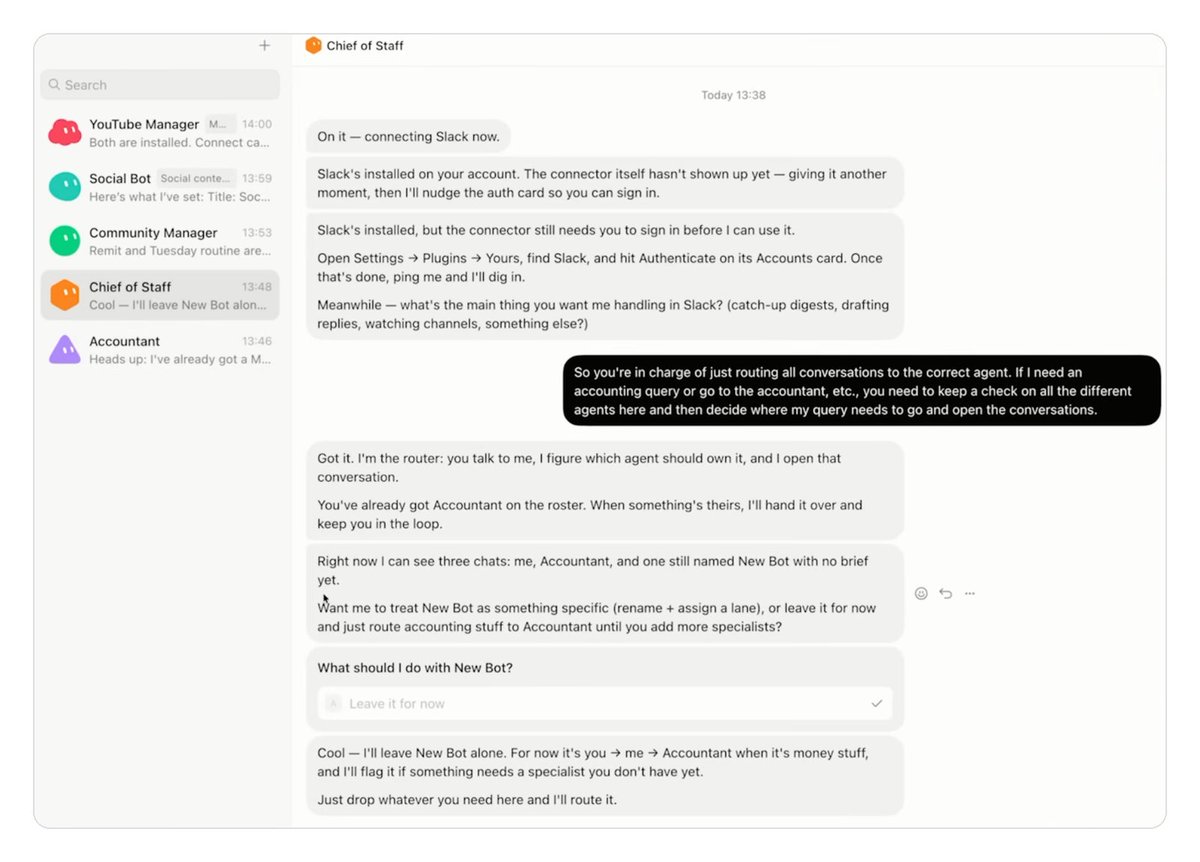
The company describes its own internal practice this way: a chief of staff on top, with a specialist for each lane, inbox, expenses, recruiting, bug fixes, operations. People call it the Chief of Staff pattern.
A workable starting roster for one person:
Chief            coordinates, answers "who should own this"
Inbox Manager    triage, drafts, flags
Expense Clerk    receipts, subscriptions, invoice matching
Research Scout   search, comparison, tables
Release Runner   repo, reviews, release notes
Three short charters you can lift wholesale and file down.
// Expense Clerk
OWNS: pull receipts from my inbox weekly, match them to invoices,
      flag subscriptions I have not used in 60 days.
GOOD: one table, columns date / vendor / amount / matched yes-no.
STOP: never cancel a subscription, never reply to a vendor, never pay anything.
LOG:  list every receipt you could not match and why.

// Research Scout
OWNS: track the 8 companies in my list. Weekly: pricing changes,
      new features, hiring signals, anything they announce.
GOOD: 5 bullets max per company, each with a date and a link.
      If nothing changed, write "no change" and stop.
STOP: never sign up for trials, never fill forms, never contact anyone.
LOG:  say which sources were unreachable.

// Release Runner
OWNS: watch the repo. On every merged PR, update the release notes draft
      and check that the changelog entry matches what actually changed.
GOOD: notes written for a user, not for a developer. No commit hashes.
STOP: never push, never tag a release, never comment on anyone's PR.
LOG:  list PRs you skipped and the reason.
Notice the shape repeating: owns, standard, stop line, log. Only the content changes, the frame stays identical, and that is exactly why the Bots stay predictable.
One more trick: you do not have to create Bots by hand at all. Give the Chief a job and it will either find the right specialist or spin up a new one for it.
The ceiling is generous, up to fifty bots and group chats per account. Still, do not start with all five. Hire one a week, and only take the next once the previous has run five times without your edits. A boring rule that saves you from a fleet of twelve Bots that each work halfway.
Split by domain, not by task size.
08. Put them in a group chat
Bots message each other and share context in threads. In a group chat they coordinate on their own: passing work, assigning ownership, pulling you in only for judgment calls.
The company's own example is an engineering Bot that reproduces a bug, files a ticket, and hands the issue to a second Bot to debug. That handoff, one Bot deciding another is better suited and passing ownership, is the thing that did not exist in any tool before this.
To make it work, give the group an objective, not a task list. A list is your decomposition, which reduces the Bots to executing your plan. An objective lets them split it, which was the entire point. One useful move: ask for a single owner at each stage.
And the sobering half: handoffs between Bots are convenience, not isolation. Different screens, one machine. If your research Bot drags a hostile instruction off some page, that instruction is now on the machine that holds all of your sessions.
This is not theoretical. Researchers recently published a technique where the hostile instruction arrives encrypted: input filters see gibberish, the model decrypts it and follows it. The demonstration ran against the chat product, but the class of attack is exactly about what an agent with access to your sessions can be talked into.

09. Draw the line by reversibility
The entire premise of Grok Bot is that a Bot finishes jobs end to end and comes back only when something needs your approval. Which puts the burden on you to define what "needs approval" means.
The line is not about task size. It is about reversibility.
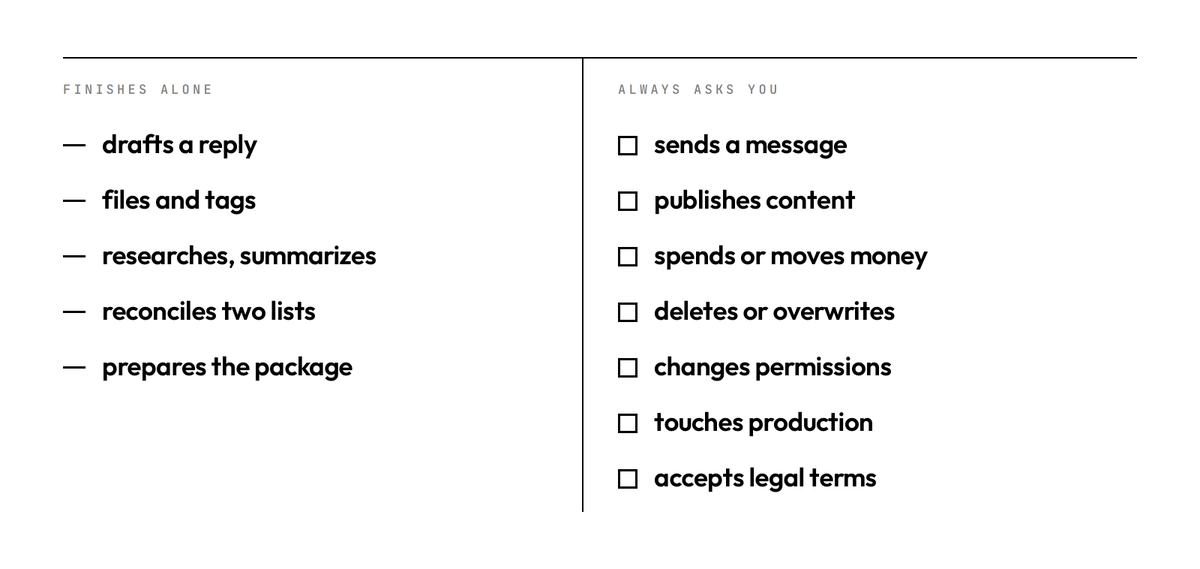
Anything the Bot can undo, drafting, filing, tagging, summarizing, researching, preparing, it finishes alone. Anything the outside world sees, anything that moves money, anything that cannot be taken back, gets parked for you.
The docs list seven classes in exactly that spirit: sending messages and invitations, publishing content, purchases and financial transfers, deleting or overwriting data, changing permissions, production changes, accepting legal terms.
// finish these alone, always
draft · file · tag · summarize · research · prepare · reconcile
   everything reversible. do not ask, do it and log it

// park these for me, always
send anything to a person outside the company
spend or move money, or commit to a price
publish anything public
delete anything that is not obvious junk
sign up for, agree to, or accept any terms

// when unsure
If you cannot undo it in under a minute, park it and ask.
The critical fact about the mechanism: it stops a proposed action, it does not undo a completed one. Word for word: "An approval controls the proposed action. It does not reverse work already completed."
That is a preventive brake, not a time machine. And there is nowhere to go afterwards to see what the Bot actually did: an audit view of Bot actions is still listed as coming, with usage and spend the only things recorded today. Which means the boundary you wrote in prose is the whole of your control.
The shape to aim for on every Bot looks like the official Sales Outbound scenario: a stack of drafts queued, zero sent. The Bot did every reversible thing and stopped precisely at the irreversible one.
10. Count the bill before it counts you
Grok Bot is not sold on its own. Access comes through plans: Cursor Ultra at $200 a month, Cursor Teams Premium at $120 per seat, SuperGrok Heavy at $300. If you already hold Ultra or Heavy, it is included. A small thing that saves money: buying through the iPhone app runs about $260 instead of $200 direct, the usual store markup.
Then it gets interesting.
There is a weekly token allowance and its size is still unpublished. Nobody is clean here: Anthropic keeps its numbers private too, and only OpenAI prints them. The difference is elsewhere: the neighbours let you set a spend ceiling by hand, and this one does not. Overage is billed from model and token cost, with no Grok Bot specific rate. The reference point is the flagship Grok 4.6 price: about $2 per million input tokens and $6 per million output, and more than that once a prompt runs past two hundred thousand tokens.
There is no product-level spend cap, there are automatic top-ups, a mechanism that raises spend rather than limiting it. And there is no model picker: the docs say plainly that neither members nor admins are getting one.
Rough math. A routine that reads about 200k input tokens per run and writes 20k out costs roughly $0.40 in plus $0.12 out, call it $0.50 a run.
One of those every weekday is about $11 a month. Five routines, around $55. Five routines twice a day, and you are past a hundred dollars on top of the subscription.
One story from the beta says it better than any table: a single month burned more tokens than the previous five years combined. Always-on agents consume a lot, and that is not a figure of speech.
Everything worth holding in your head about money and limits, in twelve numbers:

One more piece of arithmetic that explains who this pays off for. A human assistant for two hours a day runs $800 to $1,500 a month, depending on the market. A fleet with five daily routines lands around $250 to $300 including the subscription. But a Bot does not phone anyone, does not think for you and carries no accountability, so the honest comparison is not "instead of a person". It is "instead of the two hours you personally spend on inbox and receipts".
The second half of this step is the weekly review. Automation rots quietly: a site changes its layout, a routine starts silently producing garbage, and because the Bot runs while you sleep, nobody notices for three weeks.
Put fifteen minutes on the calendar. For each routine, three questions: did it run, was the output actually right, and would I miss it if I killed it. The third one matters more than it looks.
The best way to run the review is to ask the Bots for it. They keep the threads, they can report on themselves.
List every routine that ran this week. For each one:
how many times it fired, what it produced, what it skipped or guessed,
and anything you parked for me that I never answered.
Then name the one you think is least useful, and say why.
Then spot-check one output per routine by hand. A Bot reporting on its own work has the same blind spot you do. And keep in mind that no independent benchmark of agentic task success has been published at all, so the only statistics you will ever have here are your own.
Twelve habits that save you money and nerves
Collected from the first weeks of people running this thing. One line each, all of them work immediately.
- Put a checkpoint a third of the way into every task. A wrong approach shows up on row three, not row thirty, and you do not pay for the other twenty-seven.
- Keep a throwaway inbox and a throwaway channel. Every new routine gets its first run there, because the test run is not a rehearsal.
- Ask for a three-point plan before any work starts. A plan costs pennies, wrong work costs the allowance.
- Keep event rules narrow. A trigger on every inbound email will eat a week of tokens in a day.
- Put the log-your-guesses line in every charter. A week later you have a ready-made list of what the instructions are missing.
- Name Bots so you could say the role out loud to a colleague. If it does not fit in one word, the role is smeared and the Bot will drift.
- Never give a Bot an admin seat. Make a service account with the least rights, because that session is then reachable by every Bot on the account.
- Do sensitive logins by hand. Automated sign-in has already earned people a temporary IP block on the whole account.
- Plugin on for the job, job closed, plugin off. Thirty seconds that shrink the blast radius a lot.
- One process, one skill. A bloated five-stage skill breaks whole, three small ones survive any single step changing.
- Once a week ask the fleet which routine is the most useless. Bots report on their own routines without ego, and you save on whatever you switch off.
- Park anything you cannot undo in a minute. That is not caution, it is the only way to leave the fleet running overnight and sleep.
You stop being the one who does the clicking
Every AI product until now put the model in a window and left the work in your hands. Grok Bot moves the work. The Bot has the computer, the logins, the memory and the time. You keep the decisions.
That is a smaller change in technology than it sounds and a much bigger change in habit.
The skill stops being how do I phrase this and becomes what exactly am I delegating, and where does its authority end. That is not a prompting question anymore. It is a management question, with an employee who never sleeps and never gets tired.
One last thing to hold in mind this early in the beta. Half the grown-up features are still promises: no action audit, no spend cap, no rehearsal for routines, no team-level ceilings. That is not a reason to stay out. It is a reason to start with the reversible and the small, where the cost of a mistake is a redone draft rather than a sent email.
Thanks for reading this far.
If it was useful, save it and follow the profile for more breakdowns like this.
Also, check out my TG channel where I write about everything new and notify you about new interesting posts: https://t.me/shmidtai

Related articles

how to run an ai native agency with jev (FULL GUIDE)
jev is open to everyone now. it's a super fast decision model, so one person can now do work that businesses usually pay an agency a big cut for. here's how you can set up a whole ai native agency wi…
Grok Bot Agents: How to Build a 5-Person Sales Team That Never Sleeps (Full Guide)
I'm going to show you the exact 5-agent setup that's been running our lead gen, and the descriptions that go inside each one.

10 Ways to Actually Make Money With Grok Bot
Grok Bot costs $200 a month to run. Every method below is priced against real 2026 market rates for the exact same work - not made up, not rounded up for the headline. I pulled the numbers from what…