How i built a viral YouTube channel from zero using AI - the complete playbook

Part 1: Strategy, Research & Script - from zero to a finished script.
I went from 0 to monetized in under 4 months.
Not by "being consistent" or "following my passion."
I stole the systems from channels that already won - and let AI do 80% of the work.
A quick note on scope: this Part 1 covers everything up through a finished, ready-to-record script - niche selection, reverse-engineering competitors, the Bible system, and the Master Bible. It does NOT cover the actual production stack - which AI model to use for visuals, how to handle voiceover, or how to assemble a publish-ready video file. That's Part 2, where i'll walk through the specific tools (including a Claude + Higgsfield automation setup) that take a finished script all the way to an uploaded video with minimal manual work. If you're looking for that half right now, skip to the note near Phase 6 below, or wait for Part 2.
The results:
- First 10 videos made with the system (not counting the first four, which i'll get to below): 15k – 40k views each
- Monetized in 4 months
- Month 6: $3k - $6k/month
- Now consistently 50k – 150k+ views per video
- Multiple videos crossed 500k+
Here's the entire system, step by step.
The harsh truth most creators never hear
Most people start a YouTube channel and fail for one simple reason.
They guess.
They guess what topic to pick. They guess what makes people click. They guess how to structure a video so people don't leave after 90 seconds.
Then they get frustrated when it doesn't work - and blame themselves for not being "consistent enough" or "passionate enough."
That's not the problem.
Guessing is a terrible strategy when there are channels that have already figured out every answer - and they're showing you exactly what works, every time they post.
I stopped guessing. I built a system to steal their intelligence.
 — "Stop guessing. Start finding patterns."
But before i show you how - let me tell you what it actually took to get there.
The three videos i don't like talking about
The system you're about to read wasn't something i dreamed up at a desk. I got there after burning the first 6 weeks on what now feels like an almost criminal waste of time.
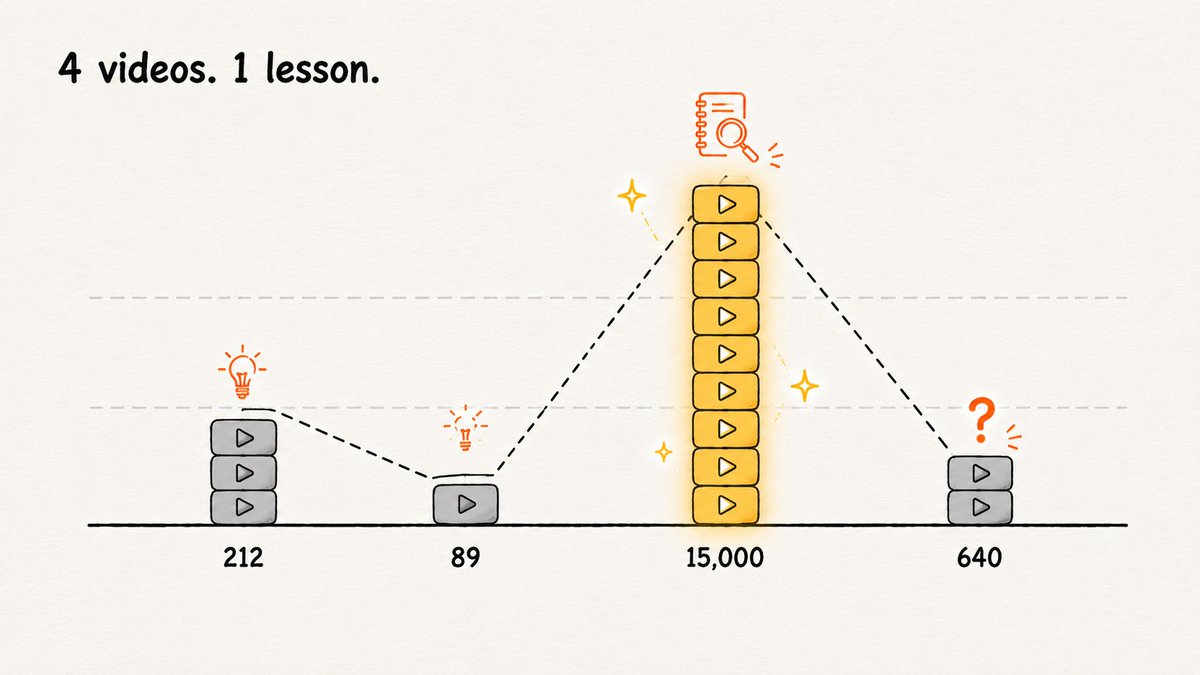
Video #1 took me 9 days to make. I wrote the script myself, "from the heart," with zero reference points. The idea felt brilliant in my head. On screen it turned into 14 minutes of flat rambling with no hook in the first 30 seconds. Result: 212 views - and i'd guess 40% of those were me, re-checking that the edit actually rendered correctly.
I remember refreshing the analytics every half hour on day one, out of pure habit, even though i knew perfectly well the number wasn't going to move. It's a genuinely humbling feeling - nine days of your life for something that didn't crack the number of contacts in your phone.
Video #2 happened because Video #1 scared me into thinking "just make more content, faster." I grabbed a topic that felt timely, cut it together in two days, posted it. Turned out nobody was actually searching for that topic - i'd simply convinced myself it would "land." 89 views. Worse than the first.
By this point i was seriously considering quitting. Not in some vague, metaphorical way - i actually opened the channel settings and looked at what the delete button looked like.
 — "Yeah, shit happens."
Video #3 is where the real shift happened - not in the content, but in the approach. I stopped inventing and started actually watching - with a notebook - five channels in my niche that were already pulling in hundreds of thousands of views consistently. Not "getting inspired." Literally pausing every 20 seconds and writing down: what did they just say, why did they say it that way, why didn't i skip to the next video right at that exact second.
It took three evenings. I filled 11 pages of notes on my phone. And only then did i see what i'd been missing the whole time: these channels have a pattern. Not genius, not charisma - a pattern. The same hook structure. The same rhythm for re-grabbing attention. The same types of stories, over and over.
Video #3, built around those patterns, pulled 15,000 views in its first week. 70x the first one. I was convinced i'd cracked the formula - from here it could only go up.
Video #4 got 640 views.
Turns out i'd drawn the wrong conclusion from my own notes - i copied the hook structure almost word for word, but picked a topic i genuinely had zero real expertise in, and it showed in every sentence. Patterns alone aren't enough if there's nothing real underneath them. That was its own uncomfortable discovery - and it's actually that one, not the success of Video #3, that made me realize i didn't need one lucky insight. I needed a system that checks every decision across multiple angles at once - structure, topic, story, visuals - instead of relying on one well-timed observation.
On top of that, manually breaking down five channels across 11 pages of notes doesn't scale. I couldn't physically do that before every single video, let alone across four different angles at once. Three evenings for one round of observations - how many rounds would it take to make this reliable instead of hit-or-miss?
That's when it hit me: what if the actual process - watch, notice, document the pattern - could be handed off to AI? Not once, but before every future video, automatically, in minutes instead of evenings.
That's how the system below was born. Video #5 onward - made fully with this system - consistently landed in the 15k–40k view range i mentioned at the top of this article. But getting to that range meant going through four videos first, three of which flopped. I'll walk you through every part of it - the same details i was missing in those first six weeks.
Phase 1: Choosing a niche that can actually win
Before you touch a camera or open a script doc, answer one question: is this niche winnable - for someone starting from zero, right now?
Not "is it interesting." Not "am i passionate about it." Winnable.
The three niche tests
Test 1 - The Evergreen test. Search your topic on YouTube, sort by upload date. Are videos from 3+ years ago still getting views today? If yes, the niche has staying power. If only the last 6 months are getting traction, you're chasing a trend.
Test 2 - The Monetization test. Check the CPC on keywords in your niche via Google Keyword Planner or any SEO tool. Finance, business, health, productivity, tech, legal - high CPC. Gaming, memes, entertainment - low CPC. High CPC means advertisers pay more to reach your audience - more money per 1,000 views.
Test 3 - The "Explain It Differently" test. Can you look at the top 10 videos in this niche and immediately see a gap - a way to explain the topic better, from a different angle, for a different audience? If every video looks the same, that's your opening.
Use Claude to pressure-test your ideas
Once you have 3–5 niche ideas, bring them to Claude:
> I'm considering starting a YouTube channel. Here are 5 niche ideas: [list them]. For each one, analyze: > > 1. Audience size and growth trajectory > > 2. Competition level and whether a new channel can realistically break in > > 3. Monetization potential (estimated CPM, affiliate opportunities, product potential) > > 4. Whether it lends itself to long-form content (10–30 min videos) > > 5. My unfair advantage given my background: [describe your experience] Give me a ranked recommendation with reasoning.
This takes Claude 2 minutes. It used to take a week of spreadsheet research.

Phase 2: Finding your reference channels
Find 3–5 channels that are already winning in your space - the ones you'll reverse-engineer completely before making a single video.
What makes a good reference channel:
- 100K–2M subscribers (big enough to have figured something out, small enough that their tactics are still relevant today)
- Consistent upload schedule for at least 18 months
- Strong click-through signals - high view counts relative to subscriber count
- Long-form content (10–30 minute videos, not Shorts)
Search your niche keywords, sort by view count. Look for channels where every video - not just one breakout hit - consistently gets strong views. That consistency is the signal.
Write down 3–5 channel names. You're going to extract everything they know.

Phase 3: The "Four Bibles" Method - the real secret
Most creators would spend 3 months manually taking notes on this. With NotebookLM, it takes a few days.
The idea: instead of copying one channel, you study 4–5 top channels and build four intelligence documents - the Bibles. Then you combine the best from each into something new, but built entirely on proven patterns.
That's not copying. That's how every successful creator has always worked. AI just makes it systematic.
A quick caveat: i'll keep naming specific tools from here on - NotebookLM, Claude - because that's what i actually built this on, and i want to give you exact, copy-pasteable prompts, not vague advice. But the methodology itself isn't tied to a specific service. The point was never "you need NotebookLM specifically" - the point is you need something with a large context window that can hold dozens of transcripts at once and find the patterns across them. Today that's NotebookLM and Claude. A year from now the names might be different. The system is the five-document structure and how they connect - not a brand dependency.
If you want to go deeper on NotebookLM specifically - how it actually handles large source dumps, what it's good and bad at, the settings most people miss - i wrote a separate breakdown a while back.
Embedded post:
Author: Dmitry (@dmtr_btc) Post ID: 2069744888002805822 Source: https://x.com/dmtr_btc/status/2069744888002805822 Reply to: none
Text:
> http://x.com/i/article/2069738842001756160
Setting Up NotebookLM
Go to notebooklm.google.com, create a new notebook, name it after your niche.
Load it with:
- Transcripts from the top 10 most-viewed videos across your reference channels (three dots under any video → "Open transcript") UPD: You can simply paste a YouTube video link - NotebookLM will automatically extract the transcript.
- Comment sections from those same videos (top 50–100 - this is where viewers tell you exactly what they want)
- Articles about what makes content in your niche work
- Your own notes from watching the channels
Don't organize it. Just get it in. NotebookLM reads everything.
 — "This is where everything changed."
📘 Bible 1: The Curiosity Bible
What it is: every technique your reference channels use to create and sustain curiosity - the questions they raise, the promises they make, the information gaps they open.
Why it matters: curiosity is the engine of retention. Viewers stay because they're waiting for an answer. The best channels are masters at opening questions in the viewer's mind and delaying the answer just long enough to keep them watching.
Prompt:
> Study these transcripts carefully. I want to understand how these channels create and sustain curiosity throughout their videos. Identify and document: > > 1. How do they open the video - what question or promise do they lead with? > > 2. What "open loops" do they create (questions raised but not immediately answered)? > > 3. How do they tease what's coming later? > > 4. What language patterns create anticipation? > > 5. How do they close loops - when and how do they finally answer their own questions? > > 6. What's the average number of open loops running simultaneously? Give me specific examples with timestamps.
Copy the output into a doc - that's your Curiosity Bible.
What you'll find: the best channels rarely answer a question immediately. They stack questions - opening a second before closing the first. By minute 5, you have 3 unanswered questions pulling you forward. That's why you can't stop watching - and now you know how to replicate it.
📗 Bible 2: The Retention Bible
What it is: the structural patterns that keep viewers watching - pacing, scene changes, re-engagement moments, the rhythm of information delivery.
Why it matters: YouTube's algorithm runs on watch time and retention. A video with 70% average view duration gets promoted aggressively. One with 30% dies. The difference is almost always structural, not content quality.
Prompt:
> Analyze these transcripts for structural patterns that affect retention. > > 1. How long is the average "segment" before something changes (new idea, angle, story)? > > 2. How do they re-engage drifting viewers - what phrases or techniques? > > 3. What happens in the first 30 seconds (the critical retention window)? > > 4. What happens at the 25–30% mark (where most viewers drop off)? > > 5. What's the ratio and pattern of stories vs. information? > > 6. What patterns separate the highest and lowest-performing videos? > > 7. How do they handle transitions between topics? Document specific examples and language used.
Copy the output into a doc - that's your Retention Bible.
What you'll find: the best channels treat every 90 seconds as a new opportunity to lose their viewer. They never assume you're still watching - they constantly re-earn your attention.
📙 Bible 3: The Story Bible
What it is: how your reference channels use storytelling - structures, character types, emotional arcs.
Why it matters: information alone doesn't retain viewers. Story does. Even in finance videos. Even in tech explainers.
Prompt:
> Analyze these transcripts for storytelling patterns. > > 1. What story structures do they use (hero's journey, problem/solution, before/after, case study)? > > 2. Who are the "characters" - real people, companies, archetypes? > > 3. How do they establish stakes - why should the viewer care? > > 4. What emotional beats do they hit, and in what order? > > 5. Specific details vs. general claims - which performs better? > > 6. How do they make abstract concepts feel personal? > > 7. What's the storytelling difference between their most and least viewed videos?
Copy the output into a doc - that's your Story Bible.
What you'll find: the best channels almost always anchor content in a specific story - a real person who failed, a company that collapsed. The story creates the frame; the information fills it.
📕 Bible 4: The Topic Bible
What it is: what topics perform best in your niche, why, and what angles haven't been covered yet.
Prompt:
> Based on these transcripts and source materials, help me build a topic strategy. > > 1. What topics consistently perform best and why? > > 2. What patterns exist in the titles and thumbnails of top-performing videos? > > 3. What questions does the audience repeatedly ask? > > 4. What's been covered to death vs. what has a fresh angle available? > > 5. What's the emotional hook in each top topic - fear, curiosity, aspiration, outrage? > > 6. What upcoming topics or events could drive strong search traffic? Suggest 20 specific video ideas, ranked by potential.
Copy the output into a doc - that's your Topic Bible.

Phase 4: Building the Visual Bible
The four text Bibles tell you how your reference channels think. The Visual Bible tells you how they look.
This is the step most creators skip entirely. Don't.
Option A: Manual Master Sheet (30 - 60 minutes)
Collect screenshots: thumbnails (expressions, colors, text overlays, composition), B-roll patterns, on-screen text, presenter framing, opening shots, scene variety.
Grab 30–50 screenshots and upload to Claude with the prompt below.
Option B: Automated Script (5 minutes of setup)
Ask Claude to write a Python script:
> Write me a Python script that: > > 1. Downloads a YouTube video from a URL using yt-dlp > > 2. Extracts one frame every 3 seconds using ffmpeg > > 3. Removes near-duplicate frames using perceptual hashing (imagehash) > > 4. Scores remaining frames by visual complexity, filtering out black screens and static slides > > 5. Arranges the best 40–60 frames into a contact sheet (contact_sheet.jpg) using Pillow - 8 columns, consistent cell sizing, small padding > > 6. Saves it to an /output folder Make it runnable from the command line with a single URL as the argument. Include clear comments.
You'll need Python + 4 free libraries: yt-dlp, ffmpeg, Pillow, imagehash.
Option C: Full automation with the Claude API
Ask Claude to extend the script:
> Extend the previous script with a final step: after generating contact_sheet.jpg, automatically send it to the Claude API with this prompt: "Analyze this contact sheet from a top-performing YouTube channel. Give me a structured Visual Bible with these sections: THUMBNAIL PATTERNS, COLOR PALETTE (hex values), PRESENTER FRAMING, TEXT ON SCREEN, B-ROLL PATTERNS, VISUAL RHYTHM, MY VISUAL BLUEPRINT. Format as clean markdown." Save the response as visual_bible.md in /output. Print a confirmation when both files are saved.
The result: drop in a URL, walk away, come back to a folder with contact_sheet.jpg and a complete visual_bible.md. Run it on 3–5 reference channels and you have a Visual Bible built from hundreds of data points across the best channels in your niche.
Option A vs. C: A captures what your eye notices. C catches patterns across hundreds of frames your eye would miss entirely.

Phase 4.5: Building the Master Bible
Five separate documents aren't a finished system yet. They're raw material.
Here's the problem i ran into: when it's time to actually write a script, you end up manually re-reading five documents and deciding which pieces from each to paste into the prompt. It's slow, and inevitably some insight gets lost - you've moved on to the Story Bible and forgotten what the Retention Bible said.
The fix: merge all five into one document. Not a mechanical copy-paste - another pass through Claude:
> Here are five documents I built by studying top channels in the [niche] space:CURIOSITY BIBLE: [paste in full] RETENTION BIBLE: [paste in full] STORY BIBLE: [paste in full] TOPIC BIBLE: [paste in full] VISUAL BIBLE: [paste in full] Merge these into a single Master Bible - a compact but complete synthesis, organized not by source document but by the stages of making a video: > > 1. TOPIC SELECTION (from the Topic Bible) > > 2. HOOK STRUCTURE (from Curiosity + Retention Bible) > > 3. STORY ARCHITECTURE (from the Story Bible) > > 4. RETENTION RHYTHM (from the Retention Bible, with rough timestamp markers) > > 5. VISUAL STYLE (from the Visual Bible) > > Remove repetition across documents. Keep only concrete, applicable patterns - no theory, no per-source breakdown.
Save the result as master_bible.md. This is your actual core asset - not five separate Bibles, but one compact document you'll open before writing every script and update after every video (Phase 7).
 — "When all the pieces finally come together."
Phase 5: Writing your first script with Claude
You now have a Master Bible - a single document unifying the insights from the Curiosity, Retention, Story, Topic, and Visual Bibles. That's more strategic intelligence than most creators develop in their first year - built in a matter of days.
The script prompt:
> I'm writing a YouTube script for a channel in the [niche] space. Here's my Master Bible - the full strategic base built from analyzing top channels in this niche: [paste master_bible.md in full] > > MY VIDEO TOPIC: [topic] TARGET LENGTH: [12–18 minutes] TARGET AUDIENCE: [describe specifically] MY UNIQUE ANGLE: [what makes your take different] > > Write a full script that: > > 1. Opens with a hook using the patterns from the "Hook Structure" section > > 2. Follows the retention rhythm (re-engagement every 90 seconds) > > 3. Uses the story architecture from the corresponding section > > 4. Hits the emotional beats in the right sequence > > 5. Includes visual suggestions in brackets, matching the style from "Visual Style" > > Format: [HOOK] / [CONTEXT] / [MAIN CONTENT] in chapters / [CLOSE], with visual notes in brackets.
What comes back is an 80% draft, built on real intelligence about what works in your niche - in one prompt, not five scattered pastes.
The Human Layer - the 20% that makes it yours
What Claude can't do:
- Add the specific story only you experienced
- Inject your actual personality and speaking patterns
- Make the judgment call about which insight is truly most important
- Know exactly what your audience needs to hear right now
Go through the draft. Wherever it feels generic - make it specific. Wherever it sounds like text - make it sound like speech. Wherever it misses your angle - correct it. This pass is where the video becomes yours.
Phase 6: The Production Loop
Note on this phase: what follows is the general production loop - the rhythm and checklist, independent of how you actually generate your visuals. I'm deliberately not naming specific AI image models, voiceover tools, or assembly software here - that's the entire subject of Part 2, where i'll go through the actual stack i use (including which image-generation model fits which niche, how I handle AI voiceover, how the final file gets assembled, and a Claude + Higgsfield setup that automates most of this end-to-end). Think of this phase as the checklist that stays true whether you're filming yourself, using B-roll, or generating every frame with AI - Part 2 is what fills in the specific tools.
Before recording
- Read the script out loud once - cut anything that feels unnatural to say
- Identify 3–5 moments that need supporting B-roll (your Visual Bible tells you exactly what)
- Prepare screen recordings, graphics, or visual elements referenced in the script
Recording
- Follow the framing blueprint from your Visual Bible
- Give yourself permission to go off-script when something better comes to mind - the script is a floor, not a ceiling
- Record more B-roll than you think you need
Editing (built around your Retention Bible)
- Cut to B-roll every 60–90 seconds
- Add on-screen text at the moments your Bible identified
- Use jump cuts to remove any pause longer than 1.5 seconds
- Pay extra attention at the 25–30% mark - does something happen there to pull viewers back?
Thumbnail (built around your Visual Bible)
- Dominant color from your niche's proven palette
- Expression matching the emotional hook of the video
- Text overlay that creates curiosity (incomplete sentence, provocative claim, number)
- Test two versions if possible
Phase 7: The Closed Loop - the Master Bible rewrites itself
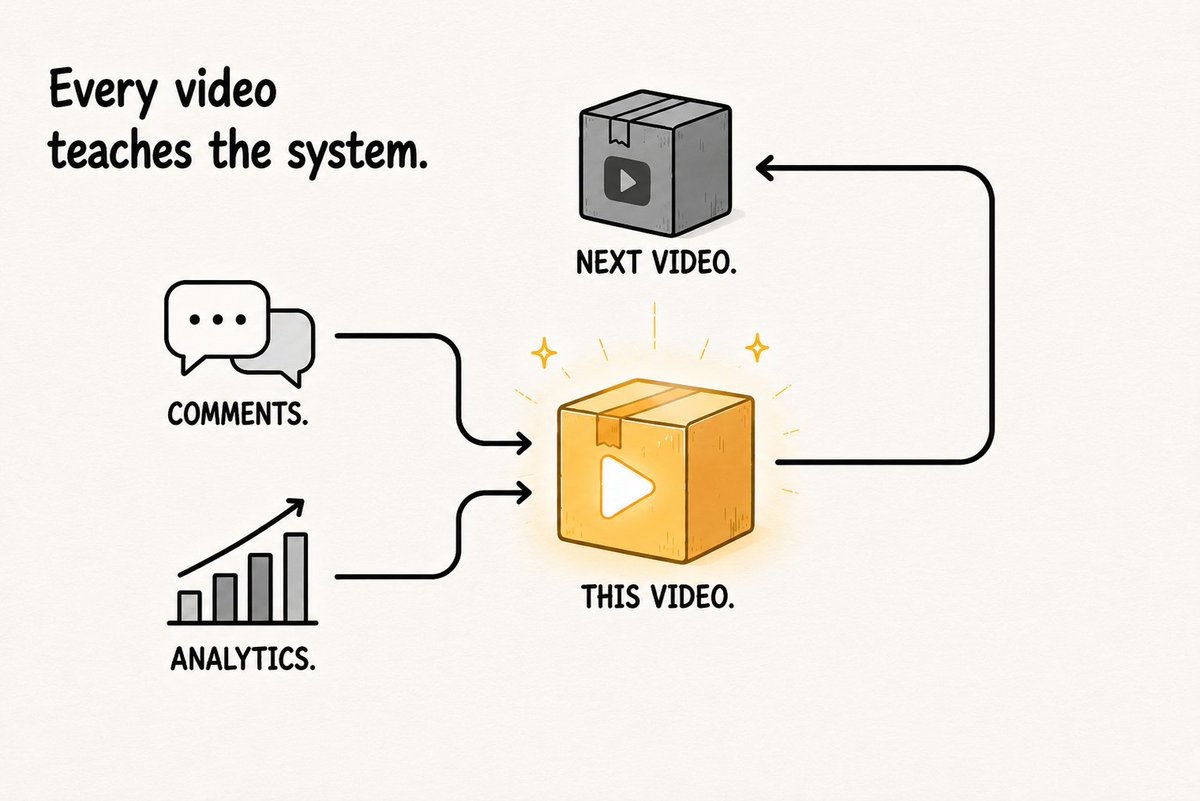
One video isn't a strategy. Iteration is. But iteration doesn't mean "learn a lesson and remember it for next time." It means a concrete action: update the Master Bible document itself, not just your own memory of what happened.
After 1 week: load the video's comments into NotebookLM. Ask: "What questions did viewers most frequently ask? What did they find most valuable? What confused them? What did they want more of?"
After 28 days: check YouTube Analytics for average view duration, biggest drop-off point, click-through rate, and top traffic sources. Bring those numbers to Claude - not just for advice, but to actually rewrite the document:
> Here's my current Master Bible: [paste master_bible.md] > > Analytics from the last video, made using this Bible: > > - Average view duration: [X]% > > - Biggest drop-off point: [timestamp] > > - Click-through rate: [X]% > > - Top traffic source: [source] > > - Viewer comments: [key themes from NotebookLM] > > 1. What does this data tell you about which sections of the Master Bible held up and which didn't? > > 2. Rewrite the sections that the data contradicts - be specific, give new wording. > > 3. Add a new section called "Proven in Practice" documenting what actually worked on a real video of mine, not just in theory from the reference channels. > > Return the full updated master_bible.md.
This is the actual difference between a linear guide and a system that learns: every next video draws on a Master Bible that isn't the same one the first video used - it's an updated version with your own results already written into it, not just the reference channels' patterns.
Phase 8: The Compounding Effect
Here's what nobody tells you about building this way: it gets exponentially better over time, because the system itself literally gets smarter with every cycle:
Reference Channels → Master Bible v1 → Video 1 → Analytics + Comments
    ↑                                                                                                                             │

    └──────────────── Master Bible v2 ◄────────────┘

                        │

                       ▼

          Video 2 → Analytics + Comments → Master Bible v3 → ...
- After 10 videos: your Master Bible isn't built purely on other channels anymore - it has your own proven patterns written into it
- After 20 videos: you can see which reference-channel hypotheses actually held up in your specific niche, and the document already reflects that
- After 50 videos: you have something most creators never build - not just "experience," but a working, continuously updated document you could hand to someone else on your team and have them make a video in your style
Most creators are still guessing at video 50. You won't be. And unlike most people's process, yours doesn't live in your head - it's written down, so it doesn't disappear along with your mood or your free time.

Why this crushes 99% of new channels
1. You're not guessing - you're copying proven patterns from winners. Every structural decision comes from channels that already figured it out. You don't hope something works - you know it works because you've documented it working.
2. You're not doing it alone - Claude and NotebookLM do the heavy lifting. The research, the synthesis, the first draft - AI handles it. You handle the judgment, the voice, the stories only you can tell.
3. You're not starting from zero - you're standing on the shoulders of channels that already won. Your first video benefits from the intelligence of 5 channels and hundreds of data points. Most creators don't reach this level of self-awareness until year two.
4. You iterate fast - every video makes the next one better. The system captures learning automatically. Each video improves the Bibles. The Bibles improve the next script. The next script improves the next video.
This isn't "AI makes videos for you."
This is "AI gives you an unfair advantage so you can win as a human."
The Full System at a Glance
PHASE 1: Niche Selection
↓ Three niche tests + Claude analysis → winnable niche
PHASE 2: Reference Channels
↓ 3–5 winning channels → deep study targets
PHASE 3: Four Bibles in NotebookLM
↓ Curiosity + Retention + Story + Topic Bible
PHASE 4: Visual Bible
↓ Manual screenshots OR automated script → contact sheet → Claude analysis → Visual Style Guide
PHASE 4.5: Master Bible
↓ All five Bibles merged into one document, organized by video-making stage
PHASE 5: Script
↓ Master Bible → Claude draft (80%) → Human layer (20%) → Final script
PHASE 6: Production
↓ Record → Edit using Retention Bible → Thumbnail using Visual Bible
PHASE 7: The Closed Loop
↓ Analytics + comments → Master Bible gets rewritten → Master Bible v2
PHASE 8: Compounding
↓ Master Bible grows with every cycle → process improves → channel grows → repeat
    │

     ──────────────► loops back into PHASE 5 with the updated Master Bible
The first Bible takes the longest to build. After the Master Bible exists, the system starts feeding itself - not metaphorically. The document you work from on video #20 is literally not the same file it was on video #1.
 — "Most creators use AI as a tool.
The goal is to build a system."
— "Most creators use AI as a tool.
The goal is to build a system."
Coming in Part 2: From Script to Published Video
Everything above gets you to a finished script and a Master Bible that improves with every upload. What it doesn't cover is the other half of the pipeline - the part that actually turns that script into a video sitting on YouTube.
Part 2 will go through:
- Which AI image/video model actually fits your niche - the tradeoffs between different generators for consistency, style, and cost, and why the "best" model depends entirely on what your Visual Bible says your niche looks like
- Voiceover - how to get a natural-sounding narration track from your script without it sounding robotic, and how to handle the editing pass once you have it
- Assembly - turning generated visuals, voiceover, and on-screen text into one finished, publish-ready file
- Automating the whole thing - a worked example using Claude + Higgsfield to take a finished script and produce most of a rough-cut video with minimal manual steps, so the Production Loop in Phase 6 stops being manual work and becomes something closer to Phase 3's Bible-building - mostly AI, with you doing the judgment calls
Start with the Curiosity Bible. It will change how you watch YouTube forever - and it will change what your viewers experience when they watch you.
Related articles


Why Software Factories Fail
A developer vibe-coding a side project a dozen people will ever run, and a team keeping a ten-year-old enterprise system alive for another quarter, share almost no constraints worth naming, and most…