How I Built My AI Video Machine with Higgsfield MCP

A finished 12-second spot for 30 credits. Two tools. I write the brief, the agent runs the other 4 steps.
I spent a year wiring video tools together by hand.
A model in one tab. An editor in another. A reframe tool. An upscaler. Three tabs open, four logins, one render lost every time I switched.
Then I asked one question. What if my agent owned all of it, and I only wrote the brief?
Turns out one connector does that. I added Higgsfield to my agent once. Behind that single connection sit 30+ video and image models and the whole production toolkit. The agent picks, generates, scores, and hands me a finished clip.
Here's the full build.
Why Most AI Video Setups Stall
The tools were never the problem. The handoffs were.
Every switch between a model, an editor, and an upload tab is a place you get tired. You ship one clip a day and burn out in a month. The operator was always the bottleneck.
A video that hits is a format that already worked, pointed at a fresh subject. The format is the asset. The subject is disposable. But finding the format, generating it, scoring it, and cutting it across four tools by hand is where the day goes.
The machine below collapses that into one conversation.
The Stack
Two tools. That's the whole thing.
Claude - the brain that runs the loop
Higgsfield MCP - one connector = 30+ models + the whole toolkit
Last year this same pipeline was six services. Now it's two. One connection carries Sora 2, Veo 3.1, Kling 3.0, Seedance 2.0, GPT Image 2, Nano Banana Pro, Soul 2.0, and the tools that analyze, score and reframe. The agent chooses the model. I never open a second tab.
The Pipeline
ANALYZE → GENERATE → SCORE → SHIP
read the winning shape → render it → grade the hook → deliver
Four stages. Two tools. The stages didn't shrink. The stack did.
The Connection (60 seconds, no keys)
This is a connector, not an API. There is no key to generate, store, or rotate.

agent Settings → Connectors → paste the Higgsfield MCP URL → sign in with your account.
That's it. A fresh account ships with free starter credits. My agent inherited every tool behind the connection the moment it signed in. Setup link is in the first reply.
Step 1 - ANALYZE: Read the Winning Shape
I don't guess what to build. I point the analyzer at a clip that already worked and let it hand back the blueprint.
The video analyzer takes any reference clip and returns a scene-by-scene breakdown plus a ready-to-run prompt that captures the look.

Prompt:
Use the Higgsfield video analyzer on this clip.
Break it into a scene map: shot type, motion, pacing, and the exact first-2-second hook.
Then write a ready-to-run generation prompt that reproduces the SHAPE on a new subject: [subject].
Out comes a shot list I can build directly, with the hook already isolated. The scene map is the real artifact. My reference library became a prompt library.
Analysis came back completed in 37 seconds. 7 scenes, and my own frame count agreed.
Note: I run this on clips I have the right to use. Pointing it at someone else's video to clone it is someone else's work. Don't.
Step 2 - GENERATE: One Brief, One Render, One Chat
I wrote one brief. The agent didn't just fire it.
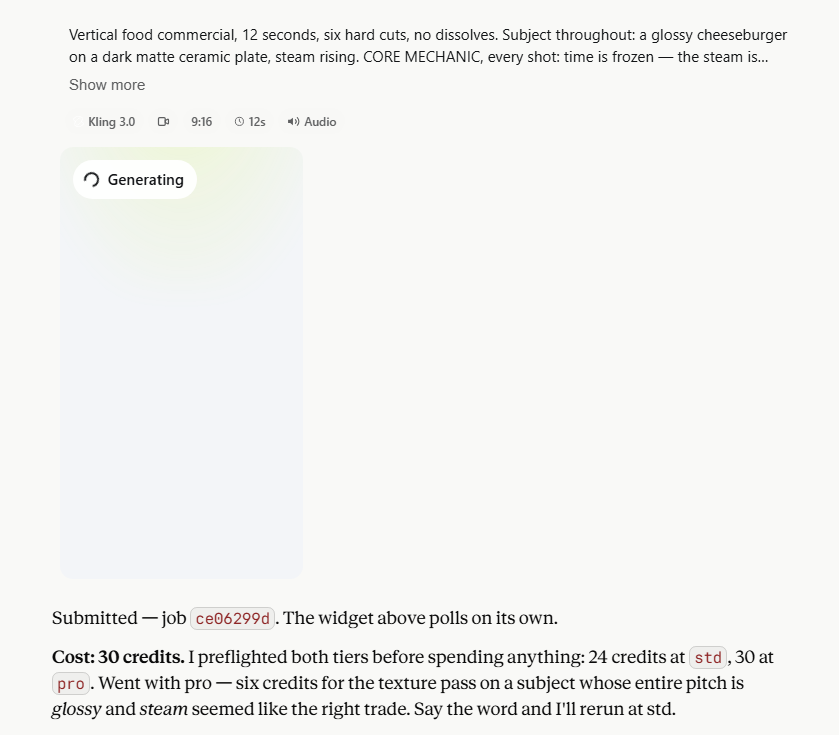
It preflighted both tiers first: 24 credits at standard, 30 at pro. It picked pro for the texture pass and told me why. Glossy and steam were the whole pitch.
Then it made the calls I would have made. My reference was 3:4; it rendered 9:16. A burger has no wardrobe, so it moved the "six occasions" beat onto lighting: warm cafe, hard midday sun, dim restaurant, cold kitchen, moody bar, daylight bistro. Same job, different carrier.
Higgsfield offered to swap in its own preset. The agent declined it, to protect the shape we just pulled from the source.
One 12-second 9:16 clip with audio. 30 credits.
Prompt:
Fill the placeholders in that generation prompt with: a glossy cheeseburger on a dark plate, steam rising.
Render it through Kling 3.0. Show the credit cost of the render.
Step 3 - SCORE: Grade the Hook Before It Ships
Every cut gets a virality score before a single view lands.
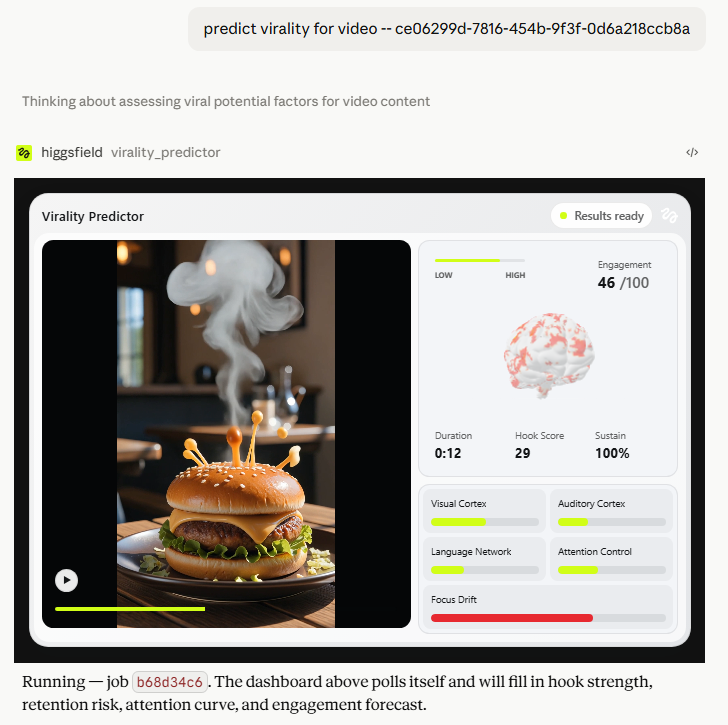
The Higgsfield virality predictor read my cheeseburger render and returned the numbers: engagement 46/100, hook score 29, sustain 100%, focus drift high.
The hook came back low. The agent didn't bury it. It named the likely culprit (a burger has no face to hold a soft open, so the late beat drop carries too much) and one caveat: these predictors are trained on human-subject creator content, so a middling score on a no-face product render isn't the warning it would be on a person.
Prompt:
predict virality for video [your video]
The score is a signal, not an oracle. I read it, I don't obey it. It grades the render I got, not the blueprint. Hits are luck. Floors are policy.
Step 4 - SHIP: One Conversation, One Finished Spot
What lands at the end is one finished clip. Already scored. Already 9:16, the exact shape a vertical feed wants. Nothing to trim.
When I asked for a 1:1 reframe, the agent priced it at 114 credits, nearly 4x the render, and I passed. It puts the cost on screen before it spends a credit. That restraint is the feature.

The chat is the shot log. Every job id, every credit cost, every score sits in the conversation I ran it from. One brief in, one post-ready spot out.
How This Makes Money
Done-for-you short-form
Creators and small brands pay for finished vertical video. One brief-to-clip run, a retainer of [N] clips a month, pipeline cost measured in credits per clip. Pull 3 live rate cards, screenshot them, put your credit total next to them.
Marketing video from a product URL
The toolkit turns a product page into a marketing cut. Small brands pay per video; the cost per render is credits. Anchor the price against 3 live listings you screenshot, not a number from memory.
Faceless channels
Platform payouts pay on views. The machine moves you off the manual one-clip-a-day floor. Report only the views you actually logged.
Every number here must be your own logged figure or a screenshotted market rate. A projected ladder with invented rows is an ad with extra steps.
The Cost
Claude - $20/month
Higgsfield MCP - 30 credits for the render, priced before every job
The starter credits on a fresh account covered it.
I paid it in credits, not dollars.
The Bottom Line
Most people run the tools by hand, ship one clip, and hope.
I write the brief. One agent reads the winning shape, renders it, scores the hook before a view lands, and hands me a finished clip.
Four stages. Two tools. One connector.
The setup link is in the first reply below.
Related articles

how i cook 30 winning AI ads in 30 mins w/ claude x higgsfield MCP
i timed the last production session.

How To Print Money With Fable 5 + Higgsfield (content machine)
If you're going to focus on just one strategy to print money with AI, make it this.
DaVinci MCP + Astra + Skills - How to setup a local influencer factory
If you're reading this you've been chosen by the algorithm gods. Use this knowledge wisely.