How to Automate a $8,000/Month YouTube Channel With Claude

I had a laptop, a $20 Claude subscription, and no idea what I was doing.
No camera. No editor. No team. I had worked with content before so I knew the basics, but I never ran a faceless channel. I wanted to test if AI could do the heavy lifting.

Four months later the channel was pulling $8,000/month. Claude writes every script. ElevenLabs voices every word. CapCut assembles every clip. I just run the system.
The part that surprised me most: once it was set up, it took about 3 hours a week to maintain.
This isn't a side hustle. It's a content factory that runs while you sleep. And you can build the exact same thing.
Here's the full system.
First: the money, because most people think YouTube pays in pennies
They're wrong. Here's what YouTube actually pays:
Niche                    RPM (per 1,000 views)
Finance / Investing           $15-50
Technology / AI               $12-30
Health / Wellness             $10-25
True Crime / Stories          $5-15
General / Entertainment       $3-8
A faceless finance channel with 500,000 views/month at $20 RPM = $10,000/month from AdSense alone.
Add sponsorships, affiliate links, and digital products and that number doubles.
Views are the engine. Niches are the fuel.
Part 1: Niche Selection. Use Claude as your market analyst
I made the classic mistake at first. I picked a niche I liked. Wrong move.
The right way is to pick based on RPM, competition gap, and content repeatability. Claude can run this analysis for you in 60 seconds.
The prompt I used:
Act as a YouTube channel strategist.

I want to start a faceless YouTube channel.

Analyze these 5 niches for me:
[list your niches]

For each, give me:
1. Estimated RPM range
2. Competition level (low / medium / high)
3. Content repeatability score (1-10)
4. Audience size potential
5. Monetization options beyond AdSense
6. One untapped content angle nobody is doing

Final recommendation: which niche to start with and why.
Run this once. You get a data-driven decision instead of a guess.
Replaces: a niche research consultant at $300-500/session.
Part 2: Script System. The machine that never gets writer's block
The script is everything. A bad script with good visuals fails. A great script with average visuals wins.
I learned this the hard way after my first 5 videos barely got any views. The problem wasn't the production, it was the writing.
Claude writes scripts faster than any human, but the prompt has to be built right. This is the one I use for every video:
You are a senior YouTube scriptwriter for faceless educational channels.

Write a full script for this video:

Topic: [topic]
Target audience: [audience]
Video length: [5 / 8 / 12 minutes]
Tone: [educational / storytelling / list-based]
Channel niche: [niche]

Script requirements:
- Hook: first 30 seconds must create a pattern interrupt
- No intro ("Hey guys welcome back")
- Use the open loop technique: tease the payoff early
- Write in spoken English, not essay English
- Include [PAUSE] markers for natural delivery
- Include [VISUAL: description] tags for every scene
- End with a soft CTA that doesn't sound like begging

Output:
- Full word-for-word script
- Estimated runtime
- 5 thumbnail concept ideas
- 3 title variations (one curiosity, one SEO, one emotional)
One prompt. Full production-ready script.
Replaces: a professional scriptwriter at $150-400 per video.
Part 3: The Full Pipeline. From idea to uploaded video
This is the actual system I run. Not theory, the exact steps in order:
Topic idea
  > Claude: research + outline
  > Claude: full script with visuals
  > ElevenLabs: voiceover from script
  > CapCut / Canva: video assembly with stock footage
  > Claude: title, description, tags, chapters
  > TubeBuddy / VidIQ: keyword check
  > Upload to YouTube

Total time per video once the system is running: 45-90 minutes.
The bottleneck is video assembly. That's the one step AI doesn't fully automate yet. Everything else is Claude.
Part 4: Metadata That Actually Gets Views
I had a video with 800 views that should have had 80,000. The script was great. The voiceover was clean. The thumbnail was decent.
The title was terrible.
A great video with bad metadata gets buried. Now Claude handles this in one shot:
Act as a YouTube SEO specialist.

Write complete metadata for this video:

Topic: [topic]
Niche: [niche]
Script summary: [2-3 sentence summary]

Output:
1. Title (under 60 characters, includes main keyword, triggers curiosity)
2. Description (200 words, SEO-optimized, includes timestamps, CTA, and 3 links)
3. 15 tags (mix of broad and specific)
4. 5 chapter titles with suggested timestamps
5. 3 pinned comment options to boost engagement

Optimize for: click-through rate and watch time.
This alone is worth $50 per video if you were paying someone else to do it.
Part 5: How to Scale to $5,000-10,000/Month
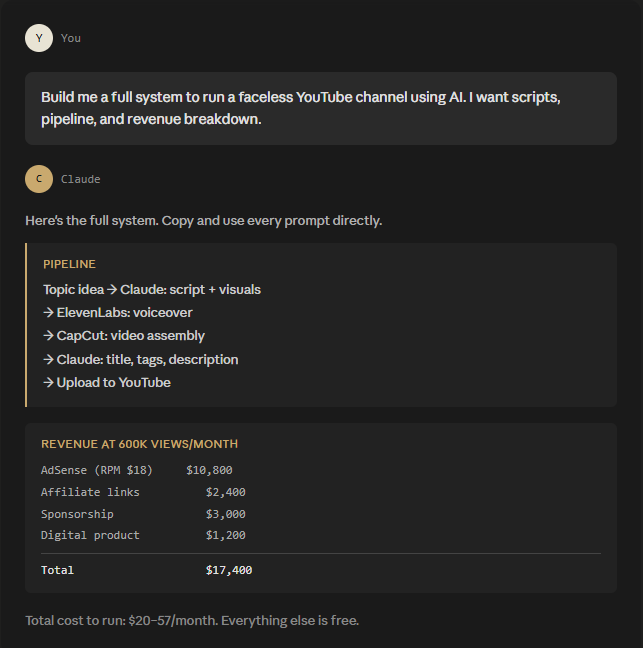
Here's what the revenue looks like on a faceless channel at 600,000 views/month:
Revenue stream               Monthly estimate
AdSense (RPM $18)               $10,800
Affiliate links                  $2,400
Sponsorship (1/month)            $3,000
Digital product                  $1,200
Total                           $17,400
Week 1-4: Post 3-4 videos/week. Test 4 different content formats. Don't optimize yet, just output.
Month 2-3: Identify your top 20% performing videos. Double down on that format. Cut everything else.
Month 4+: Add one monetization layer per month. Affiliate first, then sponsorships, then a digital product.
When you have enough data, use this prompt:
Act as a YouTube growth strategist.

My channel is in [niche]. My 3 best-performing videos are:
[list them]

Analyze what they have in common and give me:
1. The content pattern I should repeat
2. 10 new video ideas following that exact pattern
3. The next monetization layer I should add
4. One collaboration or SEO strategy to accelerate growth
Part 6: The 7 Mistakes I Made and You Can Avoid
Choosing a niche with low RPM. Views don't pay if the RPM is $2
- Skipping the hook. If the first 30 seconds don't grip, the algorithm buries you
- Posting 5 videos and waiting. The algorithm needs 20-30 videos before it starts pushing your content
- Copy-pasting from competitors. YouTube detects duplicate content structures
- Using free ElevenLabs voices everyone uses. Your channel sounds like every other AI channel
- Ignoring analytics. The data tells you exactly what to make next
- Building too slow. Consistency matters more than perfection in the first 90 days
The most expensive mistake is #3. I almost quit at video 8. The channel started moving at video 24.
The Tools
Claude          scripts, titles, strategy        $20/month       claude.ai
ElevenLabs      voiceover                        free-$22/month  elevenlabs.io
CapCut          video editing                    free            capcut.com
Canva           thumbnails                       free-$15/month  canva.com
VidIQ           keyword research                 free tier       vidiq.com
TubeBuddy       SEO + A/B thumbnails             free tier       tubebuddy.com
Pexels          stock footage                    free            pexels.com
Pixabay         stock footage + images           free            pixabay.com
YouTube Studio  upload, schedule, analytics      free            studio.youtube.com
Total cost to start: $20-57/month. Everything else is free.
The Timeline
Month 1:      $0-100         learning the system, finding your format
Month 2-3:    $200-800       algorithm starts picking up good videos
Month 4-6:    $1,000-3,000   monetization unlocked, scaling content
Month 6-12:   $3,000-10,000  sponsorships + affiliate + AdSense compounding
Year 2+:      $10,000-30,000 brand deals, products, second channel
What You Actually Need
A laptop or phone. Claude at $20/month. Free CapCut. Free Canva. An ElevenLabs account.
That's it. The same setup I started with.
The system is above. The prompts are copy-paste ready. The only variable is whether you start this week or keep reading about it next week.
If this was useful, follow.
Related articles

How I Built a Faceless YouTube Channel to $41k a Month With Claude
How I Built a Faceless YouTube Channel to $41k a Month With Claude


38 Ways to Find $1M Startup Ideas:
1. Scrape 1 and 2-star G2/Capterra reviews of popular SaaS tools to find broken features or unmet needs.