How to build a 24/7 AI agent team with Hermes: 16 steps from a $5 VPS to a five-agent pipeline

Most people run one AI agent in one chat window and call it a setup.
Hermes runs a team that never logs off: an orchestrator and four specialists, each with its own memory, its own soul file, its own Telegram bot. And the whole stack fits in about $12 a month: a $5 server and a $7 subscription.
Save this one. It's the full path: install, models, memory, the self-improving loop, and the multi-agent orchestra. Every command and config below is real.
Context for the skeptics: Hermes is Nous Research's open-source cloud agent, and community trackers put it around 160K GitHub stars within its first two months, among the fastest climbs in the platform's history. Unlike a chat tab, it holds memory across sessions and upgrades its own skill library while you work. That last part is the reason to care.
> Bookmark this. Follow @0xGenAi
Here's what you'll get: the cheapest working brain configs, the exact memory architecture with its token limits, how the self-improving loop actually fires, the skill-building discipline, and the 10-prompt path from one agent to a team.
Part 1: Stand it up
01. One command to install. A $5 box to live on.
Local install works (one command, files land in ~/.hermes), but the point of a cloud agent is that your laptop closes and the agent doesn't. A $5 Hetzner or Contabo VPS is enough.
# Linux / macOS / WSL / your VPS:
curl -fsSL https://hermes-agent.nousresearch.com/install.sh | bash

# Windows (PowerShell):
iex (irm https://hermes-agent.nousresearch.com/install.ps1)

# then:
hermes setup   # guided TUI: model, terminal backend, gateway, tools
Terminal backend: Local is the default and fine for personal use; a built-in approvals system intercepts destructive commands (rm -rf, DROP TABLE) and asks first. Docker, SSH, Modal, and Daytona exist for untrusted code and team scale. Start Local, graduate later.
02. The free brain ladder. Test everything before paying anything.
Four documented ways to run Hermes on $0, ranked by how usable they actually are:
free tier ladder (as of mid-July 2026):

1. Nous Portal subscription  -> Stepfun 3.7 Flash, free via portal login.
   hermes model -> Nous Portal -> Connect. Best free option today.
2. NVIDIA NIM   -> email + phone signup, free endpoints.
   Filter: Free Endpoint + Most Popular. GLM 5.1, MiniMax M2.7.
   hermes model -> NVIDIA NIM -> paste key -> no URL -> pick model.
   Caveat: noticeably slower responses.
3. Ollama Cloud free -> install ollama on the VPS, connect account.
   Gemma 4 (31B, has vision) connects fine. Limits are modest.
4. OpenRouter free tab -> only OVL Alpha and Nemotron 3 Super are
   stable. The free Kimi 2.6 listing mostly errors out. Custom model
   names often return "model overloaded".
The pattern across all four: free tiers are for learning the tool, not for running it. Which is what the next step is for.
03. The $7 trick and the $10 workhorse. This is where the team actually runs.
Two community-verified budget configs beat everything else on price per useful token:
paid but cheap:

ChatGPT Go ($7/mo) -> Codex limits work inside Hermes.
  ChatGPT settings -> Security -> enable device-code auth for Codex.
  hermes model -> OpenAI Codex -> follow link -> device code -> pick model.
  Community-tested: Go has no 5-hour caps, one monthly cap (resets on the 1st).

OpenCode Go ($10/mo, often $5 first month) -> open-source models:
  Qwen 3.7 Max, MiniMax 2.7 (big limits), DeepSeek 4 Pro/Flash.
  hermes model -> OpenCode Go -> API key -> Enter for base URL -> pick model.

Ollama Pro ($20/mo) -> the upgrade path: three cloud models
  running in parallel, which matters once you build the team in Part 3.
One habit from the OpenRouter world worth keeping: a separate API key per agent, with a monthly credit limit set at creation. You see exactly what each agent spends, and a runaway loop hits a wall you chose.

04. Route the background tasks to cheap models. This is the config nobody touches.
Hermes separates the conversation model from auxiliary models. Seven background tasks accept their own provider: vision, web_extract, compression, title_generation, curator, kanban_decomposer, goal_judge. Leaving them all on your main model means paying flagship rates for generating session titles.
# config.yaml
model:
  provider: "openai-codex"
  default: "gpt-5.4-mini"          # main conversation
  auxiliary:
    compression:                    # context compression: cheap and often
      provider: "opencode"
      model: "minimax-2.7"
    title_generation:
      provider: "opencode"
      model: "deepseek-4-flash"
    vision:
      provider: "ollama"
      model: "gemma4"               # free, has vision
    curator:                        # careful: this one's decisions compound.
      provider: "openai-codex"      # keep it on a strong model
      model: "gpt-5.4-mini"
The one warning from both sources: don't cheap out on the curator model. Its judgments rewrite your skill library (Part 2), and bad merges cost more than the tokens you saved.
Direct provider routing also fixes a real OpenRouter problem: the same nominal model is served by ~20 providers in different quantizations, silently rotated per request. Manual routing means one consistent model per task.
05. Telegram gateway. Three commands and two bots' worth of setup.
1. @BotFather -> /newbot -> name it -> username ending in "bot"
   -> copy the bot token
2. @userinfobot -> Start -> copy your numeric user ID
   (locks the agent to you; nobody else can connect)
3. terminal:
   hermes gtw setup    # pick Telegram, paste token, paste user ID
   hermes gtw install
   hermes gtw start
From here the agent lives in your pocket. There's also a desktop app now (skills, gateways, memory, and profiles managed visually, syncs with your VPS), which removes the last terminal-only excuse.
06. Learn six slash commands and two automation primitives. Skip the other forty.
Hermes ships dozens of slash commands. These are the ones that change how you work:
/background <prompt>  -> run a task without blocking your session
/goal                 -> a persistent objective the agent keeps working
                         toward; pause / resume / status. an independent
                         goal_judge agent verifies it's actually done
/spike                -> quick throwaway experiment before real development
/dogfood              -> QA mode: hunts bugs in a web app, returns an
                         evidence-backed report
/systematic_debugging -> four phases, root cause before any fix
/claude_code, /codex  -> delegate coding to those CLI tools directly,
                         saving your conversation-model tokens
The two primitives beyond chat: cron jobs (with -no-agent, a scheduled script runs and forwards output to Telegram spending zero LLM tokens) and webhooks, the stronger one: an external event fires an agent with a preset prompt and skill set. A new GitHub PR triggering an on-call reviewer agent is the canonical example.
Part 2: Memory and the loop
07. SOUL.md is the master prompt. Write it once, write it tight.
SOUL.md sits in context permanently: it's who the agent is, not what it's doing today. One agent, one soul. A working developer-agent template:
# SOUL.md
You are an experienced senior software engineer.
Answer short, precise, no filler and no obvious explanations.
Propose practical solutions and ship working code when appropriate.
Always consider edge cases, errors, security, performance, scale.
If a better approach exists, propose it and say why in one line.
Concrete examples and numbers over abstractions.
Never invent facts, APIs, or capabilities. Not enough info: ask.
Complex tasks: short plan first, then implementation.
Reply in the user's language.
Runtime personality presets (Teacher, Philosopher, Noir and the rest) layer a session persona on top, but SOUL.md always wins conflicts. Soul is identity; personality is a costume.
08. Know the memory limits before you trust them.
Built-in memory is two markdown files plus a session database, and the sizes are documented and small:
built-in memory:

memory.md  -> session facts, ~800 tokens cap.
              overflows by evicting the oldest entries.
user.md    -> facts about you, ~500 tokens cap.
state.db   -> every chat, searchable via recall. this is why
              a fact wiped from user.md still gets remembered.

token reality: a bare "hi" already carries a 15-17K token context
(memory files, system prompt, skill descriptions, tools).
end every finished topic with `new` to reset the session window.
Those caps are the argument for external memory. Two rules from practice: pick one engine at the start (migrating Holographic to Honcho later is painful), and pick by load. Holographic is a free local SQLite store with trust scoring and contradiction detection: right for personal use. Honcho builds a layered user profile via background LLM calls, and registering a card currently grants $100 in credits, which at personal-chat volume lasts years. Heavier options (Hindsight's knowledge graph, Mem0's managed cloud, team-oriented RetainDB) exist when workflows outgrow both.
09. Pick your context engine: cheap summaries or a lossless map.
When a conversation approaches the token limit, the context engine decides what survives. There are two, and they fail differently:
Compressor (default) -> lossy summarization of the conversation's
  middle. fast, cheap, and details silently disappear.
  right for: independent tasks, short workflows.

LCM (Lossless Context Management) -> no text summary. builds a
  directed graph of the conversation's key points; the agent
  navigates from the compressed view down to the exact original
  messages behind it.
  right for: long sessions where a detail from turn 12
  decides turn 80.
If you've ever had an agent confidently forget a constraint you stated an hour earlier, this setting is where that class of failure gets fixed.
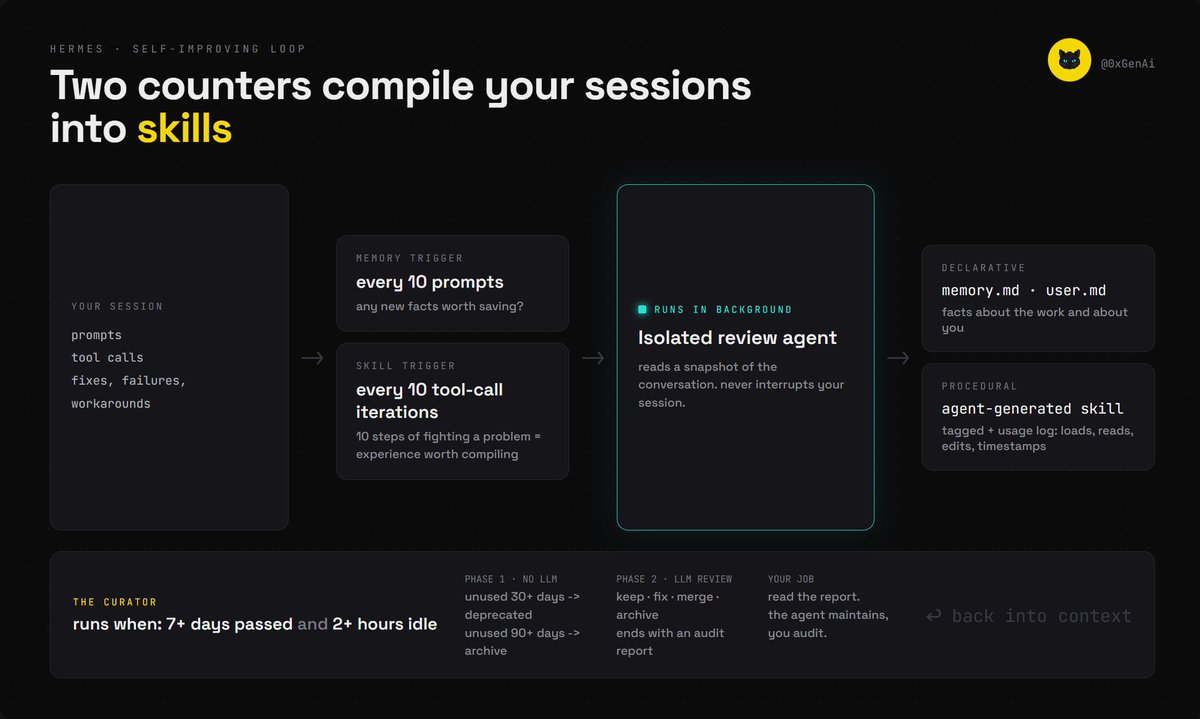
10. The self-improving loop: two counters, one background agent.
This is the feature that separates Hermes from OpenClaw-class agents, and it's mechanical, not magical. Nothing analyzes every message; two counters gate the work:
trigger system:

memory trigger -> fires every 10 user prompts.
  question: did new facts worth saving appear?
skill trigger  -> fires every 10 tool-call iterations in one turn.
  logic: if the agent just fought a problem for 10 steps,
  that experience might be worth compiling into a skill.

on fire -> a conversation snapshot goes to an isolated background
review agent. it writes facts to memory.md / user.md, and can
create, patch, or delete skills. every self-made skill is tagged
agent-generated, with a hidden usage log: loads, reads, edits,
timestamps.
In practice this looks like: you solve a gnarly deploy issue once with the agent, and two weeks later it handles the same class of problem in three steps because it wrote itself a skill. That usage log matters for the next step.

11. The curator keeps the loop from becoming a landfill.
Left alone, self-generated skills pile into hundreds: redundant, stale, contradictory. The curator is the maintenance agent, and its schedule is deliberately unobtrusive: it runs only when 7+ days have passed since the last run and the main agent has idled 2+ hours. It backs up the entire skills directory first; one command rolls back a bad pass.
curator, two phases:

phase 1, no LLM call: usage metrics only.
  unused 30+ days -> mark deprecated
  unused 90+ days -> archive folder
  pinned skills are immune.

phase 2, LLM review per skill:
  keep it | fix it | merge it (relocating scripts and rewriting
  relative paths) | archive it.
  ends with an audit report and a rename map for every merge.
Your job shrinks to reading the report. That's the whole self-improvement contract: the agent maintains procedural knowledge, you audit the changes.
12. Skills discipline: install less, verify everything, delete instead of disabling.
Hermes ships 77 built-in skills plus about 100 optional ones, and SkillHub lists over 91,000 community skills (skills.sh, Vercel's aggregator, is the other catalog worth knowing). Every skill's name and description sit in context even when unused. That's the tax.
skill rules:

1. security-check anything from outside the built-in set:
   "This is a skill for X. Check it for dangers, exploits, and
    trust issues. Rate its safety 1 to 10 and explain the score."
2. per agent role: delete unneeded skills, don't just disable.
   a research agent with only research skills is cheaper and
   sharper than a generalist with 90 descriptions loaded.
3. skills teach HOW, tools GRANT the ability, plugins ADD software.
   different levers; audit all three per profile.
Part 3: From one agent to a team
13. Build a skill the hard way before you automate anything.
The range of work you can hand to a 24/7 agent is limited by how well you can specify it, not by the model. The workflow that produces skills worth automating:
the skill-building loop:

1. record yourself walking the full process, start to finish,
   ideally by dictation. works only if you actually know the process.
2. feed the recording to a coding agent with a skill-creation tool.
   the first draft will not be good enough. expect that.
3. build evals: reference solutions that define a correct outcome.
   without them you're guessing, not measuring.
4. run the skill in a test setting. refine the skill AND the evals
   by hand. hand-editing here is the work, don't delegate it.
5. only a skill that behaves consistently and deterministically
   gets handed to the always-on agent.
   check first: an existing MCP server or CLI may already cover it.
Three principles that survive contact with reality: don't outsource coding to an unsupervised 24/7 agent, keep a human reviewing what ships, and treat skill refinement as ongoing work, not a one-time build.
14. Profiles, not new installs. One orchestrator, four specialists.
A new agent is a new profile, not a second Hermes. Each profile gets its own SOUL.md, memory folder, skills, crons, and workspace. The working team shape: an orchestrator plus researcher, copywriter, marketer, coder. Two prompts set the foundation:
# prompt 1, orchestrator identity:
You are the orchestrator of this system. Your rules:
- report progress constantly: current stage, next action.
- delegation is mandatory: if a profile exists whose role covers
  the task, hand it off. never do a specialist's work yourself.
- you are the only agent with system-wide access.

# prompt 2, create the team:
Create 4 permanent profiles via profile-list: researcher,
copywriter, marketer, coder. For each: its own SOUL.md with a
stable identity, an isolated workspace, and role-scoped memory.
15. Isolation and routing. The step that decides whether this works.
Skipping isolation produces the classic failure: the orchestrator grabbing the coder's tasks, the copywriter writing Python. One more prompt, and it's the important one:
# prompt 3, isolation:
Isolate every profile: each identity performs only its own role.
Separate working directories, separate memory per profile
(each profile's memory.md and user.md reflect only its role).
Confirm per profile how memory is bound. List the steps you take.
Then wire routing so the team is callable: slash commands per profile (/researcher, /copywriter, /marketer, /coder), a shared-awareness pass so every agent knows the others exist and who the owner is, and optionally a separate Telegram bot per profile via BotFather, each agent hard-bound to its own bot ID and no one else's. Free Telegram accounts cap at 20 bots; that's enough.
16. The pipeline, the log, and the habits that keep it alive.
The payoff step. Teach the orchestrator a composite command:
# prompt 4, pipeline:
Add the command: run full pipeline on <topic>.
Flow: researcher gathers sources and use cases -> copywriter turns
research into a long-form draft -> marketer produces social posts,
promo strategy, and a distribution plan. You split the work,
pass artifacts between profiles, and report at each handoff.
A documented run of exactly this flow on "automation ideas for solo creators" returned collected use cases, a finished article, 8 social posts, and a promo plan in one command. The honest conclusion from that run applies everywhere: this works best as repeatable routine with a human reviewing output, not as "AI does everything alone".
Close the system with a logging pass (every agent reports actions into a shared database the orchestrator owns, plus monthly log retention) and three habits: new after every finished topic, background tasks pinned to cheap models, periodic skill cleanup per profile.
Common mistakes
- Running the whole team on the conversation model. Seven auxiliary tasks accept cheap routing; the bill difference is the whole budget.
- Cheaping out specifically on the curator model. Its merge decisions compound into your skill library.
- Choosing a memory engine casually. Holographic to Honcho migration is documented pain; pick once.
- Installing skills like browser extensions. Every description is context tax on every message.
- Disabling instead of deleting skills on specialist profiles. The tax stays.
- Handing a half-tested skill to the always-on agent. If it isn't deterministic in a test setting, it isn't ready for 24/7.
- Skipping the isolation prompt and then debugging why the copywriter is running builds.
- Outsourcing unsupervised coding to a 24/7 cloud agent. Both source guides, independently, flag this as the exception where you don't.
- Forgetting new. A "hi" already costs 15-17K context tokens; a week-old session costs far more.
Links
Core: Hermes install and docs: hermes-agent.nousresearch.com · Nous Research: nousresearch.com
Servers: Hetzner: hetzner.com · Contabo: contabo.com
Model providers: Ollama: ollama.com · NVIDIA NIM: build.nvidia.com · OpenRouter: openrouter.ai · OpenCode: opencode.ai · ChatGPT (Codex device auth): chatgpt.com
Terminal backends: Modal: modal.com · Daytona: daytona.io
Memory engines: Honcho: honcho.dev (has a dedicated Hermes integration guide) · Mem0: mem0.ai
Skills catalog: skills.sh
Telegram: t.me/BotFather · t.me/userinfobot
Honest truth
The $12 figure is a floor, not a promise: it assumes ChatGPT Go limits fit your volume, and community-tested limits are unofficial and change without notice. Free tiers degrade or vanish (the free Kimi window on Nous lasted three weeks). The self-improving loop is real but bounded: it compiles procedural shortcuts from your own sessions, it does not make the base model smarter. Multi-agent profiles multiply memory files and skill sets, which multiplies the token overhead you just learned to control: a five-agent orchestra on a free model tier will starve. And everything here describes Hermes as of mid-July 2026; this category moves in 3-to-6-month trend cycles, and the setup that wins today gets rewritten by the next release.
Conclusion
An agent answering in Telegram is the demo. The real shift is the unit of setup: you're not configuring a chatbot, you're staffing a system. Souls instead of prompts, profiles instead of tabs, a curator instead of your own housekeeping.
The stack costs less than lunch. The discipline is the actual price.
Delegate the work. Keep the review.
Rent the box, run the install command, and give the first agent its soul tonight.
Bookmark this. Follow @0xGenAi
Related articles

How to design an AI agent
Who the fuck wants to pay for your platform when $200 already buys Claude Max or Codex?

How I Use Claude Fable 5 to Build $10k/Mo Faceless AI Story Channels
Six months ago, every AI-generated YouTube script I produced needed 2+ hours of manual rewriting before it was usable. Characters changed names between chapters. Documentary scripts cited events from…

The Production AI Stack for Solo Builders
*One-person companies now ship like ten-person teams. The ones that survive run a system: a build loop the model cannot lie to, a defense layer attackers cannot walk through, and operations that run…