How to Make AI UGC at MASSIVE Scale (Step-by-Step)

making 1 good AI UGC video isn't hard anymore.
making 500+ a week that all look real, stay on-brand, and actually convert is a completely different problem, and it comes down to the production system running behind it.
this is the full pipeline we run to produce AI UGC at real scale, every step and every tool in it.
let's get into it.
Step 1: Generate the Concepts (Claude)
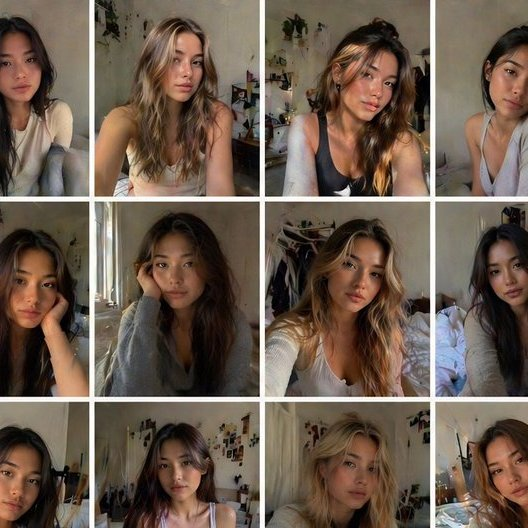
at scale you don't sit around waiting for one good idea. you generate concepts in bulk.
we run this through Claude Opus 4.8. it takes the performance data from what's already running, the offer, and the angles that have been converting, and hands back a batch of concepts for the week, hooks, angles, formats, the whole list at once.
so instead of one person brainstorming 5 ideas on a good day, you've got 50 concepts on the table before you've finished your coffee.
and they're not random. Claude's pulling from what actually performed, so the batch leans toward the hooks and angles with a real shot, not whatever sounded clever in the moment.
this is step 1 because everything downstream scales off it. 50 concepts in means 50 scripts, which means 50+ videos. the whole funnel starts here, so you want it wide and you want it data-driven.
a good batch isn't 50 versions of the same idea either. you want a spread, different hook styles, different emotional angles, problem-aware ones, curiosity ones, bold-claim ones, mixed across the formats that have been working. that spread is what gives the testing something real to compare, and it's how you find the angle you wouldn't have guessed on your own. Claude handles the spread automatically when you brief it on the offer and feed it the data.
Step 2: Write the Scripts (Claude)
concepts picked, Claude writes the actual scripts.
each one's a full short-form script, hook on the first line, the body, the CTA, written at the length the platform actually rewards. short, tight, no wasted words. and it's written in the creator's voice so it sounds like a person talking, not a brand reading off a press release.
you batch this too. Claude writes all 50 scripts in one session instead of one at a time, and it calibrates per platform while it does it. a TikTok script is paced different than a Facebook one, and that gets handled in the same run.
the script is the spine of the whole video. get it right here and the generation step has something real to work with. get it wrong and no amount of clean video saves a dead hook.
Step 3: Build the Reusable AI Creator (GPT Image 2 + Topaz + ElevenLabs)
here's the part that makes scale actually work. you build a creator once and reuse it across hundreds of videos.
the face. you generate the character with GPT Image 2, then generate a multi-angle reference set, front, 3/4, profile, a few expressions, so the creator's identity is locked from every angle. then you run the primary reference through Topaz to upscale it into a clean, high-detail base. that upscaled reference is what every future video pulls from.
the voice. you generate the voiceover with ElevenLabs, one consistent voice tied to that creator. the same voice every video, so the creator reads as a real recurring person instead of a different stranger each time.
why this matters at scale: consistency. when you're pushing 500 videos out the door, the ones that actually build an audience are the ones where the creator is recognizable, the same face and the same voice every time. a locked creator identity is what lets you produce at volume without the content turning into visual noise.
and you're not locked to one look per creator either. the same locked identity can run in different settings and outfits, kitchen, car, street, desk, bathroom mirror, so a single creator gives you dozens of distinct-looking videos that all still read as the same person. that's how you get real variety at volume without the audience feeling like they're watching the same clip on a loop.
build 5 to 10 of these creators up front and you've got a whole roster you can run for months without rebuilding anything. when one starts to fatigue, you rotate in another and the audience gets a fresh face without you starting from zero.
Step 4: Generate the Talking-Head Video (LTX / Kling / Seedance)
now you've got a script, a creator, and a voice. you feed those into the video models and generate the actual clips.
this is where routing matters, because not every clip needs the same firepower:
LTX 2.3 at $0.01/s
this is where the bulk of your volume runs, all the testing, all the concepts you're not sure about yet. it's cheap enough that you generate freely and don't think twice about it.
Kling 3.0 at $0.10/s
once a concept shows signal, you reproduce it cleaner here for proper rotation.
Seedance 2.0 at $0.168/s
this is for your proven winners, the ones getting real spend behind them, where the quality genuinely moves the needle.
and you run all of this direct through a generation platform, Replicate, AtlasCloud, or fal.ai, on your own API keys. that's the piece that makes scale affordable, because you're paying the real per-second generation cost instead of a SaaS platform's marked-up subscription. (more on the cost further down.)
the way it actually comes together: the script drives what the creator says and does, the character reference locks who they are on screen, and the voice track carries the audio, and the model renders all 3 into a clip where the creator is genuinely saying your script in their own voice. you set the clip length, the framing, and the motion in the generation parameters, and you keep those consistent per creator so the output doesn't drift from one video to the next.
the routing is what keeps the cost sane. you'd go broke generating every test clip on the premium model, and you'd leave quality on the table putting your winners on the cheap one. matching the model to the job is the whole trick.
Step 5: The Product Demo Layer
talking heads are half of it. the other half is product demos, the videos that actually show the product doing its thing.
the workflow's similar, you reference the product and generate demo clips around it, but it's worth being honest about where this gets tricky. AI handles a person holding and talking about a product really well. it handles complex physical product interactions a lot less reliably, the intricate mechanical stuff, fast hand movements, tiny detail work, and you'll burn more variants getting those clean.
so at scale you lean the product-demo volume toward the shots AI nails cleanly, talking about the product, showing it in a lifestyle setting, reaction-style demos, and you reserve the fiddly hero shots for extra variant attempts on the premium model where the quality's worth the spend.
knowing where the models are strong and where they're weak is what keeps your demo output from looking broken at volume.
you produce to the strength and you don't fight the tool on the shots it can't do yet.
Step 6: Run It All in Parallel (The Scale Engine)
this is the step that separates making AI UGC from making AI UGC at massive scale.
you don't generate clips one at a time. you generate them in parallel, dozens or hundreds at once. the generation platforms support batch processing, so a batch of 50 concepts can all be generating at the same time instead of sitting in a queue waiting their turn.
we orchestrate the batches through Claude Cowork. it runs the production pipeline across the whole batch, kicking off generations, tracking what's finished, and flagging what needs a rerun. so one person is managing a 500-video week instead of babysitting each clip through the process.
the parallelization is the actual unlock. done sequentially, 500 videos a week is impossible for a small team, the clock just doesn't allow it. done in parallel with the orchestration handling the coordination, it's a normal Tuesday. this is the difference between people who talk about scale and people who actually hit it.
Step 7: Quality Control at Scale

here's a problem nobody warns you about. you can't eyeball 500 videos a week. so QC has to be systematized, or quality falls apart the second you scale up.
we run QC through Claude plus a fixed set of criteria. every clip gets checked on 3 things, is it realistic, is the detail clean, and does it pass the real test, meaning would this read as an actual person in the first 2 seconds with no other context. anything that fails gets flagged and regenerated with the prompt adjusted at whatever broke.
the usual suspects are the ones you'd expect, hands that don't look right, eyes that drift, lip movement that doesn't quite track the audio, lighting that goes flat or plastic. the criteria catch those before they ever make it to a posted video, and the regeneration loop just retries them with the weak spot targeted until they clear.
the clips that pass move to assembly. the clips that fail never see the light of day.
this is the layer most guys skip, and it's exactly why their scaled output looks like scaled slop. QC at volume is what keeps 500 videos a week sitting at a quality level you'd actually put your name on, instead of flooding your accounts with clips that get clocked as fake on sight.
Step 8: Assembly and Editing
clips approved, now they get assembled into finished videos.
captions get added, b-roll gets cut in where it lifts the clip, the audio gets balanced, and each one gets formatted for its platform, aspect ratio, caption placement, pacing. at scale this is batched too. you're not hand-editing each video from scratch, you're running them all through a consistent assembly process that does the repetitive work the same way every time.
the goal is finished videos that look native to the platform, not obviously templated. consistent enough to produce at volume, but varied enough that they don't all look like the same video with the words swapped out. that balance is what keeps a high-volume account looking like a real creator instead of a content farm.
the assembly stage is also where you protect retention. the first second gets a visual hook, not a slow fade-in, the captions are timed to the speech so they're actually readable on mute, and the pacing stays tight so nobody scrolls. these are small things per video, but across 500 a week they're the difference between content that holds attention and content that gets skipped, so they get baked into the process instead of left to chance.
Step 9: Distribution at Scale
producing 500 videos does nothing if they sit on a hard drive. distribution is where the volume turns into reach.
you post across a portfolio of accounts, not one, with the volume spread so each account posts at a natural frequency, a few a day, not 50 dumped at once. the accounts run on cloud phones hosted on your own servers, each a fully isolated instance with its own fingerprint and proxy, so you can run the whole portfolio without a drawer full of physical phones. scheduling runs from one calendar across every account and platform at once, with the posts staggered through the day so it looks like a roster of separate people posting on their own rather than one operation hitting publish in lockstep.
and the engagement that comes back doesn't just sit there. a comment funnel catches it and routes it into DMs, so the reach turns into actual conversations and leads instead of just a view count climbing on a dashboard.
at this volume the distribution compounds on itself. more posts means more saves and shares, which means more algorithmic distribution, which feeds the next batch a warmer audience than the last one had.
Step 10: Close the Loop (Performance Feedback)

the system doesn't just produce and forget. the performance data from everything you post flows back to the front of the pipeline.
so when Claude generates next week's concepts back in step 1, it isn't starting cold. it's working off what actually hit, which hooks held attention, which creators converted, which formats got saved and shared. the concept batch gets sharper every cycle because it's learning from real results instead of guessing in the dark.
this is the part that makes the whole thing compound. week 1 you're testing wide and learning. by week 8 the system knows your audience, your winning angles, and your best-performing creators, so a bigger share of what you produce actually lands. the volume holds steady and the hit rate climbs.
a pile of disconnected tools can't do this. a single connected pipeline can, because the data from the back end actually reaches the front end and changes what gets made next.
The Cost at Scale
this is where running direct pays off, and it's worth being straight about the real cost instead of quoting a fantasy number.
say you test 50 concepts in a week. all 50 run on LTX at a cent a second, which lands around $7.50 for the batch. a handful show signal, maybe 5, and you reproduce those cleaner on Kling, call it $7 to $8. one becomes the real winner and gets the Seedance treatment, a few premium versions, maybe $10 to $15.
so your whole week of generation comes out around $25 to $30. that same volume produced entirely on the premium model would run $150+, and through a SaaS platform with their markup on top, multiples of that again.
the honest framing: a cent a second is a blended rate, not the price of every clip. most of your volume is cheap LTX test clips, a few winners run premium, and because the cheap volume massively outnumbers the heroes, the blended cost stays tiny. anyone quoting you a flat cent on every clip is selling you something.
stretch that over a year and it's roughly $1,300 to $1,600 in generation versus $7,500 to $8,000 going all-premium, for the same output. that gap is what makes massive scale actually sustainable instead of a thing you can afford for one good month and then quietly stop.
What a Week Actually Looks Like
put it all together and a 500-video week runs on a small team a few hours a day.
Claude generates the concepts and scripts in a couple of sessions. the creators are already built, so you're pulling from the roster instead of starting over. the video batches run in parallel through the generation platforms with Cowork orchestrating. QC runs across the batch. assembly runs on the approved clips. scheduling pushes everything out across the portfolio.
it's a 1 to 2 person operation running a few hours a day, producing a volume of content that would've needed a full agency and a serious budget a couple of years ago. the leverage is all in the system, the people are just steering it.
The Bottom Line
making AI UGC at massive scale isn't about finding one magic tool. it's a pipeline: concepts and scripts from Claude, a reusable creator built with GPT Image 2, Topaz, and ElevenLabs, talking-head and demo video routed across LTX, Kling, and Seedance on a generation platform you run direct, batched in parallel, QC'd at volume, assembled, and pushed across a distribution portfolio.
every one of those pieces is assemblable today. the hard part isn't any single step, it's wiring the whole thing into one system that actually runs at volume without falling over.
Related articles

How to Actually Make HIGH Quality Looking AI UGC (Step-by-Step)
quality AI UGC doesn't come from picking the best model.
no face. no camera. no audience. here's how i make $1,600 days with AI and a Glitchy link.
let me paint you a picture of what most people think affiliate marketing looks like.
I Turned One AI Influencer Into a UGC Factory. Here's the Build and Where the Money I$.
*The core idea: identity is data, not a vibe.Most people build an AI influencer like a napkin doodle. I build mine like a shipped binary: one JSON identity card, one Claude Code skill, a full week of…