How to Make Unlimited USA TikTok Accounts (For Free)
There's an entire industry of losers built on selling you US TikTok accounts for $25 a pop. "Aged," "verified," "ready to post." Most of it is garbage accounts that die the first week because whoever made them never understood the one thing that actually keeps a US account alive.
I've scaled more accounts with the method below than most of these sellers have cumulatively sold. It costs $0. Here's the entire thing, start to finish, plus the part nobody explains: why it works, so you can fix it yourself when something breaks.
The one idea everything hinges on: region consistency
TikTok doesn't decide you're a real US user because you say so. It cross-checks signals and looks for agreement. Your email's region, your IP's region, and your usage region all get read at once. When all three say USA, you look like a real person in Ohio. When they disagree: a US email over a German datacenter IP, you look like exactly what a fake account looks like, and you get flagged before you post a single video.
Every step below exists to make those three signals agree. Miss one and the other three don't matter.
Step 1 — Build a USA-based email first
Before TikTok, you need an email that reads as American. Go to Outlook and create a new address, and during signup select USA as your region. That region flag is not cosmetic, it's the first signal in the chain, and it sets the tone for everything the account does afterward.
Do this first, every time. The email is the foundation; the TikTok account inherits the credibility from it.
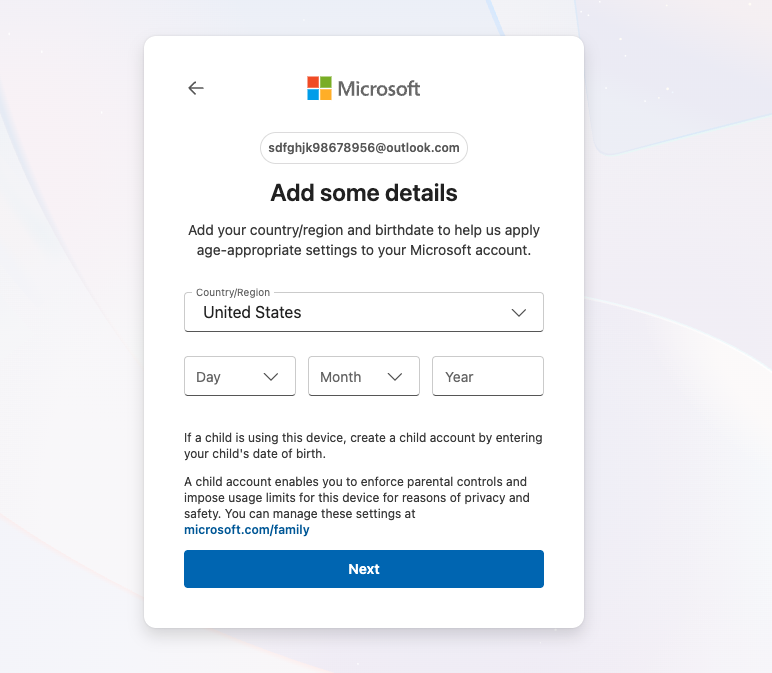 — "country selector on outlook"
Step 2 — Create the account on a real US connection
Now make the TikTok account from a phone, but you must be connected to a US server while you do it. And here's where 90% of people quietly sabotage themselves: they fire up a VPN, connect to a "US" server, and think they're covered.
They're not. A VPN's IP is almost always a datacenter IP — one address shared across hundreds of thousands of people, a huge share of them bots. To TikTok, a datacenter IP isn't anonymous. It's a flashing sign that says not a real human. That's the actual reason accounts made "on a US VPN" still die.
What you want is a residential ISP proxy: an IP that looks like a real home internet connection, because it is one. At 2–3 phones you can sometimes slide on a static IP (from a VPN). Past 5–6 phones, dedicated residential proxies aren't optional; they're the difference between a fleet that lives and a graveyard. Match the proxy's region to the account's target country — US proxy for US accounts — and you've kept the chain consistent.
Step 3 — Verify with the email you just made
Verify the TikTok account using the Outlook address from Step 1. Simple, but the point is the pairing: US email verifying a US-connection account closes the loop. The signals reinforce each other instead of contradicting.

Step 4 — Warm up on a US connection (never skip this)
A freshly created account is not a ready account. Before it posts anything real, it goes through a warmup and that warmup happens on a phone connected to US servers, so the region stays consistent through the account's first days of life, not just its birth.
I'm not going to cram the full day-by-day warmup into this article; it's a system of its own and it deserves the space. The short version: you consume before you engage, you engage before you post, and there's a make-or-break test on day 3 that tells you whether the account is clean or already dead.

Why this beats every paid service
When you buy a $25 account, you're inheriting someone else's shortcuts: an unknown email region, an unknown IP, an unknown warmup, and zero ability to diagnose it when it dies. You paid for a black box. When you build it yourself, every layer is clean and every failure is legible: you know exactly which signal broke and you can fix it and experiment some new stuff as well
That's the whole trade. $25 for a random account that dies, or $0 for an account made with a system you understand and can run a hundred times.
The checklist — steal it
- USA email first. Outlook, region set to USA.
- Create on a real US connection. Residential ISP proxy, not a VPN/datacenter IP. Region-matched.
- Verify with that US email.
- Warm up on a US connection before any real posting.
- Keep all three signals: email, IP and usage agreeing on USA. That's the entire game.
That's it. No SIM cards, no sketchy marketplace.
How do I know it works? I've scaled more accounts on this exact method than those sellers have moved in total.
Related articles

The ULTIMATE Organic Marketing Guide For App Founders
I’m going into calorie deficit, fat loss, high protein meals, gym meals, restaurant calories, what I eat in a day, meal prep, macro tracking, cutting, bulking, low calorie snacks and whatever else st…

How to Run AI Slideshows Profitably on TikTok
the algorithm re-serves a slideshow to people who scrolled past it.
How to Actually Warm Up Your TikTok Account in 10 Minutes (IT WORKS!)
You don’t need to spend 3 days warming up a new TikTok account.