How to run your first AI UGC campaign (step-by-step guide)

You've seen these videos on TikTok and Instagram. A normal-looking person, talking about an app they "just found." Not posted by the brand. Posted by some personal account with 40 followers.
That's UGC.
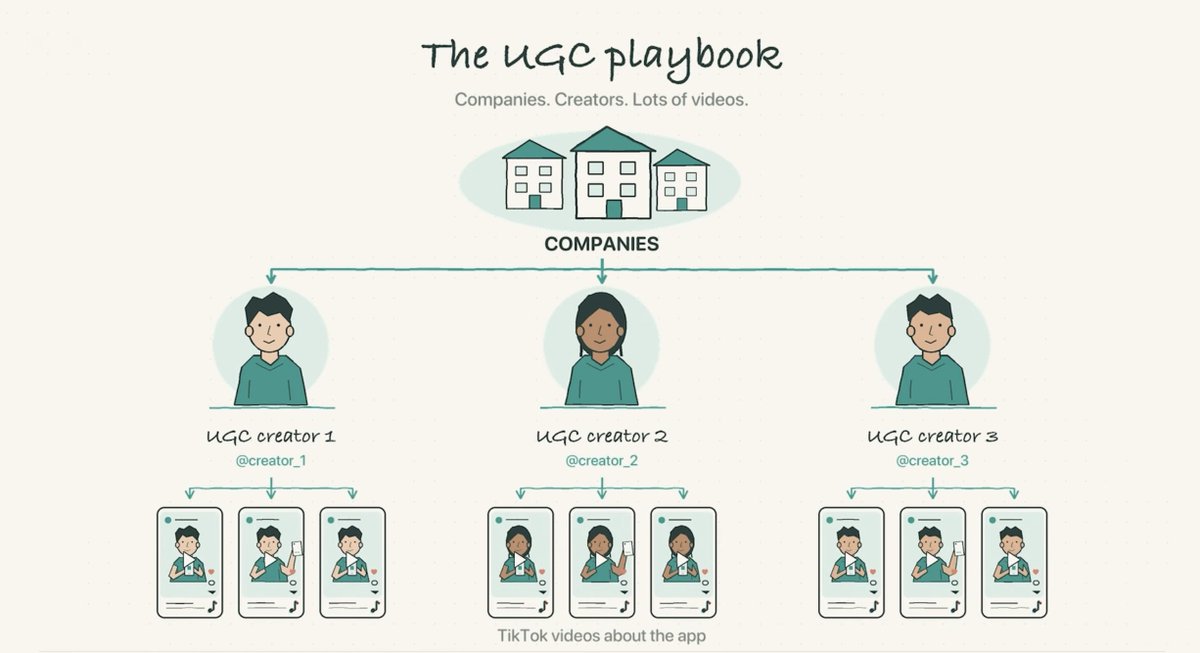 — "Image source: Joma 2nd Channel"
Typically companies hire people who have time but no following -> spin up new accounts and create video content about your product.
You are not paying for their audience, because they don't have one. You are paying for content that look like geniue user sharing a product they like.
And normally you pay $20~50/video, so It gets expensive fast.
I've spent past 2 days exploring whether we can use AI to fully generate those videos, and drive cost from $2050/video to $46?
I think I got a workflow that produce AI UGC actually works and hyper realistic, I will walk you through step by step
Step 1: Find what's already working in your vertical
A UGC video is two parts:
- The hook: the first 3 seconds. Probably the most important thing.
- The demo: showing the product.
The way you scale it is one demo paired with 5 to 10 different hooks. Then you test which one lands.

So before generating anything, I pull trending videos in my vertical and study two things: how the hooks are built, and which faces/characters resonate. Same script, different person, completely different impression. That part surprised me.
I use @treg_ai for this (context: I built it). It is like OpenRouter for data & tools, so you can connect to 3000+ premium data & tools. With no subscription, Pay for usage only.
Just paste the https://treg.to/llms.txt to your agent and it will setup in 1 min, then you can prompt it:
"Pull recently trending toktok/instagram videos in our vertical."
A minute later I have a list of what's trending on TikTok for my niche, with hooks I can read and characters I can look at.
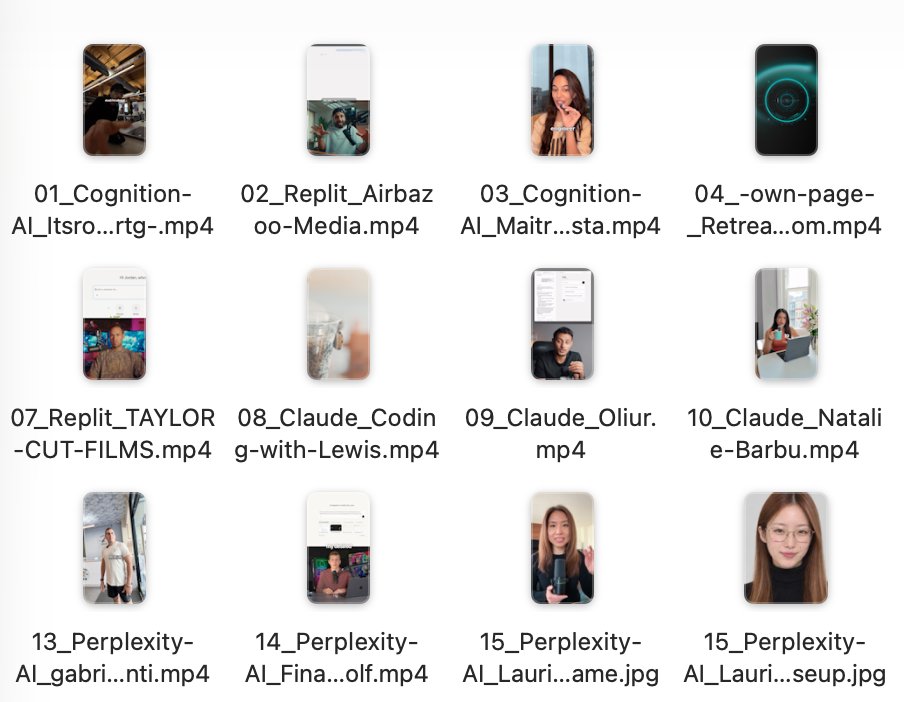
Then it comes the hard part: take a person who exists and whose vibe works, and generate a different person with the same vibe. Then build an account around that character.
Step 2: Generate a character with certain vibe (the hard part)
This is genuinely difficult, and it took me a while to understand why.
I tried GPT Image 2.5 and Gemini 3 Pro on a screenshot of a presenter from the Google Cloud channel. Both state of the art. Both looked wrong.
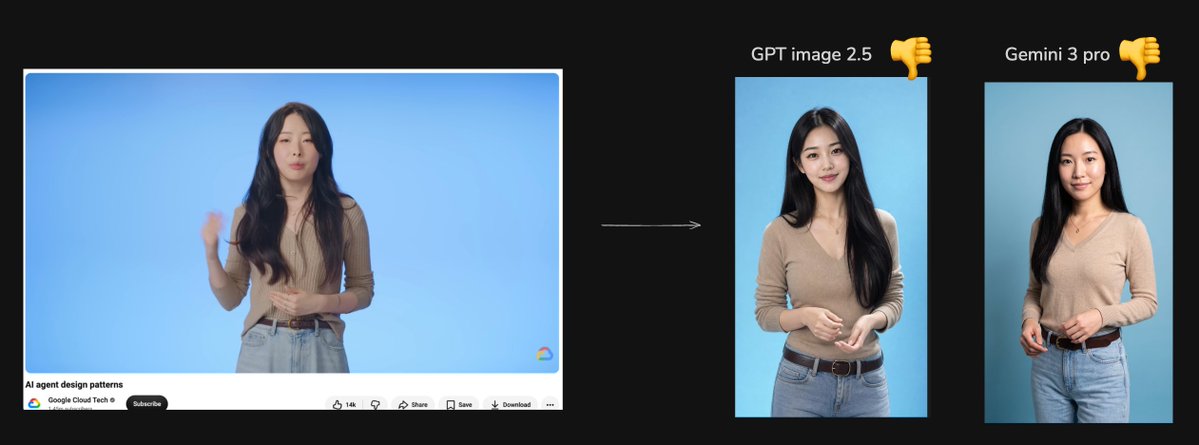
Then my friend @henry19840301 sent me a prompt that changed the output completely. Same models, and now the character looks like a real person, different from the reference, but with the same vibe.

The trick:
> Restrict the model's exploration space. Force it to define every detail it would otherwise fill in with default in JSON format
Every image model has out-of-box defaults. Eyes slightly too big. A doll-ish face. And if your prompt has "4K, 8K, ultra detailed" in it, you get that HDR, over-sharpened look that screams AI.
The fix is a JSON-based prompt that specifies everything: face structure, skin texture, lighting, camera, expression, clothing, background. When the model has no room to revert to its defaults, you stop getting slop.

I tested it on a well-known Chinese tech vlogger, a Chinese podcaster, and Jin Yang from Silicon Valley. Each time: a new person, clearly different, same vibe, looks real.

@henry19840301 turned this into a reusable skill: feed it a screenshot, get a new character.
Skill: https://github.com/agentara/skills/blob/main/skills/aigc/portrait-clone/SKILL.md
Second trick: the model matters even with the right prompt. I ran the same JSON prompt across five models. GPT Image 2.5 should technically be the best, but its faces still have that doll-face pattern in the eyes. Gemini 3 Pro gave me the most realistic result.

All the major image and video models are on @treg_ai with no markup, so I just tell Claude Code:
> "Generate the character with the portrait-clone skill on GPT Image 2.5, Gemini 3 Pro, and Seedream, so I can compare."
It calls all three, I pick the winner.
Step 3: Make the character talk
Now feed the character image to Seedance 2.5 as an image reference and give it a script. It does a good job from a single image.
One problem: Seedance 2.5 refuses hyper-realistic reference images by default, to stop people from impersonating real humans.
Two ways around it:
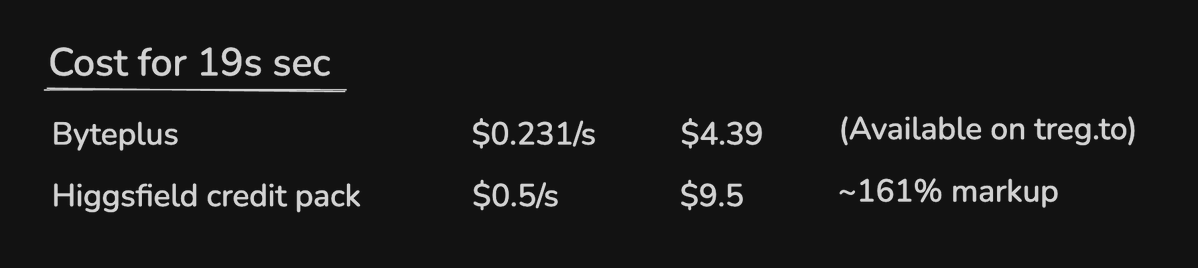
- Platforms like Higgsfield expose an endpoint that bypasses this, but they charge a margin that doubles or triples your cost.
- The proper way is BytePlus directly. Their advanced creation rights (there's a premium creation package even on the free tier) let you upload an image, register it as a digital character, and generate from it. But it takes several hurdles to get approved.
On treg we wrapped that whole process: the Seedance 2.5 less-restricted endpoint takes your image, registers it as a character asset, and generates. Same price as buying from BytePlus directly.
The voice trick. The default voice sounds wrong. Not fake exactly, just off in rhythm. The shortcut: clip the audio from the original trending video you liked and pass it as an audio reference. The rhythm and delivery come through. There are too many details in speech to describe in text, so let the model copy them instead.
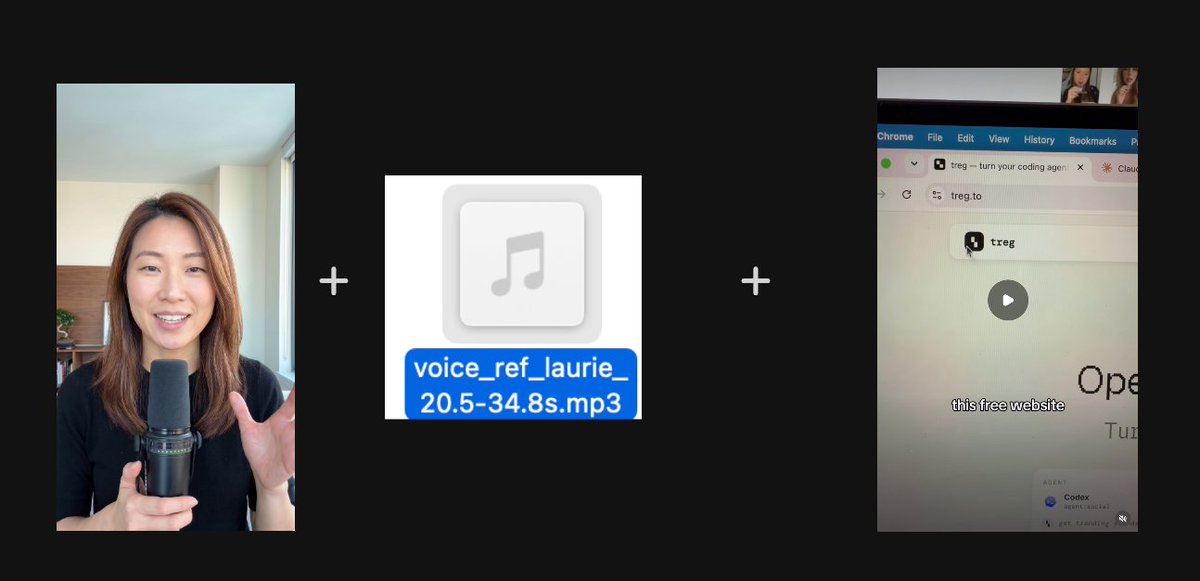
Step 4: The demo, and why the character doesn't need to be in it
To cut cost, the demo section doesn't show the character at all. I just recorded the product on my phone. In my case, treg getting Codex to do GTM work: find leads, run outreach.
Then I cloned a voice on Fish Audio from the same original audio clip, generated the voiceover, and stitched it with the screen recording plus captions.
Now I have one demo clip. Time to pair it with hooks.
Step 5: Generate hooks at scale
Back to Claude Code with treg. I gave it a few reference accounts doing this well and asked it to pull their top videos and extract the hooks.
Models are good at analyzing transcripts now. One Composio video with 3.3M impressions opened with: "They emailed over five million people and asked each for one dollar. What if you emailed every millionaire in the world and asked for just one dollar?" That's showing off a Gmail integration.
The pattern: a stunning claim, a specific number, and a result.
I asked it to brainstorm in that pattern and picked this one:
> "3 AM last night, my agent was researching hundreds of customers and emailing each of them to book meetings for me. I woke up to 12 replies and 4 meetings on my calendar. Here's exactly how I set it up."
Then one prompt: use Seedance 2.5 with the character image and the audio reference, generate the video.
I built a UGC talking-head skill for this. It takes the request, writes the script and sets the duration, grabs the voice reference, writes the Seedance prompt, and adds captions and headers to produce the final video. It's in the treg GitHub repo.
A few minutes later: 4 UGC clips for $2.67 total. Under 20 to $50 per video for a human creator.
What I'd do differently for harder videos
Software demos are simple, so one character image is enough. If your video is more complex, the flow becomes: design the character from multiple angles, use an image model to build a storyboard, then feed storyboard plus character to Seedance 2.5 for the final cut. For most software UGC I never needed this.

The full loop
- Pull trending videos in your vertical, study hooks and faces
- Generate a new character with the vibe you want (JSON prompt, Gemini 3 Pro)
- Register the character on Seedance 2.5, use the original audio as reference
- Record the demo yourself, clone the voice, stitch
- Extract hooks from top performers, generate 5 to 10 variants, A/B test
Links:
- Henry's portrait-clone skill: https://github.com/agentara/skills/blob/main/skills/aigc/portrait-clone/SKILL.md
- UGC talking-head skill: https://github.com/superdesigndev/treg
- treg (OpenRouter for data and agent tools): http://treg.to
Related articles

How to Make AI UGC Look Like Real iPhone Footage
*"realistic skin texture, visible pores around nose and cheeks, natural slight unevenness, no filter quality"*

How to CONSISTENTLY Get High Views on TikTok With AI UGC
*"realistic skin texture, visible pores, natural slight unevenness, no filter quality"*

The economics of an AI UGC phone farm
So you're thinking of marketing your app on social media with organic UGC. You have a few options to pick from: