How to use Claude Design like a pro: The Ultimate Guide

Two years ago this needed a designer. You wrote a brief. You waited days. You paid for the result
Claude Design removes all three steps. You describe a landing page, a pitch deck, or an app prototype. Claude builds it on a live canvas while you watch. Then it hands the result to Claude Code to ship as real software
It launched on April 17, 2026. Three days earlier, Anthropic's product chief had stepped off Figma's board. The market read the threat before most users did
> Most people open the tool, type one prompt, and stop. That is the beginner loop
Below is the workflow that treats Claude Design like a real design system, not a toy
 — "Claude Design"
1. Build the design system first
This is the step beginners skip, and it is the whole game
Every project you create inherits your organization's design system automatically. Your brand colors, fonts, and components are already in place. You do not upload assets each time
If the system is not set up yet, bring one in. You can import from a GitHub repo, design files, raw uploads, or your local codebase
> From Claude Code, open your design-system package and run /design-sync to pull it in
Claude builds with your real components. It checks its own output against the system. It corrects drift before you ever see it
Skip this and every result looks generic. Set it up once and every generation lands on brand
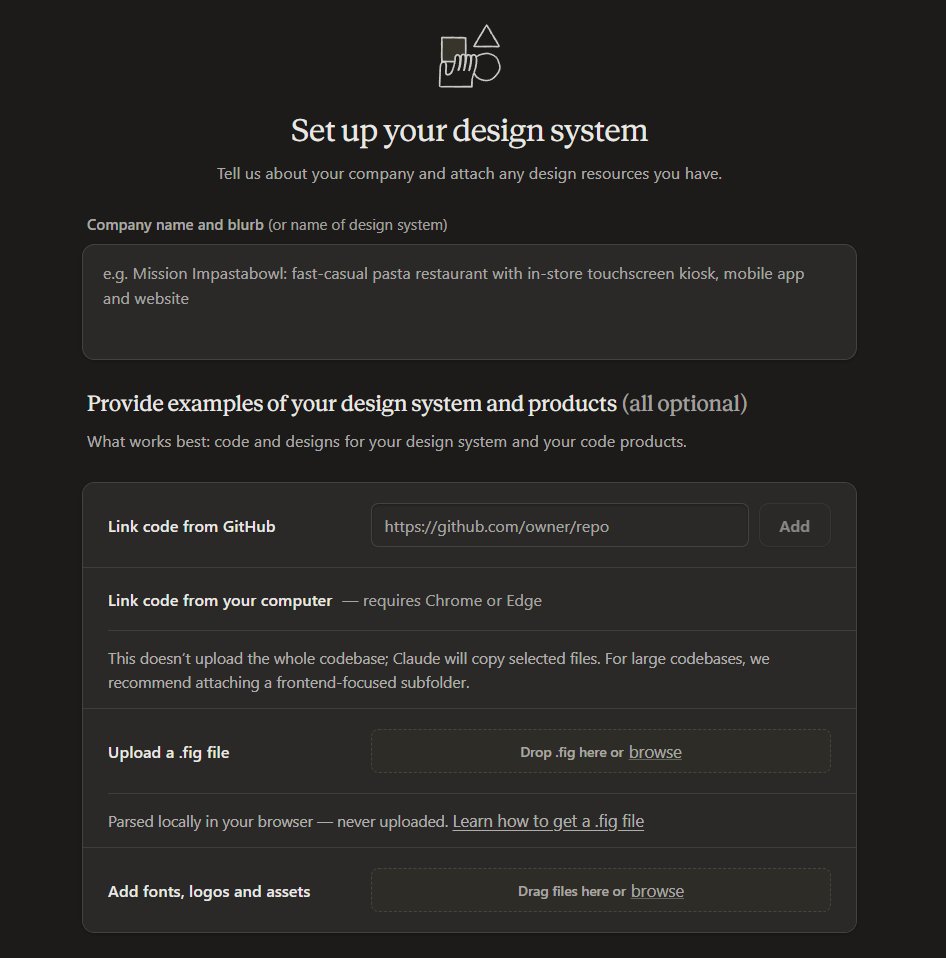 — "Setting up a design system in Claude Design"
2. Front-load the context
The more context you give up front, the less you fix later
Attach reference material before you prompt:
- Screenshots of existing designs, competitor products, visual inspiration. Use these for "make it look like this"
- An existing slide deck or document whose style you want to match
- A code repository, so Claude understands your components and architecture
> Linking a codebase is what makes a prototype production ready instead of a mockup
3. Write the prompt like a pro
You do not need design language. You need four things in every prompt
| Part | What it answers | Example |
|---|---|---|
| Goal | What are you building | A landing page for a new API product |
| Layout | How is it arranged | Hero section, code examples, pricing table |
| Content | What information shows | Three plans, one live code sample, one CTA |
| Audience | Who will use it | Developers evaluating the API |
Claude asks clarifying questions when it needs more. A vague prompt gets a vague first draft
4. Start simple, then layer
Do not ask for everything in one message
Begin with the core layout and content. Approve it. Then add interactions, edge cases, and polish
Claude responds better to incremental requests than to one giant brief
5. Refine with the right tool for the job
There are three ways to change a design. Using the wrong one wastes time
| Method | Best for | Example |
|---|---|---|
| Chat | Structural changes, new sections, anything needing context | "Rearrange so metrics sit on top, chart below" |
| Inline comment | Targeted, component-level edits | "Make this button padding larger" |
| Direct canvas edit | Quick visual and aesthetic shifts | Drag, resize, and align elements by hand |
> Pro tip: inline comments sometimes vanish before Claude reads them. If a comment gets ignored, paste the same feedback straight into chat
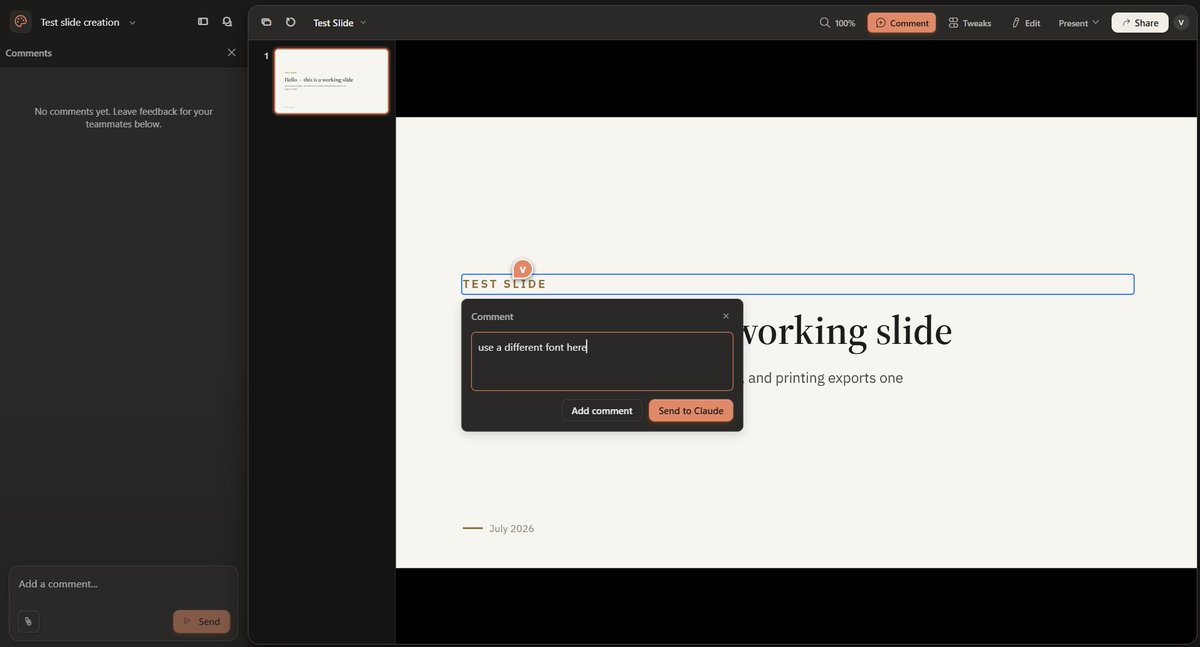 — "Inline comment"
6. Use Claude as a reviewer, not just a generator
This is the difference between a draft and a finished piece
Ask Claude to review the design for:
- Accessibility and contrast ratios
- Information hierarchy
- General usability
Then ask for two or three alternative layouts before you commit. Comparing options beats guessing
7. Branch without losing work
When you want a new direction, do not overwrite the current one
Tell Claude: "Save what we have and try a completely different approach." It saves the current version and confirms where. You keep every iteration in the conversation
8. Export or ship
When the design is ready, the Export button in the top right is the exit. Pick the format that matches the job
| Format | Best for |
|---|---|
| PPTX | Presenting a deck in PowerPoint or Keynote |
| Sending a fixed one-pager for feedback | |
| Standalone HTML | A live, self-contained web page |
| Send to Canva | Finishing marketing assets in Canva |
| .zip download | Grabbing all the raw files |
| Send to Claude Code | Turning the design into real, shippable software |
You can also send output straight to Adobe, Base44, Gamma, Lovable, Miro, Replit, Vercel, and Wix. Share links inside your org support view-only, comment, or edit access
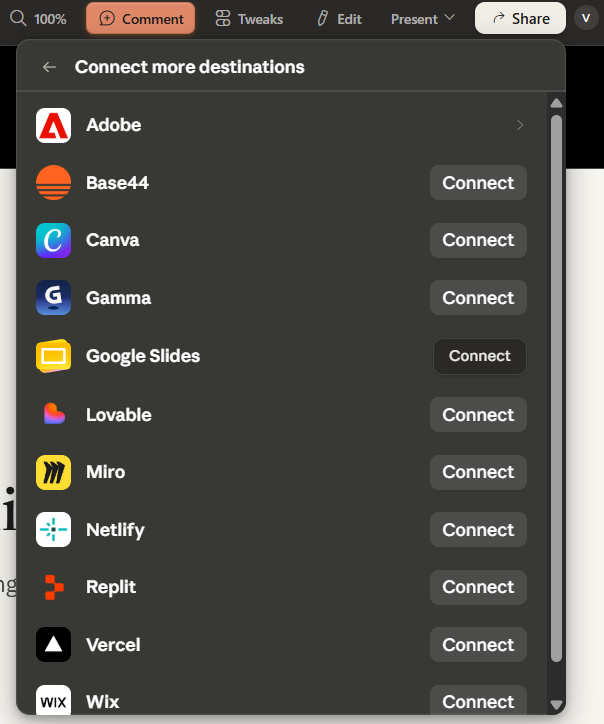 — "Different ways to export your design"
9. The pro move: hand off to Claude Code
Beginners screenshot the design and rebuild it by hand. That throws away everything Claude already built
The handoff keeps it. Claude Code continues from your actual design and components, not a picture of them
Two ways to run it:
- From Claude Design, use "Send to Claude Code" to send it to the web agent or your local one
- From the terminal, connect the Claude Design MCP server, then create and edit designs without leaving Claude Code:
claude mcp add --scope user --transport http claude-design https://api.anthropic.com/v1/design/mcp
> Run /design-login to sign in. Now one flow covers brief, design, and build
What it actually costs
Here is the economics, because that is what makes this a pro tool and not a demo
Claude Design runs on Anthropic's frontier models. It launched on Claude Opus 4.7. It now supports newer models, including Opus 4.8 and Fable 5
It is in beta on the Pro, Max, Team, and Enterprise plans. Claude Pro is $20 a month. Claude Design is included at that price. There is no separate design fee
Usage is shared. Design draws from the same pool as your chat, Claude Code, and Cowork. There is no separate design allowance to track. Large codebases and heavy iteration burn more of it. Hit the limit and design pauses until reset, unless you have usage credits on
Now the trade.
- The old way: a designer, a brief, and days of turnaround for one landing page
- The new way: $20 a month, one prompt, and a shippable page in an afternoon. For landing pages, decks, and prototypes, that math is not close
Figma's stock fell 7% the day this launched. The market already ran the numbers
Related articles

how i automated my entire meta ads management with claude (the exact system)
claude wired into the ad account through the autoady MCP

Grok just became dangerous: 18 Repos that prove it.
Most people still think Grok is a chatbot bolted onto X.

How to Design with AI Without Getting the Same Screen Twice
The model returns the average of what it has seen. The design is what you refuse to let it average.