I Built an Object Detection AI for $47. Now 6 Businesses Pay Me $11,000/month.

$47 in tools. $11,000 in invoices. Same month.
A camera counts cars, people, boxes, anything you point it at. It ran across 6 locations last month and I touched it twice.
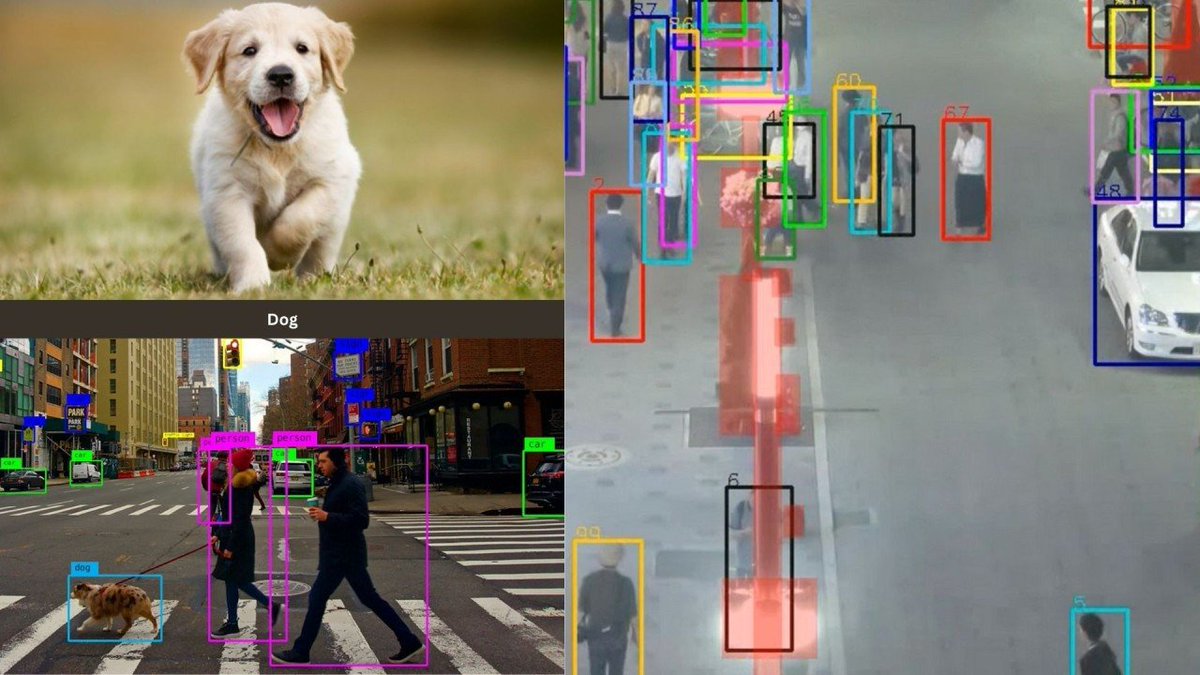
 — "one frame. 6 objects boxed and labeled in 40ms."
Most people think this takes a PhD and a GPU farm. It takes a webcam and a weekend.
The ones who figured that out are quietly billing local businesses $1,800/month each to count things a human used to count by hand.
Here is the whole build.
What it actually is
A camera points at something. The model boxes every object, labels it, counts it.
The business pays for one number: how many. How many cars entered, how many people walked in, how many boxes moved.
That number used to need a person with a clipboard. Now it needs one file on a $6 server.
That's the system.
The pipeline, end to end

> Camera feeds RTSP: live
> YOLO11 detects: 40ms per frame
> ByteTrack assigns IDs: real time
> Counter logs to CSV: instant
> Streamlit serves dashboard: 24/7
Total build time: one weekend. Total run cost: $47/month. Lines you actually edit: one.
Step 1: Install the stack
pip install ultralytics supervision opencv-python
One line in the terminal. YOLO11 detects, supervision counts, opencv reads the video.
Not a coder? This is the only setup command in the whole build. Paste it once, it installs everything. From here you clone one file and change one line: your camera link.
Step 2: Detect anything in 4 lines
from ultralytics import YOLO

model = YOLO("yolo11n.pt")
results = model("street.jpg")
results[0].show()
YOLO11 ships knowing 80 objects: person, car, bicycle, truck, dog, bottle. Point it at any image and it boxes them. No training yet.
Change one line: swap "street.jpg" for your own photo. That's the whole edit.
Step 3: Run it live on a camera
from ultralytics import YOLO

model = YOLO("yolo11n.pt")
model.predict(source=0, show=True)   # 0 = webcam, or paste an RTSP url
Swap 0 for an RTSP link and it reads any security camera in the building. This is the moment the client leans in.
Change one line: paste the client's camera link where the 0 is. Everything else stays.
Step 4: Track and count, not just detect

Detection alone recounts the same car in every frame. ByteTrack gives each object one ID and holds it across frames, so you count each thing once as it crosses a line.
import cv2
from ultralytics import YOLO
import supervision as sv

model = YOLO("yolo11n.pt")
tracker = sv.ByteTrack()
line = sv.LineZone(start=sv.Point(0, 500), end=sv.Point(1920, 500))
annot = sv.LineZoneAnnotator()

cap = cv2.VideoCapture("traffic.mp4")
while True:
    ok, frame = cap.read()
    if not ok:
        break
    result = model(frame, conf=0.5)[0]
    detections = sv.Detections.from_ultralytics(result)
    detections = tracker.update_with_detections(detections)
    line.trigger(detections)
    frame = annot.annotate(frame, line_counter=line)
    cv2.imshow("count", frame)
    if cv2.waitKey(1) == 27:
        break
line[dot]in count and line[dot]out_count hold the live totals. That is the product. You copy this block whole, you don't write it.
My first demo failed here. The camera counted shadows as people, so the parking client saw 400 cars on an empty lot. The fix was conf=0.5, the line already in the code above: ignore anything the model isn't 50% sure of. Raise it, the ghosts disappear. The client signed the next day.
Step 5: Teach it to count YOUR object
The 80 default classes cover cars and people. When a client wants pallets, wine bottles, or cattle, Roboflow does the hard part in the browser. You drag in 200 photos, click boxes around the object, hit train. No code.
 — "labeling a custom class in Roboflow. click, name, done"
from ultralytics import YOLO

model = YOLO("yolo11n.pt")
model.train(data="dataset.yaml", epochs=50, imgsz=640)
50 epochs on a free Colab GPU takes 20 minutes. Either way, the same pipeline now counts anything you showed it. This is the line in the headline.
Step 6: Log every number
import csv, datetime

def log_count(label, count):
    with open("counts.csv", "a", newline="") as f:
        csv.writer(f).writerow([datetime.datetime.now(), label, count])
One CSV row per event. This file turns a script into a report the business can read. It's already wired into the file I send you.
Step 7: Put it behind a dashboard
import streamlit as st
import pandas as pd

df = pd.read_csv("counts.csv", names=["time", "object", "count"])
st.metric("Total today", int(df["count"].sum()))
st.line_chart(df, x="time", y="count")
Run streamlit run app[dot]py, point a domain at the server, send the client a link. They log in and watch their own numbers move. That link is what you charge for.
The cost
Old way vs this build:
- Model - CV team, 6 months → YOLO11, free, 5 minutes
- Labeling - annotation firm → Roboflow, point and click
- Hardware - on-site GPU box, $4,000 → cloud server, $46/month
- Dashboard - contract dev, $8,000 → Streamlit, free
- Domain - agency retainer → $12/year, about $1/month
Server + domain land at $47/month. One client covers it 38 times over.
How you land the first client
Skip the pitch deck. Walk into a business that already has cameras and counts something by hand. A parking lot, a gym, a cafe, a small warehouse.
Ask for their RTSP link or 2 minutes of their camera feed. Run the file on your laptop right there. Show them their own doorway with live numbers on it.
Watching their own camera count for them closes the deal faster than any slide. My first 3 clients signed inside the same visit.
How it turns into $11,000/month

You sell the number, not the code.
> Month 1 - Built on my laptop. First client: a parking lot wanting hourly car counts. $500/month.
> Month 3 - 3 clients: parking, a retail door counter, a gym tracking peak hours. $4,500/month.
> Month 6 - 6 clients at $1,800 average. A warehouse counting pallets, a cafe counting foot traffic, a bike-share tracking racks. $11,000/month.
> Month 12 - Stop selling setups, sell logins. One dashboard per client, priced monthly. Past $20,000/month with cost still under $60.
The work is done once. The invoices repeat.
Start here
The stack is free. The camera is already on the wall. You edit one line and run one file.
comment "DETECT" and I'll send the full file: camera link goes in the top, everything else runs itself. Training notebook and dataset[dot]yaml template included.
The businesses on your street counted by hand today. They'll do it again tomorrow unless someone shows up with the camera link.
Related articles

A Field Guide for Computational Thinking
*Mental models you can run from statistical mechanics, computer science, information theory, and game theory.*

The Local AI Ladder: 10 Boxes That Kill Your $200 AI Bill (From $0 to $4,700)
Somewhere right now a developer is paying $200 a month for AI and has never once done the math. ChatGPT Plus. Claude Pro. Cursor. API costs that creep up quietly every month. It renews forever, and f…

Frontier AI is basically free now. The hard part is what you do with it.
5 minutes · $0 · no credit card