I found 30+ useful GitHub repos and stopped losing track of them (Claude + Obsidian, Full Guide)
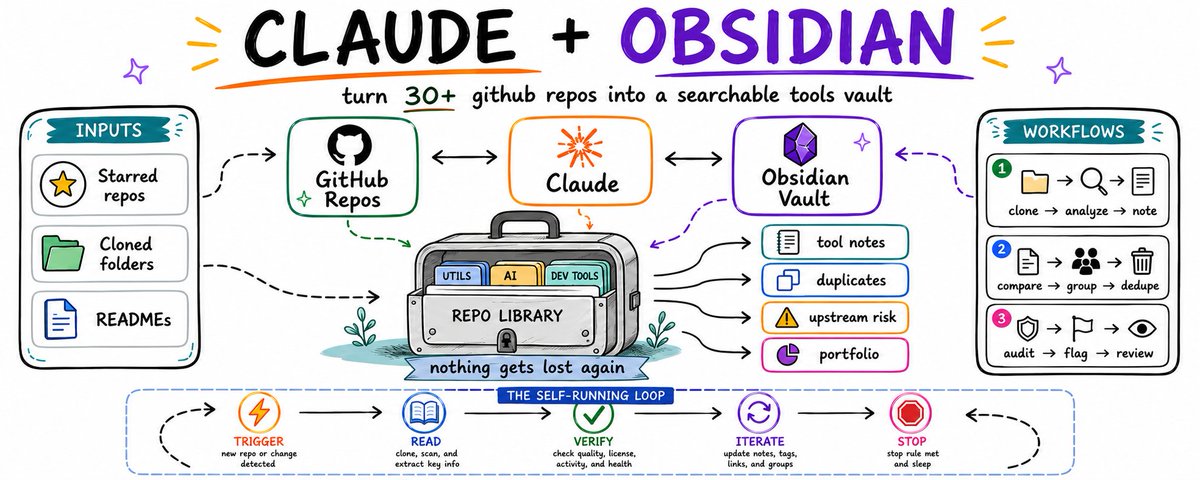
I star a repo, clone it, get it half-working, and move on to the next problem. Three months later I find the same folder again and can't remember why I grabbed it, whether I ever actually used it, or if I cloned the same kind of tool twice under a different name. Thirty-plus repos in, that stops being a joke and starts costing real time.
Why a README per repo isn't enough?
A README tells you what the author built it for. It says nothing about why you grabbed it, whether you're actually using it, or whether you already have three other tools doing the exact same job.
That's the part nobody writes down, because nobody writes it down for repos that aren't theirs. You clone something useful, get it running once, and the context for why disappears the moment you close the terminal. Multiply that by 30 repos sitting in the same folder and you get a graveyard you're scared to clean up, because you're not sure what's load-bearing and what's dead weight.
None of that shows up in any single README. It only shows up when something reads across everything you've collected, on a schedule, without you remembering to check.
What you'll end up with?
One vault, two folders:
found-tools-vault/
├── notes/                  # one markdown note per repo you've grabbed
│   ├── some-scraper-tool.md
│   ├── some-telegram-lib.md
│   └── ...
└── memory/
    └── PORTFOLIO.md         # the four cross-repo passes write here
Plain markdown on disk. Open it in Obsidian, or cat it from the terminal. No database, nothing you can't read yourself.
Set it up?
On Mac or Linux:
mkdir -p ~/found-tools-vault/notes ~/found-tools-vault/memory
On Windows, PowerShell:
New-Item -ItemType Directory -Force -Path "$HOME\found-tools-vault\notes","$HOME\found-tools-vault\memory"
Point Loop 1 and Loop 2, below, at this folder and the setup is done. Everything past here is what you tell Claude to do inside it.
The stack: same three pieces, just pointed at other people's code?
The vault. One Obsidian folder, one note per tool you've cloned, plus a folder for cross-repo passes.
The source. Every repo sitting in your clone folder, whether you use it daily or forgot it exists.
The brain. Claude, split by job. Cheap model reads the repo and its README. Sonnet does the judgment calls: is this a duplicate of something else you already grabbed, and is it actually worth the disk space.
Loop 1: one note per tool, written by Claude, not by you?
Important, before you run this on anything real:
- Never let this loop push code, install dependencies, or run anything from the tool itself. Read-only, always.
- why_i_grabbed_it gets filled from your own notes, commits, or usage elsewhere in your projects, not guessed from the repo's own README.
- If you can't tell whether you're using a tool, write the note with status: unclear instead of skipping it.

TRIGGER:   new repo cloned into the folder, or once daily
STEPS:
  1. Read the repo: README, package.json / requirements.txt, last
     upstream commit date, and check if it's referenced anywhere
     in your other projects (imports, configs, scripts)
  2. Write or update notes/<repo-name>.md with:
       ---
       repo:
       what_it_does:
       why_i_grabbed_it:
       last_upstream_commit:
       referenced_in_my_projects: []
       status: in-use | shelved | duplicate | unclear
       ---
       ## What it actually does
       ## Why I grabbed it
       ## Am I actually using it
VERIFY:    every field filled, "referenced_in_my_projects" checked
           against real usage, not assumed
STOP:      verify passes, or 2 retries, then flag for manual review
This alone is worth building even without Loop 2. The first time you read 30 of these back to back, half of them will surprise you, either because you forgot you were using the tool, or because you never were.
One generated tool note, next to the actual cloned folder it describes. This is the context you'd otherwise never write down.
What 30 found repos actually looks like once Loop 1 has run?
A list Claude regenerates every time you clone something new, pulled straight from the notes:
- github.com/author/scrape-lite - in-use, last upstream commit 2 days ago, referenced in: feed-reader project
- github.com/author/tg-bot-kit - in-use, last upstream commit 5 days ago, referenced in: two of my bots
- github.com/author/quick-scheduler - shelved, last upstream commit 41 days ago, referenced in: none
- github.com/author/api-wrapper-x - in-use, last upstream commit 1 day ago, referenced in: one project
- github.com/author/rss-to-json - duplicate, last upstream commit 3 days ago, referenced in: none (same job as scrape-lite)
- github.com/author/cheap-queue - in-use, last upstream commit 6 hours ago, referenced in: two projects
- github.com/author/webhook-relay-lib - shelved, last upstream commit 96 days ago, referenced in: none
- github.com/author/simple-cache - in-use, last upstream commit 2 days ago, referenced in: three projects
- github.com/author/old-scraper - abandoned upstream, last upstream commit 340 days ago, referenced in: none
- github.com/author/notify-me - unclear, last upstream commit 12 days ago, referenced in: not sure
- github.com/author/token-utils - in-use, last upstream commit 1 day ago, referenced in: one project
- github.com/author/quick-parser - duplicate, last upstream commit 8 days ago, referenced in: none (same job as rss-to-json)
- github.com/author/tiny-orm - shelved, last upstream commit 55 days ago, referenced in: none
- github.com/author/rate-limiter - in-use, last upstream commit 3 days ago, referenced in: two projects
- github.com/author/config-loader - in-use, last upstream commit 4 days ago, referenced in: most of my projects
- github.com/author/legacy-fetch - abandoned upstream, last upstream commit 400+ days ago, referenced in: none
- github.com/author/env-check - in-use, last upstream commit 9 days ago, referenced in: one project
- github.com/author/pretty-logs - shelved, last upstream commit 70 days ago, referenced in: none
- github.com/author/proxy-list - unclear, last upstream commit 20 days ago, referenced in: not sure
- github.com/author/backoff-lib - in-use, last upstream commit 6 days ago, referenced in: two projects
- github.com/author/dead-simple-db - shelved, last upstream commit 88 days ago, referenced in: none
- github.com/author/quick-hash - in-use, last upstream commit 1 day ago, referenced in: one project
- github.com/author/retry-wrapper - duplicate, last upstream commit 14 days ago, referenced in: none (same job as backoff-lib)
- github.com/author/format-time - in-use, last upstream commit 2 days ago, referenced in: most of my projects
- github.com/author/quick-mailer - shelved, last upstream commit 50 days ago, referenced in: none
- github.com/author/health-check-lib - in-use, last upstream commit 5 days ago, referenced in: two projects
- github.com/author/dotenv-plus - in-use, last upstream commit 3 days ago, referenced in: most of my projects
- github.com/author/simple-lock - unclear, last upstream commit 30 days ago, referenced in: not sure
- github.com/author/old-notify - abandoned upstream, last upstream commit 500+ days ago, referenced in: none
- github.com/author/tiny-scheduler - duplicate, last upstream commit 18 days ago, referenced in: none (same job as quick-scheduler)

(names above are placeholders, illustrating the shape of the list, not the actual tools)
Thirty lines is nothing to read manually. It's also enough to notice you have three separate retry-logic libraries doing the same job, and one of the repos you're actually depending on hasn't had an upstream commit in over a year.
The vault's graph view once all 30 notes exist: every tool as a node, the duplicates and shared-purpose repos pulled into visible clusters.
Loop 2: the passes that only work once you've collected 30+ tools?
A single tool's README can't tell you this. Only something that reads across everything you've grabbed can.
TRIGGER:   every 12 hours
STEPS:
  Pass 1, actually shelved:
    flag any repo with status: in-use but not referenced in any of
    your projects for 30+ days, cross-check against your own repos
    for real usage, not assumptions
  Pass 2, duplicate tools:
    compare "what it actually does" across all notes, group anything
    solving the same problem, confirmed by matching function names
    or matching purpose, not just similar-sounding descriptions
  Pass 3, upstream risk:
    flag any tool you depend on where the last upstream commit is
    120+ days old, so you know which dependencies could go stale
    on you without warning
  Pass 4, the honest read:
    one line per tool on whether it earns the disk space and the
    mental overhead of remembering it exists, no softening
VERIFY:    each pass writes to memory/PORTFOLIO.md, Pass 2's groupings
           backed by an actual shared function or purpose match
STOP:      all four passes complete, or a pass fails and gets logged,
           never silently skipped
Pass 3 is the one that actually changes how you work. You don't realize you're depending on three tools whose maintainers went quiet a year ago until it's sitting in a list in front of you.
A risk table generated from Pass 3: tools you're actually using, sorted by how long since their upstream project last moved.

Try the manual version first?
Same rule as always. Don't schedule anything you haven't proven by hand.
You will work in a loop until the task meets the bar.

TASK:
Read every repo folder in [path]. For each one, note what it does,
why you originally grabbed it, whether you're still actually using
it, and how long since the upstream project last committed. Then
compare across all repos: find duplicates and anything you depend
on that's gone quiet upstream.

SUCCESS CRITERIA (strict, no soft passes):
- every "duplicate" is backed by an actual matching function or
  purpose, not similar-sounding descriptions
- every "shelved" repo includes days since you last referenced it
  anywhere in your own projects
- upstream risk is based on real commit dates, not assumptions

LOOP PROTOCOL, repeat every turn:
1. PLAN   - state the single next step
2. DO     - produce or improve the output
3. VERIFY - score 1-10 on each criterion, be brutally honest
4. DECIDE - if every criterion is 8+, print "FINAL" and stop

RULES:
- Never call it done until every criterion is 8+
- Do not ask me questions, make a sensible assumption and continue

Begin. Run the loop until FINAL.
If the duplicate list or the upstream-risk list surprises you, it earns a schedule. If it just confirms what you already knew, don't automate it yet.
The order that actually works?
Get Loop 1 running until every cloned repo has a real note, not a placeholder.
Let it sit for a week or two. Every new tool you grab gets a note automatically from there on.
Only then turn on Loop 2. The duplicate and upstream-risk passes need enough notes to actually collide against.
Schedule it last, after you've watched it run clean by hand at least twice.
What it costs?
Loop 1 runs per new clone, so it scales with how much you actually grab, not with a fixed schedule. Most weeks that's a handful of cheap-model calls.
Loop 2 runs twice a day across 30+ notes. Move Pass 1 and Pass 3 to the cheap model, they're lookups, not judgment calls. Keep Pass 2 and Pass 4 on Sonnet, since spotting a real duplicate and giving an honest read both need a model that can actually reason about what it's comparing. Split that way, two runs a day across a 30-repo collection costs less than the time you'd spend doing the same audit by hand once.
The one thing to remember?
A README tells you what a tool does. This tells you which of the 30 tools you've found you're actually using, which ones are quietly duplicating each other, and which ones you're depending on that nobody's maintaining anymore.
The value was never in any single tool note. It's in the fact that nothing you've collected can quietly rot, quietly duplicate, or quietly go unmaintained without something writing that down where you'll actually see it.
Build Loop 1 first. Let it run for two or three weeks before you touch Loop 2. The duplicate and upstream-risk passes are useless with five repos. They start paying for themselves somewhere past twenty.
If you want more breakdowns like this, I post one every couple of days on Telegram and X. Both free.
Telegram - https://t.me/GipArcAI
Related articles

Obsidian + Claude + n8n = $8,000+ per month in retainers.
Every company has a wiki. A Google Drive folder nobody opens. A Notion workspace organized once in 2022. A Confluence page where processes die.

Your clients have a key-person problem. Claude + Obsidian fixes it. $2,400 setup. $9,600/month.
Law firms. Every associate asks the same questions about billing codes and matter procedures. One hour of a partner's time saved per week justifies the retainer on its own.

Obsidian: A Vault That Never Forgets and Never Lets You Repeat Yourself
The best argument against your last decision is already in your vault. You wrote it down eight months ago and forgot