Loop Engineering: A Dummies' Guide to /loop
TL;DR: how anyone can 10x their Claude productivity with loops - even if you're not technical at all.
If you've heard people talking about "loops" with Claude and had no idea what they meant, this article is for you.
No coding background needed, and no technical jargon. This is a plain-English walkthrough of what a loop actually is, how to run your very first one, and the mistakes almost everyone makes when they're starting out.
At the very end of this guide, I've also put together a 15+ page PDF guide that covers loop engineering - a 100% free resource you can download to make sure you never forget the fundamentals of loop engineering.
With that said, let's get right into things.
What Is Loop Engineering? (ELI5)
Let's start with the simplest possible explanation.
For the last couple of years, using AI worked like this:
You send a prompt → AI replies → You read it → You re-prompt
This is classic prompt engineering - where you're the one running every step of getting good AI responses.
Loop engineering automates this entire process.
Instead of typing message after message, you set up a goal once, and the AI keeps working on it by itself.
The simplest way to think about it
Old way: you prompt, AI answers, you prompt again (forever).
New way: you describe the goal once, it works & checks itself, and only comes back to you when it's finished (or stuck).
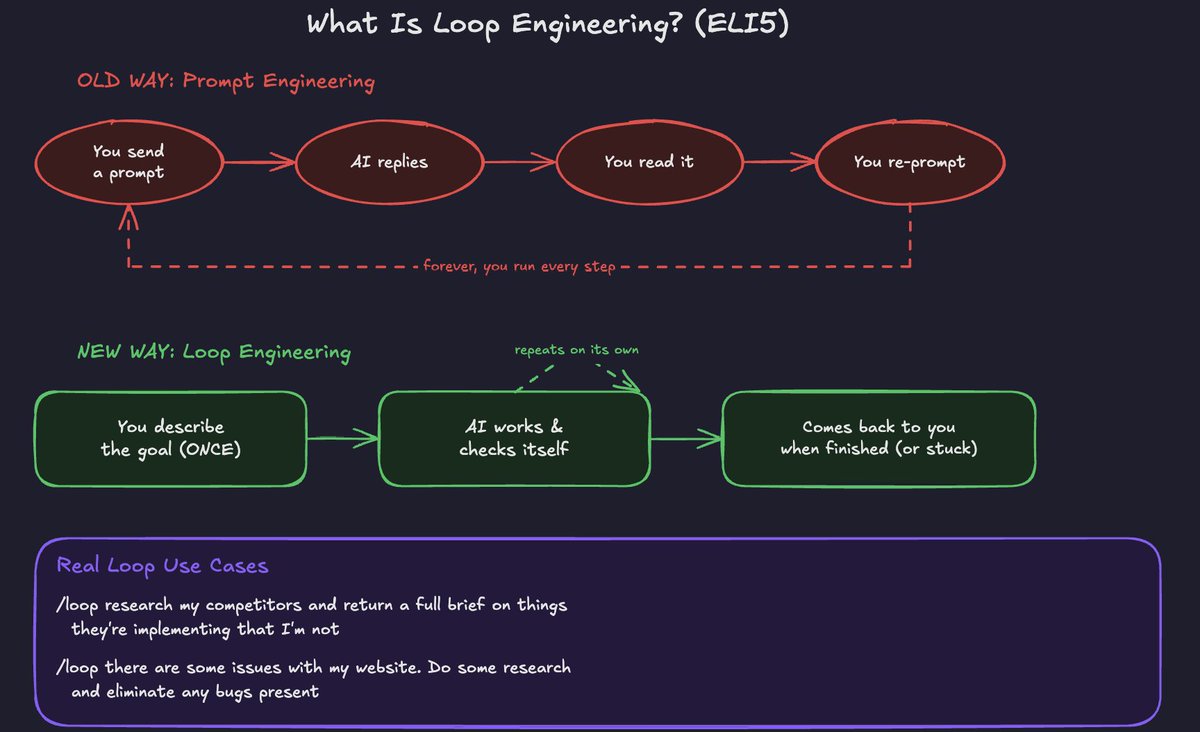 — "wtf is a /loop? ELI5"
Real loop use cases
/loop research my competitors and return a full brief on things they're implementing that I'm not
'/loop there are some issues with my website. Do some research and eliminate any bugs present
Luckily for us, AI harnesses like Claude Code make it extremely easy to set up and use loops (more on this later).
The Anatomy of a Claude Loop
Every Claude loop, no matter how simple or complex, is built from the same basic parts. Once you understand these, you can build effective loops.
 — "Image from my Fable 5 loop engineering guide * "
1. The Trigger
This is what starts the loop without you clicking anything. It could be a timer ("every morning at 8 am"), or it could just start immediately when you type your command.
Either way, the point is that the trigger kicks off a loop workflow.
2. The Doer
This is Claude actually doing the work.
Think: Reading, writing, researching, coding - or whatever the task is.
3. The Checker
This is what decides whether the work is actually good enough and/or finished.
Without this, Claude has no way of knowing if it did a good job; it just assumes it's done and stops.
A good checker might be: does this pass a test? Does this match what I asked for? Is the number correct?
4. Stop Rules
Every loop needs to know when to stop, both when it succeeds and when it fails.
Success stopping might be "all tasks are complete," and failure stopping might be "if this fails 5 times in a row, stop and tell me."
Without stop rules, a loop can either run forever or keep failing the same way over and over without ever telling you.
5. Memory
This is a simple file where the loop writes down what it did and what it learned. Next time the loop runs, it reads this file first, so it doesn't repeat the same mistakes or forget what it already figured out.
Think of it as the loop's diary.
6. Instructions
This is where you tell the loop the rules it should always follow, your preferences, your constraints, how you want things done.
This gets read every single time the loop runs, so the loop always "remembers" who you are and how you like things.
A loop is really just this simple structure:
Something starts it (trigger)
→ Claude does the work (doer)
→ Something checks if it's actually right (checker)
→ It either stops (success) or tries again (failure)
→ It writes down what happened (memory)
→ It always follows your basic rules (instructions)
How to Run Your First Loop
You have two options for running your first loop:
- Standard Prompting (the easiest way to start)
Open Claude Code (or desktop) and type:
/loop
If you're on desktop, you should see the loop command pop up:
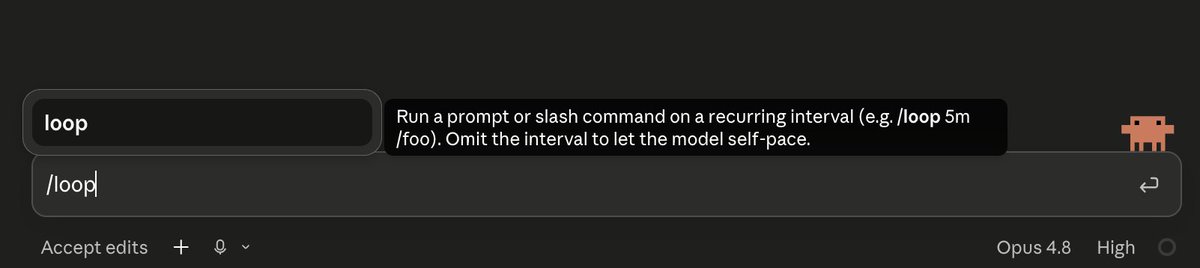
From here, just go ahead and type your goal.
Example: /loop do some research on the robotics sector - I'm looking for some potential investment opportunities and basic exposure.
-
**Scheduled Loops**
Standard prompting runs until the goal is met, then stops. But sometimes you want a loop that keeps running on a repeating basis, checking in over and over, not just once.
That's what scheduled loops are for - you add a time interval to your /loop command, and instead of running once and stopping, it keeps repeating on that schedule until you tell it to stop.
This is a good way to set up recurring workflows.
Prompting structure
/ loop [time interval]

Example: /loop everyday at 9am do [x]
/loop Slash Commands Cheat Sheet
A quick reference for the core commands you'll actually use once you start running loops regularly.
Start a loop = /loop [your goal]
Start a scheduled loop = /loop every [time interval], [your goal]
Stop a specific loop = /loop stop [loop name]
List all active loops = /loop list
Check the status of a loop = /loop status [loop name]
Pause a loop = /loop pause [loop name]
Resume a paused loop = /loop resume [loop name]
Common Mistakes to Avoid
A few beginner pitfalls to avoid (based on experience):
1. No clear finish line
You need to be able to spell out what your ideal end state actually looks like.
2. No stop rules
Without a limit on how many times a loop can try, or how much it's allowed to spend, a loop can run far longer (and cost far more) than you intended.
Always set a cap, a maximum number of attempts, or a budget, before you walk away from it.
3. Verification
Tip: Set up subagents to make sure verification and general quality control are actually high.
4. Scope creep
A loop with no boundaries can wander into places you didn't intend, edit files it shouldn't, and touch things outside the original task.
Always be specific about what the loop is and isn't allowed to touch (especially if you're running Fable 5 and GPT-5.6 Sol because they are extremely autonomous models).
Closing
I hope you found this breakdown of the basics of loop engineering valuable.
As a token of appreciation for making it this far, as promised, I put together a free 15+ page loop engineering ultimate guide that you can download now.
It covers the principles discussed in this article + more.
To claim this free guide, just click the link below, and I'll send it to you 100% for free (grab it by signing up for the newsletter):
https://www.aiedgehq.co/ythti5
Lastly, if you enjoy AI articles like this one, be sure to follow me here @aiedge_ - every single week I post various deep dive articles covering the hottest topics in AI.
Thank you for making it this far. 💙
Related articles

Graph Engineering with Claude: the 11-Step Roadmap From Loops to Graph Architect
Follow my Substack to get fresh AI alpha: [movez.substack.com](https://movez.substack.com/)

how to run an ai native agency with jev (FULL GUIDE)
jev is open to everyone now. it's a super fast decision model, so one person can now do work that businesses usually pay an agency a big cut for. here's how you can set up a whole ai native agency wi…

How to Build an AI-Native Company: Hiring, Standards, and Cadence
*We spent a year running hackathons, AI trainings, and office hours. But nothing changed until we made AI capability a requirement.*