Not sure where to start with Claude? Start here

Everything you need to start using Claude today, even if you've got zero experience and don't write code.

This guide is for anyone just getting started. You might run a business, freelance, or just want to save yourself some time. Either way, it's for you.
Inside, you'll find ready-to-use prompts and examples you can copy and run right away.
01. Sign up and first setup
Claude is an AI assistant built by Anthropic. It writes, analyzes documents, generates code, plans, and works through problems. And it's good at all of it, as long as you know how to ask.
Step 1. Sign up
Head to claude.ai and create your account. You'll need an email and a phone number.
The free plan is enough to try Claude out. For real work, you'll want Claude Pro at $20/month. It lifts the message limits and unlocks the most powerful model.
Step 2. Pick a model
Once you're logged in, you'll see the model selector at the top of the screen. As of this writing (June 2026), the most powerful option is Claude Fable 5, with Opus 4.8 right behind it.

Step 3. Turn on memory
Go to Settings → Capabilities and turn on Memory. From now on, Claude remembers the important parts of your chats: your name, what you do, the style you prefer. Over time its answers get sharper, because it has your context.

Step 4. Check that it all works
Send Claude your first message:
Hi! My name is [name].
I work as a [your job / what you do].
In three sentences, tell me how you can help me in my field.
Got a solid answer back? Then it's working. Let's keep going.

02. How to talk to Claude so it doesn't fumble
The main reason people get let down by AI: they type "make it look nice" and get junk back. Nothing's broken here. AI can't read your mind, so it works with exactly what you give it.
The formula for a good prompt
Four parts. Each one is optional, but each one makes the result stronger:
Role: who Claude should be. "You're a seasoned marketer for small businesses."
Task: what exactly to do. Skip "build a website." Try "build a one-page landing page for a photographer in Moscow."
Details: style, limits, examples. "Minimalist, light tones, no animations. Think Apple's website."
Format: how you want the answer back. "Give me ready-to-use copy" or "Give me three options to pick from."
Bad prompt vs. good prompt
❌ Bad:
Write some text for my website.
✅ Good:
You're a copywriter who specializes in the beauty industry.

Write the homepage copy for an esthetician's website.

I see clients in Miami and focus on skincare treatments for sensitive skin.

My clients are women aged 28–40 who value a natural approach.

Keep the tone calm and caring.

I need: a headline, 2–3 sentences about my approach, a list of 3–4 services, and a booking button.
The difference is huge. And that second prompt takes about two minutes to write.
Three rules that'll save you the headache
Rule 1: Treat the first answer as a draft. Don't expect perfect on the first try. Tell Claude what's off, and it fixes it. Two or three tweaks and you're there.
Rule 2: Don't start over. Claude remembers the whole conversation inside a chat. Instead of opening a new one, just say what to change: "The headline's good, now cut the description in half."
Rule 3: Show an example. When it's hard to explain in words, give Claude a sample of what you like. "I want a headline like: 'Clear skin without the salon, in 10 minutes a day.' Give me five options along those lines."
03. Projects: your superpower in Claude
Projects are one of Claude's most powerful features, and plenty of people don't know they exist. A Project is a separate workspace where you upload files and write instructions. Claude factors all of it into every conversation inside that project.
Why it matters
Picture this: you're a marketer who regularly writes posts for a client's Telegram channel. Without a project, you explain the same things to Claude every single time: who the client is, who the audience is, what tone to hit. With a project, you load that once and Claude is always up to speed.
How to create a project
- On Claude's home screen, click Projects in the left panel.
- Click Create Project.
- Give it a name (say, "Coffee shop posts").
- In the Project Instructions field, write the context you want Claude to remember.
- Upload the files you need: copy, briefs, examples, documents.


A template for your project instructions
Prompt for Project Instructions:
You're helping me with [task].

Here's the context:

My business / project: [description]
My audience: [who they are, their age, what they want]
Tone: [friendly, expert, light, etc.]
What to avoid: [whatever you dislike: corporate jargon, hype, pushy sales]

The attached files contain [what you uploaded: sample posts, a brief, a description of your services].

Use these materials as the base for every task in this project.
Project examples
For freelancers: a "My Clients" project. Upload your portfolio and a description of your services. When you need to draft a proposal or a reply to a client, Claude already knows who you are and what you offer.
For business owners: a "Marketing" project. Upload your product description, your customer profile, sample ads. When you need a new post or some ad copy, Claude writes it in the right style from the start.
For personal use: a "Travel" project. Upload the places you want to visit, your budget, your preferences. Claude helps you plan without re-asking the same things every time.
04. Get Claude to write in your voice
By default, Claude writes in a middle-of-the-road way: correct, but with no personality. To make your writing sound like you and not like an AI, show it your style.
Method 1: Styles in Claude's settings
Claude has a built-in Styles feature. You can pick a preset or create your own. Open settings and find the styles section. Upload samples of your own writing, and Claude adapts.

Method 2: A file that describes your style
Create a text file (my-style.txt) and upload it to your project.
Here's a template:
Style: conversational, no fluff, short paragraphs (2–3 sentences max). Active voice.

My signature phrases: [list your favorite expressions and turns of phrase].

What not to use:
- Throat-clearing openers: "In today's fast-paced world…", "In the digital age…", "It's important to note…", "Let's dive in…", "Let's break this down…"
- Overused AI words: "delve", "testament to", "boasts", "navigate the complexities of", "in the realm of", "underscore", "tapestry", "game-changer"
- Cliché structures: "not just X, but Y", "whether you're X or Y", em dashes (—) used as connectors
- No hype, no corporate jargon, no fake enthusiasm.

Examples of my writing:
[paste 3–5 of your best posts, emails, or pieces]
Method 3: Build a style from scratch
No writing samples yet? Claude can help you shape your style through a few questions:
I want to develop my own writing style for X (Twitter).

Ask me 10 questions, one at a time, to figure out how I talk,
what words I use, what annoys me in other people's posts,
and the effect I want to have on readers.

After I answer, write me a one-page style guide: 5 rules,
5 anti-rules, and 3 sample posts in my style on different topics.
05. Skills: tune Claude to how you work
Skills are what turn Claude from a "smart chat" into a working tool. A Skill is a set of instructions that teaches Claude to do specific things: create Word documents, read Excel spreadsheets, write code by your rules, or follow your business process.
There are three kinds of Skills: built-in, custom-made, and ready-made ones from the community.
Here's how each works.
Built-in Skills: already working, nothing to set up
Out of the box, Claude handles files, and this goes well beyond "reading the text." It creates professional documents and reads the files you upload.
Here's what's available right now:
Creating documents. You can ask Claude:
- "Make a 10-slide presentation about our product," and you'll get a finished, styled .pptx you can download and open in PowerPoint.
- "Create an Excel spreadsheet with a monthly budget, formulas, and a chart," and you'll get an .xlsx with working formulas.
- "Format this as a Word document with a table of contents and headings," and you'll get a .docx you'd be glad to send a client.
- "Generate a PDF invoice with my business details," and you'll get a ready-to-send PDF.
All of this runs on built-in Skills: Claude runs code in the background and builds a file you download with one click.
Reading files. Drop a file straight into the chat and Claude breaks it down:
- "Here's a 30-page PDF contract, pull out the key terms," and Claude reads it and highlights what matters.
- "Here's a CRM export in Excel, analyze last quarter's sales," and Claude works through the table and gives you takeaways.
- "Here's a screenshot of an error, tell me what's wrong," and Claude reads the image and explains.
Supported formats: PDF, DOCX, XLSX, CSV, TXT, HTML, JSON, PNG, JPG, and more. The limit is 30 MB per file, up to 20 files in one conversation.
For file creation to work, make sure "Code Execution and File Creation" is turned on under Settings → Capabilities.

Custom Skills: your own rules for Claude
This is the projects idea from section 03, taken deeper. You can write detailed behavior rules in Project Instructions, and Claude follows them in every conversation inside that project.
Example: a "Small-business marketer" Skill
Create a project and paste this into Project Instructions:
Skill:

You're a marketer who works with small businesses in the USA. Client ad budgets run from $1,000 to $5,000/month.

Rules:
- Always suggest solutions one person can pull off without a team (one person, two at most).
- Don't suggest tools that cost more than $500/month unless I ask.
- Write all copy in English, in a conversational tone, no corporate jargon.
- When you propose an ad strategy, start with a single channel. Don't spread thin.
- When I send you text to review, give specific edits, not vague advice like "this could be better."

My usual tasks: Facebook posts, landing page copy, competitor analysis, ad creatives.
Now every time you type "write a post about the discount" inside this project, Claude already knows the context, budget, tone, and format.
Example: a "Freelancer's assistant" Skill
Skill:

You're my personal assistant.

I'm a [profession] working as a freelancer.

Rules:
- When I send you a client request, help me draft a reply: polite, specific, no longer than 5 sentences.
- When I ask for a proposal, use my template: client's problem → my solution → what's included → price → next step.
- When I ask you to scope a task, ask me 3 clarifying questions before giving an estimate in hours and dollars.
- Never suggest "let's discuss this further." Always give me a concrete option I can send the client right away.

My rates: [list your services and prices].
Ready-made community Skills: grab them and go
Beyond what you write yourself, there are already thousands of ready-made skills online that other users built. You can install them in Claude in a couple of clicks.
How to install a ready-made skill. In Claude.ai, go to Customize → Skills → "+" and choose "Browse skills" to open the catalog. Find the one you want, click "Add," and you're done.


You can also find skills on GitHub and add them manually (upload them as a file). Here are a few useful collections:
- Marketing and content: Corey Haines's collection. 25 skills covering copywriting, SEO audits, email campaigns, product launch strategy, and A/B testing.
- Product strategy: the Wondelai collection. Skills built on well-known frameworks like Jobs to Be Done, StoryBrand, and Hooked UX. Claude starts asking questions and scoring your product against these methodologies.
- Finance: SaaS Financial Projections. Claude works out unit economics, builds financial models, and forecasts revenue.
- General collection: github.com/anthropics/skills, Anthropic's official repo with 17 skills. A solid starting point for seeing how skills are put together.
Example: adding a skill
Say you've got your eye on the social-content skill from github.com/coreyhaines31/marketingskills.

First, save the whole repository as a .zip file: "Code" → "Download ZIP."

First, unzip the .zip file, then find the folder with the name you need.
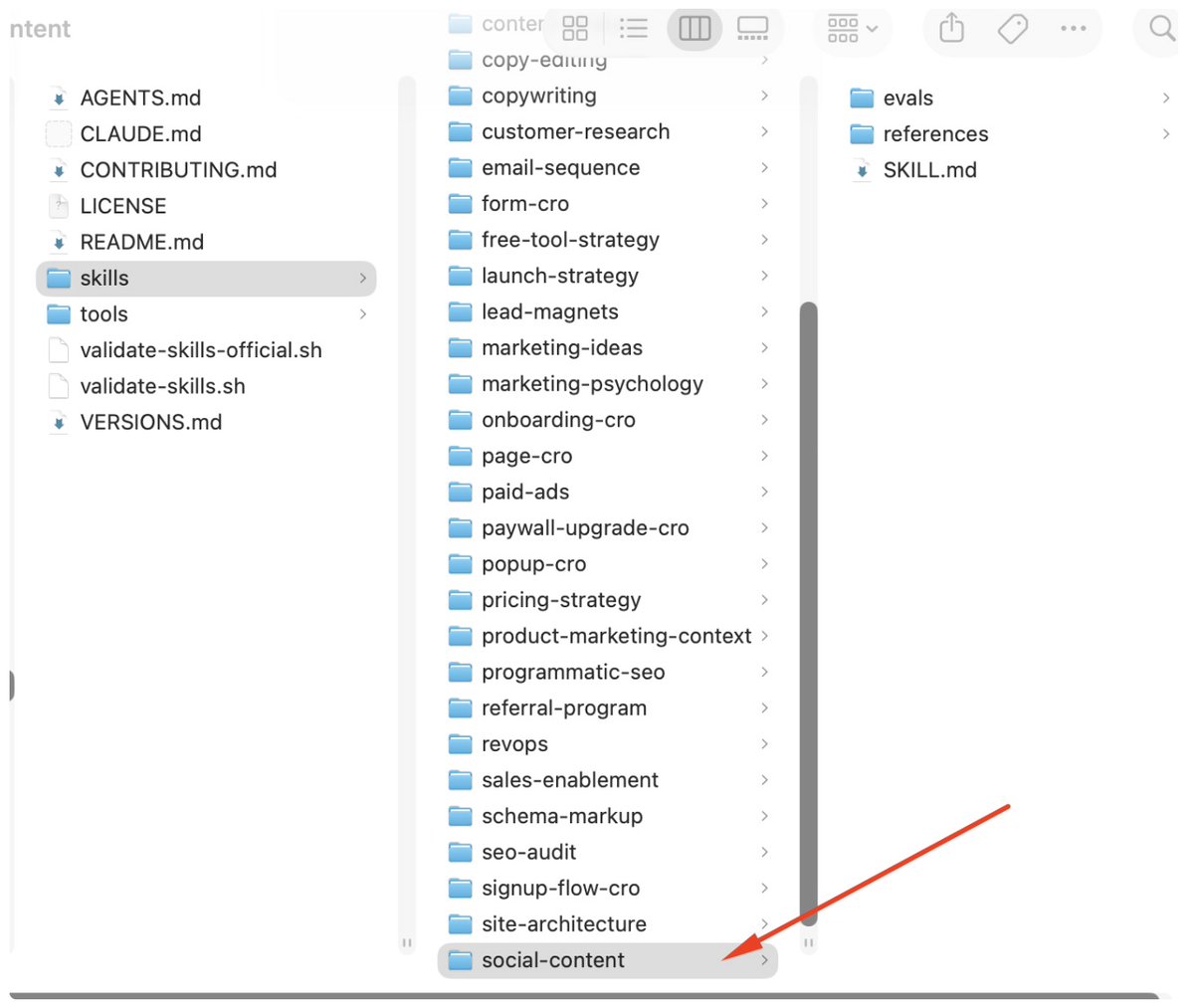
Then zip that folder back up (right-click the folder → "Compress 'social-content'") and you'll have social-content.zip.

Drag the social-content.zip archive in here.

A new skill now shows up in your skills list. You can call it on purpose in a chat, or it kicks in on its own based on what your message is about and gives you a sharper answer.
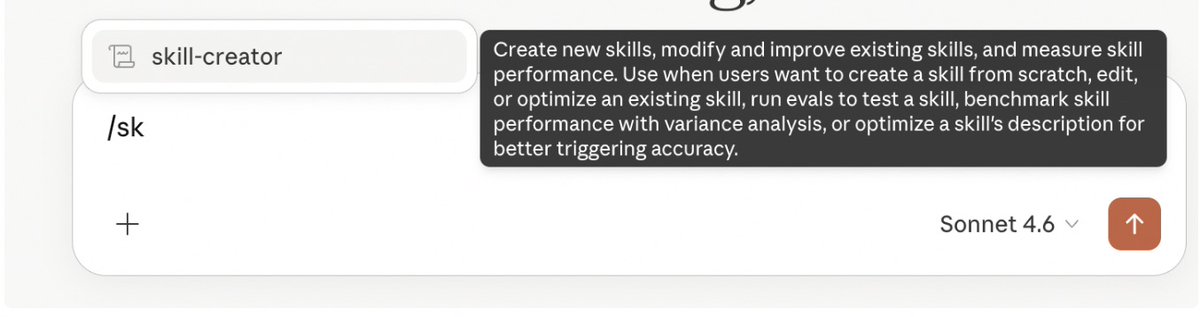
For example, after I uploaded mine, a prompt showed up right away in a new chat. I didn't do a thing. That's the magic of Claude.

In the screenshot, you can see Claude read the skill and put it to work.
One more thing: if you want to make sure Claude uses a specific skill, just type "/" followed by the skill's name. So to pull up the content skill, type "/sk" and Claude offers a list of your existing skills to choose from. Hit Enter, then keep writing your request.
Why this matters
Without skills, you explain the same things to Claude every time. With skills, it's already tuned to you.
- Built-in skills save you hours of document work.
- Custom skills cut out the repeated explanations.
- Community skills hand you expertise that would've taken you weeks to assemble on your own.
It's the difference between a cab driver you have to direct every time and a personal driver who already knows all your routes.
06. For everyday life: planner, tracker, assistant
Claude isn't just for work. Here are ready-to-use prompts for everyday tasks that save you real time.
A personal weekly planner:
Help me plan my week.

Here are my tasks and to-dos:
[list everything you need to get done]

Keep in mind:
- working hours: [from ... to ...]
- this week's priority: [what matters most]
- I want to leave time for [exercise / rest / family]

Lay it out day by day. No more than 3–5 things per day. If I can't fit something in, tell me straight and suggest what to move.
A travel assistant:
I'm planning a trip to [where] for [how many days] in [when].

Budget: [amount] for [one person / a couple / a family].

What matters to me: [what you like: food, architecture, nature, nightlife].
What I don't like: [what you dislike: crowds, beaches, guided tours].

Build a day-by-day plan. For each day: what to see, where to eat (specific places), how to get around. Throw in the kind of tips guidebooks usually leave out.
Making sense of a complex document:
Upload a file (PDF, document, or screenshot) straight into the chat and write:
Here's a [contract / proposal / manual / statement].

Explain it in plain language:
- what it actually says (briefly, 3–5 sentences)
- what to watch out for
- whether there are any catches or hidden terms
- what questions I should ask [my lawyer / the account manager / the bank]
A decision filter:
When you can't make up your mind, let Claude help you organize your thoughts:
I'm choosing between [option A] and [option B].

Context: [why this choice is on the table, what matters to me].

Make a comparison table using the criteria you think matter most in my situation.
At the end, give me your recommendation and explain your reasoning.
07. For freelancing and work: copy, briefs, proposals
If you're a freelancer, an expert, or a specialist, Claude becomes a second brain that takes the routine off your plate.
A proposal generator:
You're my sales assistant. I'm a [your profession].

I need a proposal for a client:
- Client: [name / company]
- What they need: [task]
- My services that fit: [list them]
- Prices: [add them]

Proposal format: headline, the client's problem (2 sentences), my solution, what's included, price, next step (CTA).
Keep the tone businesslike but human.
No more than one page.
A client intake brief:
I'm a [profession: designer / marketer / photographer / copywriter].

I need a client intake brief to send clients before we start working together.

Include questions that help me understand the task right away, so I'm not asking ten follow-ups.
For each question, add a hint about what exactly the client should write.

Give me a clean structure I can copy into a Google Form or send over a messenger.
Replying to a difficult client email:
A client sent me this: [paste the email text].

Context: [explain the situation: what led up to it, what the problem is].

Write a reply. Tone: [pick one: calm / confident / apologetic].
The goal of the reply is to [solve the problem / explain the situation / offer an alternative].
No longer than 5–7 sentences.
A social media post:
Write a post for [platform] on the topic of: [topic].

I'm [who you are, what you do]. My audience is [who reads it].

Format: a hook (an opening line that grabs attention), the main idea (3–5 short paragraphs), a CTA at the end.

Style: [conversational / expert / provocative]. No fluff, no "In today's world…".
08. For business: landing pages, leads, analytics
Each of these used to take a separate person. Now a lot of them get solved in a single conversation with Claude.
Landing page copy in 10 minutes:
You're a copywriter who specializes in landing pages for small businesses.

Write the copy for a one-page website.

Business: [what the business / service / product is].
Audience: [who the clients are, their age, what they want].
Main goal of the page: [get the visitor to submit a form / message me on Telegram / buy].

Sections I need:
- Headline + subheadline (the value proposition)
- About us / about me (3–4 sentences, warm tone)
- Benefits (3 of them, with short explanations)
- Testimonials (3 of them; write realistic placeholders)
- FAQ (4–5 questions with answers)
- Final call to action + button

Tone: [your choice].
What to leave out: pushy sales, countdown timers, "only 2 spots left."
Competitor analysis:
What I do: [your work].

My competitors: [list 3–5 names or links].

Analyze:
- how they position themselves (what they promise the customer)
- what's on their site / social media: what grabs attention, what falls flat
- their pricing (if it's visible)
- how I can stand out

At the end, give me 3 specific recommendations: what to borrow from them, what to do differently, and which gap they're leaving open.
A sales script / objection handling:
I'm selling [what]. Price: [how much]. My customer is [who].

The most common objections:
1. [objection 1]
2. [objection 2]
3. [objection 3]

For each objection, write 2 responses: a soft one (for messaging) and a confident one (for a call).
No manipulation, no pressure.
Win them over with value and logic.
Working out your unit economics:
Help me calculate the unit economics of my product.

Product: [what you sell]
Price: [how much]
Customer acquisition cost (if you know it): [how much]
Repeat purchases: [yes / no, how often]
Main costs per customer: [list them]

Calculate: margin, LTV, and the acquisition cost I can afford.
Explain each number in plain language, like I'm not a finance person.
If something's missing, tell me what data you need.
What's next
This is your starter kit. Enough to start using Claude today and get your first results.
But Claude is a tool. Like any tool, it gets more powerful once you learn to use it systematically. It's more than "ask a question, get an answer." The real shift happens when you build a process around your own work.

Found this useful? Hit follow.
Stay a step ahead. I'll help you get there.
Yours, @0xAIGOATexe
Related articles

from $0 to $38K in 30 days with a product I could not code
a few people asked me to write the whole story. not the tweet version. the real one, with the boring parts.

6 AI SEO Agent Habits that Got Us 57,100 AI Mentions in 3 Months
I analyzed 120 buying searches across twelve categories, from CRM software to espresso machines. For each one I pulled the AI Overview and the organic top 10 off the same page, at the same moment, th…

How to Build a One-Person AI Hedge Fund Using Grok Bot
Grok Bot is the best AI agent right now