Stop Prompting. Start Looping.

How to build an AI agent that works while you sleep
For a year now, senior AI engineers have been repeating the same line: stop prompting coding agents by hand, start designing loops that prompt your agents for you.
It sounds great and explains nothing. What exactly goes in the repo? Which commands do you type? What breaks on the second iteration?
This article answers that concretely, on three real tools: Claude Code, OpenAI Codex CLI, and Cursor CLI. Every command, path, and flag below was checked against the official docs on July 11, 2026. Loop design is the same across all three; only the filenames and flags differ, so the mapping is inline.
Prompt vs loop
A prompt answers once and stops. A loop keeps working until the job is actually done: not until it produces an answer, but until it reaches a verified outcome.
Every agent runs the same cycle underneath: discover the work, execute it, verify the result, iterate on failure, stop on a condition or a hard limit.
The difference between a prompt and a loop is not the model. It's whether something can fail the work without you in the room, and what happens when it does.
As long as the loop runs through you (write, wait, read, fix by hand), everything halts the second you step away from the keyboard.
In practice it looks like this. CI goes red at 2am, and by morning there are three ready PRs with fixes in the repo, plus a short list of two problems the agent honestly couldn't solve on its own. Or you're grinding through a 200-file migration, and every morning one more file is already rewritten, tested, and packaged as its own PR, because the loop does exactly one file per run and then stops. Or you have no reviewer because you work alone, so a separate agent plays first reader: every evening it walks your fresh commits and leaves notes.
This isn't about "writing the code for you." It's about the boring recurring work running while you're busy elsewhere, and handing you a finished PR or an honest escalation rather than a report about how hard it tried.
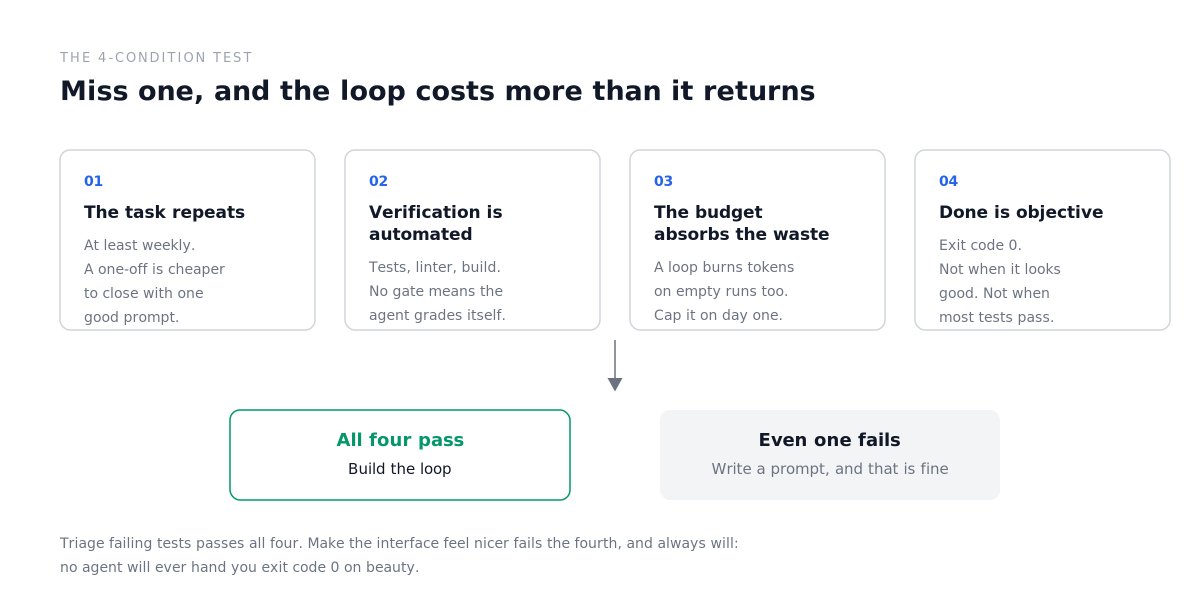
The 4-condition test
A loop earns its setup cost only when all four are true. Miss one, and it costs more than it returns.
The task repeats, at least weekly. A one-off is cheaper to close with one good prompt.
Verification is automated. Tests, linter, build, typecheck. No automated gate means the agent grades its own homework, and it is a generous grader.
Your budget can absorb the waste. A loop re-reads context every iteration, retries, explores, and burns tokens whether or not it ships anything. Claude Code has a literal fuse for this, --max-budget-usd. Set it on day one.
"Done" is objective. Exit code 0 on tests and lint. Not "when it looks good." If done needs a human opinion, keep the task manual.
Try it on your own work. "Triage failing CI tests" passes all four: it happens constantly, a test run verifies it, and done is an exit code. "Bump dependencies and make sure nothing broke" passes too. "Migrate a legacy module to the new pattern" passes if you have tests, and falls apart if you don't, because there'd be nothing to verify against.
"Make the interface feel nicer," on the other hand, fails condition 4 and always will. No agent will ever hand you exit code 0 on beauty. Tasks like that stay manual, and that's fine.
Three tools, one map
Before the steps, here is the whole mapping. Each item is unpacked below.
Install, one line each:
Everything else, tool by tool:
Claude Code (binary: claude)
Project context: CLAUDE.md
Permissions and model: .claude/settings.json
Skill: .claude/skills/ci-triage/SKILL.md
Verifier agent: .claude/agents/verifier.md
Autonomous run: claude -p "...". Resume with --continue or --resume.
Automatic gates: hooks on PreToolUse, PostToolUse, Stop
In CI: anthropics/claude-code-action@v1
Codex CLI (binary: codex)
Project context: AGENTS.md
Permissions and model: ~/.codex/config.toml
Skill: .agents/skills/ci-triage/SKILL.md
Verifier agent: .codex/agents/verifier.toml
Autonomous run: codex exec "...". Resume with codex exec resume --last.
Automatic gates: no hooks. The sandbox itself, configured by sandbox_mode, plays that role.
In CI: openai/codex-action@v1
Cursor CLI (binary: agent)
Project context: .cursor/rules. It also reads AGENTS.md and CLAUDE.md.
Permissions: .cursor/cli.json
Skills: none in the usual sense. Closest thing: commands in .cursor/commands.
Verifier agent: none. Closest thing: a separate run in --mode plan.
Autonomous run: agent -p "...". Resume with --continue or --resume.
Automatic gates: hooks in .cursor/hooks.json
In CI: no official action, but there is an official curl-based example.
One detail everyone trips over: Claude Code does not read AGENTS.md. The docs say it plainly: "Claude Code reads CLAUDE.md, not AGENTS.md." If your repo already has an AGENTS.md for Codex, wire it in with an import or a symlink:
Or create a CLAUDE.md with a one-line import plus your own additions:

Step 1. Project context
Five files from here on. Nothing exotic: plain text in your repo, each answering one question.
The agent has to understand your codebase before it can loop over it. One file in the root, read automatically at the start of every session.
AGENTS.md (Codex, Cursor) or CLAUDE.md (Claude Code):
Write down what isn't in the code but every teammate knows by month three: which directory is dangerous, which test is flaky, why that module is off limits. That's precisely what the agent cannot figure out on its own.
Limits worth knowing up front. Claude Code recommends keeping CLAUDE.md under 200 lines and supports file imports, written as an at-sign followed by the path, up to 4 hops deep. It also lets you split modular rules into .claude/rules, where a paths glob in the frontmatter loads a rule only when you touch matching files.
Codex reads the chain of AGENTS.md files from the project root down to your working directory and concatenates them top to bottom, with the closest file winning. Hard limit: project_doc_max_bytes, 32 KiB by default. Anything past that is silently cut.
Cursor keeps rules in .cursor/rules/*.mdc with description, globs, and alwaysApply in the frontmatter, and that matters more than it looks: a rule with globs only attaches on matching files, which saves real context in a large repo. The legacy .cursorrules in the root is on its way out, migrate it.
Step 2. Permissions and models
The second file decides whether the loop runs on its own or stalls at the first question.
Claude Code, .claude/settings.json. Rules evaluate deny, then ask, then allow, and the first match wins:
The space in the specifier is significant: Bash(ls *) matches ls -la but not lsof. A small thing that will one day save you an incident.
On models: the model field takes either an exact ID (claude-sonnet-5, claude-opus-4-8) or an alias (sonnet, opus, haiku, fable, best). For agentic coding the docs point to Opus 4.8; the most capable model in the lineup right now is Fable 5; and Sonnet 5 remains the sensible price/quality balance for the worker inside a loop.
Codex, ~/.codex/config.toml:
GPT-5.6 comes in three tiers: gpt-5.6-sol (flagship), gpt-5.6-terra (balanced, usually plenty for routine loops), and gpt-5.6-luna (cheapest). For a loop that runs every night, the monthly cost difference is more noticeable than the quality difference on routine fixes, so start at the bottom.
Two traps here. First: the old suggest / auto-edit / full-auto triad no longer exists, and the --full-auto flag is officially deprecated. Second: in workspace-write, network access is off by default, so a loop that needs npm install will fail without a single clear message.
Cursor, .cursor/cli.json in the project (only permissions are configurable at project level):
Cursor's own recommendation for production is "restricted autonomy": the agent edits files only, while git operations and PR creation happen in a separate deterministic workflow step. That's good advice, and it ports to any other tool.
Step 3. One reliable manual run
The most-skipped step, and the main reason loops later collapse in production.
Before automating anything, run the task by hand in the exact wording you plan to schedule. Not "roughly this," but literally that text. Watch where the agent misses, and fix the AGENTS.md, the rules, and the task text, not your expectations.
A task that needs three clarifications from you here will simply fail in an autonomous loop, silently, and on your budget.
Step 4. A skill: stop re-explaining the project
A skill is a file describing a repeated procedure: how you triage CI failures, how you decide on a fix, what you must never do. You write it once, and the agent loads it on its own whenever it judges the task to be a match. Without it, you explain the same thing in every new session.
Claude Code: .claude/skills/ci-triage/SKILL.md. Codex: .agents/skills/ci-triage/SKILL.md. Same format, it's the open Agent Skills standard.

Pay attention to the "never do" section. Without it, the agent will sooner or later conclude that the most efficient way to fix a failing test is to delete it. Technically, the suite goes green.
A Claude Code detail that saves half an hour of confusion: the command name comes from the directory name, not the name field in the frontmatter. A ci-triage folder gives you /ci-triage no matter what you write inside. No field is technically required, but always write a description: that's what the agent reads when deciding whether to load the skill at all.
Cursor has no skills in this form; the closest equivalent is custom commands in .cursor/commands/*.md, invoked as /name.
Step 5. State: the loop's memory
The agent forgets. The file does not.
Every agent run is a blank slate: it doesn't remember that it already tried this fix yesterday and it didn't work. The cure is an ordinary text file the agent reads at the start of a run and rewrites at the end.
STATE.md in the root:
Plus the one line in your context file that turns a pile of runs into a loop:
The "lessons learned" section is not decoration. It's the only place where the loop accumulates what exists neither in the code nor in the tests: the local landmines of your environment. Without it, the agent steps on them again every night, on your budget.
Step 6. The loop itself
The loop text, loop.md:
Three ways to run it:
Three traps, each worth an evening of debugging.
codex exec runs read-only by default. The run will work, report back, and change nothing. You need an explicit --sandbox workspace-write.
agent -p without --force writes no files. In this mode Cursor only proposes changes. Same silent emptiness at the end.
Claude Code has --bare for CI. It skips auto-discovery of everything extra (hooks, skills, plugins, memory) so a run is identical on any machine; the docs call it the recommended mode for scripted calls. The irony is that our loop can't use it: we need both the skill and CLAUDE.md. Keep it in mind when reproducibility in CI starts to matter.
In GitHub Actions:
OpenAI's equivalent is openai/codex-action@v1, with prompt-file, model, effort, and sandbox inputs and a final-message output. Cursor has no official action, but it does have an official example: install the CLI with curl, add the Cursor bin directory to the runner's PATH, and call agent -p.
At this point you have a working loop. The next two steps are what separate a loop you'd trust overnight from a loop that cheerfully reports one morning that it fixed all the tests, by deleting them.
Step 7. The one who did the work can't be the one who checks it
Simple premise: the model that just wrote a fix will never call it bad. It has already spent reasoning on it; it's attached to it. Ask it to review its own work and it will find a way to pass itself.
This is exactly why a newsroom has a copy editor rather than the author proofreading themselves, and why a bank has payments approved by someone other than whoever created them. It works for one reason: the second party doesn't have the first party's history in their head. They only see the result.
With agents you get this through a helper agent (in the docs, a subagent). A helper is a separate agent with its own clean context: it never saw the fix being written, took no part in the reasoning, and receives only the test requirements and the test output. You define it with a plain file.
Claude Code, .claude/agents/verifier.md. The block between --- is settings; below it is the helper's instruction:
The model: opus line isn't decoration: let the worker run on a cheaper model and keep the gate on a stronger one. By default a helper inherits the main session's model, so if you want that split, say it explicitly.

Codex, .codex/agents/verifier.toml:
The line that matters here is sandbox_mode = "read-only". It means this helper is physically forbidden from writing anything. It can only read. Otherwise something absurd eventually happens: the verifier sees a failing test and helpfully "fixes" it itself instead of rejecting the work.
Cursor has no helper agents. The closest approximation is a separate agent -p --mode ask run without --force: in that mode the agent cannot write files at all, so all it can do is give an opinion.
Step 8. A rule in prose and a rule in code are different things
You wrote in AGENTS.md: "never touch src/billing/." By message fifty of a long session, that line weighs approximately nothing. The model isn't defying you; it simply no longer remembers.
An instruction in prose is a request. What you need is a gate that doesn't depend on what the agent remembers.
Those gates are called hooks. A hook is your script, which the tool runs automatically whenever the agent is about to do something: run a command, write a file, end the session. The script looks at what's happening and answers: allow or block. It answers not in words but with a number on exit (called an exit code): 0 means "fine, go ahead," 2 means "stop, not allowed." Both Cursor and Claude Code treat 2 the same way; Cursor made that compatible on purpose.
The distinction is not cosmetic. "Please don't go into that room" and a lock on the door are not the same thing, and by message fifty the agent needs the lock.
In Cursor, hooks live in .cursor/hooks.json. Here's a gate that fires every time the agent edits a file:
Inside that guard script you check the file path and, if it's in a protected directory, exit with code 2. The edit doesn't land, whatever the agent thinks about it.
Claude Code has the same kinds of events under different names: PreToolUse fires before the agent does something (and can veto it), PostToolUse right after, and Stop when the agent believes it's finished.
The last one is the most useful. Hook Stop to a check that the tests are actually green, and the agent cannot end the session until they are. The difference from the plain instruction "always run the tests" is that an instruction can be forgotten and a gate cannot.
Codex has no hooks. Its gates are of another kind: the sandbox itself, configured by sandbox_mode, plus the fact that .git and .codex are always write-protected, even in workspace-write.
The failure modes that cost money
False "done." The agent declares the work finished halfway, exits, and the loop keeps spinning and spending. The cure is not a polite request but a stop condition someone else evaluates:
Goal drift. On long sessions, early constraints dissolve: "don't touch src/billing/" from message 3 no longer exists by message 47. The cure is that constraints live in a file that gets re-read (CLAUDE.md, AGENTS.md, a Cursor rule with alwaysApply: true), plus the hook from step 8 that simply won't let a write land in a forbidden directory.
Self-preferential bias. The maker verifies itself and always passes. The cure is the split from step 7: the verifier sees requirements and test output, but not the implementation, and holds no write permissions.
Agentic laziness. "Good enough" on vague success criteria. Same cure as the first one: the only definition of done is an exit code, not an adjective.
Pre-flight checklist
The files are in place
Context file created: CLAUDE.md, AGENTS.md or .cursor/rules
SKILL.md written, with a real description and a "never do" section
STATE.md created, and reading and writing it is declared in the context file
loop.md written, and its stop condition is an exit code, not an adjective
Shared repo: AGENTS.md wired into Claude Code via an import or a symlink

The run will actually do something
One manual run, in the loop's exact wording, completed without your hints
Codex: sandbox_mode = workspace-write, or the run writes nothing
Cursor: --force is set in autonomous mode, or the run writes nothing
Codex: network_access = true, if the loop needs to install anything
The brakes work
Permissions set, and the deny list covers .env and secrets
Hard limits on iterations and budget: --max-turns, --max-budget-usd
The verifier is a separate helper agent with no write access
Irreversible actions (PR, deploy, git push) live outside the agent
Every unchecked line is either a silent failure or a token bill with nothing to show for it.
The 60-second recap
A loop isn't about the model, it's about the gate. Discover -> Execute -> Verify -> Iterate -> Stop, where "verify" is done by someone other than the author of the work, and "stop" is defined by an exit code.
Five files and you're running: context file, config with permissions, SKILL.md, STATE.md, loop.md. Then claude -p, codex exec, or agent -p in CI or on a schedule.
Three traps that will eat your first evening: Claude Code doesn't read AGENTS.md, codex exec writes nothing by default, and agent -p without --force writes nothing either.
One last thing
Your first loop almost never comes out clean. It stumbles, it overspends, it stops in the wrong place. That's fine: a loop you built and repaired by hand will teach you more than a hundred perfect prompts.
Start with the one task you do every week and quietly resent. Give it a gate, a memory, and a hard limit. Let it run while you sleep.
Then tomorrow, build the next one.
Just build it like someone who intends to stay the engineer. Two developers can run the same loop: one to move faster through work they understand deeply, the other to avoid understanding it at all. The loop doesn't know the difference. You do.
If this is your kind of thing, I write about these systems in more depth on Telegram:
Short notes on what actually holds up in agentic work, and what sounds elegant but falls apart on the second iteration. No hype, working examples only.
Come by if you want to build, not just press go.

Prompts
DONE WHEN: npm test returns 0 AND npm run lint returns 0.
Not "when the tests look fine." Not "when most of them pass."
A separate run verifies this, not the agent's own judgment.
Hard limit: 8 iterations, then report state and stop.
{
"model": "claude-sonnet-5",
"permissions": {
"allow": ["Bash(npm run lint)", "Bash(npm run test *)", "Edit"],
"ask": ["Bash(git push *)"],
"deny": ["Read(./.env)", "Read(./secrets/**)", "Bash(curl *)"],
"defaultMode": "acceptEdits"
}
}# Loop state: CI triage
## Last run
2026-07-10 03:30 UTC - 7 failures classified, 3 fixes, 4 escalated
## In progress
- fix-auth-token-refresh - green locally, awaiting CI
- fix-flaky-payment-webhook - retry pattern applied, monitoring
## Escalated to humans
- src/billing/refund.ts - failing three ways, root cause unclear
- ci/staging-runner - infra timeouts, not code
## Lessons learned
- 2026-07-09: PowerShell hits TLS 1.2 on this Windows runner. Use bash.
- 2026-07-08: tests/e2e/checkout needs the webhook secret in env. Skip if absent.Read STATE.md to see what was already tried.
Triage every failing test in the last build using the ci-triage skill rules.
For each failure: classify it, draft a fix for bugs and dependency issues,
escalate env and infra problems.
Apply the fixes. Run npm test and npm run lint.
Both return 0 -> open a PR.
Otherwise -> record the reason in STATE.md and stop.
Update STATE.md with everything done this run.
HARD STOP: 8 iterations maximum. On the limit, report state and exit.model = "gpt-5.6" # GPT-5.6 shipped July 9, 2026
model_reasoning_effort = "high" # minimal | low | medium | high | xhigh
approval_policy = "on-request" # untrusted | on-request | never
sandbox_mode = "workspace-write" # read-only | workspace-write | danger-full-access
[sandbox_workspace_write]
network_access = true # network is OFF by default in the sandbox# Claude Code
claude -p "$(cat loop.md)" \
--output-format stream-json --verbose \
--max-turns 20 --max-budget-usd 5 \
--dangerously-skip-permissions
# Codex CLI
codex exec "$(cat loop.md)" \
--sandbox workspace-write \
--ask-for-approval never \
--json
# Cursor CLI
agent -p "$(cat loop.md)" \
--output-format stream-json \
--force --model composer-2.5curl -fsSL https://claude.ai/install.sh | bash # Claude Code -> binary: claude
curl -fsSL https://chatgpt.com/codex/install.sh | sh # Codex CLI -> binary: codex
curl https://cursor.com/install -fsS | bash # Cursor CLI -> binary: agent# AGENTS.md
## Architecture
- src/api/ - Express routes
- src/services/ - business logic
- src/db/ - models (PostgreSQL via Prisma)
- tests/ - Jest suite
## Key commands
- npm test - full test suite
- npm run lint - ESLint
- npm run typecheck - tsc --noEmit
## Rules
- Never touch src/billing/ or src/auth/ without human approval
- Always run tests before marking a task complete
- Errors only through the pattern in src/utils/errors.ts{
"hooks": {
"afterFileEdit": [
{ "command": "./.cursor/hooks/guard-billing.sh" }
]
}
}ln -s AGENTS.md CLAUDE.md---
name: ci-triage
description: Classify CI failures by root cause and draft fixes for the easy ones.
---
# CI Triage
## Classification rules
- env: missing secret, wrong variable -> flag for a human
- flake: passes on retry with no code change -> retry once, then file an issue
- bug: deterministic failure tied to a recent commit -> draft a fix
- dependency: failure after a version bump -> draft a rollback
- infra: timeout, OOM, runner -> escalate immediately
## Fix patterns
- Auth tests -> check src/auth/middleware.ts first
- DB tests -> verify the migration ran in the CI env
- E2E -> check UI selectors against the latest snapshot
## Never do
- Disable failing tests
- Change CI config without approval
- Touch src/billing/ or src/payments/
## State
After every run, update STATE.md: what was checked, how it was classified,
which PRs were opened, what was escalated.name: CI Triage Loop
on:
workflow_run:
workflows: ["CI"]
types: [completed]
jobs:
triage:
if: ${{ github.event.workflow_run.conclusion == 'failure' }}
runs-on: ubuntu-latest
steps:
- uses: actions/checkout@v4
- name: Read the loop
id: loop
run: |
{
echo 'text<<EOF'
cat loop.md
echo EOF
} >> "$GITHUB_OUTPUT"
- uses: anthropics/claude-code-action@v1
with:
anthropic_api_key: ${{ secrets.ANTHROPIC_API_KEY }}
prompt: ${{ steps.loop.outputs.text }}
claude_args: |
--max-turns 20
--max-budget-usd 5
--model claude-sonnet-5{
"permissions": {
"allow": ["Read(**/*.ts)", "Write(src/**/*)", "Shell(npm test)"],
"deny": ["Shell(git push)", "Write(.env*)", "Write(package.json)"]
}
}## Session start
Read STATE.md first and pick up where the last run stopped.
At the end of the run, update STATE.md: what was done, what's next, what you learned.@AGENTS.md
## Claude Code specifics
Use plan mode for changes under src/billing/.name = "verifier"
description = "Strict, read-only verifier."
model_reasoning_effort = "high"
sandbox_mode = "read-only"
developer_instructions = """
Verify the fix against test requirements and test output only.
Do not read the implementation. Tests green -> approve, otherwise reject.
"""---
name: verifier
description: Verifies a fix against the test requirements. Never sees the implementation.
tools: Read, Glob, Grep, Bash
model: opus
---
You are a strict verifier. You get the test requirements and the test output.
You do not look at or discuss the implementation.
Tests pass -> approve. Tests fail -> reject, listing the failures.
You have no other opinion.Links
Related articles
Stop Prompting. Start Looping.
How to build an AI agent that works while you sleep

Loop Engineering: The 20-Step Roadmap From Prompter to Loop Designer
Most people are still typing prompts into a box and waiting for an answer.
How To Build Your First AI Loop in 2026
Two of the most senior AI engineers alive said the same thing last month.