Why Hermes Desktop is not Grok Bot: the checklist that catches the wrong seat in 5 checks

On 11 August 2026, xAI opened Grok Bot, and operators sat Hermes Desktop in the same seat.
That mix is wrong. A window is a front door, not a new agent. Bot Mode now has Routines, the same English word for a different object.
Here is the exact checklist I fill before any loop starts. If you skip it, you can still ship, but from the wrong seat, and the cost is a week of retries. Which seat does your next job belong in?
The named object is the 5-Seat Control Card.

By the end, you will have:
• Why the window is not a new agent
• Why Grok Bot is not Grok Build /goal
• How a standing objective, a skill file, and a demonstrated path differ
• The 5-Seat Control Card, copy-ready
• A 20-minute first test
01 The window is a front door, not a new agent
People will message the new window like a slightly smarter chatbot, get a clean answer, and close the tab. The part they skip is the seat.
A version of you opens the new desktop app and starts teaching it workflows as if the agent changed.
Hermes Desktop is not a fork of Hermes Agent. Official docs: the native app is the same agent as the CLI and the gateway. Same config, keys, sessions, skills, and memory. Start in the window, resume in the terminal.
It runs on macOS, Windows, and Linux. Chat streams tool activity, keeps a file browser, surfaces skills and cron, and can attach to a local or remote backend.
The agent did not become a different creature because it got a window. The window made /goal, skills, cron, and profiles visible to people who never wanted a TUI.
If you already run Hermes, launch the same runtime:
hermes desktop
You should see: the same sessions and skills you already had, not a blank second brain.
If you see a blank second brain, you launched a different profile or a different HERMES_HOME. Stop. Do not teach it new workflows until the old ones are visible.
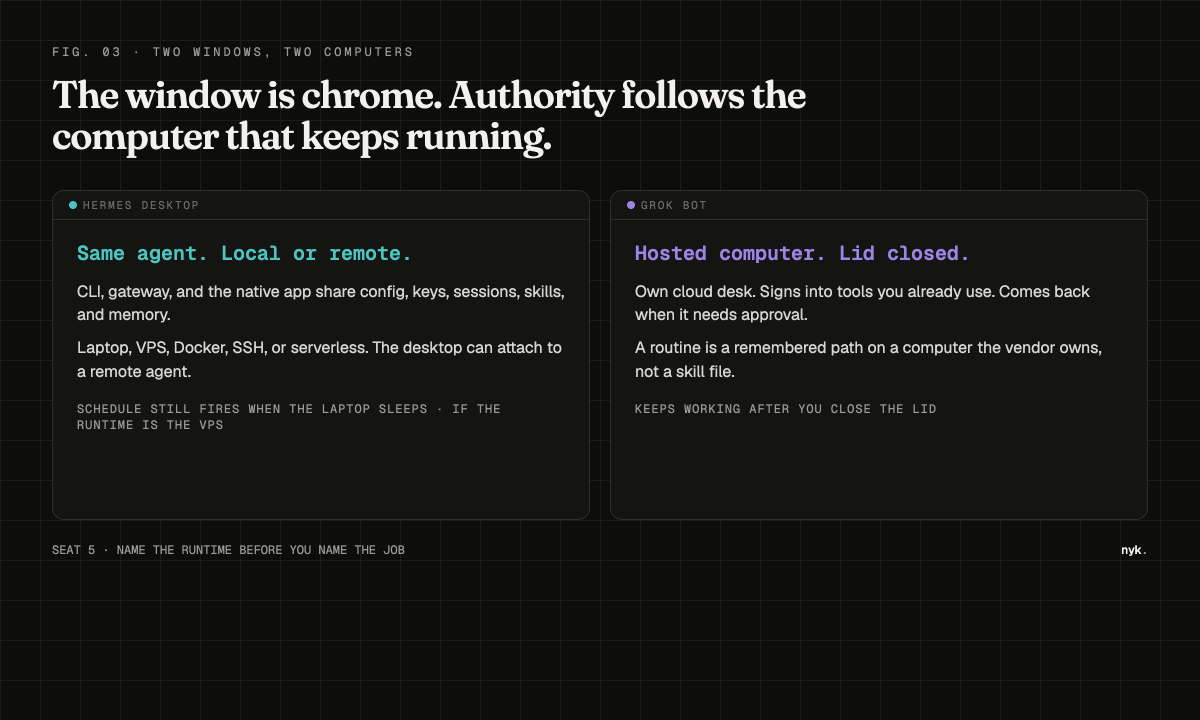
The desktop can also attach to a VPS agent you already cron. Then you have two places that look like "the bot." One schedule still fires when the laptop sleeps. Name the runtime before you name the job.
02 Grok Bot is not Grok Build /goal
Hermes Desktop is a front door on the agent you already run.
Grok Bot is a hosted computer that keeps working after you close the lid.
Grok Build /goal, shipped 22 June 2026, is a coding loop with a checklist.
Those three names collapse in a feed.
Grok is the general assistant.
Grok Build is the terminal coding agent. /goal sets one objective, keeps a progress checklist, then pause, resume, or clear.
Grok Bot launched 11 August 2026 as early-beta teammates. They have their own cloud computer, sign into tools you already use, keep working when the laptop closes, and come back when they need approval. Path is desktop and iOS, not a terminal. Access is SuperGrok Plus and Heavy, Cursor Pro+ and Ultra, and Cursor Teams Standard and Premium.
Grok Bot's durable object is a routine. You show the job once. It watches. It saves the sequence. It runs it again.
A team of bots in a group chat is still not a skill file, and still not a judged /goal loop.
/goal is a loop with a standing objective and a stop condition.
A routine is a remembered path through apps.
Mixing those two words is how operators lose a week.
Routing rule:
• Repo work until tests pass: Grok Build /goal, or Hermes /goal on a repo
• Job inside existing SaaS with no clean API: Grok Bot routine
• Reusable procedure you can open, edit, and share as a file: Hermes skill
• An answer: ordinary chat, on either product
03 Goal, skill, and routine are three jobs
Operators have long described persistence as one thing. It is not.
A standing objective that a judge scores is a goal. A SKILL.md you can open and revoke is a skill. A demonstrated click path on a vendor desk is a routine.
Hermes Desktop now also ships Bot Mode with Routines. Those routines are recurring tasks backed by Hermes cron, not teach-by-showing clicks.
Same English word. Different object. Seat 4 and seat 5 are not interchangeable because the UI reused a noun.
Hermes /goal survives across turns. After each turn a judge model answers done or continue. Default budget is 20 turns. You can pause, resume, clear, or add /subgoal criteria mid-loop. A real user message preempts the continuation. State lives with the session, so you can close the laptop and /resume later.
That is a Ralph-style loop. Grok Build /goal is the same family, scoped to coding.
The judge is conservative and fail-open: if the judge errors, Hermes continues, and the turn budget is the real backstop. A loop without a budget is not persistence. It is an unbounded bill.
Chat keeps losing for the same reason willpower does. You tell the window what you want, then catch the same unbounded loop a week later. That is not a character flaw. Chat is a small, effortful system trying to override a seat the UI already picked.
A skill is a different object. In Hermes, skills live in the home skills folder, compatible with agentskills.io. They load as slash commands. You can open SKILL.md, review it, and revoke it.
A routine on Grok Bot is a demonstrated sequence on a computer the vendor owns. Public launch copy does not claim a portable skill format.
Clicks stay clicks unless you write the file. No special gene turns a remembered path into something you can diff.
Three jobs:
• Goal. Standing objective plus a judge. Stop: done, pause, or budget. Resume session state. You cannot diff it like a file.
• Skill. SKILL.md plus optional scripts. Stop: unload or revoke. You can diff it.
• Routine. Demonstrated path on a cloud desk, or a cron-backed Bot Mode job. Stop: the bot finishes, asks, or the cron fires. You usually cannot open the Grok Bot version as a file.
If you cannot point at the object, you do not have a system. You have a chat that went well once.

04 Fill the 5-Seat Control Card before the first tool call
The primary control here is prose, not a settings panel. These five lines are 5 rules, not a prompt. Copy this card before you click Run.
Seat 1 - Chat. Answer, review, or plan. No loop. No credentials beyond the model.
Seat 2 - Goal. Keep going until a named done signal. Hermes /goal or Grok Build /goal. Write the stop test in the goal text. Set a budget. Do not start a goal that can spend money or send mail until the stop test is boring.
Seat 3 - Skill. Same procedure next week, on another machine, or with another operator. Put it in a skill file. Review the file. Then invoke it.
Seat 4 - Routine. Path through apps that have no API you trust. Grok Bot's teach-by-showing path lives here. Bound the account. Watch the first three runs. "It remembered the clicks" is not "I can audit the procedure."
Seat 5 - Runtime. Whose computer. Hermes can be laptop, VPS, Docker, SSH, or serverless, and the desktop app can attach to a remote agent. Grok Bot's computer is a cloud desk that keeps working after you close the lid. Authority, logs, and kill switches follow the runtime, not the window chrome.
Answer three questions before the first tool call. Whose credentials does this hold? Where do the logs land? What stops it in ten seconds without closing a window? If the third answer is "I quit the app," you do not have a kill switch.
Before the first tool call, tick all five:
• [ ] Seat named: chat, goal, skill, routine, or runtime
• [ ] Durable object identified: a file path, a goal text, or a routine name
• [ ] Stop test written as a command, a test, or a named approval
• [ ] Budget set in turns, in dollars, or as a single run
• [ ] Kill switch you have used once yourself, in under ten seconds
You should see: every new desktop task fills all five lines before the first tool call.
A blank line on the card means you are still guessing the seat.
Do not use separate windows as a security boundary. Isolation follows the account and the runtime, not the chrome. For anything that matters, tell the loop to check the current source instead of recalling.
05 Run one real job for twenty minutes
Hand it something you would otherwise do today. Do not start with outbound email or a production repo.
1. Pick a job that can fail in public without costing money.
Example: collect four failing tests, write the names to a file, stop.
2. Name the seat out loud before you type.
This one is a goal, not a routine, because the stop test is a file: it exists, or it does not.
3. Run it on Hermes Desktop:
/goal Write /tmp/failing-tests.txt with the names of failing tests in tests/ and stop when the file exists and is non-empty
You should see: a goal-accepted line with a turn budget, then a done reason or a continue reason from the judge.
4. Add one extra acceptance line without resetting the loop:
/subgoal also print the count of failing tests at the top of the file
You should see: the next continuation includes the extra criterion. The judge should not mark done until both are true.
5. Ask the same job of Grok Bot only if you have access.
Do not invent a pass. Watch whether it asks to follow you through the clicks (routine) or whether it stays in a coding loop (wrong seat).
If Grok Bot wants to watch you click through a browser to find tests, you put a repo job in the routine seat.
If Hermes /goal starts booking calendar holds to "help you focus," you put a file job in the chat-personality seat.
6. Write the miss on the card.
That is the receipt.
7. Run it again next week on a different job and watch which card line goes blank first.
That line is your weak seat.
A direct message from you takes priority over background work. Steer by messaging rather than restarting. Stopping work ends the turn. It undoes nothing already done.
06 Four ways this card fails
This card fails in four ways I have already paid for.
YOLO on desktop. Hermes Desktop exposes a per-session YOLO toggle. That is a dangerous-command bypass, not a productivity feature. A goal loop with YOLO on is a budget with the brakes cut.
Memory treated as a skill. A teammate that "gets sharper" is useful. It is not a portable procedure. If two operators need the same job, you still need a file.
Two always-on runtimes. Hermes cron, Hermes Bot Mode routines, and Grok Bot routines can all fire while you sleep. Two unattended loops on the same inbox is a race.
A comparison about models. The model may overlap. The seat does not. I already wrote the Grok Bot computer-and-contracts piece. This card is the routing layer in front of that computer.
Skip this article if you only wanted a feature list. Feature lists go stale in a week. The five seats do not.
The order that matters
Narrow seats. Rules on the card, the task in the message. One real job, then a skill file, then a routine, never the reverse. Approval on anything that sends, spends, publishes, or deletes.
A window is not a control plane.
Objective: stop a desktop window from starting the wrong loop.
Inputs: one job, the 5-Seat Control Card, access to Hermes Desktop and optionally Grok Bot.
Process: name the seat, point at the durable object, write the stop test, set a budget, prove the kill switch, then run the 20-minute test.
Outputs: one filled card, one receipt of which line went blank.
Guardrails: no YOLO on a goal that can spend or send, no paste of secrets into chat, no second always-on runtime until seat 5 is named.
The product does not reward a better first prompt. It rewards naming the seat once, on the card you fill every time.
Your next action: copy the 5-Seat Control Card and fill all five lines before the next tool call.
If you could instrument one bottleneck this week, which card line goes blank first?

Get the next field note
What shipped. What broke. The system behind it.
Get the next one free: https://nyk.dev/#newsletter
Private alpha channel: https://t.me/+GJ-FEpzcZrtmMTky
Related articles
how to automate lead generation (FULL GUIDE)
by the end of this guide you'll know how to generate leads on autopilot for anything. a digital product you sell online, a business generating leads for itself. or someone with no business at all, ge…

how to use GPT-6 Astra with Grok Bot to create a $3M/yr GTM team
A cold email campaign is a chain of artifacts. a verified lead list. a hypothesis about what to test. a sequence of copy. a campaign built inside a sending tool. a daily read on sending health. each…

Grok Bot vs OpenClaw vs Hermes vs Buzz: the honest comparison
Four agent platforms launched or matured in the same few months of 2026. Every review of each one is written by someone who picked a side before they finished testing.