You're Not Too Small to Get Real User Feedback: My No-Audience Beta Playbook

Thanks to the fierce AI arms race, we now have all the AI tools in the world to build our products. But one thing I’ve noticed is that I rarely see anyone sharing how to run a proper private beta test that generates meaningful feedback you can use to improve your product before officially launching it.
If you have a large email list like Dan Koe or Pieter Levels, you can probably send out a blast and get substantial feedback from your audience.
But if you’re a solo builder like me and just starting out, you probably don’t have a large email waitlist. And email open rates are already low.
Small email list → low open rate → low installation rate → nearly zero feedback, especially if you’re asking people to complete a long questionnaire.
So where and how do you get high-quality feedback?
There are plenty of platforms that can help you run a beta test, but I chose Prolific for a few reasons:
- It has a large participant pool, while still allowing you to filter participants by your target demographics and relevant characteristics.
- I conducted my initial market research there, so I could easily create a custom allowlist of participants from that study and invite them to join the beta test. More on market research if this article gets 200 saves and 200 likes.
- The ROI is great. I recruited 25 beta participants for this round, and it cost me $500, including platform fees. Each participant had to follow the instructions, download the beta app through Apple TestFlight, try the product, and complete a survey. The entire process took about 40 minutes per person.
That comes to 25 participants, 40 minutes each, and $500 total. The effective cost was $20 per completed test. This is already much more economical than platforms like BetaTesting and Userbrain.
I created the comparison chart below using ChatGPT. However, since I’ve only used Prolific myself, I don’t have firsthand experience with the other options. Take those comparisons with a grain of salt.

Tool stack
@Prolific : This is where you create studies, such as market research surveys, recruitment screeners, and beta tests, and recruit participants who match your criteria. You’ll need an external tool such as Tally or Google Forms to host the survey and collect responses.
@TallyForms : This is where you host the actual survey and collect the data. At the beginning of the form, you need to include fields for the participant’s Prolific ID, study ID, and session ID. This allows each response to be linked back to your Prolific study and matched to a unique participant.
@ChatGPTapp Codex/@claudeai Code: These tools can help founders draft survey questionnaires. I recommend using Codex or Claude Code instead of ChatGPT or Claude because coding agents can scan your codebase and create questions tailored to your product and its features.
Setting up the study on @Prolific
Create the study on Prolific first and choose "external study link," because the actual thing people do (your survey and your app) lives outside Prolific. Then build your Tally survey.

The first question everyone has: how does Prolific know who filled out my Tally form?
The Prolific ID. Every participant has a permanent, anonymous one. When you paste your Tally link into Prolific, it automatically tacks the Prolific ID, study ID, and session ID (you need to add these 3 fields in your Tally form, more on that below) onto the end of the URL, and the hidden fields in your Tally form catch them. That's the whole link between a participant and their response.
 — "Copy and paste your Tally form URL here, followed by the PROLIFIC_PID, STUDY_ID, and SESSION_ID parameters."
 — "Choose the “URL parameters” option so participants don’t have to enter this information manually."
 — "add these 3 fields in the beginning of your Tally form"
Then set your completion code.
Your Tally form doesn't talk to Prolific, so Prolific can't tell when someone finishes. Prolific gives you a completion link, and you set Tally to redirect there after submission. That redirect is what marks a participant as done and eligible for payment.
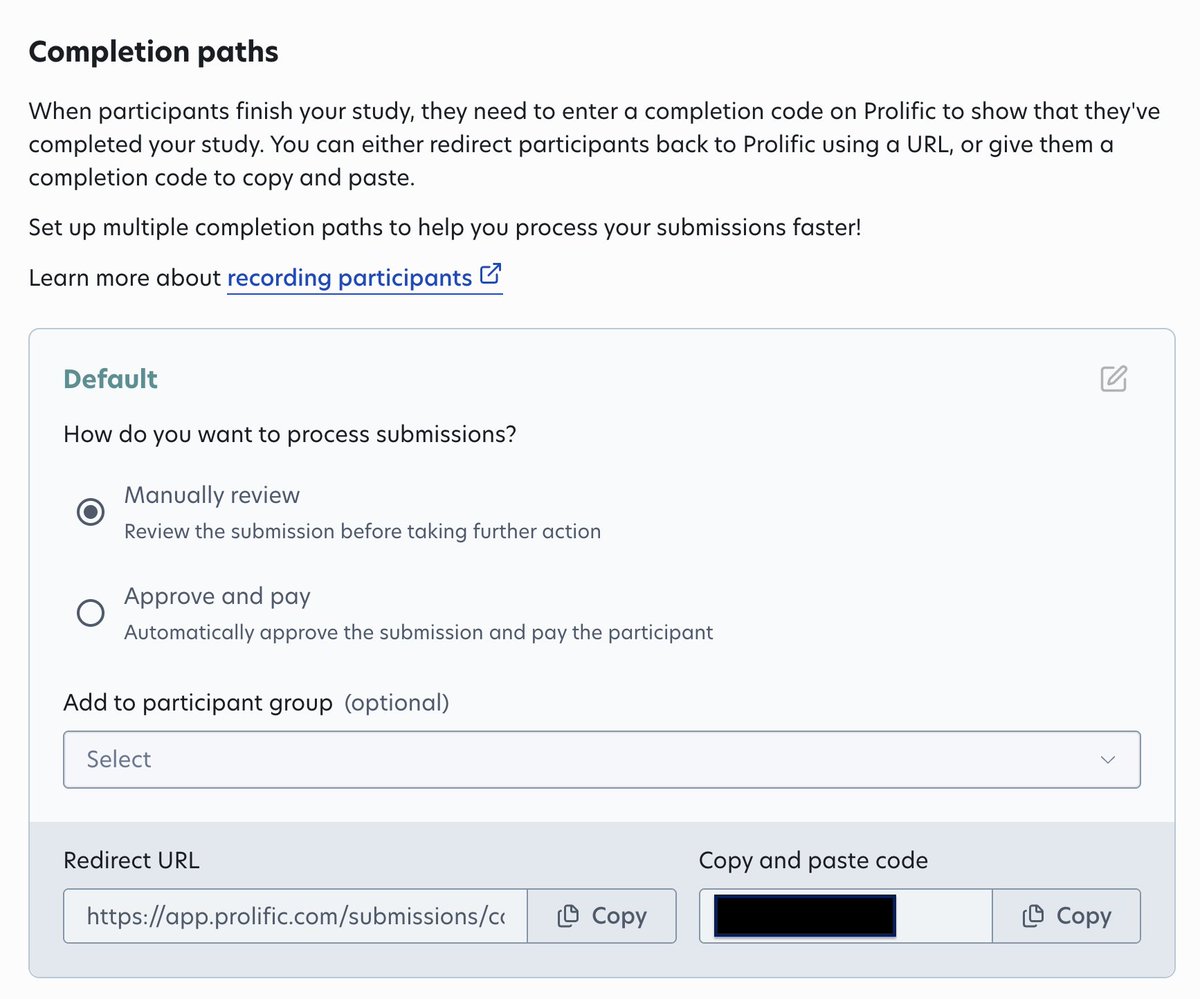 — "copy the redirect URL from Prolific study setup page"
 — "paste the URL into the Tally form setting"
Don't skip this. Miss it → people finish the test → Prolific never registers it → nobody gets paid → your inbox fills up.
Next, choose who takes it.
This is the whole reason to use Prolific instead of dropping a link on X. You get two levels of screening:
- Built-in prescreening. Prolific already knows things like age, country, and phone type, so you can require iPhone users only. You need this for a TestFlight beta.
- Custom allowlist. When your target user is more specific than Prolific's filters, you invite people by their Prolific ID. This is what I did. I pulled the IDs of the qualified people from my earlier market research study and dropped them into the allowlist.
One thing to watch: your allowlist and your number of participant places are two separate settings. Adding 100 IDs to the allowlist doesn't create 100 spots. If the spots run out, your invited people can't get in.
Set your reward.
Prolific enforces a minimum ($8/hour, recommends $12/hour) and shows your effective hourly rate live as you type. I estimated 40 minutes and paid $21 hourly rate, which lands around $14/participant and flagged as competitive.

Writing the instructions
A beta test is only as good as what people actually do inside your app. "Go try it" gets you thin, useless sessions.
So don't leave it open-ended. Give people a specific, structured task that walks them through your product's core loop and forces them to touch the exact features you want feedback on. Spell out the steps so nobody has to guess what "trying it" means.
Two rules that apply no matter what you're building:
- Tell people to use made-up details wherever the app asks for personal info. You don't want real PII because Prolific doesn't not allow researchers collecting participants' PII, and people share more honestly when they know they're not exposing themselves. Have each person enter their Prolific ID somewhere inside the app, ideally as their username or display name.
- That second one is the trick that makes the feedback trustworthy. The hidden fields already link a person to their survey answers. The in-app ID links that same person to what they actually did in the product. So when someone says a feature is confusing, you can check whether they really used it or just clicked past it.
Getting approval
This is the big one. Because my study asked people to download an app, Prolific won't let you just hit publish. Any study that involves installing something has to be approved first.
How you get it: open Prolific's chatbot (bottom corner of the researcher dashboard) and tell them exactly what your study does. In my case, participants install a beta app through Apple TestFlight, use it, then fill out a survey. Be explicit and upfront about the entire flow, and follow up in that same thread with whatever details they ask for.
It's slow. It took me nearly 5 days to get approved. Start this early and plan your timeline around it, not the other way around. I hope @Prolific can speed up!
One more thing before it goes live: funding. Prolific runs on a prepaid wallet, so you load the full cost, rewards plus platform fee, upfront.
Reviewing submissions
As people finish, they show up in your submissions list. You approve or reject each one, and approving releases the payment.
Rejecting isn't free. You can't reject people just because you didn't like their answers. On a longer study, one failed attention check question isn't enough. Prolific wants at least two, and people can appeal an unfair rejection, which drags down your researcher rating.
So I didn't lean on attention check questions. My real quality gate was the in-app data. If a Prolific ID showed no real activity in the app(which you can track in your analytics tool you installed, I use PostHog), that was a fair, defensible reason not to approve. It's about whether they did the work, not whether I liked what they said.
That's the whole loop. Build the survey and app delivery with AI, use Prolific to find, screen, and pay the right people, and thread the Prolific ID through everything so the pieces connect.
The steps that trip people up aren't the obvious ones. They're the completion code/redirect URL setup, the allowlist-versus-places gap, and the approval wait. Get those things right, and this is the cheapest way I've found to put a product in front of real people who match your user.
If you think this is helpful, please hit like, save, and share it with someone who might need this too! And let me know if you'd like to read about market research and user interviews next. Last but not least, don't forget to follow me!
Related articles


How to Build an AI-Native Company: Hiring, Standards, and Cadence
*We spent a year running hackathons, AI trainings, and office hours. But nothing changed until we made AI capability a requirement.*

38 Ways to Find $1M Startup Ideas:
1. Scrape 1 and 2-star G2/Capterra reviews of popular SaaS tools to find broken features or unmet needs.