5 Hacks to Instantly Level Up Your AI Second Brain

The number one question I get right now is how my AI operating system is organized. Where files should route, how wikis should be structured, where client projects go.
And it matters, because a disorganized OS doesn't just give you wrong answers in chat. It bakes those wrong answers into your skills and your automations.
I add more data to mine every single week without losing accuracy, and it comes down to five habits.
TL;DR
→ Almost every wrong answer traces back to four failure modes: poisoning, bloat, confusion, clash
→ Tip 1: treat your CLAUDE.md as a router, not a system prompt
→ Tip 2: have the AI audit its own setup (I built a free skill for this)
→ Tip 3: cron the data you always want fresh
→ Tip 4: segment knowledge into separate wikis
→ Tip 5: when it misses something, make it backtrack and fix its own routing
Why Agents Get It Wrong
When your agent tells you something incorrect, it's one of four failure modes.
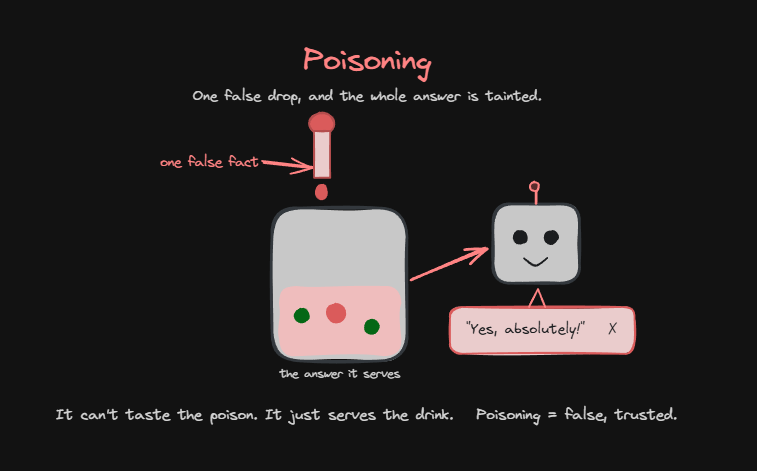
1️⃣ Poisoning. A false fact is sitting in the context. The agent isn't lying, it grabs the bad fact and confidently delivers it, to you or in an email to a customer. It's the easiest one to fix: verification. Fact-check with a web search or two, cross-check against your live database, or force a human in the loop anytime it's not 100% confident.
2️⃣ Bloat. Too much data. Between context rot and needle in the haystack, the agent can't pull out what's relevant anymore, and stuff bleeds into answers where you don't want it.

3️⃣ Confusion. An irrelevant fact, or something missing entirely. This is the classic hallucination, because the agent fills the gap with its own answer.

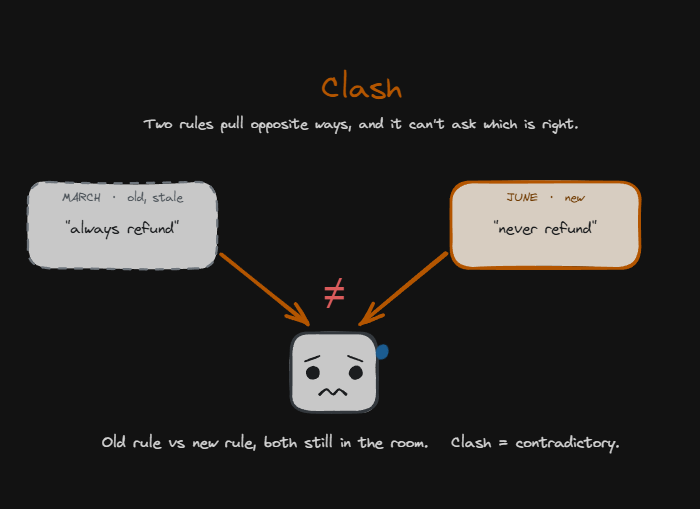
4️⃣ Clash. Two sources disagree. In March your policy was always refund. In June it became never refund. A refund question comes in and the agent doesn't know which to trust, so sometimes it picks the old one, sometimes the new one, sometimes it makes up a third thing.
Expertise vs Situational Context
If you use my Four Cs framework (context, connections, capabilities, cadence), the context and connections are the second brain piece. I think of context as expertise and connections as situational.
Expertise context is the rulebook. Who you are, your goals, your policies. It's preloaded into every run, like a system prompt.
Situational context is what you pull just in time.
Think of a principal and a teacher making a seating chart. The principal knows how classrooms should run, where the whiteboard is, how to build a good chart. But the teacher knows which student has bad vision and needs to sit closer, and which two kids will laugh through the whole class if they sit together. That's the situational layer.
Yesterday's customer support ticket doesn't need to live in your context permanently. Leave it in there and you're buying bloat, confusion, maybe a clash. Pull it in live on Thursday at 2pm when the question actually shows up.
I Let a Skill Roast My Own Setup
I turned all of this into a free OS audit skill. The premise: your indexes and wikis are claims about what exists and what's current, and the audit checks every claim against reality. It's read-only. It never fixes, renames, or deletes, it just writes a report into an audits folder. Works on any Claude Code project.
It checks routing integrity (does everything your CLAUDE.md points to actually exist, and is anything misrouted in the reverse direction), index truth (do your indexes match what's on disk), freshness (is each data feed fresh, drifting, frozen, retired, or on-demand), plus memory, bloat, duplication, and organization. On big projects with 100+ folders it fans out one Explore sub-agent per check and merges the reports.
I ran it on a month-old copy of my own setup. Two minutes later:
→ Routing integrity: red. An OTA misroute, plus unmapped OTAs.
→ Index truth: red. The index claimed 55 folders. The disk had 79.
→ Freshness: red. Knowledge current through June 29, almost a full month stale.
→ Hygiene and context placement red, bloat and duplication yellow.
Here's what stood out. The report includes a section called "what would wrong-answer you today." Any question about the business after June 29 would have gotten a confident answer based on June state. Confidently wrong is the worst version of wrong.
Then it hands you a fix list and waits for approval: finish the in-flight cleanup, repair the routing and indexes, ingest the missed Q&As and meetings, and set up weekly crons so it stops drifting in the first place.
The skill is in my free Skool community: https://www.skool.com/ai-automation-society
Tip 1: Treat CLAUDE.md as a Router
Most people use their CLAUDE.md like a system prompt. Here's your background, here's what you do. For specific projects that's correct.
But my whole OS lives under one massive folder, and the root CLAUDE.md is almost purely a router. A master table of contents. If you need business knowledge, here's the wiki path and the hot cache. Here's where API keys live. Here's where skills, agents, decisions, templates, and references live.
Inside that one folder: brand assets (logos, fonts, pictures of me), brainstorms from grill-me sessions, audits, a decision log, my wiki, a projects folder that holds almost every deliverable I make (including one subfolder per YouTube video), and standalone repos for the big stuff.
Two reasons I like it this way. One push to GitHub backs everything up. And I can cd into any subproject that has its own CLAUDE.md when I want project-specific rules.
It's all just files and folders, so I can plug in Claude Code, Codex, or anything else on top of the same brain.
Flat structure or nested doesn't really matter. What matters is that the routing rules let you and your agents find things.
Tip 2: Have the AI Audit Itself
Before I built the skill, I just did this conversationally at the end of every week: open everything up, check that the routing rules are still accurate, and suggest changes based on best practices and how I actually talk to you every day.
That loop is how my knowledge got segmented in the first place. I had one master wiki, and Claude Code itself pointed out that I was feeding it two distinct types of data on a weekly cadence and suggested splitting them. Less bloat, less confusion, faster answers, and fewer tokens burned per search.
There's no right way to build a second brain. The only way you're doing it wrong is if you keep getting wrong answers and do nothing about it.
A simple test: open your file explorer and try to find something you made, without search and without asking Claude. If you can follow your own folders to it, the structure is intuitive, and an agent with routing rules can navigate it too.
Tip 3: Automate the Data Pulls
If you keep telling your agent "hey, go pull that data," pay attention. That's not situational context anymore, it's recurring.
Every Monday I have a Q&A. Every Tuesday I meet with my leadership team. Both belong in my wiki, every week, no exceptions. So crons pull them in automatically, and even if I forget after a meeting, the data is already there next time I open a session.
Setting this up is genuinely simple now. You need the API key, and then it's natural language: set up this cron, set up this routine, push this script to Modal.
Tip 4: Segment Knowledge
When a node of knowledge is distinct and going to keep growing, give it its own wiki. My YouTube transcripts and my meeting transcripts each have one.
The payoff is narrower search. If my agent needs to know whether I've ever covered Apify, it goes straight to the YouTube transcripts wiki instead of digging through 5 or 10x more files.
The most common question I get here is where client projects go. I'd keep client information inside my OS, segmented by client. One clients folder, then Client A, Client B, Client C, each holding the internal knowledge: signed the contract June 25th, project price, discovery calls, scope of work.
But the actual deliverables I'd build in a separate client-facing repo, so the client can be a collaborator or I can push it to an environment. My OS keeps a pointer to where that repo lives and full context on the engagement, without owning the client's files every time I push my own repo.
Tip 5: Make It Backtrack
When your agent searches five minutes for something it should have found instantly, or tells you it doesn't have access to a file you know is there, don't just say "don't let that happen again."
Make it backtrack. Go look through what you did, where you searched, and figure out why you didn't find that data right away.
It comes back with the honest version: I made a mistake, here's where I should have looked. Now it has proven its own miss, so have it fix it. Update the routing, move things, reorganize based on what it found. That lands way better than a vague instruction to make no mistakes.
The Next Problem: Teams
Second brains are blowing up right now, and the question every business is about to hit is how you sync them at the team and department level.
I don't have a full answer yet, but I don't think it's a tech problem. You could do this with Google Drive, Notion, or GitHub. It's a people problem: getting a team to habit-shift into syncing data, knowing what to pull in, making their agents read things, and handling permissions.
So the best move right now is mastering your own system. When the team-level version arrives, you'll have already walked the walk.
I walk through all of this, including the live audit, in the full video. Link in the first reply.
Related articles

this system will change your life...
"build me a personal knowledge vault at ~/vault. create numbered top-level folders so you can always find things predictably: 00-inbox for raw material i haven't reviewed, 10-identity for who i am an…

Claude Code + NotebookLM + Obsidian: Research Monster That Gets Smarter Every Time You Use It
Most people treat research as a manual task.

Claude + Obsidian = $1M YouTube on Autopilot
Most content creators use AI as a temporary worker with amnesia. Every time they open a new chat to write a script, they waste tokens and time re-explaining their niche, target audience, brand voice,…