5 Step Video GEO Guide for SaaS (62k AI Mentions in 3 Months with Claude)
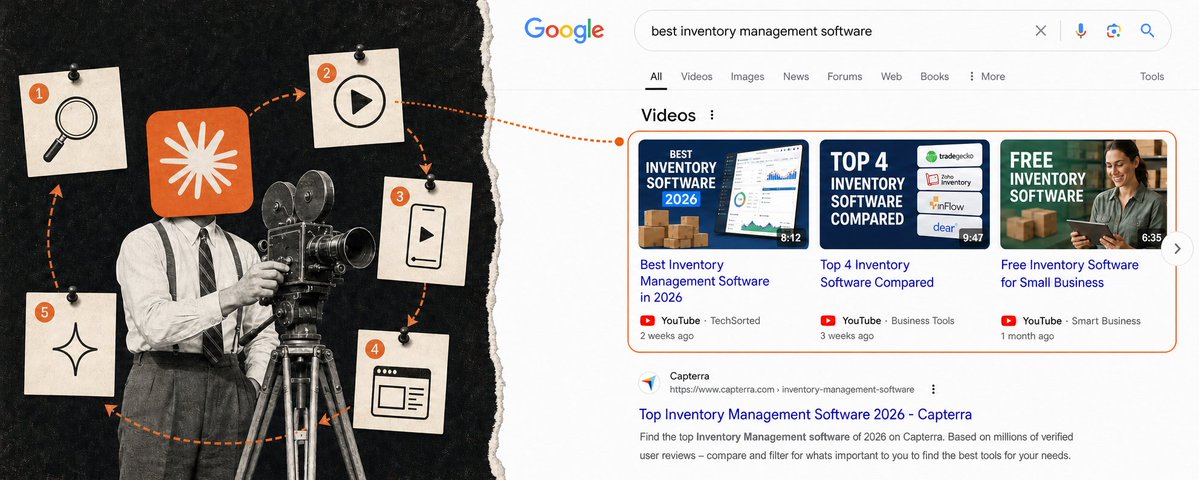
If you want your SaaS to rank in AI for "best X" but
↳ Your blog posts are buried under G2 and YouTube videos
↳ You have no time to put into SEO
**Run this playbook manually or let Distribb post videos for you 👈
Short form videos are most cited for B2B SaaS keywords...**
> I pulled every "best ... software" keyword with real US search volume, 2,328 of them, and ran 140 through DataForSEO on Google US mobile on September 1, 2026: the 60 biggest category head terms plus a random sample of 80 across four volume bands. I read the top 30 results for each and logged every YouTube, Shorts, TikTok and Instagram result. Then I checked the video citation numbers against OtterlyAI's 100 million citation study, Ahrefs' July 2026 AI Overview table and my own 100 question AI study from last week. One crawl from one US location with no personalization, so it shows what a logged-out phone gets and cannot show what caused any result to rank.
TL;DR
↳ YouTube ranked in the top 10 on 86 of my 140 "best X software" searches
↳ 29 of 140 had a row of videos on the page, and every video in those rows was long-form
↳ OtterlyAI: 94% of YouTube citations in AI answers go to long-form videos, and 40.83% of cited videos had under 1,000 views
↳ Ahrefs: YouTube is 21.1% of AI Overview citations, the most cited domain. Instagram 5.8%, TikTok 3.2%
↳ Google's AI is where video pays. AI Overview and AI Mode cited YouTube 63 times each in my 100 questions, Gemini 3, ChatGPT 0
↳ Step 1: Google your keyword and look for videos
↳ Step 2: Make one long YouTube video that answers the search
↳ Step 3: Cut it into Shorts and post them, YouTube first, then Instagram, then TikTok
↳ Step 4: Put the video and the answer on your own website
↳ Step 5: Once a month, check if Google's AI names you
↳ Bonus: Use the super-video-maker skill so Claude makes steps 2 and 3 for you
The 5-step playbook
Step 1: Google your keyword and look for videos

Type "best [your type of] software" into Google on your phone. Look at the first page.
↳ Is there a row of videos? That is Google telling you it wants a video for this search
↳ Tap one. If it is a normal long video, make a long video. If it is a Short, make a Short
↳ On my 140 searches, 29 had a row of videos and every video in those rows was long-form
Time: 5 minutes.
Step 2: Make one long YouTube video that answers the search
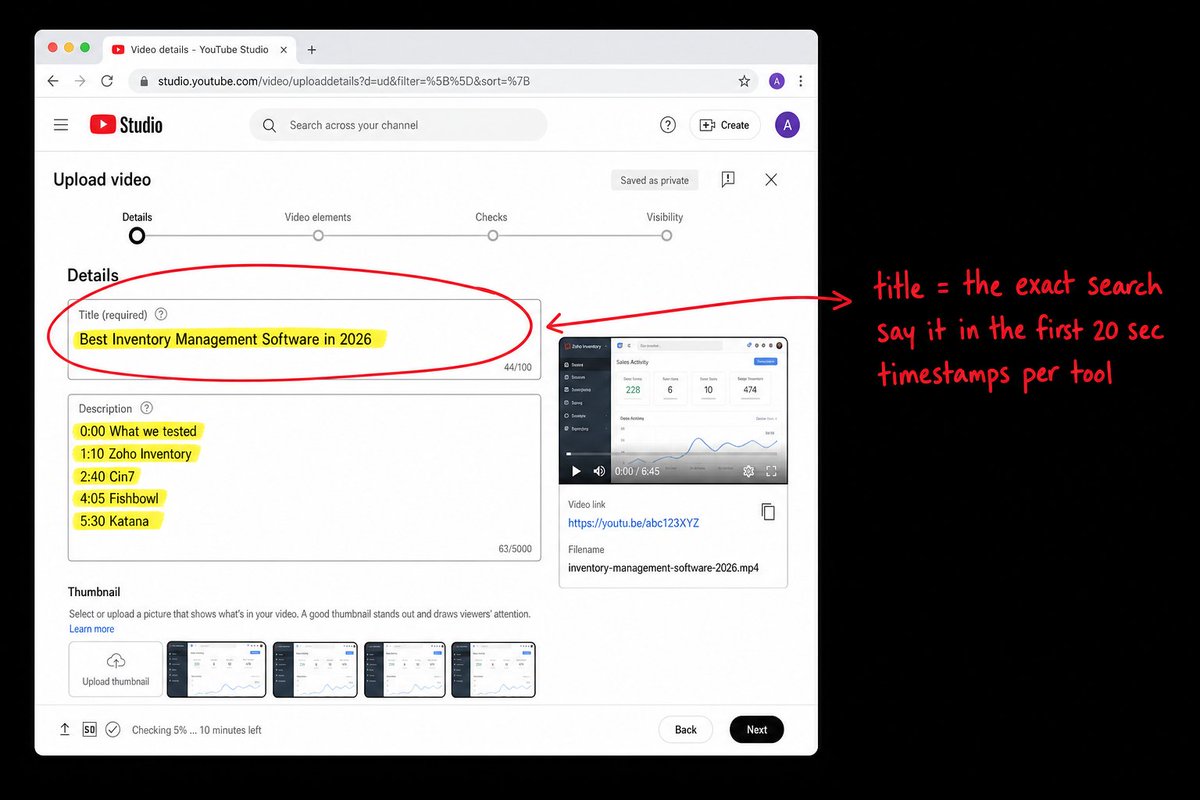
One video per search. The title is the search itself. "Best inventory management software in 2026."
↳ Say the title out loud in the first 20 seconds
↳ Open each tool on screen and show it doing the job
↳ Write the tools and the minute they appear in the description
You do not need subscribers. OtterlyAI looked at 100 million AI citations and 40.83% of the YouTube videos AI cited had under 1,000 views. The title is what gets you picked.
Time: one afternoon per video.
Step 3: Cut the long video into Shorts and post them

Do not film Shorts on their own. Cut them out of the step 2 video.
↳ Cut 3 to 5 clips under 60 seconds. One tool or one verdict per clip
↳ Post them to YouTube Shorts first. Google owns YouTube
↳ Then post the same clips to Instagram, then TikTok
Ahrefs counted where Google's AI answers take their sources from. YouTube 21.1%, Instagram 5.8%, TikTok 3.2%. That is the order.
Distribb's video plan cuts two clips a week from your articles and posts them as Shorts and Reels, so if you already publish with it the clips exist.
Time: one hour per long video.
Step 4: Put the video and the answer on your own website

Give SEO juice to the video from your website.
↳ One page per search, titled the same way as the video
↳ Put the video at the top of the page
↳ Write the prices and name the other tools you compared
In my August 27 study, vendor websites were the biggest source of citations on all five AI answer engines, between 36.0% and 47.4%.
Time: two hours per page.
Step 5: Once a month, check if Google's AI names you
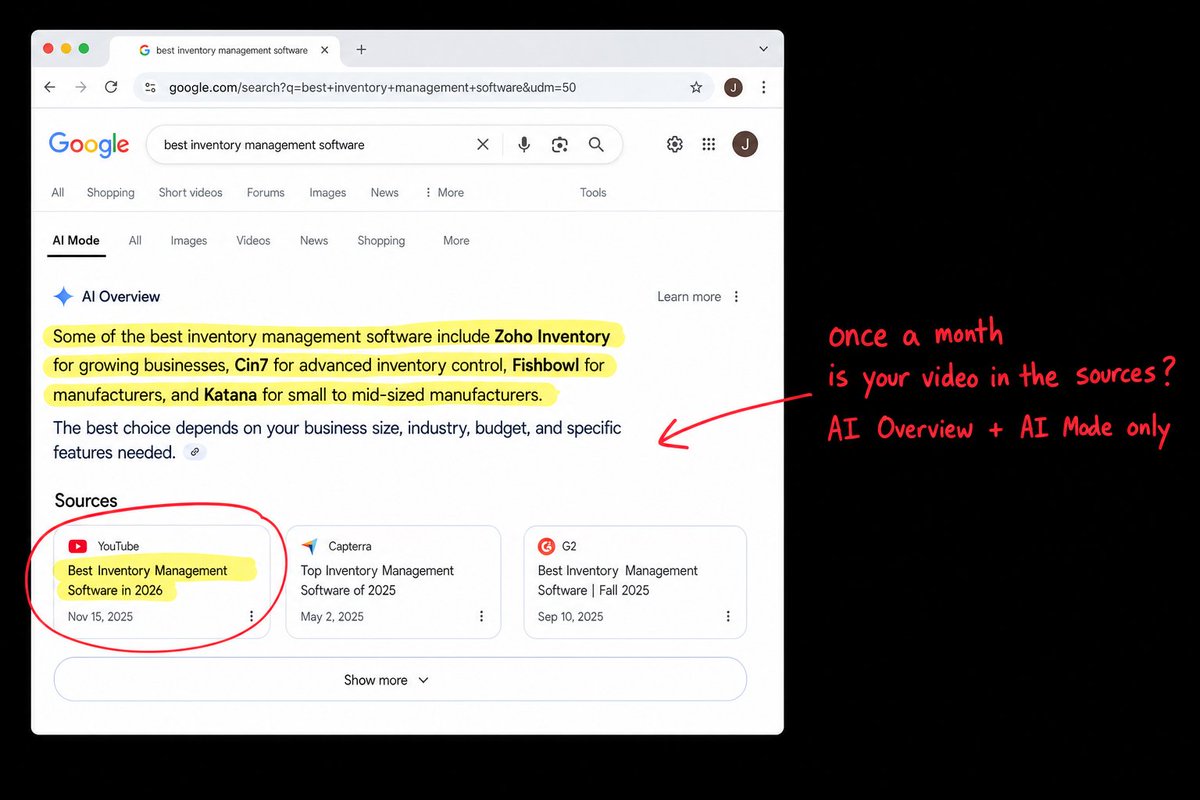
Type your search into Google again. Read the AI Overview at the top. Then open AI Mode and ask the same thing.
↳ Is your video or your page in the sources? Write down yes or no
↳ Skip Gemini and ChatGPT for this. Gemini cited YouTube 3 times in my 100 questions, ChatGPT zero times
↳ Repeat step 1 as well, because the row of videos comes and goes month to month
Time: 10 minutes.
Bonus step: Let AI make the videos for you
Steps 2 and 3 are the ones that eat a day. I open sourced the skill I use for Distribb Accelerator Done-For-You so Claude Code, Codex, Grok Bot or Cursor can do them.
Install it once:
git clone https://github.com/bomx/super-video-maker-skill.git
cd super-video-maker-skill
python3 -m venv venv && source venv/bin/activate
pip3 install -r requirements.txt
npm install
brew install ffmpeg
cp .env.example .env
Put your HeyGen, OpenAI, Fal and ElevenLabs keys in the .env file. HeyGen is the presenter, Fal runs Seedance for the b-roll, ElevenLabs is the voice, OpenAI writes the captions.
Then make the step 2 video with one prompt:
> Use the super-video-maker skill. Make a 6 minute avatar explainer titled "Best inventory management software in 2026". Say the title in the first 20 seconds. Compare Zoho Inventory, Cin7, Fishbowl and Katana. For each one, screen record the app finishing one real job and show it on screen while the presenter talks. Put the tools and their timestamps in the description. Show me the plan and the cost before any paid call.
It records the screens, generates the presenter, writes the captions and exports one mp4. You watch the final frames before it goes anywhere, and the skill will not skip that check.
Then cut the Shorts with a second prompt:
> Use the super-video-maker skill. Take tmp/video_jobs/inventory/final.mp4 and cut it into 4 vertical Shorts under 60 seconds, one tool per clip. Burn captions in the center. End each clip with "search Distribb" on screen, no link in the description.
The clips come out as 9:16 mp4 files ready to upload in the step 3 order. Do not say "link in the description" in a YouTube Short. Shorts do not allow clickable links there.
Time: 20 minutes of typing, then wait for the render.

Example:
Recap: run the five steps in order
↳ Step 1: Google your keyword and look for videos
↳ Step 2: Make one long YouTube video that answers the search
↳ Step 3: Cut it into Shorts and post them, YouTube first, then Instagram, then TikTok
↳ Step 4: Put the video and the answer on your own website
↳ Step 5: Once a month, check if Google's AI names you
↳ Bonus: Let the super-video-maker skill do steps 2 and 3
A hundred and forty searches, and long-form YouTube on the first page of 86 of them.
***Try Distribb free and let it make and post the videos for you 👈***
Thanks for reading.
Borja