6 Grok Bot agents on 1 shared cloud computer is a full company for $200 a month.

xAI shipped Grok Bot on August 11, 2026, which was 14 days ago, and most people have created 1 bot, asked it 3 questions and closed the app — they bought a payroll and are using it as a search box.
Here is the full build: 6 roles, every prompt, and the 1 folder that keeps the whole thing alive after the machine wipes itself.
What actually shipped
A Bot is a named, persistent agent with a cloud computer behind it — real browser, real terminal, real file system, sitting in a data center — so when you close your laptop at 11 PM the work does not stop.
It signs into your tools by clicking through them the way a human does, which matters because roughly 80% of the software you use has no clean API for an agent to plug into.
Access right now runs through SuperGrok Heavy, Cursor Ultra at $200 a month and Cursor Teams Premium at $120 a seat, on macOS, Windows and iPhone, with enterprise still a waitlist.
The thing 90% of people get wrong on day 1

They think each bot gets its own computer, and it does not 1 account means 1 shared cloud computer, where every bot on your roster touches the same files, the same browser sessions and the same terminal credentials.
xAI says it plainly in the docs: do not treat separate bots as separate security boundaries.
That single fact is the entire architecture, because it is why a handoff costs nothing Research saves a file and Sales already sees it and it is why you sign into LinkedIn once and all 6 are signed in.
Stop thinking 6 employees, start thinking 6 people sharing 1 desk.
PART 1 — The description field is the org chart
The name is decoration, the description is the hire, and when one bot needs to pass work it reads the other descriptions and routes on that alone, which means a blank description takes that bot off the chart permanently and it will never receive work from anyone.
Every description ends on a limit, and that is the part people skip, which is exactly why they cannot leave the thing running unattended.
Paste this to build the chart before you build the team:
Act as my Chief of Staff. Before creating anything, interview me
one question at a time until you understand: the outcome I need,
how often it repeats, which tools and accounts are involved, what
"finished" looks like, and which actions must never happen without me.

Then return a one-page Mission Contract with 7 fields:
Outcome, Inputs, Output, Frequency, Definition of Done,
Constraints, Approval Gates.

Reject any quality standard written as "good", "useful" or
"professional". Replace each one with a check I can verify in
under 60 seconds.

Do not create any bots yet.
If it cannot produce a clean contract, the mission is broken and no amount of bots will fix it.
PART 2 — Hire the 6
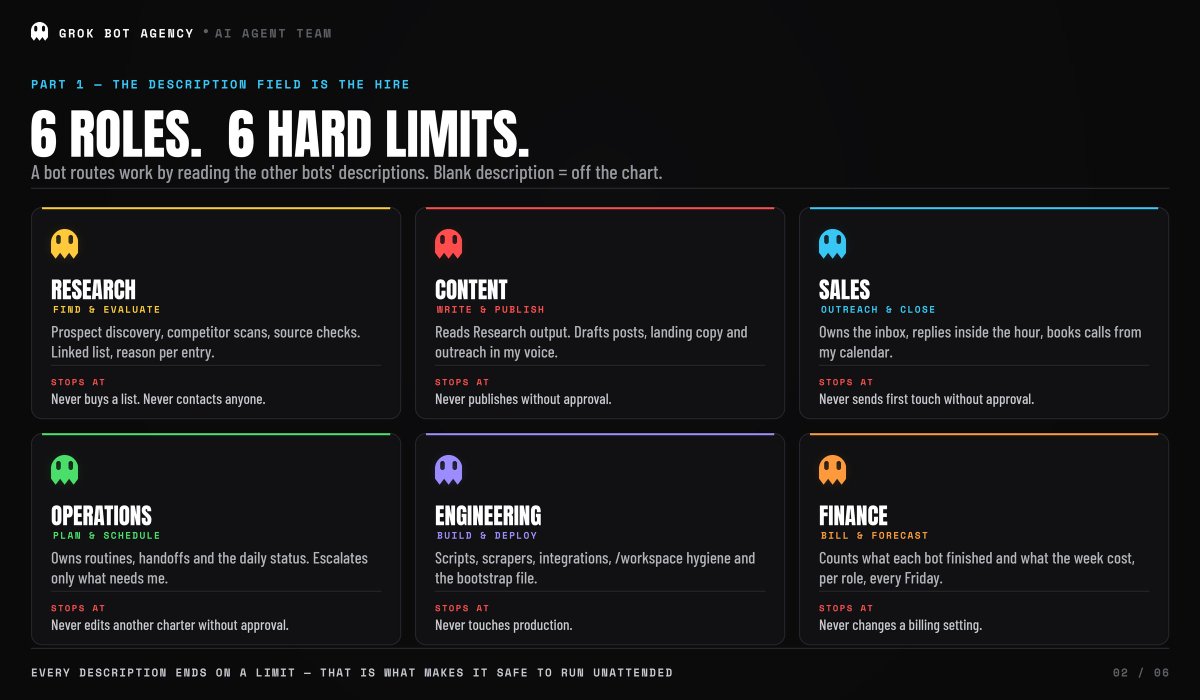
Roles, not job titles, each owning a lane nobody else touches.
Create 6 bots. For each one output: Name, Title, Description
(4 sentences max, the last sentence is a hard limit), Inputs,
Output format, and Handoff destination.

1. RESEARCH — find and evaluate. Owns prospect discovery,
competitor scans, source verification. Returns a linked list
with a reason per entry, strongest first. Never buys a list,
never contacts anyone.

2. CONTENT — write and publish. Reads Research output, drafts
posts, landing copy, outreach in my voice. Never publishes
without approval.

3. SALES — outreach and close. Owns the inbox, replies within
the hour, books calls from my calendar. Never sends a first-touch
message without approval.

4. OPERATIONS — plan and schedule. Owns routines, handoffs,
and the daily status. Escalates only decisions that need me.
Never changes another bot's charter without approval.

5. ENGINEERING — build and deploy. Owns scripts, scrapers,
integrations, /workspace hygiene. Never touches production.

6. FINANCE — bill and forecast. Counts what each bot finished
and what the week cost. Never changes a billing setting.

Every description must end with an explicit line naming where
the bot stops and asks me.
Do not go past 6 until the first version works, because every extra bot adds another context window, another handoff and another place to lose information.
PART 3 — Make them hand work to each other

A group chat holds 2 to 6 bots and they sort out who answers on their own, with @ there for the times you want to name one, though the real failure mode is 3 bots doing the same job in parallel and the fix is naming a single owner per stage:
@Research gather the source material and link every claim with
a publication date. @Content turn the verified findings into a
draft. @Operations check the draft against the sources and list
only blocking issues.

One owner per stage. If you are not the owner, do not start.
Hand off using this format every time:
Objective / Artifact / Evidence / Status / Blockers / Next Action.

Evidence travels with the work. Never make the next bot rebuild
it from chat history. Do not publish anything.
Evidence travels with the work, and that one rule kills most multi-agent failures before they start.
PART 4 — Teach it once instead of explaining it twice
Teach a task records you doing the workflow on the bot's screen and hands back a draft skill, where draft is the operative word a recording shows the happy path but cannot show what to do when a source 404s or a number needs sign-off:A skill waits to be called and a routine is the call:
Save the process we just recorded as a skill called
"[SKILL NAME]".

Include: the source systems, the exact output format, and the
approval line.

Then add the exceptions the recording could not show:
- IF a source is unavailable, report the failure instead of
using yesterday's data
- IF two sources disagree, flag both and stop
- IF a rate limit appears, pause 300 seconds and retry once
- ALWAYS verify the output file is non-empty before handing off

Return the skill as a numbered checklist. Mark every step that
requires my approval.
PART 5 — Put it on a clock
A skill waits to be called and a routine is the call:
Every weekday at 8:00 AM, run the [SKILL NAME] skill against
the current source list. Post the result as a linked summary in
this conversation. Do not contact anyone. If the source data is
unavailable, report the failure instead of using old data.
That last clause is what keeps Monday's numbers out of Friday, and you schedule nothing after 1 successful run run 1 you observe, run 2 you check whether the fix stuck without re-instructing, run 3 you release.
PART 6 — Draw the approval line by reversibility, not by importance

Anything reversible runs alone scraping, research, drafting, organizing files, test builds while anything irreversible stops and waits, meaning sending, publishing, purchasing, deleting, changing permissions or touching production.
5 things always stay human and the docs name every one: passwords, 2FA codes, CAPTCHAs, payment or identity checks, and any site that explicitly requires a person.
BOUNDARY RULE — append to every outbound bot description:

You have full authority to research, summarize, draft and save.
You must never click Send, Publish, Buy, or Delete, and never
change permissions or production data, without my explicit
written approval in this thread. When you hit a login, 2FA
prompt or CAPTCHA, stop and hand me the screen.
36 drafts ready and 0 sent is the correct Friday.
PART 7 — The folder that survives
The cloud computer rebuilds itself on updates and global installs, apt packages and manually installed CLIs go with it, but builders testing this in the days after launch found 1 directory still standing afterward, which you can verify yourself in 5 minutes:

date > /workspace/marker.txt
date > ~/marker.txt
# Settings → Beta → Update Agent Computer, wait, then:
ls /workspace/marker.txt ~/marker.txt
1 of those 2 files comes back, so everything the roster owns goes in the folder that kept its file:
/workspace/bin      → CLIs your bots call, this folder on PATH
/workspace/config   → every config those tools read
/workspace/skills   → the methods you taught
/workspace/state    → files, results, project state
Then put this line at the top of every skill:
Before any other step, run /workspace/bin/bootstrap.sh: install
anything missing into /workspace/bin, copy configs from
/workspace/config into place, and put /workspace/bin on PATH.
Never install into the home directory and never apt-install
into the system.
The roster reinstalls its own tools before it starts working, and home becomes a cache from there on.
PART 8 — Price the week or the seat reads as a cost
Every Friday at 5:00 PM, ask me for this week's seat cost and
the on-demand total. Divide both by the number of jobs each bot
finished this week. Post cost per finished job by role in this
conversation. Do not change any billing settings.
The meter moves on how much the roster has to look at, and since every screenshot is an image the model reads before it can act, routing repeat work through a connector instead of the browser is what stops the weekly pool from paying to stare at screens.
What will actually break
Weekly limits bite first, because spinning up 6 bots at once is the fastest way to burn a pool and freeze a swarm mid-task, so build 2, prove them, then add 4.
Websites bite second, since layouts change, popups appear and automation gets blocked, which is why you use a connector wherever one exists and keep the browser as the fallback rather than the plan.
Then there is the last 10%, a wide gap between 90% done and 100% done that lives entirely in the weird cases, and underneath all of it the trust question this thing works because it holds your logins, so start on reversible low-stakes jobs and keep financial and legal systems disconnected until it earns them.

The realistic 30 days
Week 1 is 1 bot, 1 recurring job and 4 hours of correcting it, week 2 is 2 bots and the first handoff that works without you, week 3 is 3 routines on a clock with /workspace migrated and the first update survived, and week 4 is 6 roles, 1 approval pass a day and a Friday priced per finished job.
Nobody hits 6 agents on day 1, and the people posting screenshots of 12 bots are managing 12 bots badly.
Full 6-agent boot pack all descriptions, skills and the bootstrap file in the reply, free.
You stopped asking for work and started signing off on it.
The org chart was always the moat, and it costs $200 now.
Related articles


How to Turn Grok Bot Into Your Own Bloomberg Terminal
Grok Bot is the best AI agent right now

How to Build a One-Person AI Hedge Fund Using Grok Bot
Grok Bot is the best AI agent right now