Claude + Cursor + Vercel = $5k–30k/month Micro-SaaS: A Step-by-Step Guide from MVP to B2B Sales

In 2026, the software development paradigm has completely shifted. Winning is no longer about who memorizes language syntax best; it’s about who can turn a hypothesis into a working link with a "Pay" button the fastest. The industry calls this "Vibe Coding": Claude provides the brains, Cursor handles the heavy lifting, and Vercel serves as the storefront.
This guide is an ultimate blueprint for building a Micro-SaaS over a weekend and scaling it to reach the most profitable audience available: e-commerce store owners.
PART 1: Building the Base MVP (AI Hook Generator)
First, let's build a classic viral utility, an AI Hook Generator (a service that crafts high-engagement opening lines for X/Twitter and LinkedIn posts).

Step 1.1: Project Initialization in Cursor
We will use the Next.js (App Router) and Tailwind CSS stack. Open your terminal in Cursor and run:
npx create-next-app@latest ai-hook-generator --typescript --tailwind --app
(Select "Yes" for all prompts, but choose "No" for the src/ directory option). Open the newly created folder in Cursor.
Step 1.2: Implementing the Base MVP Code
We need three core files. Press Cmd + N in Cursor and create them at the following paths.
- Environment Variables (.env.local in the project root)
ANTHROPIC_API_KEY=your_claude_api_key_here
STRIPE_SECRET_KEY=your_stripe_key_here
NEXT_PUBLIC_APP_URL=http://localhost:3000
- Backend: Generation Logic (app/api/generate/route.ts)
This route handles the incoming topic, queries the Claude API, and returns an array of hooks.
import { NextResponse } from 'next/server';

export async function POST(req: Request) {
  try {
    const { topic, style } = await req.json();

    if (!topic) {
      return NextResponse.json({ error: 'Topic is required' }, { status: 400 });
    }

    const response = await fetch('https://api.anthropic.com/v1/messages', {
      method: 'POST',
      headers: {
        'x-api-key': process.env.ANTHROPIC_API_KEY || '',
        'anthropic-version': '2023-06-01',
        'content-type': 'application/json',
      },
      body: JSON.stringify({
        model: 'claude-3-5-sonnet-20241022',
        max_tokens: 1000,
        messages: [
          {
            role: 'user',
            content: `Write 3 viral hooks for a social media post on the topic: "${topic}". Style: ${style}. Return the response STRICTLY as a JSON array of strings: ["hook1", "hook2", "hook3"], with no conversational filler or extra text.`
          }
        ],
      }),
    });

    const data = await response.json();
    const rawText = data.content[0].text;
    const hooks = JSON.parse(rawText);

    return NextResponse.json({ hooks });
  } catch (error) {
    console.error('Backend error:', error);
    return NextResponse.json({ error: 'Error generating hooks' }, { status: 500 });
  }
}
- Frontend: App Interface (app/page.tsx)
Clear out the boilerplate Next.js template and replace it with a clean, high-conversion Tailwind UI.
'use client';
import { useState } from 'react';

export default function Home() {
  const [topic, setTopic] = useState('');
  const [style, setStyle] = useState('Aggressive / Clickbaity');
  const [hooks, setHooks] = useState<string[]>([]);
  const [loading, setLoading] = useState(false);

  const handleGenerate = async () => {
    setLoading(true);
    setHooks([]);
    try {
      const res = await fetch('/api/generate', {
        method: 'POST',
        headers: { 'Content-Type': 'application/json' },
        body: JSON.stringify({ topic, style }),
      });
      const data = await res.json();
      if (data.hooks) setHooks(data.hooks);
    } catch (err) {
      console.error(err);
    } finally {
      setLoading(false);
    }
  };

  return (
    <main className="min-h-screen bg-slate-950 text-white flex flex-col items-center justify-center p-6">
      <div className="max-w-2xl w-full space-y-8 bg-slate-900 p-8 rounded-2xl border border-slate-800 shadow-xl">
        <div className="text-center">
          <h1 className="text-3xl font-extrabold bg-gradient-to-r from-blue-400 to-purple-500 bg-clip-text text-transparent">
            AI Hook Generator
          </h1>
          <p className="mt-2 text-sm text-slate-400">1 generation = 1 credit. Test for free.</p>
        </div>

        <div className="space-y-4">
          <div>
            <label className="block text-sm font-medium text-slate-300">What is your post about?</label>
            <input
              type="text"
              value={topic}
              onChange={(e) => setTopic(e.target.value)}
              placeholder="How I made my first $200 with an arbitrage bot..."
              className="mt-1 block w-full rounded-xl bg-slate-800 border-slate-700 text-white p-3 focus:ring-purple-500 focus:border-purple-500"
            />
          </div>

          <div>
            <label className="block text-sm font-medium text-slate-300">Style</label>
            <select value={style} onChange={(e) => setStyle(e.target.value)} className="mt-1 block w-full rounded-xl bg-slate-800 border-slate-700 text-white p-3">
              <option>Greentext / Storytelling</option>
              <option>Aggressive / Clickbaity</option>
              <option>Expert / Professional</option>
            </select>
          </div>

          <button onClick={handleGenerate} disabled={loading} className="w-full py-3 px-4 rounded-xl text-sm font-medium text-white bg-gradient-to-r from-blue-600 to-purple-600 hover:from-blue-500 hover:to-purple-500 transition-all disabled:opacity-50">
            {loading ? 'Claude is thinking...' : 'Generate Hooks'}
          </button>
        </div>

        {hooks.length > 0 && (
          <div className="mt-6 space-y-3">
            {hooks.map((hook, index) => (
              <div key={index} className="p-4 bg-slate-800 rounded-xl border border-slate-700 text-slate-300 select-all cursor-pointer hover:border-slate-600 transition-all">
                {hook}
              </div>
            ))}
          </div>
        )}
      </div>
    </main>
  );
}
Step 1.3: Deploying to Vercel
Push your code to a private GitHub repository.
Go to Vercel.com -> "Add New" -> "Project" -> Import your repository.
Paste your ANTHROPIC_API_KEY into the Environment Variables section and hit "Deploy".
Your MVP is live and kicking.
Here's how we turn this fine-tuning into real cash flow 👇
PART 2: Where the Money Is -> Shifting to Shopify (B2B Micro-SaaS)
Average retail consumers are notoriously reluctant to pay for text generators. Shopify store owners (merchants), however, are a completely different story. They evaluate software purely through the lens of ROI: "If this software bumps my product page conversion rate by even 1%, I will make my money back in a single day." They already have corporate cards on file and are highly accustomed to premium subscription pricing.
We are going to expand our application by introducing a dedicated B2B section: the Shopify Product Optimizer -> a specialized tool that transforms raw supplier details into high-converting HTML product descriptions and matches them with ready-to-use Facebook Ads hooks.
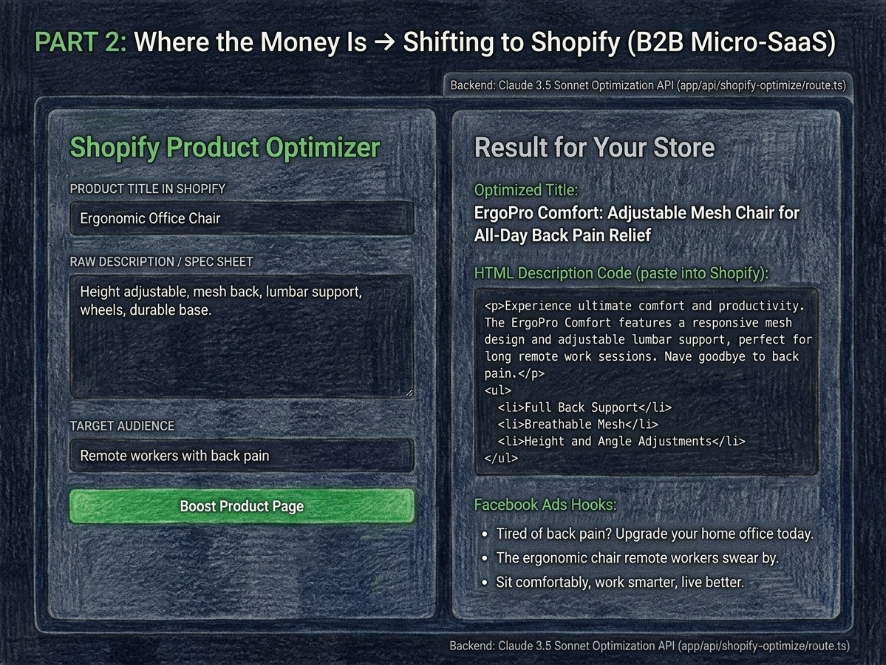
Step 2.1: Implementing B2B Logic for Shopify
- Create the Product Optimization API (app/api/shopify-optimize/route.ts)
This backend forces Claude to act as a world-class e-commerce copywriter.
import { NextResponse } from 'next/server';

export async function POST(req: Request) {
  try {
    const { originalTitle, originalDescription, targetAudience } = await req.json();

    if (!originalTitle) {
      return NextResponse.json({ error: 'Product title is required' }, { status: 400 });
    }

    const response = await fetch('https://api.anthropic.com/v1/messages', {
      method: 'POST',
      headers: {
        'x-api-key': process.env.ANTHROPIC_API_KEY || '',
        'anthropic-version': '2023-06-01',
        'content-type': 'application/json',
      },
      body: JSON.stringify({
        model: 'claude-3-5-sonnet-20241022',
        max_tokens: 1500,
        messages: [
          {
            role: 'user',
            content: `You are a world-class e-commerce copywriter for brands pulling in $100M+ in revenue.
            Analyze this product:
            Title: "${originalTitle}"
            Old Description: "${originalDescription || 'None provided'}"
            Target Audience: "${targetAudience || 'Broad audience'}"

            Rewrite this to maximize sales conversions. Return the response STRICTLY in JSON format with this exact structure:
            {
              "optimizedTitle": "Catchy, SEO-optimized title",
              "optimizedDescription": "High-converting description following the AIDA framework with bullet points for benefits (in HTML tags like <p>, <ul>, <li> for direct pasting into Shopify)",
              "facebookAdsHooks": ["ad hook 1", "ad hook 2"]
            }
            Do not include any conversational text or explanations outside of the JSON object.`
          }
        ],
      }),
    });

    const data = await response.json();
    const rawText = data.content[0].text;
    const optimizedData = JSON.parse(rawText);

    return NextResponse.json({ success: true, data: optimizedData });
  } catch (error) {
    console.error('Shopify Optimizer Error:', error);
    return NextResponse.json({ error: 'Optimization failed' }, { status: 500 });
  }
}
- Create the Merchant Dashboard UI (app/shopify-booster/page.tsx)
'use client';
import { useState } from 'react';

interface OptimizedResult {
  optimizedTitle: string;
  optimizedDescription: string;
  facebookAdsHooks: string[];
}

export default function ShopifyBooster() {
  const [title, setTitle] = useState('');
  const [desc, setDesc] = useState('');
  const [audience, setAudience] = useState('');
  const [result, setResult] = useState<OptimizedResult | null>(null);
  const [loading, setLoading] = useState(false);

  const handleOptimize = async () => {
    setLoading(true);
    try {
      const res = await fetch('/api/shopify-optimize', {
        method: 'POST',
        headers: { 'Content-Type': 'application/json' },
        body: JSON.stringify({ originalTitle: title, originalDescription: desc, targetAudience: audience }),
      });
      const resData = await res.json();
      if (resData.data) setResult(resData.data);
    } catch (err) {
      console.error(err);
    } finally {
      setLoading(false);
    }
  };

  return (
    <main className="min-h-screen bg-slate-950 text-slate-100 p-8">
      <div className="max-w-6xl mx-auto grid grid-cols-1 md:grid-cols-2 gap-8">

        {/* Left Column: Input Panel */}
        <div className="bg-slate-900 p-6 rounded-2xl border border-slate-800 space-y-4">
          <h2 className="text-xl font-bold text-green-400">Shopify Product Optimizer</h2>
          <div>
            <label className="text-xs text-slate-400 uppercase">Product Title in Shopify</label>
            <input type="text" value={title} onChange={(e) => setTitle(e.target.value)} className="w-full mt-1 bg-slate-800 p-3 rounded-xl border border-slate-700" placeholder="e.g. Ergonomic Office Chair" />
          </div>
          <div>
            <label className="text-xs text-slate-400 uppercase">Raw Description / Spec Sheet</label>
            <textarea value={desc} onChange={(e) => setDesc(e.target.value)} className="w-full mt-1 bg-slate-800 p-3 rounded-xl border border-slate-700 h-32" placeholder="Paste basic supplier details here..." />
          </div>
          <div>
            <label className="text-xs text-slate-400 uppercase">Target Audience</label>
            <input type="text" value={audience} onChange={(e) => setAudience(e.target.value)} className="w-full mt-1 bg-slate-800 p-3 rounded-xl border border-slate-700" placeholder="e.g. Remote workers with back pain" />
          </div>
          <button onClick={handleOptimize} disabled={loading} className="w-full bg-green-600 hover:bg-green-500 py-3 rounded-xl font-medium transition-all">
            {loading ? 'Claude is optimizing conversions...' : 'Boost Product Page'}
          </button>
        </div>

        {/* Right Column: Output Panel */}
        <div className="bg-slate-900 p-6 rounded-2xl border border-slate-800 space-y-4">
          <h2 className="text-xl font-bold text-slate-300">Result for Your Store</h2>
          {result ? (
            <div className="space-y-4">
              <div>
                <span className="text-xs text-green-400 font-bold">Optimized Title:</span>
                <p className="bg-slate-800 p-3 rounded-lg mt-1 border border-slate-700">{result.optimizedTitle}</p>
              </div>
              <div>
                <span className="text-xs text-green-400 font-bold">HTML Description Code (paste into Shopify):</span>
                <div className="bg-slate-800 p-3 rounded-lg mt-1 border border-slate-700 text-xs font-mono max-h-40 overflow-y-auto">{result.optimizedDescription}</div>
              </div>
              <div>
                <span className="text-xs text-green-400 font-bold">Facebook Ads Hooks:</span>
                <ul className="list-disc list-inside mt-1 space-y-1 text-sm bg-slate-800 p-3 rounded-lg border border-slate-700">
                  {result.facebookAdsHooks.map((hook, i) => <li key={i} className="text-slate-300">{hook}</li>)}
                </ul>
              </div>
            </div>
          ) : (
            <div className="h-64 flex items-center justify-center text-slate-500 border border-dashed border-slate-800 rounded-xl">
              Data will appear here after clicking optimize
            </div>
          )}
        </div>

      </div>
    </main>
  );
}
PART 3: How to Turn This Code Into Real Money

Building the software takes 10% of the effort. The other 90% is getting merchants to pay for it. Here is your execution strategy:
- High-Conversion Guerrilla Outreach (Cold DMing)
Never sell the software features; sell the immediate transformation.
- Head to X/Twitter, search for dropshippers using hashtags like #ecom or #shopify, or scan newly launched e-commerce stores.
- Identify a store featuring a product with a bland, uninspiring description.
- Plug their product title and raw info into your newly hosted tool on Vercel.
- DM the owner directly with an outreach script like this:
> "Hey! Stumbled across your shop -> love the product choice. However, your current description is leaving a lot of money on the table. I ran it through my AI optimization engine, and here is a snippet of a high-converting AIDA framework description ready for your product page: [Insert HTML sample]. If you want to optimize your remaining 50 products like this in two clicks, grab an account here: [Your Vercel Link]."
Since you've already delivered upfront value and handed them tailored work for free, your conversion-to-signup rate will skyrocket.
- Tiered Pricing Model
E-commerce businesses expect standard B2B monthly pricing. Start with a baseline of $29/month:
- "Starter" Plan ($29/mo): Up to 100 optimized product pages. Perfect for testing new stores.
- "Pro" Plan ($79/mo): Up to 500 product pages + ad hooks generation optimized for Facebook/TikTok.
- "Unlimited" Plan ($149/mo): Unlimited processing for massive dropshipping operations launching 20+ products daily.
When a user hits their monthly limit, trigger a clean frontend redirect to a Stripe Checkout payment link built inside your Stripe dashboard in under a minute.
- The Ultimate Scale: Shopify App Store
Once you secure your first 5 to 10 paying customers using manual outreach, open your Cursor Chat (Cmd + L) and type: «Rewrite our API routes to integrate with the Shopify App Bridge architecture so I can bundle this as an official application.»
This transition lets you list your software directly onto the official Shopify App Store. This handles automated billing directly through the merchant's unified Shopify invoice and plugs your tool straight into organic, high-intent traffic from millions of store owners worldwide.
Thanks for reading, bookmark it so you don't lose the guide 📝
Related articles

Grok Bot Agents: How to Build a 5-Person Sales Team That Never Sleeps (Full Guide)
I'm going to show you the exact 5-agent setup that's been running our lead gen, and the descriptions that go inside each one.

Your Next Customer Might Be an AI Agent
Product-led growth (PLG) made software self-serve for humans.

ChatGPT Voice is an AGI moment for me. Here’s how to master it.
ChatGPT Voice is an AGI moment for me.