Create Viral AI Dance Covers: Complete Workflow + Prompts

AI dance videos used to feel like a gamble.
You wrote a prompt, hit generate, and waited to see what survived the first body roll. Maybe the video looked amazing. Or maybe the face slowly became someone else, the outfit changed halfway through, the hands gave up, the timing missed the beat, and the dancer moved like the model had only heard rumors about choreography.
That was fine when AI video was still a novelty.
But creators are not just experimenting anymore. They are making TikToks, Reels, Shorts, X content, music teasers, dance challenges, product drops, and full AI influencer accounts. For that kind of work, random motion is not enough.
Dance content needs identity.
It needs rhythm.
It needs continuity.
And most importantly, it needs a repeatable workflow.
That is where APOB AI comes in.
APOB AI is an independent AI influencer platform built for creators who want more than one lucky generation. By combining the AI Influencer Generator, GPT Image 2.0 inside Chat to Generate and Chat to Edit, and Seedance 2.0 inside Image to Video Ultra S, APOB AI helps creators turn dance video creation into a structured production system.
Instead of writing a longer prompt and hoping the model invents a clean routine, creators can now build the dancer, shape the look, control the identity, and guide the movement before the video even begins.
Because the future of AI influencer dance videos is not about luck.
It is about choreography with control.
From Random Motion to Repeatable Choreography
A single impressive AI dance clip can grab attention.
A repeatable choreography workflow can build an audience.
With APOB AI, the process becomes more intentional:
- Build an AI influencer model using the AI Influencer Generator.
- Use Chat to Generate, powered by GPT Image 2.0 inside APOB AI, to create the opening dance frame.
- Use Chat to Edit to turn that frame into a 16-panel dance storyboard and movement guide.
- Use Image to Video Ultra S, built with Seedance 2.0, to generate a guided dance video from the storyboard.
- Add a hook, voice line, talking avatar intro, caption, or lip sync layer.
- Review the motion, refine the storyboard, and repurpose the dance across platforms.
Instead of a simple:
prompt -> dance clip
The workflow becomes:
influencer model -> first frame -> 16-panel storyboard -> guided video prompt -> Seedance 2.0 video -> social content
That shift matters. It turns the AI dance generation from a lucky attempt into a practical creative system.
Step 1: Build the AI Influencer as the Dancer
A strong dance video starts with a recognizable performer.
Not just a pretty avatar.
Not just a random virtual model.
Not just a generic dancer with a good outfit.
Dance content depends on identity. The audience needs to recognize the same face, body language, styling, energy, and attitude from one clip to the next.
APOB AI starts with the AI Influencer Generator so creators can define the character directly. The goal is to create an original AI influencer who can carry many videos, not a one-time image that disappears after one post.

For a dance workflow, the influencer model should include details that matter for movement: body type, height, hairstyle, outfit style, facial expression, posture, and the kind of performance energy the character should bring.
This AI influencer model becomes the identity base for the entire dance series.
Every new frame no longer starts from zero. It starts from the same performer.
That is how an AI dancer becomes a reusable creative asset instead of a lucky clip.
Step 2: Create a Strong First Dance Frame
After the influencer model is ready, the next move is to create the first frame.
This is where Chat to Generate comes in.
Inside APOB AI, Chat to Generate uses GPT Image 2.0 as part of the AI influencer workflow. Instead of asking creators to describe everything from scratch, it helps turn the influencer model into a controlled opening shot.
For a dance video, the first frame matters because it anchors the character, outfit, body position, camera angle, lighting, location, and performance mood.
If the first frame is weak, the video model has to guess too much.
If the first frame is clear, the video already has a visual starting point.
Chat to Generate Prompt: First Dance Frame
A vertical 9:16 first frame for a 15-second viral K-pop TikTok dance challenge video.
Scene:
A clean modern dance practice studio with pale gray walls, polished light wooden floor, full-height mirror wall behind the camera side, soft overhead studio lights, minimal background, a few blurred speaker boxes and water bottles near the wall. The room feels like an official K-pop practice clip or TikTok dance challenge filmed on a phone.
Performers:
Exactly five original female K-pop-style dancers stand in a tight V formation facing the phone camera. The center leader stands slightly forward, two dancers behind left and right, two dancers anchoring the back line. All are looking directly at the camera with confident playful expressions.
Outfits:
Coordinated athletic K-pop practice outfits in black, white, gray, and small red accents: cropped tops, track jackets, cargo pants, biker shorts, mini skirt over shorts, sneakers, simple jewelry. No logos, no readable brand names.
Pose:
They are frozen right before the beat drops. Knees slightly bent, hips angled, shoulders relaxed but ready. One hand is near the chest or cheek, the other hand low near the waist, prepared for a sharp hand gesture sequence. The pose feels casual, catchy, and TikTok-native, not a concert stage pose.
Camera:
Stable vertical phone-on-tripod framing, slight wide-angle smartphone lens, full-body visibility from head to shoes, dancers centered, enough space for synchronized arm and foot movement.
Style:
Official K-pop TikTok dance challenge, clean practice-room aesthetic, sharp synchronized choreography, casual idol energy, bright studio lighting, realistic AI influencer video, 9:16 vertical.

You are not just generating a nice image. You are building the first beat of the video.
Step 3: Turn the First Frame Into a 16-Panel Dance Storyboard
Many creators generate a first frame and immediately send it into image-to-video.
That can work, but dance is one of the hardest formats to leave to chance.
Dance needs timing. It needs clean transitions. It needs a readable body path. It needs the model to understand what happens at every beat.
A stronger approach is to use Chat to Edit after the first frame is created.
Chat to Edit also uses GPT Image 2.0 inside APOB AI, but its role is different. Instead of making another isolated image, it turns the first frame into a choreography map.
The first frame says:
> Start here.
The storyboard says:
> Move like this. Hit these beats. Keep this identity.
Chat to Edit Prompt: 16-Panel Dance Storyboard
Create a detailed 16-panel storyboard for a 15-second vertical 9:16 K-pop TikTok dance challenge video. Keep the same five original dancers, same clean practice studio, same outfits, same hairstyles, same phone-camera framing, and same sharp athletic K-pop choreography across every panel.
Panel 1:
Opening shot. Five dancers hold a tight V formation in the practice studio, center leader slightly forward, all facing the phone camera.
Panel 2:
The beat starts. All five snap their heads up and bounce their shoulders once.
Panel 3:
They bring one hand near the cheek and flick the wrist outward in sync.
Panel 4:
The group steps right with a small hip bounce, knees bent, arms low and relaxed.
Panel 5:
They step left and cross both arms briefly at the chest.
Panel 6:
Center leader points toward the camera while the other four mirror smaller hand accents behind her.
Panel 7:
Full-body shot. All five perform quick step-cross footwork, staying tightly synchronized.
Panel 8:
Signature move: palm up, palm down, finger point, cheek tap, then wrist flick.
Panel 9:
Formation shifts from V shape into a clean horizontal line.
Panel 10:
They perform a sharp shoulder roll and body wave, then freeze on the beat.
Panel 11:
The two front-side dancers lean outward while the center leader leans slightly forward, creating a triangular visual shape.
Panel 12:
All five do a small jump-step together, landing softly with arms angled near their faces.
Panel 13:
They take one small step closer to the camera, smiling with confident idol expressions.
Panel 14:
Fast hand sequence: chest tap, outward push, wrist flick, hand near cheek.
Panel 15:
They return to the original V formation, center leader forward, all preparing the final pose.
Panel 16:
Final loopable pose. All five freeze with one hand near the cheek, hips angled, confident expressions, ready to loop back to the opening.
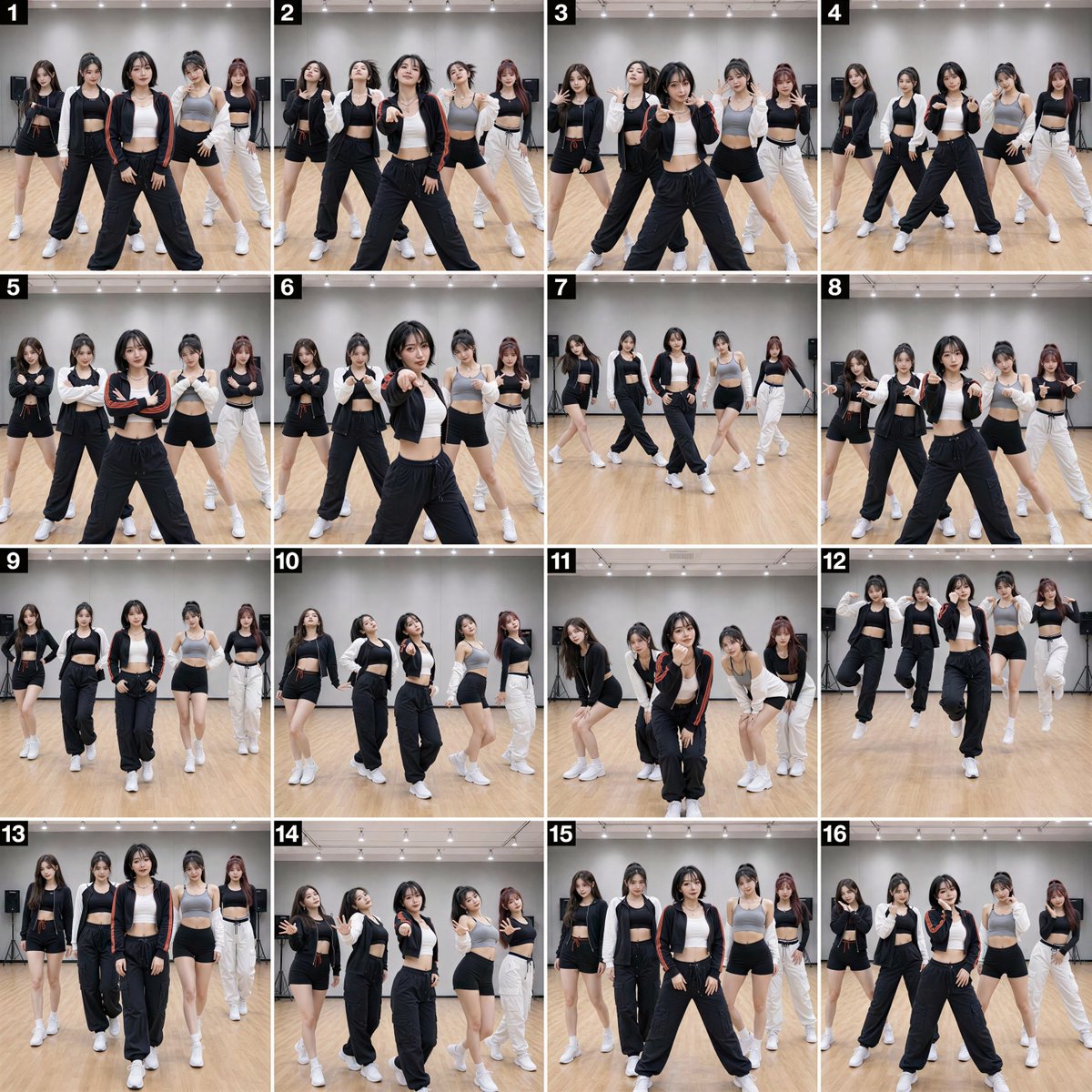
This gives the video model a movement map before animation begins.
The storyboard does not replace the prompt.
It makes the prompt more useful.
That is why Chat to Generate and Chat to Edit work best as a pair.
Chat to Generate creates the visual starting point.
Chat to Edit turns that starting point into choreography direction.
Better direction leads to better dance videos.
Step 4: Generate the Dance Video With Image to Video Ultra S
Once the AI influencer model, first frame, and 16-panel storyboard are ready, the video has a real foundation.
The first frame anchors the performer.
The storyboard defines the routine.
The written prompt clarifies timing, camera behavior, lighting, and realism.
Then Image to Video Ultra S can turn that visual plan into motion.
This is where Seedance 2.0 fits into the APOB AI workflow. It is not being used as a loose text-to-video experiment. It becomes part of a guided image-to-video process built around assets the creator has already shaped.
The workflow is no longer:
text prompt -> dance video
It becomes:
AI influencer model -> first frame -> 16-panel storyboard -> motion prompt -> Seedance 2.0 video
That extra structure makes a real difference.
Image to Video Ultra S Prompt: Seedance 2.0 Dance Video
Animate the provided first frame into a 15-second vertical 9:16 K-pop TikTok dance challenge video. Keep the same five original dancers, same faces, same hairstyles, same outfits, same clean dance practice studio, same phone-camera framing, and same bright practice-room lighting throughout the entire video.
STYLE:
Official K-pop TikTok dance challenge, clean studio practice video, sharp synchronized choreography, athletic idol energy, simple viral hand gestures, confident expressions, loopable ending. The video should feel like a high-view K-pop dance challenge filmed for TikTok, not a full concert music video.
CHARACTER LOCK:
Exactly five fictional female dancers appear for the entire video.
Center leader: long dark brown hair, white cropped athletic top, black oversized track jacket, gray cargo pants.
Left-front dancer: short black bob with bangs, black fitted sleeveless top, white track pants.
Right-front dancer: long ash-blonde hair, gray cropped hoodie, black mini skirt over shorts.
Left-back dancer: long black low ponytail, white zip-up sporty jacket, black biker shorts.
Right-back dancer: dark red-brown high ponytail, black crop top, gray wide-leg pants.
Do not swap faces, outfits, hairstyles, body positions, or identities. No extra dancers.
TIMELINE:
0–1.5s:
Start exactly from the first frame. The five dancers hold a tight V formation, looking directly at the phone camera. Still for half a beat to create a scroll-stopping hook.
1.5–3s:
The beat drops. All five snap their heads up, bounce their shoulders once, then bring one hand near the cheek and flick the wrist outward.
3–4.5s:
They step right with a hip bounce, then step left. Arms cross briefly at the chest and open outward in perfect synchronization.
4.5–6s:
Center leader points toward the camera and silently lip-syncs one beat. The other four dancers mirror smaller cheek-level hand gestures behind her.
6–7.5s:
Full-body choreography. All five perform quick step-cross footwork, heel pivot, knee bounce, then a sharp freeze. Feet stay grounded and readable.
7.5–9s:
Signature viral hand sequence: palm up, palm down, finger point, cheek tap, wrist flick. Hands must be clean and synchronized.
9–10.5s:
Formation changes from V shape into a horizontal line. The group performs a controlled shoulder roll and short body wave, then snaps back upright.
10.5–12s:
All five do a small jump-step together, landing softly with knees bent. Arms angle near the face, then drop to the waist with a hip accent.
12–13.5s:
They step slightly closer to the camera with confident smiles, creating a more intimate TikTok challenge feel.
13.5–15s:
They reset into the original V formation and repeat the cheek-tap plus wrist-flick signature move. End on a loopable freeze pose matching the opening energy.
CAMERA:
Stable vertical phone-on-tripod shot, slight smartphone wide angle, full-body visibility, centered composition, minimal camera movement. Avoid cinematic stage moves.
MOTION:
Sharp K-pop challenge choreography: head snap, shoulder bounce, cheek gesture, wrist flick, side step, hip bounce, arm cross, camera point, step-cross footwork, body wave, small jump-step, final loop pose.
LIGHTING:
Bright soft overhead studio lighting, clean practice-room look, natural skin tones, no harsh shadows.
ENDING:
End with exactly five dancers in a confident V formation, one hand near cheek, hips angled, ready to loop back to the first frame.
A good video prompt should not compete with the storyboard. It should reinforce it.
If the storyboard shows a clean neon dance routine, the prompt should support that routine. It should not suddenly introduce a new outfit, location, camera style, or unrelated movement.
Think of the storyboard as the choreographer.
The prompt is there to clarify the choreography, not rewrite it.
When the influencer model, first frame, storyboard, and prompt all point toward the same outcome, Image to Video Ultra S can produce stronger motion, smoother continuity, and more controlled results.
Step 5: Add Voice, Hook, and Personality
Motion captures attention.
Personality makes the account memorable.
For dance content, the voice layer does not need to dominate the clip. A short intro, ending reaction, talking avatar post, or caption can be enough.
The script can be simple:
"Wait for the last hit."
"Sixteen counts. One take."
"I built the whole routine from a storyboard."
With APOB AI, creators can add Talking Avatar or Lip Sync when the influencer needs to introduce the routine, explain a challenge, promote a product, or invite the audience to try the move.
Dance videos do not need long speeches.
They need a hook that lands fast.
Step 6: Build a Scalable Dance Content Loop
The real value is not one successful dance generation.
The value is the loop.
Create. Edit. Storyboard. Animate. Review. Improve. Post. Repeat.
That is how one AI influencer becomes an ongoing content series.
One AI influencer model can support:
- TikTok dance challenges
- Instagram Reels
- YouTube Shorts
- X video posts
- music teaser assets
- fashion fit-check routines
- fitness warm-up clips
- product launch videos
- UGC-style dance ads
- recurring virtual brand characters
The identity stays consistent while the choreography changes.
The creator can build different routines, camera moods, outfits, music hooks, and product moments around the same recognizable performer.
That is the shift APOB AI is focused on.
AI influencer dance videos should not feel like a gamble.
It should feel choreographed.
The Next Phase of AI Influencer Dance Video
The strongest AI creators will not be the ones who generate once and get lucky.
They will be the ones who build systems.
With APOB AI's AI Influencer Generator, GPT Image 2.0 inside Chat to Generate and Chat to Edit, and Seedance 2.0 inside Image to Video Ultra S, creators can move from unpredictable dance outputs to a full production workflow:
Build the influencer model.
Create the first frame.
Edit it into a 16-panel dance storyboard.
Generate a more controlled Seedance 2.0 video.
Add a hook or voice layer.
Improve the next version.
Scale the content across platforms.
APOB AI is an independent AI influencer platform built to make advanced AI generation more practical, consistent, and creator-friendly.
Prompt roulette is over.
A better dance workflow has arrived.
Try it now: https://mega.apob.ai/article
🎁Quote or retweet this post to get 5,000 credits to try it out — plus access to more dedicated prompts and workflows.
Disclaimer: APOB AI does not support or permit the creation of deepfakes. Users are responsible for intellectual property rights and legal compliance for their generations. Please review APOB AI's Terms of Service for full details.
Related articles

How to Run AI Slideshows Profitably on TikTok
the algorithm re-serves a slideshow to people who scrolled past it.

How To Cook 100+ VIRAL Slideshows In 10s With Opus 5
slideshows are the format TikTok's algorithm rewards the most right now and almost nobody is producing them at volume.