Everyone's debating Kimi K3 benchmarks. I spent 48 hours finding what it's useful for. Save this.

Five workflows the 1M context window unlocks, from feeding it your entire repo to analyzing a 3-hour video without a transcript. Full run costs $3. Reruns cost $0.30.
1. The 60-second context
Kimi K3 came out on July 16 from Moonshot AI. The spec sheet: 2.8T parameters in a mixture-of-experts setup, a 1M token context window, native input for text, images and video. Pricing sits at $3 per million input tokens, $15 per million output, and $0.30 on cache hits. Open weights are promised for July 27.
The benchmark noise is real. It took #1 on Frontend Code Arena ahead of Claude Fable 5 and posted 88.3 on Terminal-Bench against Fable's 84.6, while it still trails the top models on hard reasoning. But benchmarks miss the point. The story is the price of context. A window this big at this price changes what you can hand to a model in one shot. That list is below.
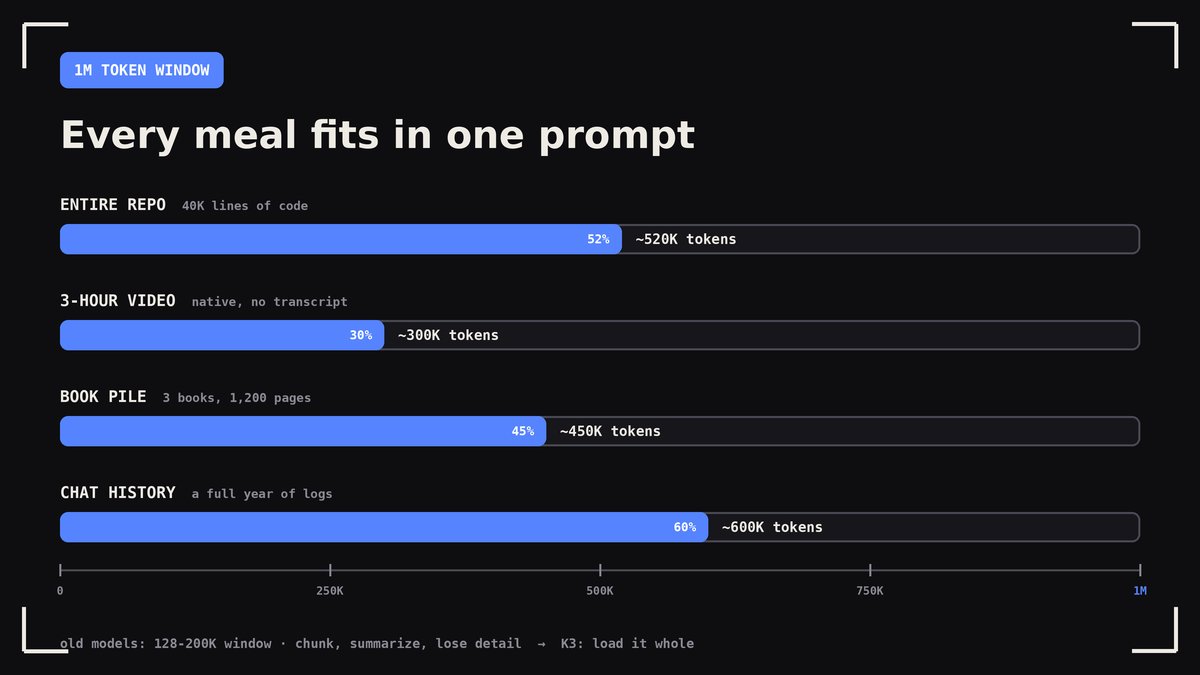
2. Workflow 1: feed it your whole repo
A 40K-line codebase is around 520K tokens. That fits with room to spare. So skip the RAG pipeline that retrieves the wrong files and paste the entire repo.
What to ask once it holds everything: map the architecture and the data flow. Find every place auth is checked and every place it's missed. List dead code and unused dependencies. Plan a migration and show every file it touches.
The practical pattern: spend the first $3 run on an architecture map and a risk list. Every follow-up question hits the cache at $0.30. One repo, one loaded context, a week of cheap questions.
3. Workflow 2: hand it a 3-hour video
K3 takes video as raw input. No transcript, no frame extraction scripts, no Whisper step. Upload the recording and ask.
Where this earns its keep: a 3-hour webinar becomes a summary with timestamps. A recorded sprint review becomes an action-item list with names attached. A competitor's product demo becomes a feature table. A conference talk becomes notes you can search.
The part people miss: it reads the screen, not just the audio. Slides, terminal output and UI clicks in the video land in the answer. A transcript never had that.
4. Workflow 3: the research pile
Three books run about 450K tokens. Twelve PDFs of papers fit next to them. Load the pile and ask questions no single-document chat could answer.
Where do these sources contradict each other. Which claims appear in one book and nowhere else. Build a reading order for this stack. Pull every number about X with a page reference.
This replaces the workflow where you summarize each document separately and then try to merge summaries that lost the details you needed.
5. Workflow 4: split it across 100 agents
K3 Swarm Max runs up to 100 parallel agents, and each one carries its own 1M context. You write one prompt. An orchestrator splits the task, farms it out and merges the results.

What this looks like in practice: 50 sources researched at the same time instead of one after another. A repo-wide refactor where every module gets its own agent. A competitive scan of 30 products that finishes over lunch. Work that used to take a team a week compresses into minutes of wall-clock time.
The catch inside the catch: swarm mode lives in the Max tier, so price it before you plan around it.
6. Workflow 5: the $0.30 loop
The cache is the quiet lever in the pricing. First run loads your 1M tokens at $3. The context stays cached, and every question after that costs $0.30 per million.

Run the math on a real week: 20 questions over one loaded repo comes to $3 plus 19 rebills at $0.30, under $9 total. The same 20 questions with a fresh context each time would run near $60. The habit that follows: load once in the morning, interrogate all day.
7. The catches
Honesty section. Thinking mode is always on, so answers arrive slower and you pay for thinking tokens whether you wanted them or not. On hard multi-step reasoning it loses to Claude Fable 5 and GPT-5.6 Sol, so keep your hardest problems where they live now. The open weights exist as a promise dated July 27, and promises slip. The swarm needs the Max tier. And the distillation questions from February still hang over Moonshot without an answer.
None of that cancels the workflows above. It just marks where the monster's teeth end.
8. Try one today
The shift here has a one-line summary: context stopped being the expensive part. When 1M tokens cost $3, the bottleneck moves from "what fits" to "what do you want to know."
Getting started takes five minutes. The API lives at api.moonshot.ai/v1, speaks the OpenAI format, and the model id is kimi-k3. Pick the workflow closest to your week: a repo you inherited, a webinar you skipped, a pile of PDFs you keep postponing. Feed the monster and see what comes back.
If this saved you a subscription's worth of experimenting, the bookmark button is right there.
Related articles

How to Design with AI Without Getting the Same Screen Twice
The model returns the average of what it has seen. The design is what you refuse to let it average.


AI keeps shipping the same generic UI, here's the cure
i'm going to show you why every AI generated UI on the internet looks like one website wearing 40 different icons, and the simplest unsexiest tool that fixes it for you.