How To Make Money With Whop + GrokBot...

i'm going to show you how Grok Bot works, then hand you 10 workflows that drive real cash for your business with whop...
one specialized bot per workflow, running 24/7 on its own computer.
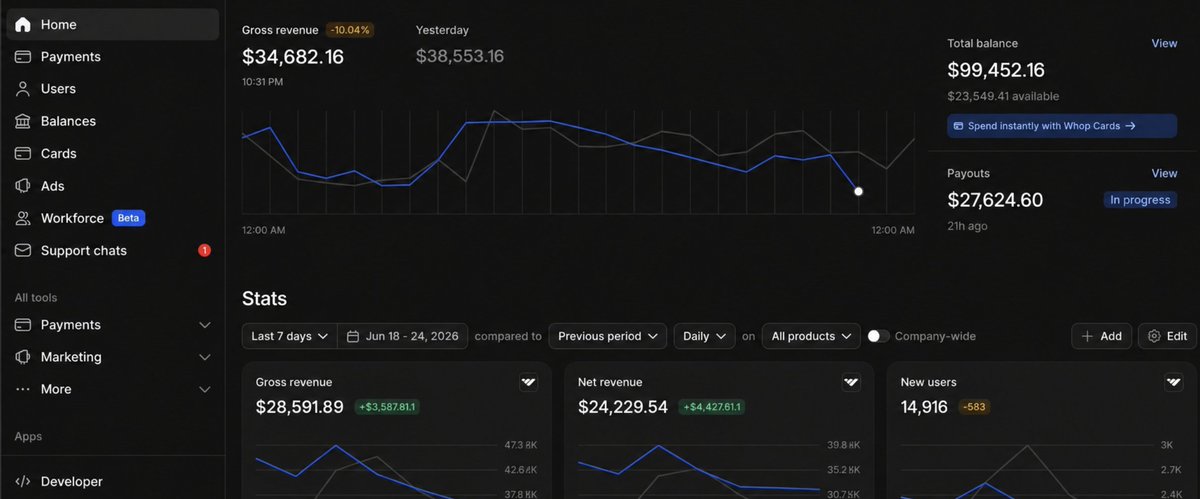
and i'll say it upfront: my favorite workflow with Grok Bot is the one where the bot stops writing code and starts running a business, because that's what the Whop connector unlocks, so that's the first one we're going to build
because a Bot in Grok Bot is one persistent, named agent, one AI teammate with one job
the mistake i keep seeing when i help people set up agents in their business: they stack ten jobs into one giant agent, then can't keep up with what's happening inside it, lose trust, and stop using the thing entirely. the agent didn't fail, the setup did
today we're fixing it with your own team of agents that work 24/7, driving revenue in your business, with Whop as the layer where money actually changes hands

here's what's inside this guide:
- the first workflow, built right away: the Whop connector business bot
- what Grok Bot is and how the shared computer works
- why one bot per workflow beats one agent that does everything
- how to plug the team into your knowledge base
- the reverse prompting session that gets you started right
- the nine other revenue workflows, with the tools and the approvals
- how to monitor the team without becoming the middleman
so we're jumping right into building the first workflow, then i'll get more advanced: setting up Grok Bot properly, building a knowledge base, running the reverse prompting session, and rolling out the rest of the workflows
the first workflow: the Whop connector
vanilla Grok Bot answers questions and writes code. it can build you a website, but the site is a folder on a computer. it can't take a payment, host anything, form a company, or tell you what you earned yesterday
connect Whop and that changes. the bot gets hands on the real world. it can create a product, set a price, hand you a live checkout link, host the thing it built, file the company behind it, and pull your revenue as structured data, all in one session, while you direct
that's the whole difference. before, your agent could build the thing. now it can sell the thing, host the thing, incorporate the thing, and report on the thing, without you writing payment code or opening a single government portal
you add Whop as a native connector inside Grok Bot. connectors are direct integrations, so this is more reliable than having the bot click through a website. once it's on, every Whop action is callable from your bot's cloud computer
here's the pass, and every step ends with something real, not a chat draft
step 1 - the product: you tell the bot the idea in plain words. it creates the product on Whop, sets the price, and configures the plan. no dashboard, no forms filled by you
step 2 - the checkout: the bot hands you a live checkout link. real customers pay through that exact link. you wrote zero payment code and connected zero payment processor, it's already wired
step 3 - the hosting: the site or app the bot built goes live on Whop, hosted, in the same session. build, upload, promote to production, read the logs if something breaks, all from one place. you never touched a hosting dashboard
step 4 - the company: if you want it legal, the bot files the LLC or C-Corp. founders, ownership split, state filing, registered agent, EIN. you approve and pay, it files. the thing you built on a Tuesday night has a real company behind it by the time you're done
step 5 - paid access: building software people pay for? the bot wires the license validation from the same place it built the product. paying users get in, everyone else stays out, and you didn't write the auth
step 6 - the report: the bot pulls your revenue, customers, and churn from Whop as structured data. not a screenshot it reads back to you, real data it can act on, so the same bot that built the product can tell you which plan is slipping and do something about it
you drop the idea in, the bot runs this whole pass as a saved skill, parks the checkout link and the numbers for review, and you push the ones that sell
and here's the safety net, which matters because this lane touches money. every agent action is logged, so you see exactly what it did. destructive operations, deletes, payouts, transfers, always ask you first. money moves are never automated on day one, and the approval is you
what is Grok Bot
xAI's launch line says it plainly: "Bots are AI teammates that do real work for you. they sign in to your tools, use them just like you do, and come back with finished work"
the architecture under that line is what makes the money part possible

each Bot runs on a persistent cloud VM with a browser, a filesystem, and a terminal. work finishes inside the real tools, not as chat drafts you copy-paste. the bot logs into Whop, into your ad account, into your outbound tool, and comes back with the work done
all of your Bots share one cloud computer assigned to your account. files, browser sessions, and logins carry across the whole roster, so when your outbound bot closes a deal and hands it to your Whop bot, the login is already there, no setup repeated
each Bot gets its own screen on that shared computer, so several Bots can click through browser and desktop tools in parallel, but one Bot runs one computer-use task on its screen at a time

there's no workflow builder or prior setup required... you talk to a bot and it works, as if your working with a team...
and it runs on Grok 4.6, the model xAI built with a specific focus on long-running agents, priced so keeping agents working all day finally makes economic sense instead of burning your month's budget by noon
the pieces you configure, and it uses plain words for all of them so a normal person knows what they are:
- description: the rules that stay true for that bot, its permanent identity
- conversation: the task-specific instructions for today
- memory: stable preferences and summaries from its work, not a source of truth
- connectors: direct integrations like Whop, more reliable than clicking through a website
- computer use: the browser and desktop, for anything without a clean API
- skills: reusable instructions covering the steps, the decision rules, the expected output, and the safety boundaries
- routines: when to run, on a schedule or after an event, even with your laptop closed
- approvals: rules that stop risky actions and wait for you
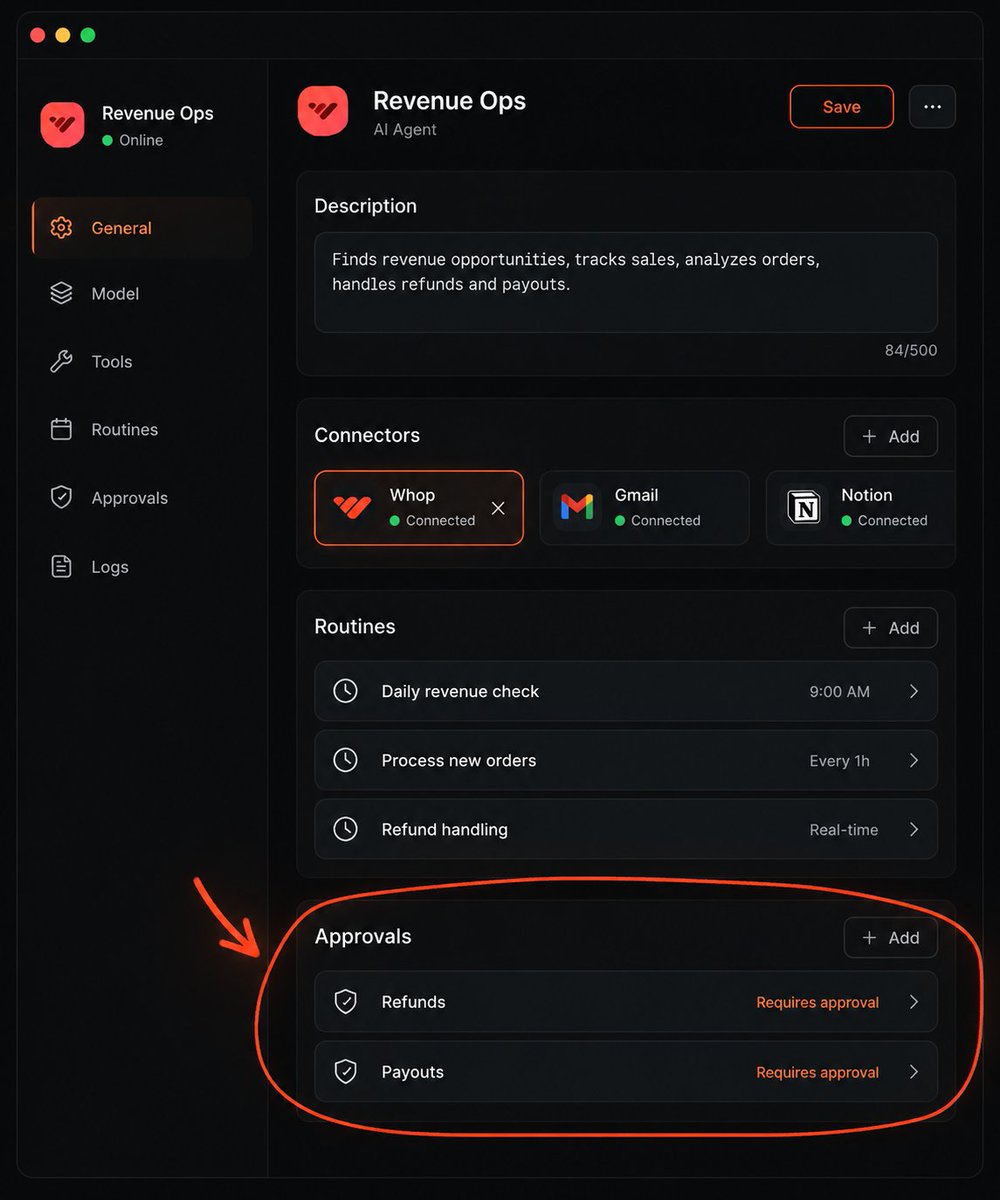
that last one is the safety net. Require Approval rules always stop matching actions, and when an allow rule and an approval rule both match, approval wins. wire it to every lane that spends money or sends on your behalf, and you can let the rest run
why one bot per workflow
from my experience, the issue with a single mono-agent is that it gets bloated and very hard to manage once you stack complex workflows for a business
context, memory, tool calling... everything degrades together. the agent that was sharp on outbound gets dull the day you also make it run ads, because now it's carrying both and confusing the two
grok bot had a nice idea: isolate different actions into different bots
that's better for you and better for everything technical in the background
each bot carries only the context of its own lane, calls only the tools its lane needs, and remembers only what its lane taught it. your Whop business bot holds products and checkout. your outbound bot holds the offer and the ICP. neither one drowns in the other's context, so both stay sharp
the official docs land on the same rule i learned the hard way: the best roles own a repeatable outcome, not a loose category of questions. "handle my marketing" is a category and it rots. "draft outbound from the vault every morning and queue it for approval" is an outcome and it holds
one agent per task.
and there's a management payoff nobody sells hard enough. when each bot owns one lane, you open the app and see exactly where you are on revenue, on outbound, on ads... like reading a team dashboard instead of scrolling one agent's endless log

plug the team into your knowledge base
every Bot has a filesystem and a terminal on its cloud computer, so you can give the whole roster one source of truth
an Obsidian vault is just a folder of markdown files. sync it to that computer, git works, so does any sync folder the bot can reach, and now every bot reads and writes the same knowledge base
this fixes the weakest part of bot memory. a Bot's memory holds preferences and summaries, but the docs say it straight: memory is not a substitute for an authoritative source
your vault is that authoritative source. offers, ICP, voice guidelines, pricing, product list, your Whop checkout links, client notes, all in files every lane can open
- the research bot files findings as markdown notes
- the content bot reads the voice guide before it drafts a word
- the Whop business bot pulls the price list and the offer from the same folder before it builds a checkout
- you open the vault in Obsidian and see everything the team knows, in one place, editable by hand
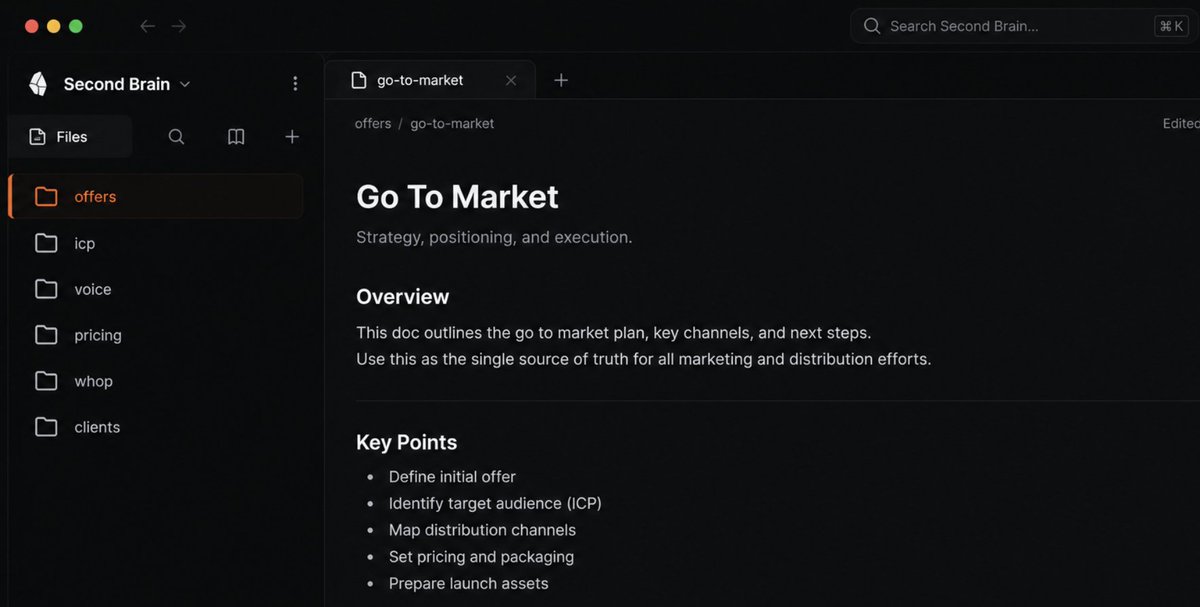
one source of truth, ten bots reading it
the best way to get started: a reverse prompting session
don't start by writing prompts... start by letting Grok Bot interview you
open a chat and tell it: interview me about my business, my offer, and my clients before we set anything up
goals, offer, clients, tools, what a won week looks like, what you refuse to automate... let it pull the whole picture out of you and save it. you'll answer better than you'd ever prompt, because it's asking the questions you'd forget to write
and here's the cheat code if you already run another agent: ask it to extract everything it knows about you and your business into a single .md file. your context, your projects, your preferences, your writing samples, all of it in one file
drop that file into the reverse prompting session and into your vault, and your first bot starts with months of context instead of a blank slate

then the setup pattern for every lane, and it's the same four moves every time:
start with read-and-prepare work only. review the result yourself for a week. then grant approved actions, one at a time. then add a routine so it runs without you
do the job once while the bot watches, save it as a skill, and say what done means, otherwise the bot decides for you
now the rest of the money part
the nine other revenue workflows
the whop business bot is already running. everything below maps to one bot, one tool, one lane. the bot brings the hands, the tool brings the data, and whop shows up wherever cash actually moves

1 -> the daily X research bot
if you're starting from zero, this is the lane to open with. Grok 4.6 is just so good at researching X, and it's basically free once you have the subscription you need for Grok Bot
the routine: every morning, research what performed on X in the last 14 days around your niche, real posts with real engagement, note each winner's angle, and file the findings as markdown in your vault
that research feeds three revenue paths at once: your own content, the products you launch on Whop, and client deliverables. read-only, zero risk, immediate value, the perfect first lane
2 -> the whop partner referral bot
this is the lane most people miss. Whop pays partners 30% of Whop's gross profit on every transaction a business you referred processes, for life, plus 1% of that business's ad spend
so point a bot at it. it scrapes digital businesses already selling memberships and physical businesses with recurring billing and a findable address, works out what each one is worth to you per month at Whop's 2.7% plus 30 cents, drafts the outreach with each business's real number in it, and ends every message with a pre-filled Whop signup link for their category
the number is the whole pitch. not "you should try Whop", but "you've got roughly 800 members at 49 a month, here's what you're overpaying, here's a link that skips the setup"
you approve the list, the sends stay behind approval, and one referral that keeps selling pays you every month without you touching it again
3 -> email outbound
the bot researches accounts overnight, scores contacts with intent, drafts email in your voice from the offer and ICP in your vault, and leaves a review list for you to approve
when the offer is one of your own Whop products, the draft ends with the live checkout link for the exact plan, so the reply-to-buy path is one click. they don't get a "book a call", they get the thing to pay for
keep every send behind approval... drafting is the bot's job, sending is yours until it earns trust
4-> the checkout concierge
someone asks how do i buy. the bot generates a Whop checkout link for the exact plan they asked about and replies, on request, every time
it runs the same move inside your community and your DMs, so nobody who wants to pay you ever waits on you to be awake. the most expensive thing in your business is a ready buyer with no link, and this lane deletes that
5 -> paid access and licensing
building a tool people pay for. the bot wires the Whop license validation so paying users get in and everyone else stays out, and creates or updates the plans and prices without you logging into a dashboard
this is the lane that turns a project into a product. the bot holds the checkout, the access, and the pricing in one place, so the thing you built actually gates on payment instead of being free forever because you never got around to the auth
6 -> paid media and ads
the bot pulls live channel and campaign data, messages you a recommended reallocation against your monthly budget, and holds for your approval before touching anything
it can launch and manage the campaigns from the same place the product was built, since Whop handles ads too. pair it with a creative strategist lane that spots early winners before they're obvious and writes a why-it-works hypothesis with no invented metrics. two bots, two screens, same ad account
the revenue report bot
every morning the bot pulls yesterday's revenue, new customers, and churn from Whop as structured data and posts it in one place you actually read
you get the number with coffee instead of logging in. and because the data is structured, not a screenshot, the bot can act on it, flag a churn spike, or surface the plan that's slipping before it costs you a month
7 -> social content and clipping
a social media manager bot studies your real posting history, drafts when something noteworthy ships, and parks posts for you to publish, fed by the X research lane so every draft starts from a proven angle. the bot drafts, you publish, and your voice stays yours because nothing goes out without your click
a second bot works your back catalogue of talks and recordings. pull the next one, retrieve the transcript, extract the section worth clipping, and file it for production. a content library growing while you sleep, from footage you already paid for once and used once
8 -> competitor and market intelligence
a bot that monitors overnight for new launches, price moves, and fatigued creatives, surfacing only the shifts that gain traction, with suggested changes
lead research, price watching, competitor content... the highest-value jobs for a scraping-equipped agent, and all of them end in a pricing or positioning move that makes money, usually a change to one of your Whop offers you'd never have made in time on your own
9 -> how to monitor the team
the team UI is the part beginners underrate. anyone who isn't deep into AI agents can follow along and give the right orders to the right agent, because each lane has a name and a face
three moves keep it manageable:
- put a chief-of-staff bot on top that scans the other lanes and delivers a read-out with sources, so you're not the middleman running between agents
- use group chats when lanes need to hand off, two to six bots passing work among themselves, the outbound bot handing a closed deal to the Whop business bot to spin up the checkout
- check the dashboard for spend and usage, and know that a per-action audit view is still coming, it's not all there yet
one rule from my own setups: make every bot verify before reporting back. a bot that says "done" without checking is worse than no bot, because now you trust a thing that lied to you once
10 -> limits and human control
i'm not going to pretend this is finished software... it's early and the sharp edges are real:
- the shared computer is one machine, and separate bots are separate work surfaces, not separate security boundaries
- passwords, 2FA codes, CAPTCHAs, payments: the bot hands you the computer, always
- browser-based work is slower than an API and stalls when a site changes its UI
- there's no grok bot-specific spend cap yet, so watch the usage page
- an approval controls the proposed action, it does not reverse work already completed
so the rule: start with one valuable, reversible workflow. read-and-prepare first, actions behind approval, money moves never automated on day one. whop's own guardrails help here, every action logged and destructive ones gated, but the gate is you
the expansion rule
get one lane running and stable before you add the next specialist
my sequence: the reverse prompting session today, the Whop business bot and the X research lane this week, review their output daily, save the routines, then pick the lane closest to your revenue and give it a bot of its own
every agent harness i've run rewards the same discipline: specific profile, specific actions, visible lanes. grok Bot just made that discipline the default instead of something you have to build yourself, and Whop gave the agents somewhere to put the money
one bot, one job, one lane you can see, and a checkout link at the end of it... that's how agents make you money instead of making you tired
Related articles
Build a Marketing Intelligence System With Grok Bot
I want one Grok Bot whose entire job is to know what's happening in my market before I do.

make money with grok bot in 6 weeks (FULL GUIDE)
set up everything you'll need to run postcard campaigns for me later.

Grok Bot: a real way to make a profit
Memecoins are back in style. The hype cycle came around again and everyone's chat is full of "who made money on what." So I wanted to test something: what happens if you meet that cycle not by tradin…