Lovable Is CRACKED at Shipping SaaS. Here's the Workflow That Actually Works.

Most people open Lovable and start prompting screens. An hour later they have a pretty demo that falls apart the second real data touches it.
Some go further. They build a full UI, then try to bolt a backend on at the end, and end up with a tangle they can never actually ship.
And then there's a small group who run an actual system. Plan, design, build, connect, monetize, deploy. In that order. Those are the people shipping real products with paying users.
I run an AI agency and a builder community, and this is the exact workflow we use to take a SaaS from an idea in my head to a live, paid product inside Lovable. It's the same system I teach in my free course, where I build a real app called Braindump start to finish.
Here is the full breakdown.
Why Most Lovable Builds Die as Demos
Here's the loop most people are stuck in.
You open Lovable and start prompting screens immediately. No plan, no source of truth. Every new prompt fights the last one, the design drifts, and you pivot three times mid-build.
Then the backend becomes an afterthought. You wire it in late, it doesn't match the UI you already built, and the whole thing gets brittle. That's where "vibe coded" apps fall apart.
The fix is not a better prompt. It's a sequence. Same tool, same models, completely different result, just because of the order you do things in.
This is the order I run.
Phase 1: Plan the Whole SaaS in Claude Before You Touch Lovable
Planning is 80 percent of the work. Skip it and you pay for it later in wasted prompts and rebuilds.
Start with a raw brain dump. Get the idea out without overthinking it, then let Claude expand it, clarify it, and stress-test it with you.
Then cut scope, hard. I use the MoSCoW framework (must-have, should-have, could-have, won't-have) to strip the idea down to only the must-haves for MVP phase one. Everything else waits.
From there:
→ Map the full user journey end to end, so you never pivot mid-build
→ Lock in a simple monetization plan
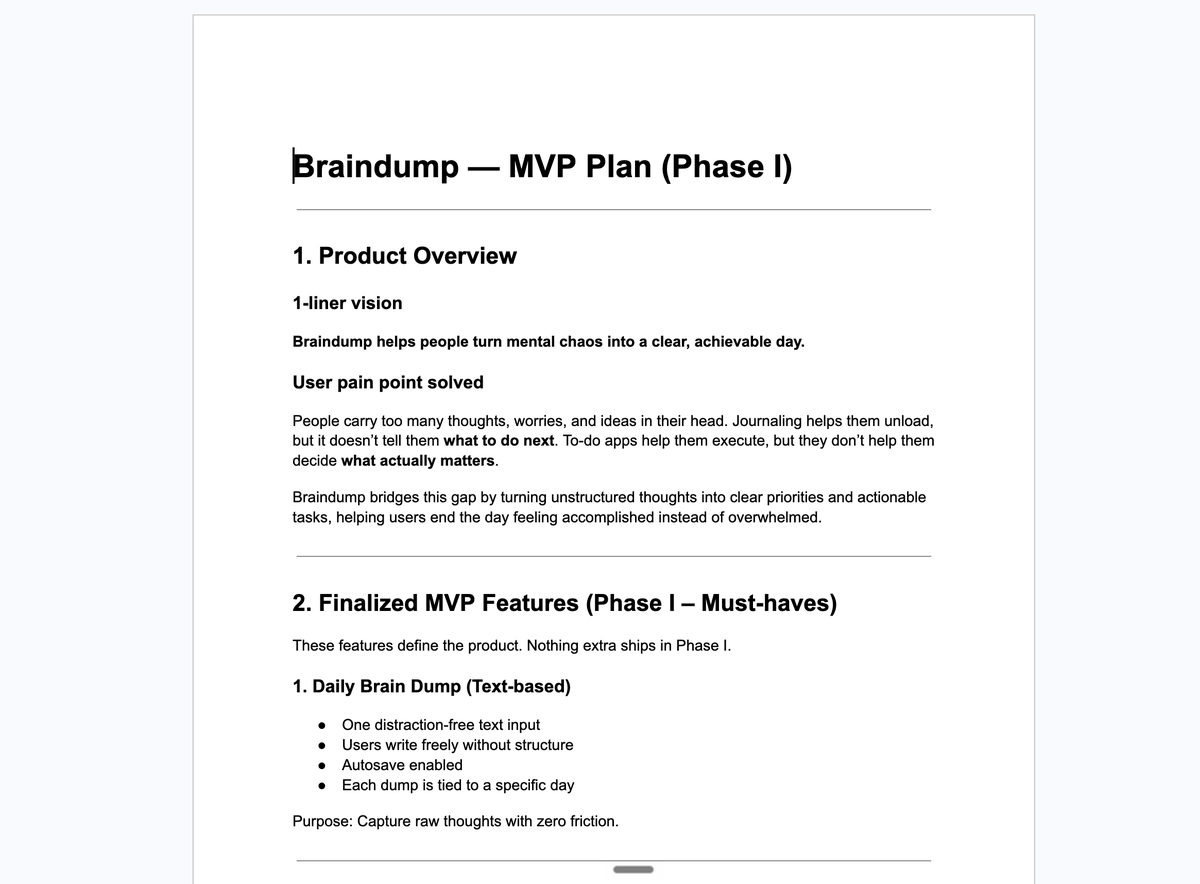
→ Produce two documents: an MVP plan and a UI development plan
Those two documents are your source of truth for everything that follows. Every screen you build, every table you create, traces back to them.

Phase 2: Build the Landing Page First
This surprises people. Before any app screens, I build the landing page.
The reason: the landing page locks the design system for your entire product. Colors, typography, spacing, feel. Get it right once here and every screen after inherits it.
You don't start from scratch either. Pull real design inspiration from Dribbble or Behance, find a direction you love, and turn it into a build-ready prompt using Snap Prompt, my custom GPT built for exactly this.
Then build it inside Lovable, refine section by section, and polish:
→ Lock in a theme and keep it consistent
→ Swap weak sections using 21st Dev components
→ Add simple visuals, nothing overengineered
The goal is a beautiful landing page you can publish the same day. For Braindump, this is where it stopped looking like a project and started looking like a product.
Phase 3: Build the Full Frontend, Screen by Screen
Now you build the actual product, using the UI development plan from Phase 1 as your single source of truth.
Go one screen at a time. Review the plan, prompt Lovable for that screen, check it, move on. For Braindump the order was authentication, onboarding, the core brain dump screen, the processing screen, then results.
Two rules that keep this clean:
→ Keep every screen consistent with the landing page design system
→ Test the routing and user flow after every single screen, so you catch breaks early instead of at the end
Focus on complete and functional, not pixel-perfect. You're aiming for a working frontend that follows the full user journey in one to two days, not a museum piece.


Phase 4: Get Set Up. Backend Path and Platform
Before you build any backend logic, two setup decisions.
First, pick your backend path. You have two:
→ Lovable Cloud. The fastest option. Lovable generates the backend for you: tables, relationships, security rules. Best choice for beginners and for shipping your first SaaS quickly.
→ Traditional Supabase. More control, more work. Worth it when you need custom logic or you're planning to export to Cursor and scale beyond the basics.
For this build, and for most people shipping their first product, go with Lovable Cloud. Decide now, because switching later is painful.
Second, get oriented in the platform before you build. A ten-minute walkthrough saves hours:
→ Connect GitHub before you build anything. It's your backup and your escape route, with two-way sync so your code is never trapped.
→ Find where connectors live and what Lovable Cloud gives you out of the box.
→ See how AI integrations are handled for you, no manual setup.
Don't build yet. Just know where everything is.


Phase 5: Build the Backend
Now the app gets real.
Start by giving Lovable full product context. Save your MVP plan as an .md file in the project root so the agent always builds against your source of truth.
Then, before you create a single table, design the complete database schema. This is the step people skip and regret. Get the schema right and everything downstream is smooth.
Once the schema is locked, use Lovable Cloud to generate the backend, and build in clear phases:
→ Authentication first
→ Connect the frontend to the database
→ Add the core feature logic (for Braindump, the AI-powered clarity analysis)
After each phase: test it, read the logs, debug what breaks, and validate the flow before moving on. This is how a UI-only build becomes a working, backend-powered SaaS.
Phase 6: Finish the Backend and Add Monetization
The last stretch is what separates a project from a business: getting paid.
Work through the remaining backend phases with a structured task breakdown, then:
→ Add user tracking to separate free and pro users
→ Integrate Stripe subscriptions with a simple, MVP-friendly approach
→ Build the upgrade flows and access control
→ Handle real-world edge cases (for Braindump, things like multiple brain dumps in a single day)
Test each phase properly. Verify free vs pro limits, confirm upgrade prompts trigger, run Stripe in test mode, and validate the full payment flow end to end. Finish with a complete walkthrough of the app as a real user would experience it.
At this point you have a live SaaS with auth, AI features, monetization, and upgrade flows. Ready for real users.
What Changed Since I Recorded This: Connectors
I recorded this course in January. My workflow above is exactly the same today, but one thing has changed the game since, and I have to add it: connectors.
Connectors plug your app straight into real outside services, so Lovable handles the integration work that used to eat weeks of hand-written code.
A few that matter:
→ Twilio, so your app sends real text messages
→ ElevenLabs, so your app talks back in a real human voice
→ Google Workspace, wiring in Gmail, Sheets, and more
→ Payment and data services, connected without the usual plumbing
The workflow tip: wire your connectors first, then build the UI on top of them. That one flip turns integrations from the hardest part of a build into the easiest.

Lovable Isn't Just a SaaS Builder Anymore
The other shift since January: Lovable stopped being only a product builder.
You can now generate your entire go-to-market inside the same tool you built the product in:
→ Full animated launch videos from a single prompt, the kind that used to cost $500 and take a video editor days
→ Brand assets, icons, mockups, and social posts from a short brief
So the old mental model, "Lovable is a UI builder," is dead. You can build the product AND everything you need to launch it, in one place. That is a different category of tool.
What to Watch Out For
A few honest flags before you run this.
→ The plan is the product. Skip Phase 1 and no prompt will save you. This is the number one reason builds fail.
→ Don't overengineer the frontend before the backend exists. Functional first.
→ Lovable Cloud is speed. Know when you'll outgrow it toward Supabase and Cursor, and choose deliberately.
→ Connect GitHub on day one. No exceptions. It's your safety net.
What This Actually Means
Shipping a SaaS used to take a team. A designer, a frontend dev, a backend dev, weeks of coordination, and real money.
Now it's a sequence one person runs in a few days. The tool isn't the moat, everyone has the same Lovable. The moat is knowing the order to use it in. Plan, landing page, frontend, backend, monetize, then layer on connectors and launch assets.
Most people will keep prompting random screens and wondering why their app never ships. The ones who run the system will have live, paying products while everyone else is still on demo number four.
2026 is going to be UNFAIR for builders who move early on this.
TLDR
→ Plan the whole SaaS in Claude first. Brain dump, MoSCoW to cut scope, map the user journey, produce an MVP plan and a UI plan as your source of truth.
→ Build the landing page first to lock your design system (design inspiration plus Snap Prompt, then refine in Lovable).
→ Build the frontend screen by screen off the UI plan, testing the flow as you go.
→ Pick Lovable Cloud for speed, connect GitHub on day one, and learn the platform before building.
→ Build the backend: schema first, then auth, then connect the frontend, then your core AI feature. Test every phase.
→ Finish with monetization: user tracking, Stripe, upgrade flows, edge cases.
→ New in 2026: wire connectors first for real integrations, and generate your launch video and brand assets inside Lovable too.
I broke this entire build into a free 10-part video course where I ship Braindump from scratch. Comment "BUILD" and I'll send you the link.
LFG.
Related articles

How to Design with AI Without Getting the Same Screen Twice
The model returns the average of what it has seen. The design is what you refuse to let it average.


AI keeps shipping the same generic UI, here's the cure
i'm going to show you why every AI generated UI on the internet looks like one website wearing 40 different icons, and the simplest unsexiest tool that fixes it for you.