make money with grok bot on autopilot (FULL GUIDE)

since grok bot has its own computer and uses tools the same way you do, you can leverage it to make money fully autonomously. it just needs the right systems behind it and the setup done properly.
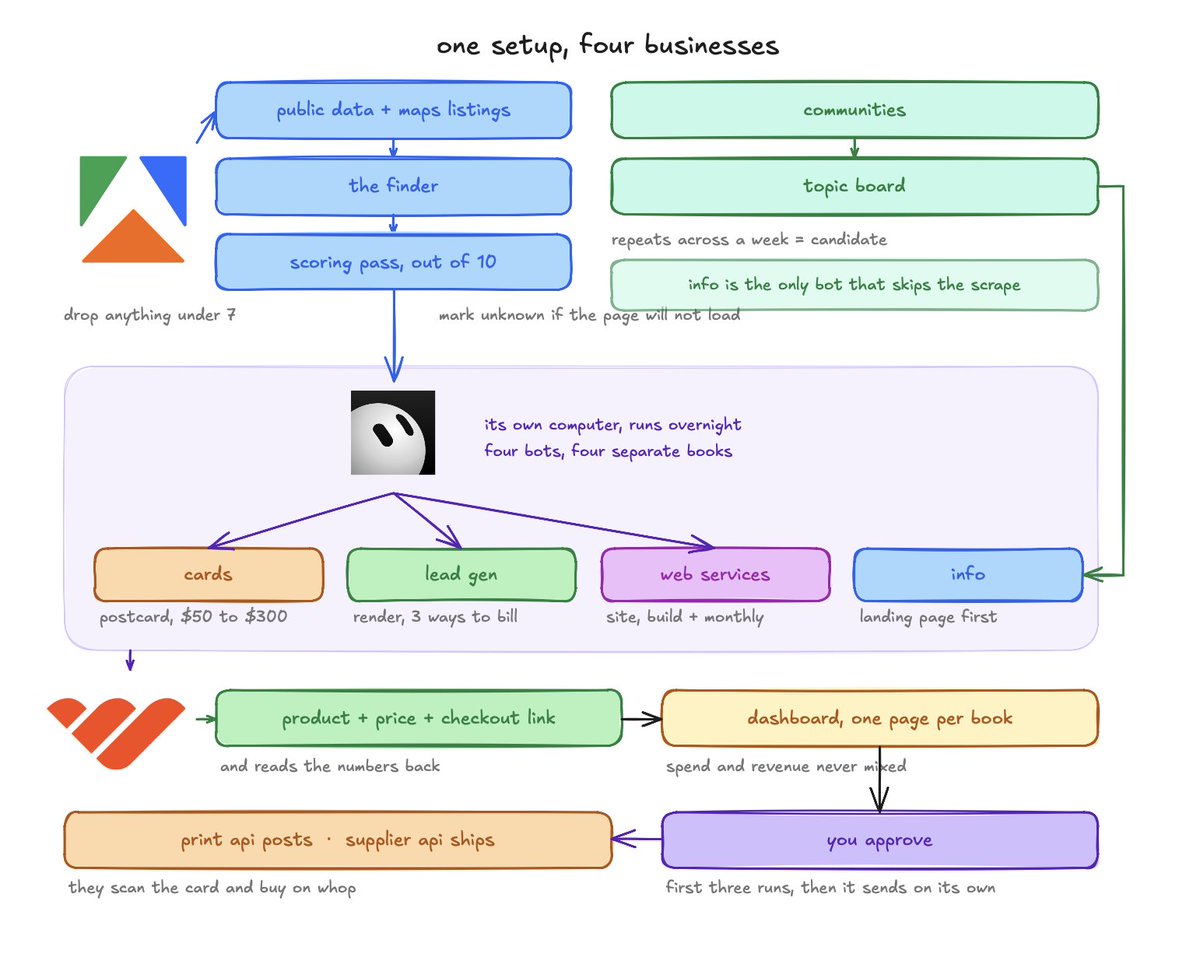
so you run a few of them at once, each one on a different business, and the loop is the same for all of them. find the customers, find what they're stuck on, build the thing that fixes it, and take the payment through the whop.
by the end of this guide you'll have four systems set up:
- physical products sold to local businesses, $50 to $300
- autonomous lead gen systems, sold outright, on a retainer, or on a percentage
- info products written from what people are actually asking for
- web services, the site built before you contact them
what grok bot gives you
two things, and the first one is the main reason to use it over a normal agent
it has its own computer. it opens browsers, runs terminals, signs into portals, fills in forms. that matters because most of what makes money sits on platforms with no api. vendor applications, print portals, affiliate networks, listing sites.
it runs on a schedule and keeps going in parallel, so you're not triggering it.
the whop cli is what makes it a business
the whole whop api runs from a terminal now, and grok bot has a terminal on its own computer. so it logs into whop itself and holds that session.
from then on it creates the products, sets the prices, generates the checkout links and reads your numbers back, without you opening any browsers.
the command shape is predictable. whop products list, whop plans create, whop stats time_series. it's whop <resource> list|get|create|update for almost everything, and every command takes --format json so the bot gets structured output back instead of text it has to guess at.
two commands do the setup for you. whop --llms hands the bot the full command list in one go, and whop skills add installs a skill that teaches it how to run an account properly.
whop also marks the destructive commands in the manifest agents read, so deletes, payouts and transfers ask for confirmation before they run.
how much you watch it
watch the first two or three runs of anything properly. read every postcard, open every site it built, check if the addresses match.
once a bot is producing work you'd have sent yourself, let it send. that's the point of the first couple manual runs.
for one of the systems, the one thing that stays yours permanently is posting and replying from your own accounts. platforms detect automated posting. i've tested that with vpns and rotating proxies and it was the thing that got them banned.
so physical mail, checkout links and site deploys can go on their own once you trust them. anything that logs into a social account, I recommend you do it manually.
step 1, set up the bots
download grok bot and paste this in.
> create four separate bots. each one runs one small business for me and does not touch the others.
> - bot 1 sells physical items to local businesses. nfc review cards, window clings, front desk kits. $50, $150 and $300, paid on whop, no sales call. it designs a mockup from the business's own public info and puts it on a postcard
> - bot 2 finds a real property from public listing data, generates a before and after, and mails it to the owner. the leads go to a trade business, and i get paid one of three ways: they buy the system outright, they pay a monthly, or i take a percentage of closed jobs
> - bot 3 finds a real thread where people are stuck on something specific, writes an info product that answers it, builds the landing page, whop takes the payment
> - bot 4 finds local businesses whose listed website is dead or missing, builds them a working site before anyone has spoken to them, and mails a postcard showing it. they buy the site through whop. no calls
> - for the first three runs of anything, stop before sending and show me. after that, keep going on your own unless something is different from the last batch
> - never refund, change a price or move money. if a spend cap is hit, stop and tell me rather than raising it
> - keep each book separate. never mix spend or revenue between them
> - before you build anything, tell me which of these four will take longest to reach its first sale and why. if you think one of them can't work as described, say so now instead of building it
step 2, give it whop
paste this next:
> install the whop cli, sign in, and run whop skills add so you have the skill for it.
> - then run whop --llms and tell me in your own words what you can and can't do with the login i've given you
> - list what's already on this account. if you find products i didn't create, leave them alone and just tell me what they are
> - tell me anything whop turns on by default that i didn't ask for
then the products, paste this:
> set up three products for bot 1 on this account.
> - tap pack, $50, one time
> - window kit, $150, one time
> - front desk kit, $300, one time
> - create a checkout link for each one and give me the three urls
> - do not touch anything belonging to another business on this account
the command underneath is whop checkout-configurations create --plan_id plan_xxx, and once the plans exist you pull the numbers back with whop stats time_series whenever the dashboard needs updating.
from here every asset a bot makes has a real price and a real link on it

step 3, the finder
this runs off public data and it's the same scrape for three of the four bots, so build it once. paste this:
> find local businesses in [city] in [category] using the apify connector that match all of these:
> - they have a physical address i can post to
> - between 20 and 200 google reviews, scored above 4.0
> - owner run rather than a chain
> - tell me for each one whether their listed website loads at all, works on a phone, or doesn't resolve
> - give me the business name, address, review count, score and phone
> - use public sources only, nothing behind a login
> - if you can't find the address, drop the business rather than guessing at it, and tell me how many you dropped for that reason
if it finds sixty and drops forty, the postal list is basically thin and you change category rather than pushing on.
step 4, the scoring pass
the raw list is useless. what you want is a ranked list where each business already has the reason you're contacting it attached.
paste this:
> go back over that list and score every business out of 10 as a prospect.
> - open their site if they have one and tell me whether it works on a phone or breaks
> - when it looks like it was last touched, and whether the hours, phone and address are on the page anywhere
> - when they last replied to a review, and how many they've never replied to
> - whether there's a working contact form and what fields it has
> - then give me the single worst thing about their current setup, in one line, written the way i'd say it to the owner
> - drop anything on a modern platform with a decent site, anything chain owned, and anything with no activity in the last year
> - if a page won't load at all, mark it unknown rather than scoring it anyway
that one line about their worst problem is what goes on the postcard, so it has to be specific. not "your website is old". "your site doesn't load on a phone and your hours aren't on it anywhere".
the unknown rule matters because a site that times out once during a scrape isn't a dead site.
what comes out of this is the ranked list, the specific line for each card, and which of the bots that business belongs to. a business with no site at all goes to bot 4. a business with a decent site and thin reviews goes to bot 1.
step 5, the assets
each bot builds a different thing off the same scored list.
for bot 1, paste this:
> for each business above 7, generate the postcard.
> - front is a mockup of the product with their own business name on it, in their own colours if their listing has photos to pull them from
> - back is four lines and the checkout url. who i am, the specific problem from their score, what the product does, the price
> - four lines is the limit. anything longer will sound like a sales letter
> - leave the qr corner blank and tell me, i'm compositing a real one in
generated qr codes look right and don't scan. always leave the square empty and drop a real one in.
for bot 2, paste this:
> for each property, produce a before and after.
> - before is the real listing photo, unedited
> - after is a generation of that same property with the work done
> - label it as a visualisation and not a quote, on the image itself
> - every generated image has to be the actual property on the card. if you can't get a usable photo of that address, drop it rather than using a similar looking house
i had four attractive houses come back and only one of them was the address on the card. so you have to keep an eye here for the first couple runs.
for bot 4, paste this:
> for every business whose domain doesn't resolve, build them a working site.
> - their own business name, phone, address, services and hours pulled from the listing
> - one page, works on a phone, real content and not lorem ipsum
> - deploy it to a subdomain with a bar across the top saying it goes live when they subscribe. everything else on the page works
> - screenshot it and put that screenshot on the postcard front so they see their own business working before they've spoken to anyone
> - the qr goes to the finished site, not to a page about the finished site, and the checkout link sits in that bar
> - if the listing doesn't have enough detail to fill the page, tell me which fields are missing rather than making up services they don't offer
they should be looking at their own business working on their phone, with the buy button on the same screen.

the supplier api
for bot 1 the product is a physical object, so before you sell one you need a supplier the bot can order from without you.
nfc review cards, clings and desk kits are all made by print-on-demand suppliers, and the ones worth using have an api. the bot sends the artwork, the quantity and the customer's shipping address, and they print and post it.
so when you're picking a supplier, check for the api before you check the price.
paste this:
> here's my supplier api key: [key]. read their docs and tell me back:
> - what you need from me for a single order to go through end to end
> - which of my three products map to which of their skus, and what the artwork spec is for each one
> - whether they confirm shipping and give a tracking number back, and how i'd know if an order failed
> - set a hard cap of [amount] per month at the supplier's end, not in this chat
> - then place one test order to my own address and show me what came back before you touch a real one
this is a test order to yourself. if you find out the bleed is wrong, or the artwork spec is a different size than you generated, you can fix it.
same applies to the artwork itself. give the bot the supplier's template dimensions in step 5 so the mockups it generates are already at print size, otherwise every order needs a resize before it can go.
step 6, the money side of each bot
cards, web services and info products all take payment on whop, and the bot creates the product and the checkout link itself. that's the whole point of the cli and there's nothing left for you to do on those three.
lead gen, three ways to get paid
the render system sells three different ways and you pick per trade.
sell it outright to one business in that trade and geo. they own it, they get every lead, you charge once and hand it over.
run it yourself and charge a monthly. you keep the system, they get the leads, and you get paid whether the leads close or not. this is the one to default to.
take a percentage of closed jobs. highest ceiling and slowest to start, because it's the only one of the three that needs a partner program, an agreement and documents.
> find installer partner programs in [trade] that pay a referral cut.
> - free to apply only, no paid franchise or dealer buy-in
> - for each one tell me the cut, whether it's per lead or per closed job, and exactly what documents the application asks for before you start filling anything in
> - do not create accounts and do not invent business details. fill them to the last screen and stop
> - if a program needs something i haven't given you, list what's missing rather than working around it
the percentage route looks easier than it is. getting someone to agree to pay you a cut needs you to be a real registered business with documents,
so either build the identity pack first, or start on one of the other two routes while you get the documents together. company details, real address, tax documents, business bank account etc.,
on timing, for example: christmas light programs are the only part with a deadline you can't move. installers fill their books through october, so applications go in during september or that bot sits idle until next year.
web services, build plus monthly
for web services, price it as a build plus a monthly rather than one payment. the site is the thing they say yes to, and the monthly covers the changes they'll email you about.
paste this:
> set up the web services products on whop.
> - site build, [price], one time
> - site plus monthly updates, [price] a month
> - create checkout links for both and put the monthly one in the bar on every site you deploy
> - when someone buys the one-off, follow up two weeks later offering the monthly, and show me the message before you send it
> - do not create any other products on this account
the builder affiliate sits on top of that rather than being the business. when the owner eventually takes the account over in their own name, that signup pays you as well. worth setting up, not worth building around, because it pays once and only if they convert inside the referral window.
step 7, bot 3, the one that costs basically nothing
info products have no postage and no print cost, which makes this the cheapest of the four to run and the easiest to get wrong.
it gets it wrong when you let it ship one a day. there are already thousands of ai-written guides on every platform and they don't sell. what sells is one that answers a question the buyer has personally asked.
so the rule is that a topic has to repeat across a week before anything gets written, and the landing page goes up before the product does.
paste this:
> every day, read the top and rising posts from the last 24 hours in these communities: [list].
> - pull every post where someone is stuck on something specific and losing money or time over it
> - record their exact words. do not clean up the phrasing, the phrasing is the product
> - score each one on how often it appeared this week, how urgent the wording is, and whether they mention already paying for something that didn't work
> - keep a running board. a topic only becomes a candidate when it repeats across the week, not from one loud post
> - only bring me topics i could plausibly write from experience. if the top scoring one is something i clearly have no background in, tell me that rather than handing it to me anyway
a bot optimising for demand hands you the most desperate audience it can find, and desperation isn't the same as a market you should sell into. keep this one on business and trade communities where the problem is money or time.
then, before the product exists, paste this:
> for the top candidate this week, build the landing page first. nothing written yet.
> - the headline is the problem in their own words, taken from what you collected
> - then what's inside, specific rather than benefit language
> - then who it's for and who it isn't
> - then the buy section, with the whop checkout link
> - no testimonials, no invented numbers, no "join 2,000 readers" when there are none
> - deploy it and give me the url
if people click through and try to buy, you write it. if nobody clicks, you killed it in a day instead of after a week of writing.
step 8, what happens when someone pays
the checkout link is not the end of it. someone paying $50 for a physical product expects the product.
paste this:
> watch for payments on the whop account and handle each one.
> - when a payment comes in, match it to the business in the list and mark that book as paid
> - for a card order, send it straight to the supplier api with their details and the artwork we already generated, then log the order id and the tracking number against that customer
> - for a site, remove the bar, point their domain if they have one, and send them the email address they can send changes to
> - send a confirmation with what they bought, when it ships or goes live, and one address they can reply to
> - if the shipping address on the payment is different from the address we mailed, use the one on the payment and flag it to me
> - if the supplier rejects an order or an artwork file, hold it and tell me rather than retrying with something changed
> - if anything about the order is unclear, hold it and ask me one question rather than guessing
the address mismatch rule is there because the person who buys is often not at the address you posted to.
for the info product, delivery is automatic once whop has the file, so that book needs nothing here.
step 9, the print api
the postcards are the other physical thing in this and they work the same way as the cards.
lob and postgrid both let you post a card programmatically. you send the front, the back and the address, they print it and it goes out.
paste this:
> here's my print api key: [key]. read their docs and set up the postcard run.
> - tell me the exact size, bleed and file format they want, and generate every card to that spec from now on
> - build the batch from the approved queue only, never from the full scored list
> - set the monthly cap at the provider's end, not in this chat, and stop when it's hit
> - use my own campaign, never any other campaign on that account
> - send me the batch total and the cost before it goes, and wait for me to say send for the first three runs
generating to their spec from the start is always ideal. otherwise every card needs resizing before it can go.
the campaign rule matters here too, if there's anything else on that print account. a bot with access to a print vendor with a bunch of lists is not ideal.

step 10, the dashboards
one page per business and one index that links them, so there's a single link to remember. paste this:
> build the dashboard yourself. write it, host it, give me a live url i can open on my phone.
> - do not send me a zip and do not go looking for an existing dashboard product
> - one page per business with its own url, plus an index that links to all of them
> - each page shows only that business. what ran last night, what's waiting on me, spend and revenue for that business alone, and anything blocking it in plain words
> - every item waiting shows the full asset, a copy button for the text, and the direct link to act on it
> - the index shows one line per business: spent, earned, and whether it needs me today
> - the url has to stay live permanently and load on a phone. tell me now if the host you're planning to use can't promise both
ask that last question up front. mine started on a temporary url that expired after 24 hours and the whole thing vanished overnight, and before that i went through a host that wouldn't load from where i live and another that hit an anonymous daily limit.
then i asked directly, it named the limitation before publishing instead of after.
tell it to keep the pages light too. mine started at 42mb and wouldn't load on mobile properly. getting it to 2.5mb took converting the images to webp, cutting the font down to one character set, and loading each page only when you open it.
step 11, the caps
short section, and it's the part that saves you money.
set the limits at the provider, not in the prompt. telling a bot to stay under twenty dollars is a suggestion. better setting it inside the scraping platforms.
my scraping cap is $20 a month and the first run cost seven cents for eight items, so this is not expensive to operate. the caps aren't there for normal running.
same for the print and supplier accounts. cap both at the vendor, because those are the two that spend real money on physical objects and neither can be undone once it's posted.
step 12, the schedule
paste this once everything above is working:
> from now on, run this on a schedule.
> - overnight: each bot runs its own finder, scores what it found, and builds its assets for the morning
> - overnight: bot 3 reads the day's threads and updates the running board
> - each morning: update every dashboard page and the index
> - each morning: message me one summary. what each business did, what's waiting, what you spent, and what's blocking you
> - weekly: tell me which of the four is furthest from a sale and what you'd change
> - if a bot has nothing worth showing me, say that rather than filling the queue to look busy

reading the queue
if you're rejecting most of a queue, the problem is upstream of the drafts. either the scoring pass is letting through businesses that were never prospects, or the category is wrong for that product.
the fix is the scoring prompt, tighten what gets through and the drafts get better on their own.
if you're approving nearly everything, that bot is ready to run without you and you should move to the next one.
which models to use
grok imagine handles the postcard mockups and the page images. it does editing and compositing as well as generation.
for the property renders, test before you switch anything over. that job is editing a real photo while holding the house geometry still, which is different from let's say generating a nice room. run five real addresses side by side before you commit.
check the watermark too. chat output usually carries one and api output usually doesn't.
gemini 2.5 flash for anything that means reading at volume, like going through a few thousand listings.
the second city
once one city is working, the second one is just a prompt with a different place name in it, because the scoring pass, the templates and the print routine all carry over.
that's the actual return on setting this up properly.
what changes between cities is the category mix. the trade that's underserved in one place is saturated in another, so let the scoring pass tell you which category has the most businesses above 7 rather than assuming.
hope you have fun setting this up with your grok bot!
join here for more value: https://t.me/+pbCBBtUEtu1lZDA1
Related articles

How To Make Money With Whop + GrokBot...
i'm going to show you how Grok Bot works, then hand you 10 workflows that drive real cash for your business with whop...

10 Ways to Actually Make Money With Grok Bot
Grok Bot costs $200 a month to run. Every method below is priced against real 2026 market rates for the exact same work - not made up, not rounded up for the headline. I pulled the numbers from what…

How to Master Grok Bot in 17 Steps
On August 11, 2026, Elon Musk's xAI launched Grok Bot in early beta.