Stop Doing the Work Yourself: Build AI Loops That Never Sleep

> The 2026 Playbook
You open Claude or ChatGPT, write a prompt, check the result, fix it, write another prompt…
You are still the bottleneck.
The people earning real money with AI in 2026 don't prompt manually anymore. They build AI Loops - autonomous systems that plan, execute, verify, and improve on their own.
This is the complete practical guide.
Why Most People Stay Stuck
You are the human in the loop. Every step depends on you. Small errors multiply. Time is wasted.
The real shift in 2026: one good goal → the AI runs the entire process by itself.
| Old model | Loop model |
|---|---|
| You prompt, check, fix, repeat | You define a goal once |
| Errors compound with every manual step | The system verifies and corrects itself |
| Time scales with how many prompts you write | Time scales with how good your stop condition is |
| You are the bottleneck | You are the reviewer of a finished result |
What a Real AI Loop Consists Of
| Component | Purpose | Example |
|---|---|---|
| Goal | Clear, measurable outcome | "Create a full landing page with real reviews" |
| Plan & Execute | Break down and do the work | AI decides the next step automatically |
| Verify | Quality check | Score results and find weak points |
| State | Remembers what was done | LOOP-STATE.md or memory in Mira |
| Stop Condition | Prevents endless running | Max 8 iterations or when the goal is met |
3 Practical Use Cases
| # | Use Case | Flow |
|---|---|---|
| 1 | Local Business / Freelance | Google Maps → find businesses without websites → AI builds landing pages → recurring service offer |
| 2 | Content Creation | One voice note → 5 ready posts for Instagram, Telegram, YouTube, LinkedIn |
| 3 | Personal Productivity | Daily briefs, habit tracking, email & calendar automation |
> Note on pricing: figures like "$700–900 per client" reflect a possible starting point for this kind of service, not a guaranteed rate - actual pricing depends on your market, niche, and what's already been proven to sell there.
Universal Loop Template (Copy & Paste)
You are running in a loop until the goal is achieved. Do not ask me questions.

GOAL: [Your goal here]

SUCCESS CRITERIA (must be 8/10 or higher):
1. ...
2. ...
3. ...

LOOP PROTOCOL (repeat every round):
1. PLAN — next single step
2. DO — execute it
3. VERIFY — score the result honestly
4. DECIDE — If all criteria ≥8 → "FINAL". Otherwise "ITERATING" and fix
   the weakest point.

Start now.
Why This Actually Works (The Mechanics)
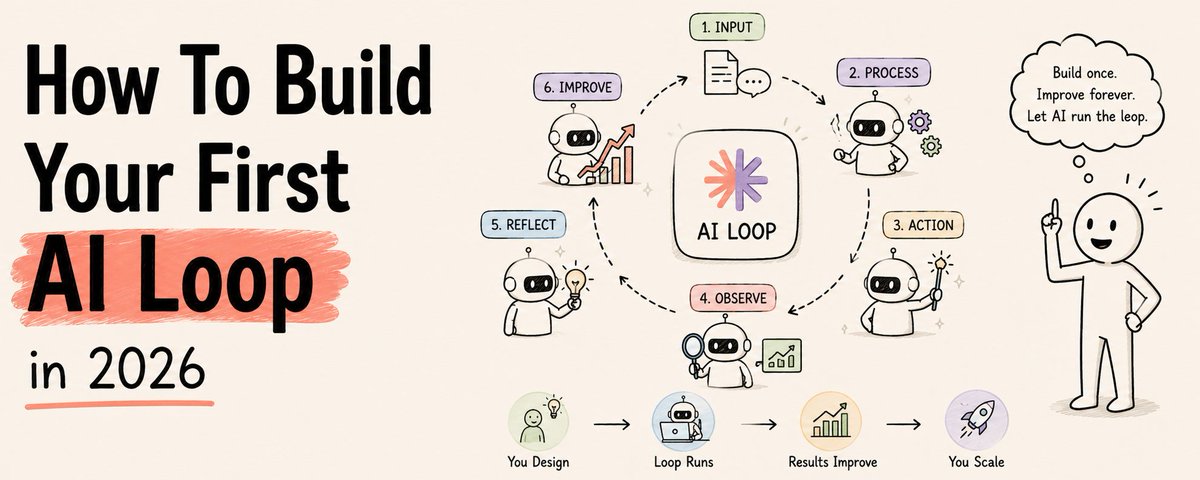
A loop isn't magic — it's four boring pieces working together on repeat. Understanding each one is what lets you debug a loop that stalls instead of just re-running it and hoping.
Goal. If the goal is vague ("make me some content"), every downstream step inherits that vagueness. A goal needs a shape the AI can check itself against - "5 posts, each under 200 words, each ending with a question" is checkable. "Good content" is not.
Plan & Execute. The AI doesn't try to do everything in one shot. It picks the next single step, does it, and only then decides what comes after. This is the difference between a loop and a wall of text generated in one pass - one-shot output can't correct itself mid-way, a loop can.
Verify. This is the step almost everyone skips when they build their first loop by hand - and it's the one that matters most. Without a scoring step, the AI has no way to know its own output is weak. With one, it catches its own mediocre work before you ever see it.
State. Every loop needs a memory of what it already tried, or it repeats the same mistake every iteration. A simple LOOP-STATE.md file - what was done, what scored low, what's left - is enough for most use cases.
Stop condition. Without this, a loop either runs forever burning tokens, or stops arbitrarily at a bad result. "Stop at 8/10 or after 8 iterations, whichever comes first" gives you a predictable ceiling on both time and cost.

6 Practical Use Cases

| # | Use Case | Flow |
|---|---|---|
| 1 | Local Business / Freelance | Google Maps → find businesses without websites → AI builds landing pages → recurring service offer |
| 2 | Content Creation | One voice note → 5 ready posts for Instagram, Telegram, YouTube, LinkedIn |
| 3 | Personal Productivity | Daily briefs, habit tracking, email & calendar automation |
| 4 | Lead Qualification | Inbound form fills → loop scores fit against your ICP → only qualified leads reach your inbox |
| 5 | Competitor Monitoring | Weekly scan of competitor pricing/positioning → loop drafts a summary of what changed and why it matters |
| 6 | Client Reporting | Raw weekly metrics in → loop drafts the client update, flags anything that needs a human sentence, sends the rest |
> Note on pricing: figures like "$700–900 per client" reflect a possible starting point for this kind of service, not a guaranteed rate — actual pricing depends on your market, niche, and what's already been proven to sell there.
Common Mistakes That Break a Loop
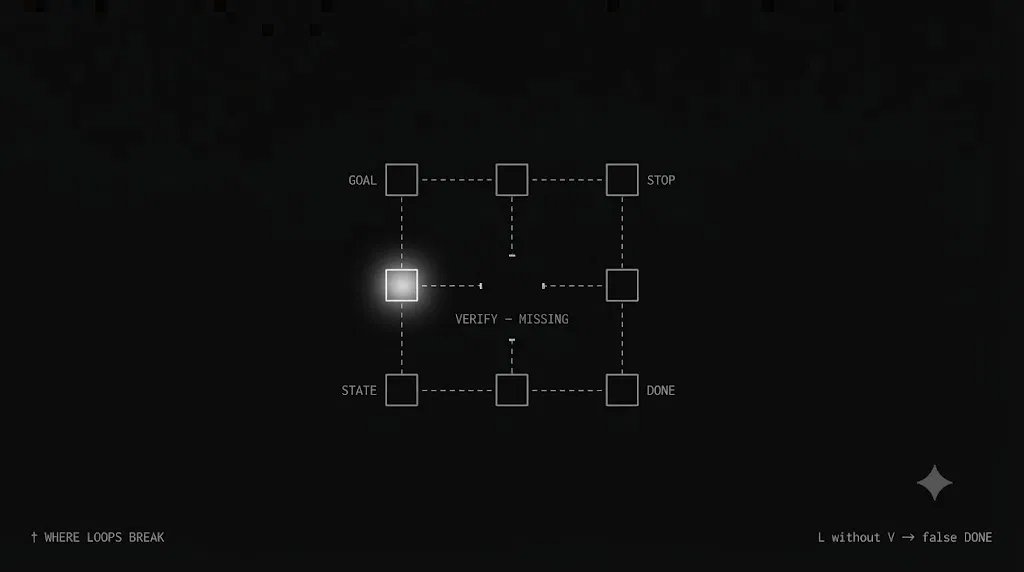
- No verify step. The loop "finishes" but the output is mediocre, because nothing ever checked it against a standard.
- Success criteria that aren't measurable. "Make it good" can't be scored. "Under 200 words, includes a CTA, no generic phrases" can.
- No stop condition. The loop either runs indefinitely or you have to kill it manually every time — both defeat the point.
- Too broad a goal for a first loop. "Automate my whole business" fails immediately. "Automate this one weekly report" ships in a day.
- No state memory. Without it, a loop can re-do work it already finished, or repeat a mistake it already made and scored low on.
- Treating the first loop as the last one. Your first version will be rough. The point isn't to get it perfect — it's to get one small loop actually running, then improve it.
2-Day Launch Plan
| Day | Steps |
|---|---|
| Day 1 | Choose a task → gather data → run the template in Claude → test 2-3 iterations |
| Day 2 | Add state memory → set up a recurring task in Mira (Telegram) → deploy (website, daily brief, etc.) |
Recommended Tools
| Tool | Best for |
|---|---|
| Claude / Grok | Complex, multi-step loops |
| Mira (Telegram) | Daily automation |
| Lovable / Framer | Fast website builds |
| Instant Data Scraper | Pulling leads from Google Maps |
What Results Could Look Like
The numbers below are illustrative planning scenarios, not promises or guarantees — actual outcomes depend heavily on niche, effort, and execution quality.
| Timeline | Illustrative Range |
|---|---|
| Month 1 | Early traction, first paying clients |
| Month 3 | Consistent recurring revenue as the loop compounds |
| Month 6 | A tested, repeatable system — this is where scaling decisions get made |
Choosing Your Tool: A Quick Comparison
| Tool | Strength | Weakness | Best for |
|---|---|---|---|
| Claude / Grok | Handles multi-step, judgment-heavy loops well | Needs a clear prompt structure to stay on track | Complex loops: landing pages, research, reporting |
| Mira (Telegram) | Runs on a schedule with zero manual trigger | Less suited to open-ended, judgment-heavy tasks | Daily briefs, recurring reminders, habit tracking |
| Lovable / Framer | Fast to a working, deployable page | Not built for logic-heavy loop protocols | Turning a loop's output into something live and shareable |
| Instant Data Scraper | Pulls structured leads fast | Just data collection, not a loop on its own | Feeding raw leads into a loop's first step |
Most people don't need to pick one — a working system usually chains two or three of these together: one tool for the loop logic, one for the daily trigger, one for the final output.
Frequently Asked Questions
**Do I need to code to build a loop?**No. The Universal Template is plain text — you're writing instructions, not scripts. Coding helps if you want to connect tools automatically, but it's not required to start.
**How is a loop different from just a longer prompt?**A long prompt still produces one output in one pass. A loop repeats: plan, do, verify, decide — and only stops when the result actually meets your bar, or hits your iteration limit. It can catch and fix its own weak output; a single prompt can't.
**What happens if the loop never hits 8/10?**That's what the iteration cap is for. If it hits max iterations without reaching your threshold, you get the best attempt so far plus a log of what kept scoring low — which usually tells you the success criteria needs adjusting, not that the tool failed.
**Can a loop run without me checking in at all?**For narrow, well-scoped tasks — yes, especially with a clear stop condition. For anything with real consequences (sent to a client, published publicly, touching money), keep a human review step before the final output goes out, at least until the loop has a track record.
**How long should my first loop take to build?**Under an hour for a narrow task using the template above. If it's taking a full day, the goal is probably too broad — narrow it and try again.
**Is this the same as an "AI agent"?**Overlapping idea, different emphasis. An agent usually implies tool use and external actions. A loop is specifically about the plan → execute → verify → decide cycle that lets a task self-correct — you can build a loop with or without external tool access.
7-Day Loop-Building Roadmap

| Day | Focus | Target |
|---|---|---|
| Day 1 | Pick one narrow, repeatable task | One goal statement with measurable success criteria |
| Day 2 | Run the Universal Template manually, 2-3 iterations | See the plan → verify → decide cycle work at least once |
| Day 3 | Add a state file so the loop remembers past attempts | No repeated mistakes across iterations |
| Day 4 | Tighten the stop condition | A predictable ceiling on iterations and cost |
| Day 5 | Connect the output to something real (site, message, doc) | The loop produces something usable, not just chat text |
| Day 6 | Set up the recurring trigger (schedule or event) | The loop runs without you starting it manually |
| Day 7 | Review a week of runs, fix the weakest recurring failure | One loop that's actually boring to check on |
Action Step — Do It Now
- Open Claude or Mira.
- Copy the Universal Template.
- Replace the Goal with your task.
- Run it.
Reply with your first Goal or chosen sphere — happy to help refine the prompt.
Stop Doing the Work Yourself: Build AI Loops That Never Sleep
Related articles

Stop Prompting. Start Looping.
How to build an AI agent that works while you sleep

Loop Engineering: The 20-Step Roadmap From Prompter to Loop Designer
Most people are still typing prompts into a box and waiting for an answer.
How To Build Your First AI Loop in 2026
Two of the most senior AI engineers alive said the same thing last month.