The Grok Bot Playbook: How One Person Can Run a Whole Operation From a Laptop (Full Setup Inside)

At 7:00 in the morning a bot you named last week opens a browser you never see, signs into your inbox with a session you authorized once, clears everything that arrived overnight, drafts nine replies, and parks the two that mention money.
Your laptop is closed. You are asleep. Nobody clicked anything.
That is not a demo reel. That is the default behavior of a product that shipped in August 2026, and most people are still using it like a chat window with a nicer icon.
This is the whole build, in order: what Grok Bot actually is underneath, how to get in, how to write a bot that behaves like a hire instead of a prompt, and how to grow one bot into a roster that runs an operation while you sleep.
Read it once, then do it with the app open.
A prompt is a request. A bot is a role.
Every AI tool until now waited for you. You open it, you ask, it answers, you close it. The work stayed in your hands and the model narrated it.
Grok Bot inverts that. Each bot you create is a named teammate with a persistent thread, its own memory, and access to a real computer in the cloud with a browser, a filesystem, and a terminal. It opens sites, clicks, fills forms, and sends, the same way you would.
So the unit of work stops being the message and starts being the job. You do not write a better prompt. You write a job description, and it stays written.
This is the single decision that separates people who get value out of this thing from people who bounce off it in a week. Name your first bot after a job a real person could hold. Inbox Manager. Outbound Rep. Bookkeeper. Talent Scout.
Name it General Helper and you get a chatbot with extra steps, because a bot only builds sharp memory around a domain you keep returning to.

One account, one computer, and a roster that shares everything
Here is the architecture nobody explains before they hand you the app.
You do not get a machine per bot. You get one persistent cloud computer per account, and every bot on your account works on it. Each bot has its own screen on that shared machine, so several can drive tools at the same time, but the filing cabinet underneath is singular.
That means browser cookies and signed in sessions are shared. Files are visible to every bot. Command line credentials are shared. One bot picks up exactly where another one left off, with no upload, no re-login, no glue code between them.
Think of it as an office. The cloud computer is the office, each bot is a coworker with their own desk, and there is one filing cabinet and one set of keys.
The handoff being free and the roster sharing one set of consequences are the same fact seen from two sides. A bot is not a security boundary. Do not put a credential or a file on that machine if any bot on your account should not have it.
Durable work belongs in the shared workspace at /workspace. Temporary directories and manually installed packages carry no guarantee and get wiped on recovery.
Getting in takes about four minutes:
- There is no standalone plan yet. Access comes bundled with SuperGrok Heavy at around three hundred a month, Cursor Ultra at around two hundred, or Cursor Teams Premium at around a hundred and twenty per seat.
- Download the app at x.ai/bot for macOS or iOS and sign in with the account you already pay for.
- Onboarding asks one question: which tools do you use daily. Pick your real stack, because it shapes every teammate suggestion after that.
- Open Settings, then Plugins, and connect Gmail, Drive, Calendar, Slack, Notion, GitHub, Salesforce, HubSpot with one click each.
- Set Execution on Local Computer to never allowed until a bot has a specific reason to touch your own machine.
Connections live at the account level, not per bot. Connect Gmail once and the fifth bot you ever create is productive in seconds. It also means the reach of any connection is every bot you will ever build, which is a good reason to connect what you actually need and leave the rest alone during a beta.
For tools with no plugin, the bot drives its own browser until it hits a login wall, then hands you the screen. You open the agent computer, take control, type the password or the two factor code yourself, return control, and it resumes in that authorized session.
You never paste a credential into a chat message. The bot gets a session, not a secret. If any tool ever asks you to type a password into the conversation, that is the wrong path.
The charter is the hire, and it lives on as a file
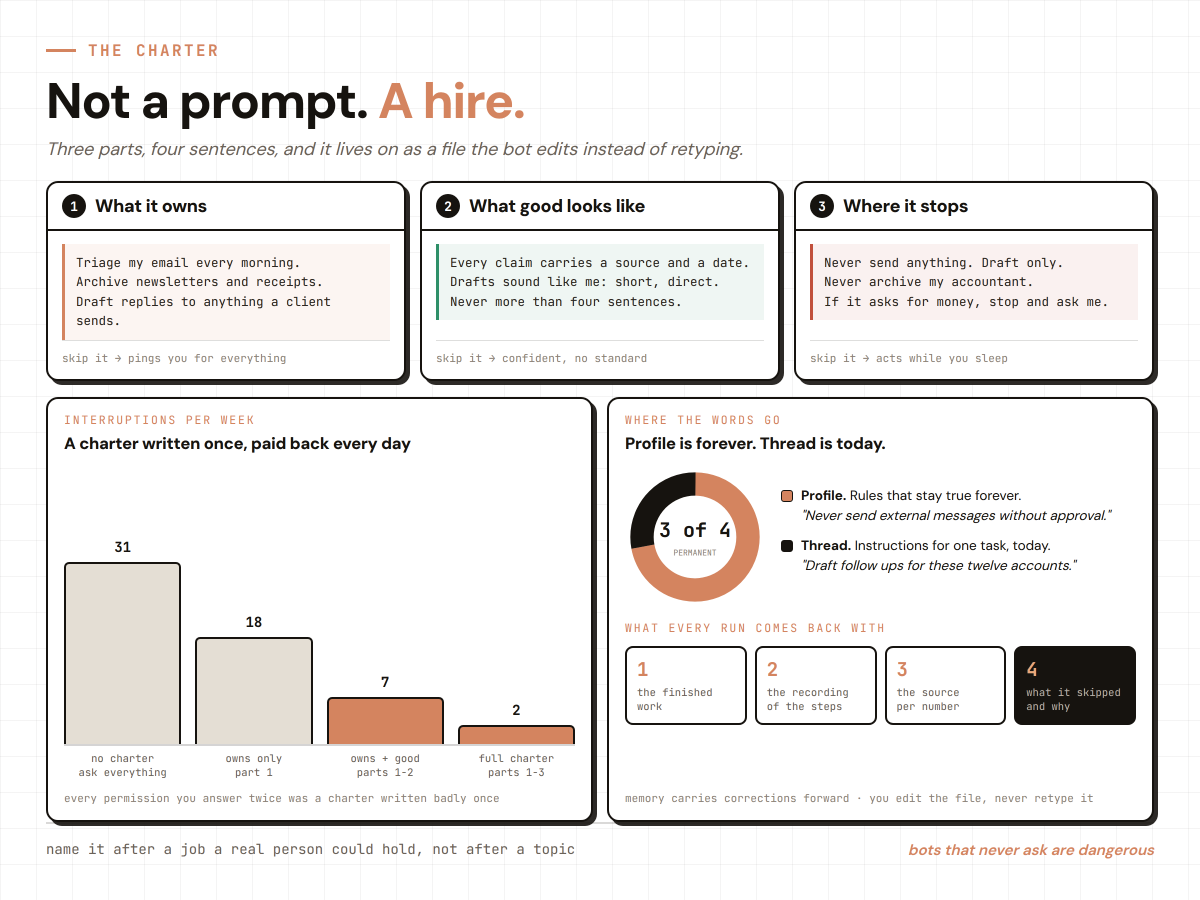
When you create a bot you are not writing a prompt, you are briefing someone on day one. That text becomes a profile the bot keeps forever and edits instead of retyping.
Three parts do all the work.
What it owns, so it acts alone on routine work without asking.
What good output looks like, written as checks and not adjectives, because "every claim carries a source and a date" beats "make it professional" every single time.
Where it stops, meaning the actions it must never take without you.
That last part is not paperwork. It is the reason you can leave the thing running unattended, because you drew the line once instead of worrying about it daily. Bots that ask about everything are useless. Bots that never ask are dangerous.
Keep the rules that should always be true in the profile, and the task specific instructions in the thread. "Never send external messages without approval" belongs in the profile. "Draft follow ups for these twelve accounts" belongs in the conversation.
Show it once instead of explaining it twice
This is the feature that turns a tool into an employee, and it is the one most people never touch.
Open a one to one conversation, open the computer view, choose Teach a task, describe the result you want, then do the workflow once while it records its own screen. It saves the whole flow as a named skill it can repeat on its own, fixing small mistakes as it goes. Recording captures up to ten minutes of visible interaction and no microphone audio.
The tasks that eat your week are usually tedious to describe and trivial to demonstrate. "Pull the numbers from this dashboard, cross reference the ones that dropped, paste them into the doc under the right heading, and Slack the lead if anything moved more than fifteen points" is a paragraph to write and forty seconds to show.
Pick the first recording carefully. The best candidate is recurring, touches two or more tools, and has steps that rarely change. Anything that fits all three is work waiting to be lifted off your plate.
A recorded skill is a draft, not a procedure. It captured your clicks, not your judgment, so add the rules yourself or it will do something confident and wrong at the first edge case. Re-test it after any site redesign, connector change, or format change.
Then give it a reason to fire. A routine assigns a workflow to one bot and decides when it runs: a schedule like every weekday at seven, or a trigger like the moment a matching email or Slack message lands. The schedule makes it punctual. The trigger makes it feel present.

One bot is a tool. Six bots are a company.
You do not need a big team. You need the smallest one that can finish a mission end to end, which for most operations is a coordinator plus four to six specialists.
Do not build five bots on day one. Build a Chief of Staff first and make its entire job coordination. Give it access to what already describes your business, ask it to audit the operation and name the three roles that would move revenue first, then get one task working through it by hand before you say "now build a bot that does exactly this."
You earn every new hire by proving the task works before you scale it.
An account holds up to fifty bots and group chats combined, each bot can own up to fifty routines, and the app keeps the twenty most recent run records for each one. Group chats hold two to six bots and exist for handoffs that need to be visible.
Give a group an objective, not a task list. A task list means you already did the decomposition and the bots are just typing it out. An objective lets them split it, decide who owns each stage, and hand off to the next one, pulling you in only for judgment calls.
That handoff, one bot deciding another is better suited and passing ownership, is the thing that did not exist in any tool before this.
Ask for a single owner at every stage. Too many parallel handoffs create duplicate work and noisy updates, which is exactly the failure mode that shows up once a roster passes four or five bots.

Draw the approval line by reversibility, not by size
The whole premise is that a bot finishes jobs end to end and comes back only when something needs you. Which puts the burden on you to define what needs you, because the default the bot picks may not match yours.
The line that works is not about how big the task is. It is about whether the outside world saw it.
Anything the bot can undo, drafting, filing, tagging, researching, reconciling, preparing, it finishes alone and logs. Anything that sends, spends, publishes, deletes, or agrees to terms gets parked. If it cannot be undone in under a minute, it waits.
Where enforcement is available, the product evaluates actions before they run. Require Approval rules always stop a matching action. Always Allow rules let one proceed only when the automated review finds no other reason to stop it. When both match, Require Approval wins. That review is model based, so treat it as a second layer on top of least privilege, never as a replacement for it.
Bake one more rule into every bot: if it cannot show you how it got a number, it leaves the number out. Good bots return the finished work plus the receipts, a recording of the steps, the source behind every figure, anything they guessed at listed separately, and anything they skipped and why.
That single line kills the failure people complain about most, which is the confident report built on nothing.

The limits worth knowing before you connect anything
None of this is magic, and pretending otherwise is how people get burned.
It is early beta, so a redesigned page or a random popup can trip a bot mid task. The floor is roughly two hundred a month with no standalone plan. Every bot shares one computer, so the blast radius of a mistake is the whole roster, which is your cue to keep banking and anything sensitive off it entirely. Approvals stop an action before it happens but they do not reverse one that already did, and there is no full audit log yet.
Automation also rots quietly. A site changes its layout, a routine starts producing garbage, and because it runs while you sleep nobody notices for three weeks. Put fifteen minutes on the calendar every week and ask three questions per routine: did it run, was the output actually right, and would I miss it if I killed it.
Hand over control on a schedule instead of waiting to feel ready. Week one it only drafts and you read everything. Week two you approve each action but stop reading the process. Week three it handles routine cases and escalates exceptions. Week four it runs on a schedule and you read the summary.
The real difficulty is not technical. It is training yourself to stop interrupting, because every time you break a run to re-ask something the profile already knew, you pay to relearn it. Context compounds only if you leave it alone.
Your first ten minutes
Do not finish this and do nothing.
Pick the ugliest repeatable thing in your week, the one no integration will ever touch. Create one bot, give it a name and a four sentence charter, teach it the task by doing it once, and put it behind an approval line. Then walk away and come back in the morning.
The first time you return to finished work you did not do is the moment the whole thing clicks. You stop being the human router copying context between five chats, and you stop being the one grinding through the list.
The skill stops being how do I phrase this and becomes what exactly am I delegating, and where does its authority end.
That is a management question, not a prompting one. Which is why the people who win at this look nothing like the people who won at prompting.
Follow me and subscribe to my Telegram channel:
Related articles

Grok Bot: Not a Chat, but an Employee With Its Own Computer. The A-to-Z Breakdown
Behind that line sits one detail: every bot inside Grok Bot gets its own computer. A real virtual machine, with a browser, files, a terminal, and your logins. And it keeps working even when your lapt…

10 Ways to Actually Make Money With Grok Bot
Grok Bot costs $200 a month to run. Every method below is priced against real 2026 market rates for the exact same work - not made up, not rounded up for the headline. I pulled the numbers from what…

How I use Grok Bots to rank brands on AI answers that it feels illegal
Name this bot `CrowdReply - Scout`.