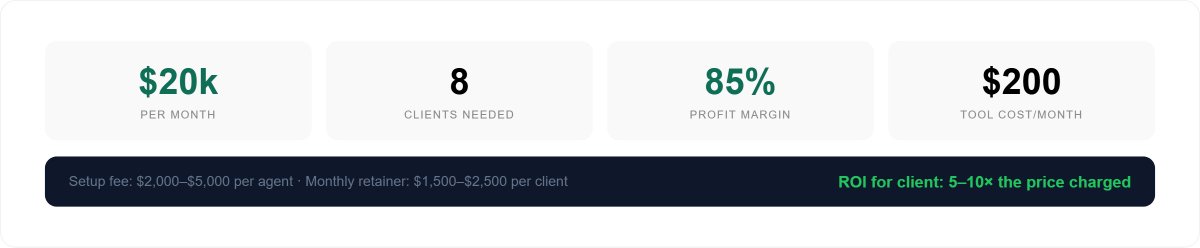
Claude agents as a service. $20,000/month selling AI automation to small businesses. Business model.

A marketing agency in Austin had a 6-person operations team. Lead qualification, customer support, invoicing, reporting, competitor monitoring - all done manually, all costing $28,000/month in salaries.
They replaced 80% of it with 5 Claude agents. Total tool cost: $200/month. Monthly savings: $22,400. The person who built those agents charges $2,500/month to maintain them.
That is the business. Build agents once. Maintain them on retainer. $20,000/month is 8 clients.
Here is everything needed to build it.
What a Claude agent actually is
Most people confuse agents with chatbots. They are completely different things.
A chatbot answers questions. An agent completes processes.
Chatbot:
Human asks → Claude answers → done
Human asks again → Claude answers → done
Human asks again...

Agent:
Trigger fires → Claude reads input →
Claude decides what to do →
Claude takes action in external systems →
Claude checks the result →
Claude routes output to the right place →
Process complete — zero humans involved
↻ Runs again automatically next trigger
A Claude agent can monitor an email inbox, qualify every inbound lead, score it 1-10, update a CRM, send a personalized reply in the company's voice, alert the sales team for high-value prospects, and log everything - all triggered by one email arriving, all completed in 90 seconds, running 24 hours a day, 7 days a week, without anyone touching it.
That is what small businesses will pay $2,500/month to have permanently.
Why now:
The tools to build this became accessible in 2024-2025. Claude API is $20-50/month at typical small business automation volume. n8n connects 400+ apps with no code. Every small business already uses Gmail, Slack, Stripe, HubSpot, Airtable - all of which connect in minutes.
The implementation gap is massive. Businesses know AI exists. Almost none know how to implement it. That gap is the business opportunity.
The tech stack
Two tools do everything. Claude is the brain. n8n is the nervous system.
Claude API (console.anthropic.com):
  The AI brain inside every agent
  Reads inputs, makes decisions, writes outputs
  Cost: $20–50/month at typical volume
  Connect to n8n in 2 clicks via HTTP Request node

n8n (n8n.io):
  Workflow automation — like Zapier but more powerful
  Connects 400+ apps
  Visual drag-and-drop, no code required
  Free self-hosted OR $20/month cloud
  Runs workflows automatically on triggers

Client-side tools connected per client:
  CRM:          HubSpot, Pipedrive, Airtable
  Email:        Gmail API, Outlook API
  Notifications: Slack, Microsoft Teams
  Payments:     Stripe API
  Scheduling:   Calendly webhooks
  Forms:        Typeform, Tally, website forms
  Documents:    Google Docs, Notion

Your infrastructure (one-time setup):
  Billing:      Stripe
  Contracts:    DocuSign or PandaDoc
  Client portal: Notion workspace per client
  Monitoring:   n8n built-in execution logs

Total monthly tool cost (your side):  $80–$200
Total monthly tool cost (client side): $0–$50 additional
Agent 1. Lead Qualification and Response
Every business has leads sitting unanswered for hours. The average response time for small businesses is 3-6 hours. Studies show leads contacted within 5 minutes are 9x more likely to convert than those contacted after 30 minutes.
This agent responds in 60 seconds. Every time.
How it works:
Trigger:  Lead submits contact form (Typeform/website)
Step 1:   n8n receives form data via webhook
Step 2:   n8n sends data to Claude API
Step 3:   Claude analyzes, scores, writes reply
Step 4:   n8n updates CRM with score and notes
Step 5:   Personalized email sent from client domain
Step 6:   If score 8+ → Slack alert to sales team
Step 7:   All data logged to Airtable for reporting
The Claude prompt:
You are a senior sales development representative
for [Company Name], a [describe the business].

Our ideal client: [describe ICP — industry,
company size, budget range, key pain points]

A new lead just submitted this contact form:
[insert all form fields here]

Do the following:

1. Score this lead 1–10 based on:
   - Budget signals (explicit or implied)
   - Company size signals (team size, revenue hints)
   - Urgency signals (timeline, language urgency)
   - Fit with our ideal client profile
   - Quality and specificity of their message

2. Identify:
   - Primary industry
   - Main pain point they're expressing
   - Budget tier: low / mid / high / unknown
   - Urgency: low / medium / high

3. Write a personalized reply email that:
   - Opens by referencing their specific situation
   - Acknowledges their main pain point directly
   - Explains how we solve that specific problem
   - Proposes a specific next step (15-min call)
   - Sounds like a human wrote it, not a template
   - Under 150 words
   - Signs off as [Sales Rep Name]

4. Output ONLY as valid JSON:
{
  "score": number,
  "industry": string,
  "pain_point": string,
  "budget_tier": "low|mid|high|unknown",
  "urgency": "low|medium|high",
  "urgent_flag": boolean,
  "reply_email": string,
  "crm_notes": string,
  "recommended_action": string
}
Time saved: 3 hours/day × $30/hour × 250 days = $22,500/year
Agent 2. Customer Support Tier 1
80% of support tickets are variations of the same 20 questions. A human reads each one, looks up the answer, writes a reply - for information that hasn't changed in months.
This agent handles all of them instantly, escalates the remaining 20% with full context, and never burns out at 2am.
How it works:
Trigger:  Email received at support@company.com
Step 1:   n8n captures email content and metadata
Step 2:   n8n pulls customer history from CRM
Step 3:   Sends everything to Claude
Step 4:   If auto-reply → sends immediately
Step 5:   If escalation → routes to right team member
           with context and suggested response
Step 6:   All interactions logged to Airtable
Step 7:   Weekly Claude summary sent to team:
           top questions, satisfaction signals, gaps
The Claude prompt:
You are a customer support specialist for [Company].

Your tone: [warm/professional/casual — match the brand]
Your knowledge base: [paste full FAQ and product docs]

Incoming message:
Subject: [email subject]
From: [customer name, email]
Message: [full email body]

Customer history from CRM:
[paste customer record — purchases, past tickets,
account status, total spend]

Do the following:

1. Classify this message:
   - Category: billing / technical / general /
     complaint / refund / praise / other
   - Urgency: low / medium / high / critical
   - Sentiment: positive / neutral /
     negative / angry / upset

2. Determine response type:
   AUTO-REPLY if:
   - Answer exists clearly in knowledge base
   - No account-specific action required
   - Not a complaint requiring empathy

   ESCALATE if:
   - Requires account action (refund, cancellation)
   - Complaint that needs human empathy
   - Technical issue not in knowledge base
   - VIP customer (flag in CRM)
   - Urgency is high or critical

3. If AUTO-REPLY: write complete response
   - Under 200 words
   - Warm and specific to their situation
   - References their name and specific issue
   - Clear next step if relevant
   - Sign as "Support Team" or [Agent Name]

4. If ESCALATE: write escalation summary
   - Issue in one sentence
   - Customer history relevant to this issue
   - Suggested approach for human agent
   - Urgency and why

5. Output ONLY as valid JSON:
{
  "category": string,
  "urgency": string,
  "sentiment": string,
  "response_type": "auto_reply|escalate",
  "response": string,
  "escalation_route": string or null,
  "escalation_notes": string or null,
  "satisfaction_risk": "low|medium|high"
}
Time saved: 4 hours/day × $25/hour × 250 days = $25,000/year
Agent 3. Invoice and Payment Automation
Creating invoices, sending reminders, and chasing overdue payments takes 2-3 hours daily for any business with 20+ clients. The work is identical every time. The only thing that changes is the client name and amount.
This agent does all of it, with a 3-sequence escalation that feels professional not aggressive.
How it works:
Trigger:   Project marked "Complete" in project tool
           OR scheduled date reached in Airtable
Step 1:    n8n pulls project data (scope, rate, hours)
Step 2:    Claude generates professional invoice body
Step 3:    Invoice sent via Stripe or direct email
Step 4:    7 days unpaid → Claude writes follow-up 1
Step 5:    14 days unpaid → follow-up 2, firmer tone
Step 6:    21 days unpaid → flag to account manager
Step 7:    Payment received → thank you + status update
           in project tool and CRM
The Claude prompt:
You are a professional billing specialist
for [Company Name].

Client: [name, email, company]
Project: [description of work completed]
Deliverables: [list what was delivered]
Amount: $[amount]
Payment terms: Net [15/30]
Invoice number: [number]
Due date: [date]
Follow-up day: [null / 7 / 14 / 21]
Previous follow-ups sent: [list dates if any]

Generate the following:

1. Invoice email body:
   - Professional but warm opening
   - Clear summary of work completed
   - Payment amount and due date prominent
   - Payment instructions: [Stripe link / bank details]
   - Grateful closing

2. If follow-up day is 7:
   - Friendly tone, assume oversight
   - Single paragraph, under 80 words
   - Don't mention consequences

3. If follow-up day is 14:
   - Polite but clear urgency
   - Mention you're happy to discuss if any issues
   - Under 100 words

4. If follow-up day is 21:
   - Professional and firm
   - Reference previous messages
   - State next step clearly
   - No threats but clear consequence

Output ONLY as valid JSON:
{
  "email_subject": string,
  "email_body": string,
  "tone": string,
  "next_followup_day": number or null,
  "escalate_to_human": boolean
}
Time saved: 2.5 hours/day × $25/hour × 250 days = $15,625/year

Agent 4. Meeting Prep and Follow-up
This is the highest perceived value agent. Executives immediately understand what it does and immediately want it.
Before every meeting, a one-page brief lands in the organizer's inbox - who's in the room, what they care about, context from previous interactions, suggested agenda. After every meeting, action items go to every attendee within 5 minutes.
How it works:
PRE-MEETING (60 minutes before):
Trigger:  Calendar event in 60 minutes (Google Calendar
          or Outlook webhook)
Step 1:   n8n pulls meeting details and attendee list
Step 2:   n8n searches Gmail for previous email threads
          with each attendee
Step 3:   n8n pulls CRM record for each attendee
Step 4:   Claude receives all data and writes brief
Step 5:   Brief emailed to organizer 60 min before

POST-MEETING:
Trigger:  Organizer forwards meeting notes or
          transcript to a dedicated email address
Step 1:   n8n captures the forwarded content
Step 2:   Claude extracts decisions and action items
Step 3:   Individual emails sent to each owner
Step 4:   CRM updated with meeting summary
Step 5:   Follow-up calendar invites created
Pre-meeting Claude prompt:
You are an executive assistant preparing a
meeting brief for [Executive Name].

Meeting details:
Title: [meeting title]
Date/time: [when]
Duration: [length]
Agenda: [if provided]

Attendees and their data:
[For each attendee:]
  Name: [name]
  Title: [title]
  Company: [company]
  LinkedIn summary: [paste or summarize]
  Last email thread: [paste relevant excerpts]
  CRM notes: [paste CRM record]
  Previous meeting notes: [if any]

Recent news about their company: [paste if found]

Write a one-page meeting brief:

1. WHO'S IN THE ROOM
   One sentence per person: role, what they
   care about professionally, relationship history
   with [Executive Name]

2. KEY CONTEXT
   What has happened since last interaction?
   What do they likely want from this meeting?
   Any tensions or sensitivities to be aware of?

3. SUGGESTED AGENDA (3–4 points, priority order)

4. THREE THINGS TO ACCOMPLISH
   The minimum for this meeting to be a success.
   Be specific — not "discuss the project" but
   "get sign-off on Q3 budget by end of call"

5. ONE THING TO AVOID
   A topic, tone, or approach that could derail.

Executive reads this in 3 minutes. Keep it under
one page. Direct, specific, no corporate filler.
Post-meeting Claude prompt:
You are an executive assistant processing
meeting notes.

Meeting: [title, date, attendees]
Notes / transcript: [paste full content]

Extract and structure:

1. DECISIONS MADE
   Bullet list. Each decision in one sentence.
   Owner of each decision if mentioned.

2. ACTION ITEMS
   Format: [Person] will [specific action]
   by [specific deadline or "TBD"]
   Flag any action items without deadlines.

3. OPEN QUESTIONS
   Things discussed but not resolved.
   Who needs to answer each one.
   By when.

4. RELATIONSHIP NOTES
   Anything useful about attendee sentiment,
   concerns, or interests for future reference.

5. FOLLOW-UP EMAIL DRAFT
   To: all attendees
   Subject: [Meeting name] — decisions + next steps
   Content: 3-paragraph summary of decisions,
   action items with owners, next meeting if set.
   Under 200 words. Professional and clear.

Output as structured JSON for CRM import
plus the follow-up email as plain text.
Time saved: 1.5 hours/meeting × 5 meetings/day × $40/hour × 250 days = $75,000/year for a 5-person executive team
Agent 5. Competitor Intelligence
Most businesses monitor competitors the same way: inconsistently, manually, and only when someone remembers to do it. Important changes get missed. Pricing shifts go unnoticed for weeks.
Every Friday at 3pm, this agent delivers a full competitive intelligence report.
How it works:
Trigger:  Every Friday at 2pm
Step 1:   n8n fetches competitor data:
          - Website changes via Visualping webhooks
          - New blog posts via RSS feeds
          - LinkedIn posts and job listings via API
          - New G2/Trustpilot/Capterra reviews
          - Pricing page screenshots (Visualping)
Step 2:   Claude receives all data for analysis
Step 3:   Intelligence report emailed by 3pm Friday
Step 4:   If major change detected (price, product,
          leadership) → immediate Slack alert
The Claude prompt:
You are a competitive intelligence analyst
for [Company Name] in the [industry] space.

Our main competitors: [list names]
Our key differentiators: [list what makes us different]
Our current pricing: [list]

Here is this week's competitor data:
[paste all fetched data organized by competitor]

Produce a Friday competitive intelligence report:

1. BIGGEST CHANGES THIS WEEK
   What actually moved? Be specific.
   Price changes, new features, new hires,
   major content, fundraising, PR activity.
   If nothing significant: say so.

2. WHAT THEY'RE BUILDING
   Based on job postings and product updates —
   what is their strategic direction?
   What does this mean for us?

3. CUSTOMER SENTIMENT
   Based on new reviews this week —
   what are customers loving?
   What are they complaining about?
   Any patterns we can exploit?

4. CONTENT WORKING FOR THEM
   What topics and formats are getting engagement?
   What can we learn? What can we counter?

5. OPPORTUNITIES FOR US
   Based on their weaknesses and gaps this week —
   where should we move aggressively?
   Be specific about the action, not just the insight.

6. ALERT LEVEL
   Green: nothing urgent
   Yellow: worth discussing in Monday standup
   Red: requires response this week — explain why

One rule: every observation must lead to a
possible action. No observations without
implications. No vague strategy advice.
Time saved: 5 hours/week × $45/hour × 50 weeks = $11,250/year
The discovery call that closes clients
The discovery call has one goal: make the math undeniable. The product sells itself when the numbers are on the table.
Full script - 30 minutes:
Minutes 0–2: Open
"Thanks for taking the time. Before I show you
anything, I want to understand your operation first.
Is that okay?"

[Never pitch first. Always diagnose first.]

Minutes 2–12: Find the repetitive work
"Walk me through a typical week for your ops team.
What tasks happen the same way every time?"

[Let them talk. Listen for: email processing,
data entry, follow-ups, reporting, scheduling,
invoicing. These are all automatable.]

"How many hours per week does [process they mentioned]
take across your team?"

"And at their hourly rate — roughly what does that
cost you per month?"

[Calculate live: hours × rate × 4.33 = monthly cost]
[Write this number down where they can see it]

Minutes 12–20: Show the solution
"Can I show you what this looks like automated?"

[Show the demo. Ideally a recording of the actual
agent running on a real example.
60 seconds. Lead form submitted.
Reply in inbox. CRM updated. Done.]

"This agent does that entire process automatically.
Every time. In 90 seconds."

Minutes 20–25: Run the ROI math
"So if we automate [their process]:
 You currently spend $[X]/month on this work.
 The agent handles 80% of it.
 That's $[X × 0.8]/month saved.
 The retainer is $[Y]/month.
 You're ahead by $[savings minus retainer] every
 single month.
 The setup fee pays back in [weeks] weeks."

[Show the numbers. Let silence work.]

Minutes 25–30: Close
"The way this works: there's a one-time setup fee
of $[X] to build and configure everything for your
specific systems. Then $[Y]/month ongoing — I
monitor it, maintain it, and improve it.

When would you like to start?"

[Not "are you interested" — when. Move forward.]
Pricing that closes
Most beginners underprice because they're nervous. These numbers are real market rates. Charging below them signals inexperience, not value.
Single agent (when client insists):
  Simple (1–2 integrations):   $1,500–$2,500 setup
  Medium (3–5 integrations):   $2,500–$4,000 setup
  Complex (6+ integrations):   $4,000–$6,000 setup
  Retainer:                    $500–$1,500/month

Packages (always lead with these):
  Starter — 2 agents:
    Setup:    $5,000
    Retainer: $1,500/month
    Typical client saving: $4,000–$6,000/month
    Client payback: 4–6 weeks

  Growth — 4 agents:
    Setup:    $10,000
    Retainer: $2,500/month
    Typical client saving: $10,000–$15,000/month
    Client payback: 3–5 weeks

  Full Stack — 6 agents:
    Setup:    $18,000
    Retainer: $4,000/month
    Typical client saving: $20,000–$30,000/month
    Client payback: 3–4 weeks
The objection: "That seems expensive." The response: "Let's look at your current cost for this process together." Pull out the ROI math. The conversation changes immediately.
How to build and test the first agent
Step by step for the lead qualification agent - the best starting point.
DAY 1 — Setup (2 hours):

1. Create accounts:
   n8n.io → sign up free cloud trial
   console.anthropic.com → create account
   Get Claude API key → copy it

2. In n8n:
   Settings → Credentials → Add new
   → HTTP Request Auth → Bearer token
   → Paste Claude API key
   → Name it "Claude API"

3. Create new workflow in n8n

DAY 2 — Build (4 hours):

Node 1: Webhook trigger
  → Add Webhook node
  → Copy webhook URL
  → This is where Typeform/website sends data

Node 2: HTTP Request (Claude)
  → Method: POST
  → URL: https://api.anthropic.com/v1/messages
  → Authentication: Claude API credential
  → Body (JSON):
    {
      "model": "claude-sonnet-4-20250514",
      "max_tokens": 1000,
      "messages": [{
        "role": "user",
        "content": "[paste the lead qualification
                    prompt with form data injected
                    using n8n expressions]"
      }]
    }

Node 3: JSON Parse
  → Parse Claude's response
  → Extract score, industry, reply_email, etc.

Node 4: HubSpot/Airtable
  → Create or update contact record
  → Set properties from Claude's JSON output

Node 5: Gmail
  → Send email from client's address
  → To: lead email
  → Body: Claude's reply_email field

Node 6: IF node (conditional)
  → Condition: score >= 8
  → True path → Slack notification

Node 7: Slack
  → Channel: #sales-alerts
  → Message: "Hot lead: [name] scored [score]/10.
              Check HubSpot. [lead email]"

DAY 3 — Test (2 hours):

Test 1: Perfect lead form submission
Test 2: Missing email field
Test 3: Foreign language submission
Test 4: Angry message
Test 5: Spam submission
Test 6: Very long message (500+ words)
Test 7: Same person submitting twice

For each test: verify score, reply quality,
CRM entry, and Slack alert behavior.

How to get the first 3 clients in 30 days
Week 1. Build the demo:
The first client does not come from a website or cold outreach. It comes from one conversation with someone who watched a 2-minute demo.
Day 1–2: Build lead qualification agent
  Follow the step-by-step above
  Use a test Typeform and test Gmail
  20 test submissions, all passing

Day 3: Film the demo (Loom or screen recording)
  Show: form submitted on client website
  Show: reply arriving in inbox in 60 seconds
  Show: CRM updated automatically
  Show: Slack alert firing
  Narrate what's happening as it happens
  Keep it under 2 minutes
Week 2. Publish and distribute:
Post 1: The demo video with caption
  "Built this in 2 days. Every lead that fills
  out your contact form gets a personalized reply
  in 60 seconds. Automatically. Here's how it works."

Post 2: The numbers
  "Average response time for small businesses:
  3–6 hours. Leads contacted in under 5 minutes
  are 9× more likely to convert.
  This agent does it in 60 seconds. Every time."

Post 3: The offer
  "Building this for 3 businesses this month.
  DM to see if it fits your operation."
Week 3-4. Discovery calls:
Run every call with the 30-minute script above. Send the proposal within 24 hours. Follow up at 48 and 72 hours if no response.
The roadmap to $20,000/month
Month 1:
  Goal: 1 client · $2,500/month
  How: Demo → discovery call → first contract
  Investment: 40–60h to build
  Constraint: getting the first client

Month 2–3:
  Goal: 3 clients · $7,500/month
  How: Content driving inbound, referral from client 1
  Investment: 30h/month maintenance
  Constraint: delivery speed

Month 4–6:
  Goal: 6 clients · $15,000/month
  How: Productized packages, templated delivery
  Investment: 40h/month total
  Constraint: systematizing so each client takes less time

Month 7–9:
  Goal: 8 clients · $20,000/month
  How: Referral flywheel, repeat upsells
  Investment: 50h/month total
  Margin: 85%+
  Constraint: deciding whether to stay solo or hire

Mistakes that kill the business early
Mistake 1. Building before sellingSpending 40 hours building a perfect agent before anyone has agreed to pay. Build a demo in 2 days. Sell it. Build the real version after the contract is signed. First client matters more than perfect product.
Mistake 2. Hourly pricingCharging by the hour means the better you get, the less you earn. A 2-hour agent build billed at $150/hour = $300. Same agent packaged correctly = $2,500 setup + $1,500/month recurring. Package everything.
Mistake 3. Taking every clientThe worst clients have vague problems, low budgets, and high expectations. The discovery call is as much about deciding if you want them as selling them. Qualify hard. One bad client costs more in time than two good clients earn.
Mistake 4. No written scope"We'll figure out the details later" always costs money. Before starting any agent: document what it does, what triggers it, what apps it connects to, what success looks like, and what is explicitly out of scope. Scope creep kills margins.
Mistake 5. No retainerTaking the setup fee and walking away is a series of one-time projects - not a business. Agents need monitoring, occasional fixes, and regular improvements. Without a retainer there is no recurring revenue and no business.
Mistake 6. Skipping the test phaseEvery agent needs 20+ test inputs before going live, including edge cases and failure scenarios. The weird inputs always show up in production. If you don't know what happens when something breaks - the client finds out instead.
Mistake 7. Building in public too earlyPosting "I'm starting an AI agency" before having a client attracts other beginners, not clients. Build and deliver first. Then post the results.
The first 48 hours
Everything above is useless without action.
Hour 1:
  Create n8n account (n8n.io — free)
  Create Anthropic account (console.anthropic.com)
  Get Claude API key

Hours 2–8:
  Build lead qualification agent (step-by-step above)
  Test with 20 sample submissions
  All edge cases passing

Hours 9–12:
  Record 2-minute Loom demo
  Write and publish the article
  Post the demo video

Hours 13–24:
  Reply to every comment and DM
  Schedule 3 discovery calls

Hours 25–48:
  Run discovery calls with the script above
  Send 3 proposals within 24 hours of each call
  Follow up at 48 hours
Every restaurant, law firm, real estate agency, e-commerce store, and consulting firm has processes running on human time that should run on AI.
The math works. The demand exists. The tools are ready.
The only question is whether to start this week.
→ Follow - AI automation systems posted every week
→ Save this - every prompt is copy-paste ready
→ Like if you'd automate one of these this week
Related articles

10 SEO backlink Claude automations for 61k AI mentions in 3 months
Link building is trial and error.

The Guide to Dominate Local SEO (Automated with Claude)
"Here's my site: [url]. Audit my Google Business Profile setup. Find the top 3 competitors ranking locally for my main keyword, tell me which primary and secondary categories they use, and give me a…

GROK BOT: HOW TO HAND YOUR ROUTINE TO A BOT IN 10 STEPS
Every AI tool you have used so far waits for you. You open it, you ask, it answers, you close it. The work still sits in your hands, the model just talks you through it.