Four Grok Bots, One Machine: How to Build an Autonomous Crew Without Burning Your Quota in 3 Days

Most people still use AI as an expensive clipboard. Open the chat, type the prompt, copy the answer, paste it into Sheets or Notion by hand.
You are the adapter between the browser and the model.
Grok Bot changes the pattern. But drop the illusion first: the bots do not live on separate servers.
You get one virtual machine per account. The docs say it plainly: do not treat separate bots as a security boundary. They share one Chromium and one virtual PC.
So the job is not handing out prompts. The job is designing the handoff pipeline and installing hard stops before the machine reaches them.
Below is the full breakdown of a 4-bot system, and how to run it without torching your weekly balance in 72 hours.

1. Split by domain, not by task size
The classic first-week mistake is building one super-bot and loading everything onto it, from scraping X to writing reports.
Two hours in, it starts mixing up instructions and forgetting its own system prompt.
One bot fills the context window fast. The split has to run along domains of ownership:
Chief of Staff (coordinator). Your only entry point. Takes the high-level task, breaks it down, assigns owners, collects the result. Does no low-level work itself.
Scout (researcher). Lives in the cloud browser. Parses X, Telegram, competitor sites, pulls raw facts.
Dealmaker (analyst). Works in Sheets and CRM. Runs the numbers, checks the databases, prepares personalized offers.
Publisher (content). Packages raw output from Scout and Dealmaker into finished drafts of emails and reports, in your voice.

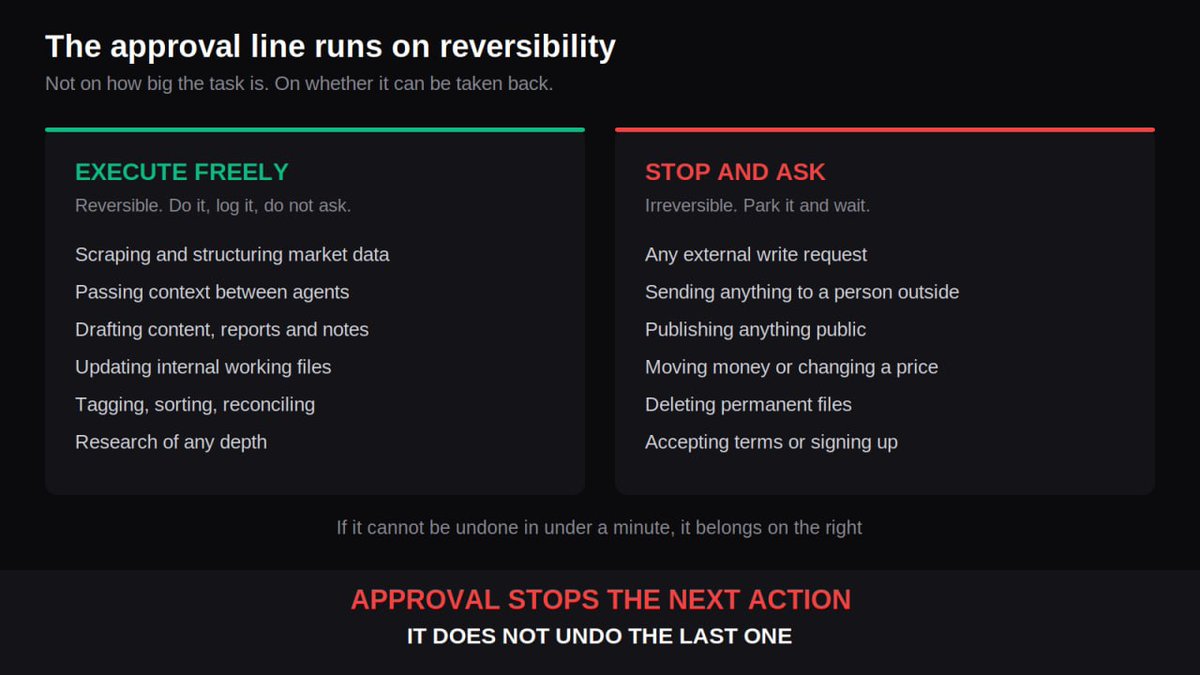
2. Draw the approval line on reversibility
The machine is shared and the environment is common, which makes the boundaries load-bearing.
A bot with filesystem access and open write permissions can wipe a working folder just by reading a task the wrong way.
Every action splits in two. Reversible, the bot does alone. Irreversible, the bot waits for your click.
Here is the working system prompt for the coordinator:
ROLE: Chief Operations Officer. Do not execute tasks yourself.
Assign work to Scout, Dealmaker, or Publisher.

AUTONOMY BOUNDARIES:

1. EXECUTE FREELY (No approval needed):
   - Scraping, parsing & structuring market data
   - Internal context transfer between agents
   - Drafting content, reports and notes
   - Updating internal working files

2. HARD STOP (STOP & ASK ME):
   - Any external API write-requests
   - Publishing content publicly
   - Executing financial transactions or changing prices
   - Deleting permanent files

HANDOFF PIPELINE:
If task == "Find opportunities": trigger Scout.
If Scout output == "High Value Signal": trigger Dealmaker for ROI evaluation.
If Dealmaker approves numbers: trigger Publisher to prepare draft.
Final Step: Deliver a 3-bullet decision summary to Human with [APPROVE / REJECT].
One detail that most guides skip. Approval stops the next action. It does not undo the last one.
A test run does real work, not a simulation. So the protection has to sit in the permissions you set before launch, not in the moment you confirm.

3. Hand over the session, never the password
The upside of one shared Chromium: you never type a password into a prompt.
When a bot needs a new service, Salesforce or Sheets or some internal panel nobody ever integrated with, it walks to the login screen, pauses, and asks you to sign in.
You authenticate once by hand inside the app window. The bot inherits the live session through cookies and keeps going.
Now the part worth understanding. You did not give away a password. You gave away an authorized session, and that session sits on the shared machine.
Every other bot on that account can reach the same tab. Including the ones you create next month. Deleting a bot removes its profile, chats and routines, and leaves the logins where they are.
Plan your roster with that in mind.

4. Budget the quota before you schedule anything
Putting Scout on a five-minute monitoring loop feels smart until Wednesday.
That frequency drains the weekly allowance by midweek, and the whole system sits dead until the counter resets.
Here is the launch grid that keeps the spend flat:
Week one, break-in mode. No more than 2 routines running at once. Nothing fires more than once a day.
Scout. One or two runs per day, ideally an 8:00 collection. Markets do not move fast enough to justify parsing them every fifteen minutes.
Dealmaker. On demand only, or triggered by a Scout signal.
Publisher. Once a day in the evening, to assemble drafts.
What to do when the quota dies on Wednesday.
Switch the coordinator to manual. Turn off automatic handoffs between bots. Let Scout drop its output into your chat and move it into Publisher's prompt yourself.
Every handoff carries context with it, which is why the spend lives in the automatic transfers and not in the tasks. Manual mode cuts it for the rest of the week.
5. Reset the state instead of dragging the thread
After ten to fifteen message handoffs inside one thread, the agents start slipping. They skip rules, hallucinate, ignore the system prompt.
This is the wall you hit in week three.
Do not try to carry a long conversation. Use a state reset.
Add one line to the coordinator's system prompt so it happens on its own:
When handing off a task to another agent, NEVER pass the conversation
history. Summarize the current state into a State Reset JSON and send
only this payload.
The payload looks like this:
{
  "system_state": {
    "active_task_id": "TASK-8921",
    "current_stage": "ROI_EVALUATION",
    "required_agent": "Dealmaker",
    "context_summary": "Scout confirmed competitor price drop by 18%. Source: landing_page_v2.",
    "instructions": "Calculate margin impact if we match the 18% discount. Do not query external web."
  }
}
Shorter payload, cleaner reasoning, smaller bill. Three problems, one line.
6. Audit the routines every Friday
Automation rots quietly. A site changes its layout, a routine starts producing garbage, and since the bot runs while you sleep, nobody notices for three weeks.
The most durable routines are news research. They run flawlessly for a month and nobody opens a single report.
Fifteen minutes on Friday. Ask the coordinator to audit itself:
List every routine you ran this week. For each one:
- how many times it fired
- what it produced
- anything it skipped, failed, or had to guess at
- anything you parked for me that I never answered

Then tell me which routine you think is least useful, and why.
Then spot-check one output by hand, because a bot reporting on its own work has the same blind spot you do.
If a routine produces reports you stopped reading, delete it without ceremony.
The main takeaway
You’re not typing everything by hand anymore or trying to write the perfect prompts. You’re designing roles, setting the boundaries of autonomy, and keeping an eye on the token economy.
Multi-agent system architects - drop it in the comments: how are you dealing with burning through limits on recurring routines? Resetting context with JSON, cutting how often agents run, or moving part of the workflow to local scripts?
Related articles

How we scaled Cal AI to $50M ARR with influencers
PLUS links to a bunch more articles and threads I've written on this subject so you can run this same playbook to scale your own consumer app.
How to Start a 6 Figure Faceless YouTube Channel (Full Breakdown)
I've helped over 400 people start profitable faceless youtube channels. i've ran over 50 channels myself. Generated over $4 MILLION by age 25. Worked with youtubers that have 10 million+ subscribers,…
$5T opportunity: AI Roll Ups
You are a sourcing analyst for a holding company buying [industry] firms in [region]. Using the attached list of licensed firms, identify businesses that likely match these criteria: 5 to 50 employee…