How to Automate Your AI UGC Workflow for App Marketing

Building an app has never been easier. Every day, thousands of new apps are published on the App Store, and AI is only accelerating that trend.
The difference between building an app and building a profitable one isn't the product anymore - it's marketing.
The challenge as a solo founder is that you can't spend all day coding and still have time to film, edit, and test new creatives. The context switching alone is enough to kill your momentum.
So I started looking for a way to automate as much of the process as possible.
AI UGC is one of the best-performing formats on TikTok right now, and in this article I'll show you how to automate the entire workflow using an AI agent (I'll be using Codex) together with the Arcads MCP.
Pick ONE repeatable format
Some UGC formats come and go. Others have been working for years.
One of the most consistent examples is the reaction format: someone looks genuinely surprised, shocked, or emotional after discovering a product, followed by the reveal of what caused that reaction.
You've probably seen dozens of versions of it already. The hook changes, the product changes, but the structure stays almost identical because it consistently grabs attention.
That's exactly what makes it perfect for AI.
Instead of trying to invent a brand new concept every time, we can recreate a proven format with a consistent AI creator, swap the hook, attach a different app demo, and generate new creatives almost indefinitely.
This isn't a one-off viral - it's a repeatable format that keeps working.

Why Arcads MCP?
To automate a workflow, your AI agent needs a way to control the tools you're using.
That's exactly what Arcads MCP does.
Instead of manually generating actors, downloading videos, and moving files around, your agent can control Arcads through natural language. That means the entire UGC production pipeline can run from a single conversation.
Setting up Arcads MCP takes less than a minute.
- Open Codex → Settings → MCP servers → Add server
- Select Streamable HTTP → paste Arcads MCP server url → Save
- Authenticate with your Arcads account.
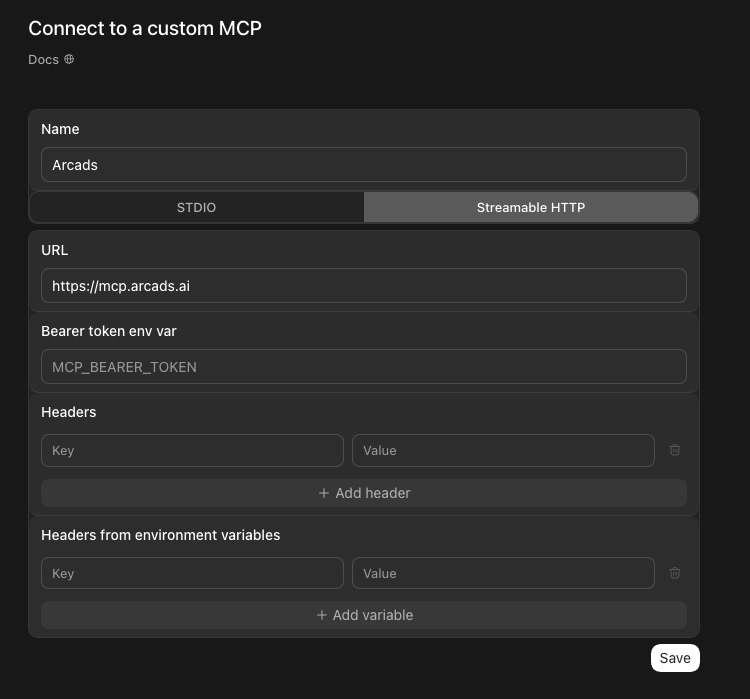

That's it.
Your AI agent can now browse your Arcads workspace, generate actors, create videos, and manage your assets directly through natural language without ever opening the Arcads interface.

Build a consistent AI creator
One mistake I see people make is generating a different AI actor for every video.
While it might seem like more variety is better, it actually makes your content feel less authentic. The best creator accounts become recognizable because viewers keep seeing the same person.
Generate one avatar that matches your target audience and reuse it across all of your videos. A consistent face helps build familiarity and makes your content feel like it's coming from a real creator rather than a collection of random AI clips.
We'll start by generating a few different creator candidates. Instead of picking the first result, generate several variations and choose the one that best matches the style you're aiming for.
Use Arcads with the Nano Banana Pro model.

Generate 6 image variants in a 9:16 aspect ratio using this prompt:

A young Northern European man in his mid-20s with thick dark blond hair, medium length on top with a messy textured crop and faded shorter sides, light blond eyebrows, vivid blue eyes, fair skin with slight natural redness, light uneven blond stubble, a narrow face, and an athletic build. Extreme close-up iPhone front-facing camera selfie, his face filling most of the frame, shot from slightly below eye level with subtle wide-angle front-camera distortion. One hand reaches in from above with fingers spread and rests against the upper side of his forehead and hairline. Intense surprised, slightly bewildered expression: eyes opened very wide, eyebrows raised and drawn together, forehead creased, mouth open in a small shocked O. Wearing a fitted dark athletic T-shirt, only the upper shoulders visible. The phone is not visible. Simple warm-toned apartment interior with a plain wall behind him. Soft natural daylight from a nearby window mixed with faint warm indoor light. Natural iPhone HDR, realistic unretouched skin texture, visible pores, mild facial redness, slight camera noise, imperfect candid framing, authentic everyday social-media selfie. No interface elements, captions, borders, logos, watermarks, beauty filters, airbrushing, studio lighting, or extra people.

After generation:

1. Wait until all 6 images are ready.
2. Download them to the workspace as 01.png through 06.png.
3. Combine them into one 3-column × 2-row contact sheet.
4. Arrange images 1–3 in the top row and 4–6 in the bottom row.
5. Label every image from 1 to 6 in its top-left corner using white text on a semi-transparent black rectangle.
6. Save both the individual images and the final contact sheet as PNG files in the workspace.
7. Visually inspect the completed contact sheet.
8. Display it in the final response and provide a clickable link to the file.
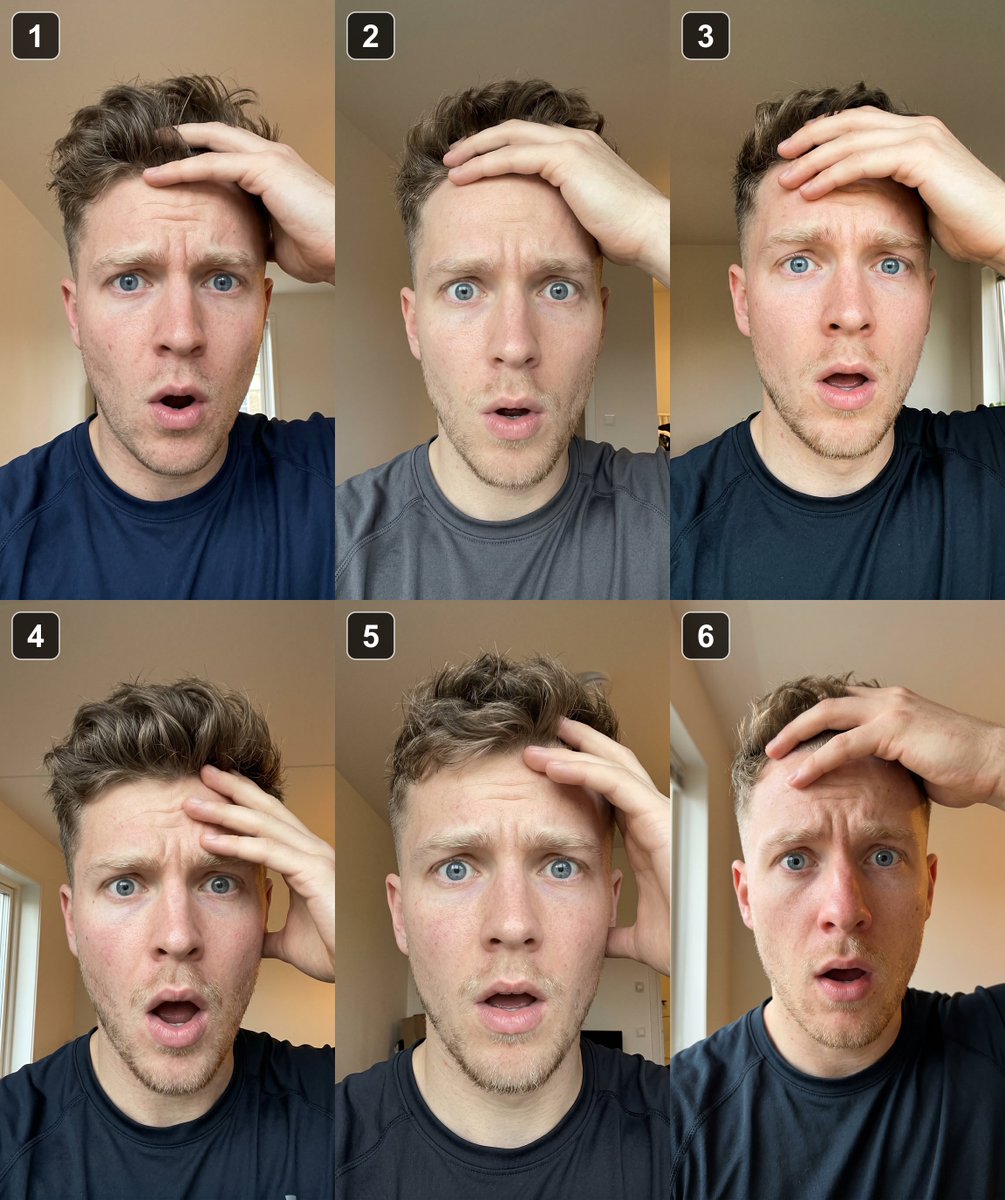
There's no limit here - you can generate dozens of candidates if you want. For the sake of keeping this tutorial simple, we'll pick one from these six.
Once you've found your creator, add them to Arcads as a reference:
Use Arcads. Ask the user which numbered image they choose, upload that image as a persistent Arcads asset, and return its asset ID.
Your AI agent will then be able to reference the same person every time it generates a new UGC video.
Build Your App Recording Library
The AI creator is only half of the equation. The other half is your app, and that's what ultimately keeps people watching.
Before automating anything, build a small library of reusable screen recordings. Focus on visually satisfying interactions: scans, results, animations, completed tasks, or anything that feels fast and rewarding.
Think of these as reusable assets, not recordings for a single video. Store them in an app-recordings folder so your agent can automatically reuse them throughout the workflow.
The more engaging your footage is, the easier it becomes to hold attention. Once you have a consistent AI creator and a library of recordings, everything else becomes automation.
Build the Skill
At this point, we have everything we need: a repeatable format, a consistent AI creator, and a library of reusable app recordings.
Now it's time to turn the entire workflow into a reusable skill. Instead of manually creating every new video, we'll teach our AI agent how to do it for us.
The skill should:
- Generate a 3-second shocked reaction clip using our custom Arcads actor with Seedance.
- Overlay the provided hook as TikTok-style text using FFmpeg.
- Pick one recording from the app-recordings/ folder.
- Append the recording after the reaction clip.
- Export a ready-to-post 9:16 MP4.
Here's an example skill prompt you can use as a starting point:
Use Arcads to create a finished TikTok-style UGC reaction video.

Inputs:
- hook
- actor_asset_id

Workflow:

1. Resolve the actor using the provided Arcads asset ID.

2. Generate a 4-second vertical reaction video with Seedance 2.0 using the actor as the only reference.

Generation prompt:

A hyper-realistic iPhone front-camera selfie video of the exact same actor from the reference image. Preserve the person's identity, hairstyle, clothing, lighting and environment. The video should feel like authentic handheld TikTok UGC: natural indoor lighting, subtle camera shake, realistic autofocus breathing, slight smartphone noise and imperfect framing.

The actor starts with a slightly confused expression, gradually becomes genuinely surprised, instinctively moves the phone a little closer (real camera movement, not digital zoom), then freezes while maintaining direct eye contact with the camera.

3. Download the video and keep only the first 3 seconds.

4. Add the provided hook using FFmpeg:
- 1080×1920 canvas
- bold white sans-serif font
- black outline
- centered horizontally
- automatically wrap long text

5. Select one random video from `app-recordings/`.

6. Normalize both videos to 1080×1920 (H.264, AAC, 30fps) and append the app recording after the reaction clip.

7. Save the final MP4 to `outputs/` using a slug generated from the hook.

8. Verify the output with ffprobe and return the output path together with the selected app recording.
At this point, the workflow is no longer about generating a single video - it's about iteration.
Run the same skill with a different hook, swap the app recording, or regenerate the reaction clip while keeping the overall structure exactly the same. The format stays fixed, but the creative angle changes.
Because everything now runs through your AI agent, scaling becomes trivial. Connect a social media scheduler, generate a week's worth of videos overnight, or track which hooks perform best and feed those learnings back into future generations.
Try It
If you want to build a workflow like this yourself, start by connecting Arcads to your AI agent through the Arcads MCP. Once that's done, build your creator, record your app, create the skill, and keep iterating.
The goal isn't to automate marketing entirely - it's to automate everything except the creative decisions that actually matter.
You can try Arcads here.
Related articles
11 VIRAL AI UGC formats we abused to engineer 150M+ app downloads
9 out of 10 people think AI UGC is 1 thing: a fake person talking to a camera about a product.
how to RAGEBAIT your way into a $100k+/mo app (with viral ai ugc)
a soda company ran an AI-generated ad last year and the internet lost its mind.

The Cal AI Distribution and Scaling Blueprint
But because we out-distributed every major competitor, we shot to the #1 app in Health & Fitness in 18 months and eventually were acquired by MyFitnessPal.