How to Run Signal-Based Outbound

We've run 1,000+ GTM campaigns on the way to $7M ARR.
The ones that booked meetings almost always had the same thing going for them: a specific, recent reason to be in that inbox that week.
So people ask me which intent signals actually work. What I usually find when I open their setup: a signal feed wired straight into a sequencer, everyone who trips a trigger dropped into the same three emails, and a reply rate that looks exactly like the cold list it replaced.
A signal is only worth the sentence it lets you write. If it doesn't change your first line, you've paid for a list.
Here are the six we keep going back to, and the exact workflow behind each:
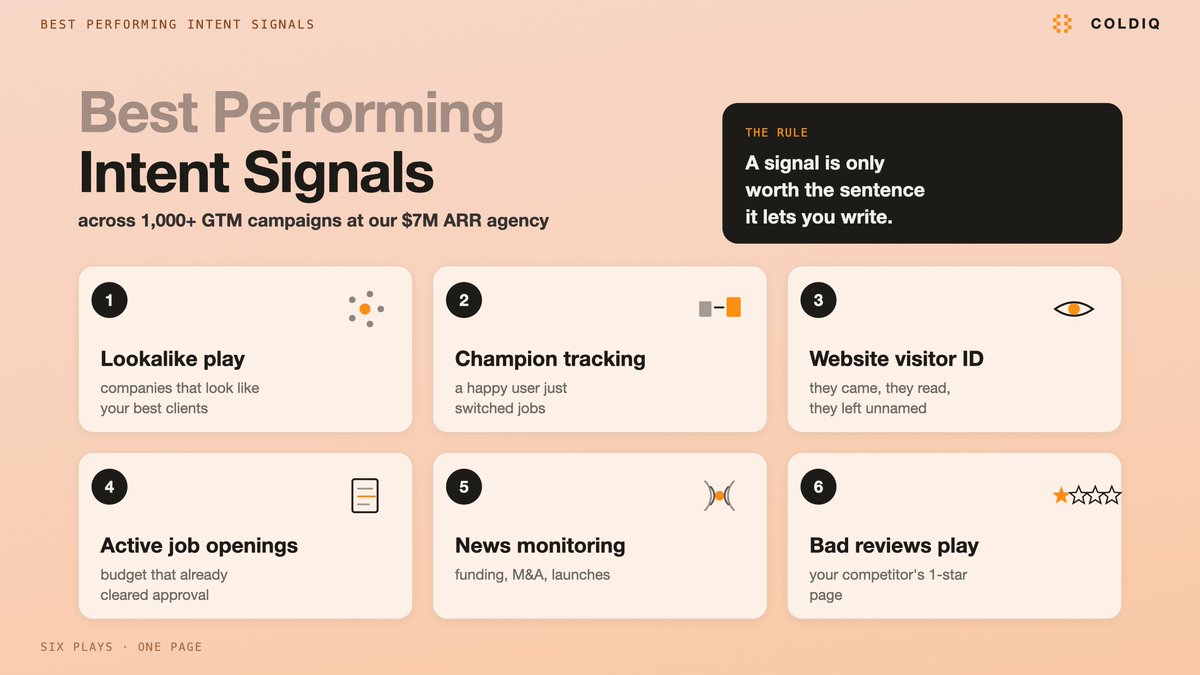 — "The six intent signals we keep going back to"
1. Lookalike play
One caveat before we start. Nobody at the target company did anything here, so calling it an intent signal is generous. You're borrowing evidence from the clients you already closed.
Lookalike = targeting companies that resemble your best accounts.
The tools:
→ PredictLeads tracks company-level signals (hiring, funding, tech installs) and returns similar-company sets from a seed domain
→ DiscoLike runs the same seed-to-similar job off a different index
→ LeadsFactory filters the returned companies down to the decision makers
→ ColdIQ's MCP inside Claude Code does that same filtering step without you moving between tools
The workflow:
- Take a batch of your best clients' domains. Keep it to the ones you'd want ten more of.
- Import them into PredictLeads or DiscoLike. Both return a larger list of companies resembling the seeds.
- Filter down to decision makers with LeadsFactory, or run it through ColdIQ's MCP inside Claude Code.
- Write the message off the similarity itself.
The message:
> "Hey {name}, we generated {result} for {similar company A} & {similar company B}. Since you're also {similarity}, I figured we could achieve comparable results for you. Can I send over a quick breakdown of how we did so for {similar company A} & {similar company B}?"
The case study is doing the qualifying here, so it has to be one they'd recognise themselves in.
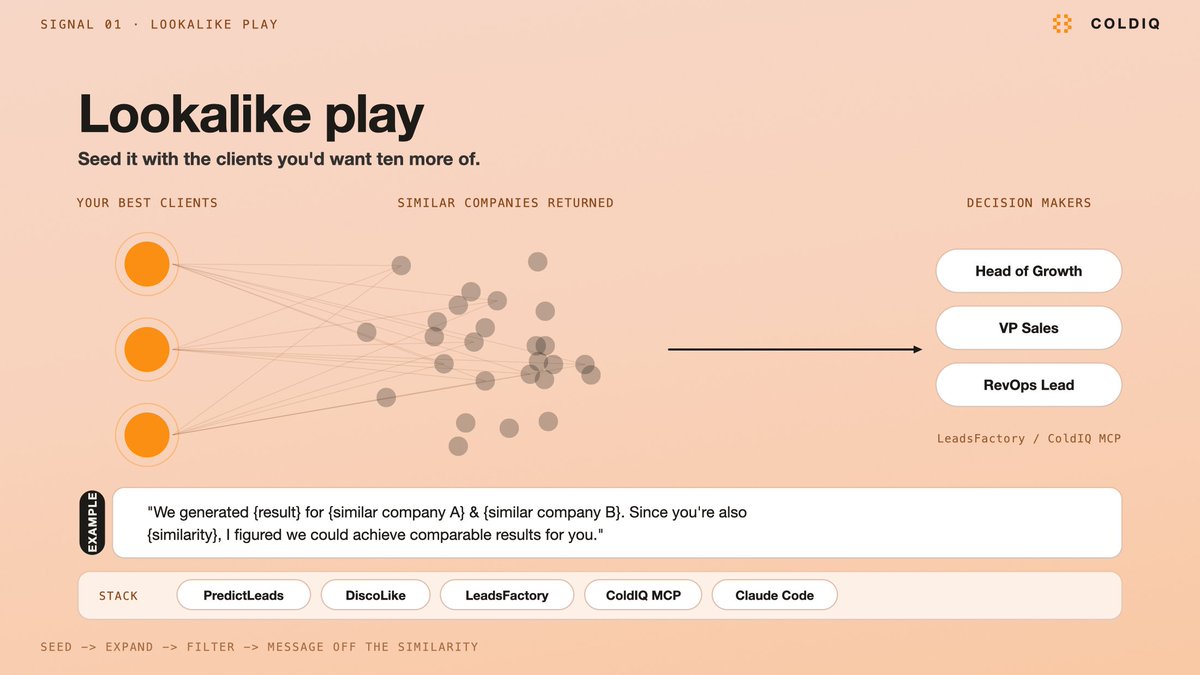 — "Lookalike play: seed your best clients, expand, filter to decision makers"
2. Champion tracking
Champion tracking = targeting people who already used your product happily, and just moved somewhere new.
This is the one I'd run first if you have the data for it. The buyer already knows the product works, so the entire education step is gone before you send anything.
The tools:
→ Your CRM is the source of truth here. A live sync beats a one-time export, because the list ages the moment you download it.
→ Artisan monitors job changes across a list of people you feed it
→ ColdIQ's MCP + Claude Code runs the same monitoring from the terminal
The workflow:
- Import your list of past buyers and users. Syncing the CRM directly is the better version of this step.
- Monitor for anyone who changed companies in the last 3 months.
- Reach out while the move is still recent.
The message, a template I picked up from Brian LaManna:
> "Hey {name}, congrats on your new position at {new company}. Given you're already familiar with {your product}, I'll spare you the pitch. Curious are you thinking it could be helpful to you/your team in your new role?"
The window matters because the stack for their new role is still being decided. And "I'll spare you the pitch" earns the reply by acknowledging they already sat through it once.
 — "Champion tracking: catch a past user inside the first 3 months of a new role"
3. Website visitor identification
Visitor ID = de-anonymising the people who landed on your site and left without filling anything in.
One constraint before you budget for it: person-level de-anonymisation works in the US. Plan the play around that.
The tools, all covering the identification step:
→ Instantly.ai · Knock2.ai · RB2B · Vector · WarmAI · ColdIQ
The workflow:
- Someone visits your site anonymously.
- De-anonymise the visitor (US).
- Segment, qualify and score ICP fit. ColdIQ's MCP handles the scoring step.
- Reach out with the context of what they actually looked at.
Most of the value sits in step 4. Someone who opened your pricing page three times is a different conversation from someone who read one blog post and left.
for visitor in identified_visitors:
    if not icp_match(visitor.company):
        continue

    context = visitor.pages_viewed        # pricing, docs, a specific feature page
    intent  = weight(context) + visitor.visit_count
    route(visitor, intent, opening_line=context.most_recent)
Open with the page they read. The rest of the sequence follows from it.
 — "Website visitor ID: de-anonymise, score ICP fit, open with the page they read"
4. Active job openings
Job openings = reading a company's open roles as a statement of what they're about to spend money on.
A posted role is a budget that already cleared approval, and a description that lists the responsibilities in the company's own words.
The tools:
→ lemlist · PredictLeads · Explorium · ColdIQ, all of which surface openings you can scan by domain, company name, job title or keyword
The workflow:
- Scan openings by domain, company name, job title or keyword.
- Analyse the description and responsibilities with your LLM of choice.
- Reach out to the Head of Department who owns the role.
Step 2 is worth a real prompt:
Read this job description and return:
- the initiative behind the role
- the 3 tools or processes this person will own
- the metric their manager is being judged on
- one opening line a vendor could use that references the initiative itself
Frame the product as something that makes the new hire more effective at the job. A message that reads like a replacement for the role gets ignored by the person who just fought internally to open it.
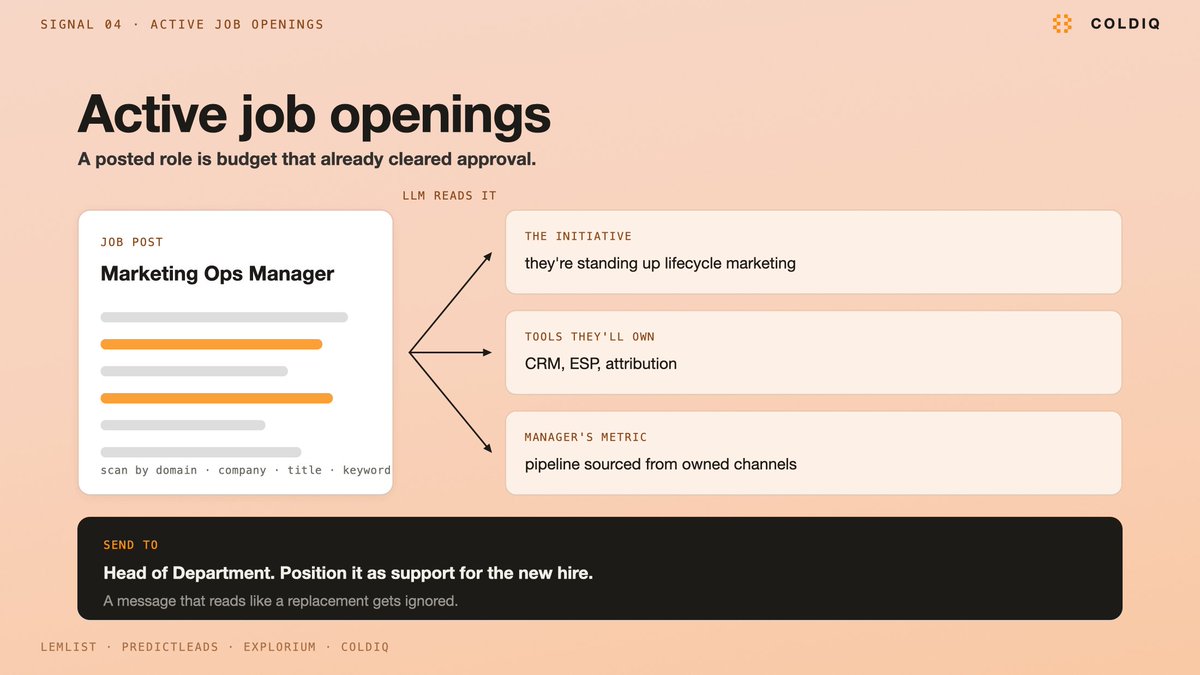 — "Active job openings: read the description as a budget that already cleared"
5. News monitoring
News monitoring = watching target accounts for mergers, acquisitions, product launches and similar events.
The tools:
→ Google Alerts creates the feed
→ Exa and ColdIQ's MCP ingest that feed URL
→ Serper does the same job against live search results
→ OpenAI, or whichever LLM you prefer, does the assessment
The workflow:
- Set up alerts for specific keywords, which can be the names of the companies you're monitoring. This produces a feed URL.
- Copy that feed URL into Exa or ColdIQ's MCP.
- Prompt an LLM to assess, at scale, whether each item is usable for prospecting.
Don't skip the filter in step 3. Most of what an alert returns has nothing you can open with, and without the filter you end up congratulating someone on a funding round they announced over a month ago.
For each news item, return:
- event type (funding / M&A / launch / leadership change / expansion)
- who inside the company now owns a new problem because of it
- whether that problem is one we solve (yes / no / unclear)
- the opening line, naming the event directly
- days since publication
Keep that last field. Recency is what separates this from a cold list, and an event nobody is still talking about internally won't earn you a reply.
 — "News monitoring: the LLM filter is what keeps stale events out of your sequence"
6. Bad reviews play
Bad reviews = reading your competitors' negative reviews as a list of people who already wrote down their problem.
The tools:
→ G2 and Capterra, the marketplaces where the reviews live
→ Jina AI's API, which handles the scraping and runs inside ColdIQ
→ ColdIQ for identifying and enriching the reviewer
The workflow:
- Monitor the bad reviews your competitors receive on G2 and Capterra.
- Prompt AI to single out which feature was missing or malfunctioning in each review.
- Identify the reviewer and enrich their contact information.
- Reach out about that specific feature.
The message:
> "I understand {competitor bad feature} is frustrating, hence why I came up with {product} for which I insisted on building {feature} right."
You don't have to guess at the pain on this one. The prospect wrote it down themselves, in public, with a date on it. Quote it back to them and keep your own commentary out of the way.
 — "Bad reviews play: the prospect already wrote the problem down in public"
Where to start
- Pick the signal you already hold the data for. A CRM full of past users means champion tracking. Real site traffic means visitor identification. With neither, start on lookalike, since your own client list is the seed.
- Run a small batch by hand before you automate anything. You're testing one thing: whether the signal changed your first line.
- Write the message template before you buy the tool. The template tells you which fields the signal has to return.
- Add the second signal once the first one books meetings.
One thing to plan for before you add the second signal. The six plays above run on fifteen separate providers. PredictLeads, Artisan, RB2B, lemlist, Exa, Jina and nine more. That's fifteen bills and fifteen API keys, any one of which can expire on a Tuesday and take a campaign down with it.
That's the part we got tired of. ColdIQ's MCP is one subscription and one key to 40+ GTM tools, with each task routed to whichever provider handles it best.
In Claude Code that's one sentence:
> "Pull every company that hit our pricing page this week, drop the ones outside ICP, check which of them have a Head of Growth role open, and draft me a first line for the ten strongest."
Two of the six plays, running against the same list, in one instruction.
You still have to know which clients you'd want ten more of, and what to say when you find them.
Come schedule a chat with me on coldiq.com & I'll tell you which of the six fits the data you already have.
Related articles

How I Make $20k/Month With Pixar Animations (and how you can too)
Every time I've made the most money in my life it came down to right time, right skill. AI Animations are exactly this to me right now

How to launch a one-person product (without destroying your life)
Over the last 5 years, I’ve helped launch products that went on to make multiple 7 figures in revenue per year.

the whop partner business model explained in 5 minutes...
every online business model is a trade between 3 things.