How to Start TikTok Ads With Completely Untested Creatives (Print $$$ in Weeks)
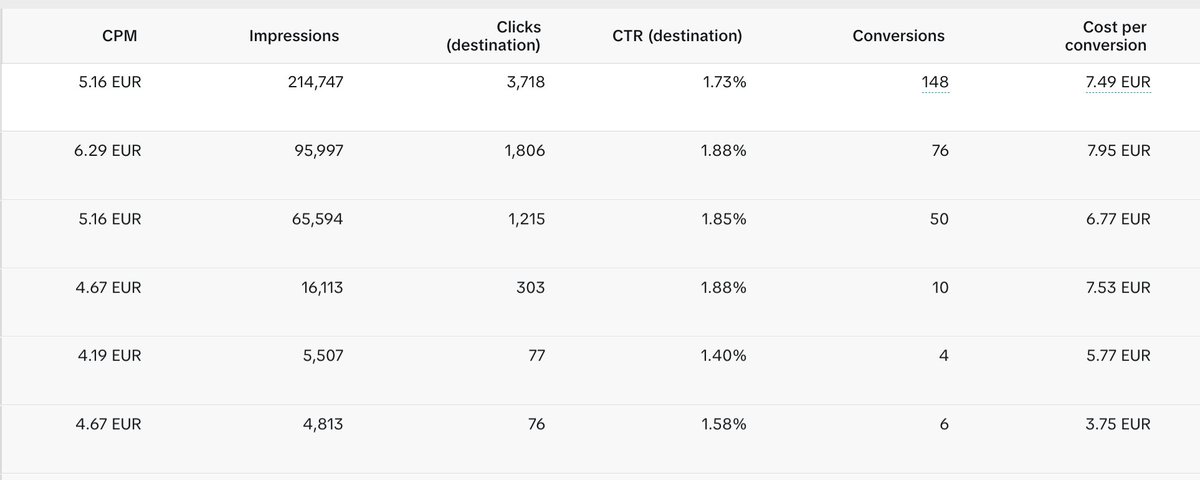
This is part 3 of my TikTok ads series for indie iOS developers. If you haven't read the first two, start there — this article builds directly on them:
- Part 1: The Technical Setup — MMP, events, TikTok App ID, making sure your data actually flows (https://x.com/maxzrco/status/2067895797971083590)
- Part 2: The Campaign Setup — campaign structure, ad group settings, budgets, targeting (https://x.com/maxzrco/status/2071949557135511922)
This article is about what happens after you press launch: how to read your results, when to intervene, and how to climb from an Install campaign all the way to a Subscribe campaign without burning money in the learning phase.
Who this guide is for (important)
This roadmap is for one specific situation: you're starting with completely untested creatives. No proven hooks, no organic winners, no idea which angle converts. You're starting cold.
If that's not you — if you already have an angle that works or an organic video that took off — skip the ladder and go straight to a Subscribe (or Start Trial) campaign. A creative that already performs organically has proven it can stop the scroll and create intent. It doesn't need the slow validation process below.
The ladder below exists because untested creatives need cheap, high-volume feedback. Installs give you that. Subscriptions don't.
The core logic: events need volume
Before any tactics, understand the one rule that drives everything:
TikTok needs roughly ~50 conversions per week per ad group to exit the learning phase.
The deeper the event sits in your funnel, the rarer it is:
Install → Paywall View → Start Trial → Subscribe
If you optimize for Subscribe on day one with untested creatives, TikTok might see 2–3 events per week. That's statistical noise. The algorithm never learns who your buyer is, delivery stays erratic, and your CPA is meaningless. You'd be paying premium prices for zero learnings.
So with untested creatives, you start at the top — where events are cheap and plentiful — and climb down as volume allows.
Phase 1: The Install campaign (Days 1–4)
Launch with 3–5 creatives with different hooks. Then do the hardest thing in performance marketing:
Don't touch anything for 3–4 days.
Every change — budget, pausing a creative, editing targeting — resets the learning phase. Days 1–2 always look bad. That's not a signal, that's the algorithm exploring. Intervening early is the #1 beginner mistake and it costs you both money and data.
The benchmarks that matter
| Metric | Bad | Okay | Good | Great |
|---|---|---|---|---|
| CTR | < 0.4% | 0.4–0.8% | 0.8–1.5% | > 1.5% |
| CPI (US, consumer iOS) | > $6 | $3–6 | $1.50–3 | < $1.50 |
| CPM | > $20 | $10–20 | $6–10 | < $6 |
| CVR click → install | < 5% | 5–10% | 10–20% | > 20% |
After 3–4 days, evaluate each creative — but only if it has at least ~1,000 impressions or ~50 clicks. Below that, everything is noise.
A few notes on these numbers:
- These are for US targeting, consumer iOS apps in the travel/lifestyle space. Other geos run cheaper (and convert worse down-funnel).
- CPI varies wildly by niche. A mood tracker isn't a fintech app. Treat these as orientation, then build your own baseline after week one.
- CTR is your hook metric. CVR click→install is your store page metric. Don't confuse the two — they have different fixes.
The diagnosis table: what to do when results are bad
| Symptom | What it means | Intervention |
|---|---|---|
| All creatives CTR < 0.4% | Your hooks don't stop the scroll | New hooks. Not more budget — budget amplifies what's already there |
| Good CTR, CPI way too high | People click but don't install — store page mismatch | Fix App Store screenshots, title, or align creative promise with store page |
| Barely any delivery | Budget too low or bid too conservative | Raise budget slightly or broaden targeting; check ad group isn't stuck in review |
| One creative eats 90% of budget | Normal — TikTok found a winner | Let it run. Build 2–3 variations of that hook |
| High CTR from weird demographics | Hook attracts the wrong crowd | Check audience insights; rewrite the hook to filter, don't over-restrict targeting |
Selecting winners (Day 4–5)
After every creative has enough data:
- Winner: clearly above average on CTR and below average on CPI → keep, scale, build variations
- Middle: let it run another few days
- Loser: worst CTR and highest CPI → pause it. A dead creative drags the whole ad group's delivery down
Then iterate: take your winning hook and produce 2–3 variations (different b-roll, slightly different text, different sound). This is where you learn which angle installs cheapest — and that learning carries all the way to Subscribe.
Phase 2: Moving up to Paywall View (Days 5–14, once two gates are passed)
Don't switch by calendar. Switch when both of these are true:
- You have a stable winner creative with a CPI you can live with
- Your event pipeline is verified — paywall events arrive reliably in your MMP and TikTok Events Manager (Part 1 covers this; for iOS this includes being approved for real-time reporting, without which TikTok can't optimize on down-funnel events at all)
Then create a new campaign optimizing for View Content / Paywall View (App Event Optimization). Never rebuild the running Install campaign: let it keep running (or wind it down) while the new one takes over.
Benchmarks for this phase
| Metric | Concerning | Solid | Great |
|---|---|---|---|
| Cost per Paywall View | > $5 | $2–5 | < $2 |
| Install → Paywall rate | < 40% | 40–60% | > 60% |
If your install→paywall rate is low, that's not an ads problem — that's an onboarding problem. Fix the flow before spending more.
Run this phase until you're seeing paywall volume that suggests ~50 trials/week is realistically reachable at the next level. If your paywall→trial rate is, say, 10%, you need ~500 paywall views a week before moving on makes sense.
Phase 3: The Subscribe / Start Trial campaign
Once the volume math works and real-time reporting is confirmed, set up a new campaign optimizing for Start Trial (or Subscribe, depending on your paywall setup).
What changes now:
- Expect higher CPMs. TikTok hunts for buyers, not scrollers. This is fine — you're paying for quality.
- Judge slower. Trials are rarer events; give ad groups 5–7 days before verdicts.
- Never run Install and Subscribe campaigns simultaneously on the same audience. They cannibalize each other — the Install campaign hoovers up cheap low-intent users and poisons the Subscribe campaign's delivery.
Benchmarks
| Metric | Concerning | Solid | Great |
|---|---|---|---|
| Cost per Trial (US, consumer subscription) | > $25 | $10–25 | < $10 |
| Trial → Paid rate | < 20% | 20–40% | > 40% |
The full roadmap at a glance
| Phase | Optimization event | Duration | Exit condition |
|---|---|---|---|
| 1 | Install | Days 1–5+ | Stable winner creative, acceptable CPI |
| 2 | Paywall View | 1–2 weeks | ~50 trials/week realistically reachable, real-time reporting live |
| 3 | Start Trial / Subscribe | ongoing | This is the destination |
And remember the shortcut from the top: proven creative → skip straight to Phase 3. The ladder is a validation tool for cold starts, not a ritual.
The short version
- Untested creatives start at Install — cheap, high-volume feedback. Proven creative? Skip straight to Subscribe.
- Don't touch anything for 3–4 days. Every change resets the learning phase.
- Judge only with enough data (~1,000 impressions / ~50 clicks) — CTR tells you if the hook works, CPI if the funnel behind it works.
- Low CTR = new hooks, not more budget. Good CTR but high CPI = fix your store page, not your ads.
- Climb one step at a time: Install → Paywall View → Start Trial. Each step needs ~50 conversions/week — and a new campaign, never a rebuilt one.
- Real-time reporting is the gate. Without it, TikTok can't optimize on down-funnel events.
- From Subscribe onwards, never trust TikTok's native CPA alone — it sees ~25% of your installs and none of your revenue.
The money is made in Phase 3 — but only if Phases 1 and 2 taught you which creative and which angle deserve the budget.
I'm building in public — sharing every fail and number as I go. Follow along if this was useful. 🚐
Related articles

The TikTok Ads Setup to Actually Print Money - It Took Me 6 Months to Get Right (Skip the Pain)
I run a bootstrapped iOS subscription app. For months I was burning ad budget into TikTok and getting back garbage: 0 conversions in Ads Manager while my payment processor clearly showed people subsc…

How to turn attention into consumer-app customers who don’t churn
That playbook worked when building the product was hard and distribution was cheap, but the opposite is true in 2026.

i analyzed 27 apps that went from zero to millions of views without spending a dollar on ads. they a
$0 to $80K MRR in 70 days. $0 to $200K MRR in 9 months