The TikTok Ads Setup to Actually Print Money - It Took Me 6 Months to Get Right (Skip the Pain)

I run a bootstrapped iOS subscription app. For months I was burning ad budget into TikTok and getting back garbage: 0 conversions in Ads Manager while my payment processor clearly showed people subscribing.
The ads worked. The attribution was broken. And a broken attribution pipe means TikTok's algorithm is optimizing blind — it can't find more buyers if it never learns who bought.
This is the exact setup I wish someone had handed me on day one. If you're a vibe coder shipping a subscription app, copy this and skip the 6 months of pain.
Why this is hard (and why most guides don't help)
On iOS, Apple's privacy framework (ATT + SKAN) sits between your app and the ad networks. By default, TikTok barely sees what happens after the install. Two things go wrong:
- SKAN throttling — Apple only sends conversion postbacks once you cross a privacy threshold (~90 installs/day). Below that, up to ~74% of postbacks come back null. On a small budget, you're flying blind.
- Signal conflict — if you have both the TikTok SDK and an MMP installed, TikTok keeps listening to the wrong one and reports 0 conversions even when attribution is actually working.
The fix is a proper Mobile Measurement Partner (MMP) setup with real-time reporting, and manually telling TikTok to trust it. Here's the whole thing.
The stack
- App: iOS subscription app (React Native / Expo in my case)
- MMP: AppsFlyer
- Subscriptions: RevenueCat
- Ads: TikTok Ads Manager + Business Center
These four have to talk to each other in a specific way. Order matters.
Step 1 — TikTok Business Center & account structure
- Create a new Advertiser Account inside Business Center.
- Link your TikTok account to it.
- Go to Tools → Events Manager → New data source.
- Add your MMP: select AppsFlyer, paste your iOS App Store link, and choose All App Events.
Don't skip the Business Center layer. It's what lets you cleanly manage permissions later.
Step 2 — AppsFlyer dashboard configuration
This is where most setups quietly fail. The defaults are wrong for small bootstrappers who need real-time signal.
App Settings
- Aggregated Advanced Privacy (AAP): OFF. This is the big one. With AAP on, AppsFlyer only sends aggregated anonymous data to partners — which kills iOS real-time reporting. Turn it off at the app level.
- Timezone: set it to your reporting timezone (mine is Europe/Berlin) so revenue lines up with your day.
Partner integration (TikTok)
- Configure TikTok as an Advanced SRN partner.
- Advanced Privacy toggle (partner level): OFF as well. Both the app-level AAP and the partner-level toggle have to be off.
Permissions — give TikTok all of these:
- Ad network permissions: ON
- Configure integration: ON
- Configure in-app event postbacks: ON
- Access aggregate conversions data: ON
- Access aggregate in-app events data: ON
- Access aggregate revenue data: ON
- Use Cost Import: ON
SKAN Conversion Studio
- SKAN measurement: ON
- Support anonymized users: ON
- (You'll later turn SKAN off in TikTok once real-time reporting unlocks — more on that below. Keep it configured here as the fallback.)
Step 3 — RevenueCat → AppsFlyer integration
In RevenueCat, go to Integrations → AppsFlyer and enable it.
- Fill in your iOS App key and iOS App ID.
- Use default event names.
Now RevenueCat will automatically send rc_initial_purchase_event, rc_renewal_event, and rc_cancellation_event to AppsFlyer server-side — as long as the AppsFlyer ID is correctly set as a subscriber attribute. That last part is a code step, and it's the one that breaks silently.
Step 4 — The code (the part nobody documents)
This is the glue. If you're vibe coding, paste these as hard requirements into your setup, because the "obvious" approaches are wrong.
Initialize AppsFlyer the right way
- Lazy-load the AppsFlyer SDK so it doesn't crash in Expo Go.
- Initialize on app start, but first check ATT status. If it's still undetermined, wait (up to ~60s) for the user's ATT answer before initializing. This lets attribution happen correctly with or without the IDFA.
Link AppsFlyer to RevenueCat — use the correct method
- After init, grab the AppsFlyer UID and pass it to RevenueCat with:✅ Purchases.setAppsflyerID(uid) ❌ NOT setAttributes({ $appsflyer_id: uid }) — that creates an invalid attribute name and the whole server-side pipe silently fails.
- Re-sync the same ID right before opening the paywall (a small syncAppsFlyerIdToRevenueCat() helper). Belt and suspenders.
Track these events
- af_content_view → on paywall open
- af_complete_registration → after signup
- af_login → on login
- af_start_trial → on trial start
- af_purchase → on direct purchase
Every purchase event must include the Apple Transaction ID as af_order_id for deduplication. Also guard locally (e.g. AsyncStorage) so the same event can't fire twice.
Why both SDK and RevenueCat send events: the SDK catches the live purchase; RevenueCat catches renewals and cancellations the SDK never sees. Because both use the same Apple Transaction ID, AppsFlyer dedupes them automatically. You get full coverage with no double counting.
One more gotcha: after a successful purchase, call Purchases.logIn() with your real backend user ID (Supabase in my case), not the anonymous RevenueCat ID — otherwise you'll hit row-level-security violations when saving the subscription.
Step 5 — ATT prompt & Info.plist
- Show the ATT prompt at a natural moment — I trigger it on "Get Started" in the auth screen.
- Your Info.plist needs:the tracking usage description string the AppsFlyer SKAN endpoint (https://appsflyer-skadnetwork.com) the full list of SKAdNetwork IDs for AppsFlyer's partners — including all the TikTok/ByteDance IDs (238da6jt44, 899vrgt9g8, mj797d8u6f, 22mmun2rn5).
Without those IDs, iOS literally cannot send SKAN postbacks to TikTok. This is a common silent failure.
Step 6 — The switch that fixes "0 conversions"
Here's the one that cost me weeks.
In TikTok Events Manager, the Primary Signal must be set to AppsFlyer (MMP) — not the TikTok App Events SDK.
If you have both installed, TikTok defaults to the SDK and shows 0 conversions even though AppsFlyer sees everything correctly. This switch does not happen automatically. I had to get TikTok support to flip it manually (support ticket and all).
If your Ads Manager shows zero conversions but your MMP shows attribution — this is almost always why.
Step 7 — Campaign structure
- Create an iOS 14.5+ Dedicated Campaign with the App Promotion objective.
- Optimize for Subscribe as the conversion goal.
- Once TikTok shows "Your app is eligible for iOS real-time reporting," turn SKAN attribution OFF. Now conversions appear near real-time instead of being delayed and throttled by Apple's privacy threshold. Real-time signal = faster, smarter algorithm optimization. This is the single biggest unlock for a small budget.
Event postback mapping in AppsFlyer:
- af_complete_registration → Registration (no values/revenue, all media sources)
- af_content_view → ViewContent (values, no revenue, all media sources)
- af_purchase → Subscribe (values + revenue, all media sources)
- af_start_trial → StartTrial (values + revenue, all media sources)
- af_skad_revenue → Subscribe (values + revenue, this partner only)
- rc_initial_purchase_event → Subscribe (values + revenue, this partner only)
How I actually run the campaigns
The setup above is the foundation. Here's how I spend on top of it:
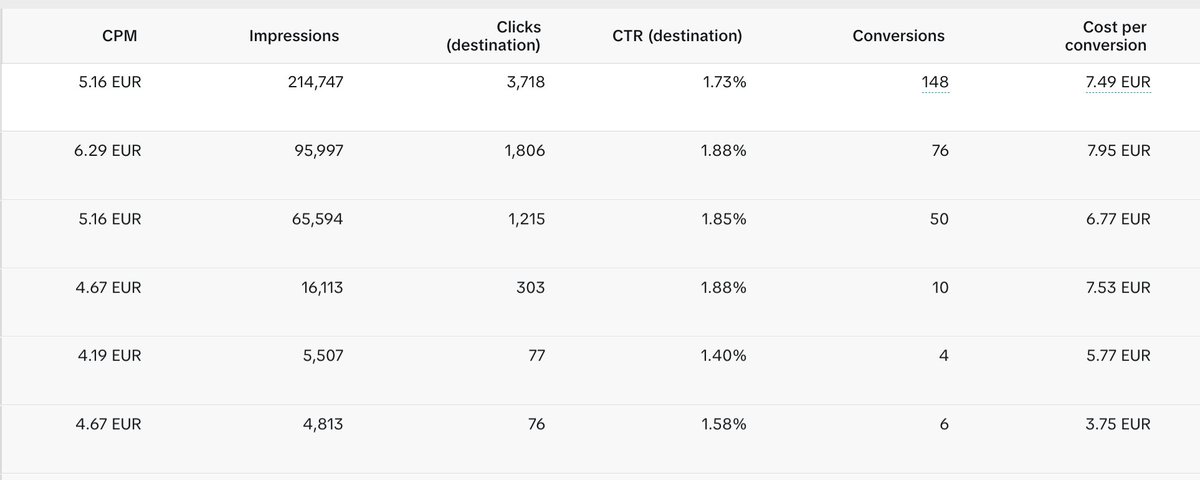
- Go straight to the US market. Don't waste months on Europe like I did. For months I ran Germany and a patchwork of European countries, fighting for every conversion to break even. The day I switched to the US, everything changed — purchase intent is dramatically higher, and the campaigns were profitable almost instantly. Same app, same creatives, completely different economics. If I could start over, I'd skip the European market entirely and launch on the US from day one.
- Languages: always All. Don't fragment by language.
- Skip Target CPA in the early phase. Let it learn.
- Learning phase: 5–7 days. Don't touch it, don't panic.
- Budget ramp: start ~€40/day for ~4 days, then scale up gradually. Sudden jumps reset learning.
- Creative health check: a good creative gets 40–60%+ of viewers watching a 6-second video to 100%.
- Smart+: run 1–2 weeks with ~5 creatives, kill the losers, keep the winners.
- Rotate creatives every 7–14 days to fight fatigue.
The short version
- MMP (AppsFlyer), not just the TikTok SDK.
- Turn OFF Aggregated Advanced Privacy — both app level and partner level.
- Use Purchases.setAppsflyerID() — never setAttributes.
- Put all the TikTok SKAdNetwork IDs in your Info.plist.
- Manually set TikTok's Primary Signal to the MMP. This fixes the dreaded "0 conversions."
- Once eligible, turn SKAN off for real-time reporting.
- Give it a 5–7 day learning phase before judging anything.
SKAN on a small budget is a trap — Apple's privacy threshold only behaves around ~90 installs/day. Real-time reporting through an MMP is what lets a bootstrapper's budget actually find buyers.
That's the whole thing. It took me 6 months. It should take you an afternoon.
I'm building in public — sharing every fail and number as I go. Follow along if this was useful. 🚐
Related articles
How to Start TikTok Ads With Completely Untested Creatives (Print $$$ in Weeks)
This is part 3 of my TikTok ads series for indie iOS developers. If you haven't read the first two, start there — this article builds directly on them:

How to turn attention into consumer-app customers who don’t churn
That playbook worked when building the product was hard and distribution was cheap, but the opposite is true in 2026.

i analyzed 27 apps that went from zero to millions of views without spending a dollar on ads. they a
$0 to $80K MRR in 70 days. $0 to $200K MRR in 9 months