I Saved $5,000 a Month by Turning 9 Manual Steps Into 1 Prompt

5 apps did the work. I opened 1 and got back the 4 days a month I used to spend between them.
The video was never the slow part. The shuffling between apps was: copy the scene out of the plan, pull the references from Drive, generate, download, upload the file back, post it in the channel, retype the spec so nobody has to open the file, add the calendar entry, mark the row done.
9 manual steps. Not one of them is the video.
40 clips went out last month, 46 minutes of shuffling each. 31 hours, 4 working days, $4,600 at my day rate. Add $400 of tools whose only job was moving files between other tools. $5,000 a month to carry files between tabs.
Imagine Computer keeps the connectors in one list. 30-odd services, one toggle each.
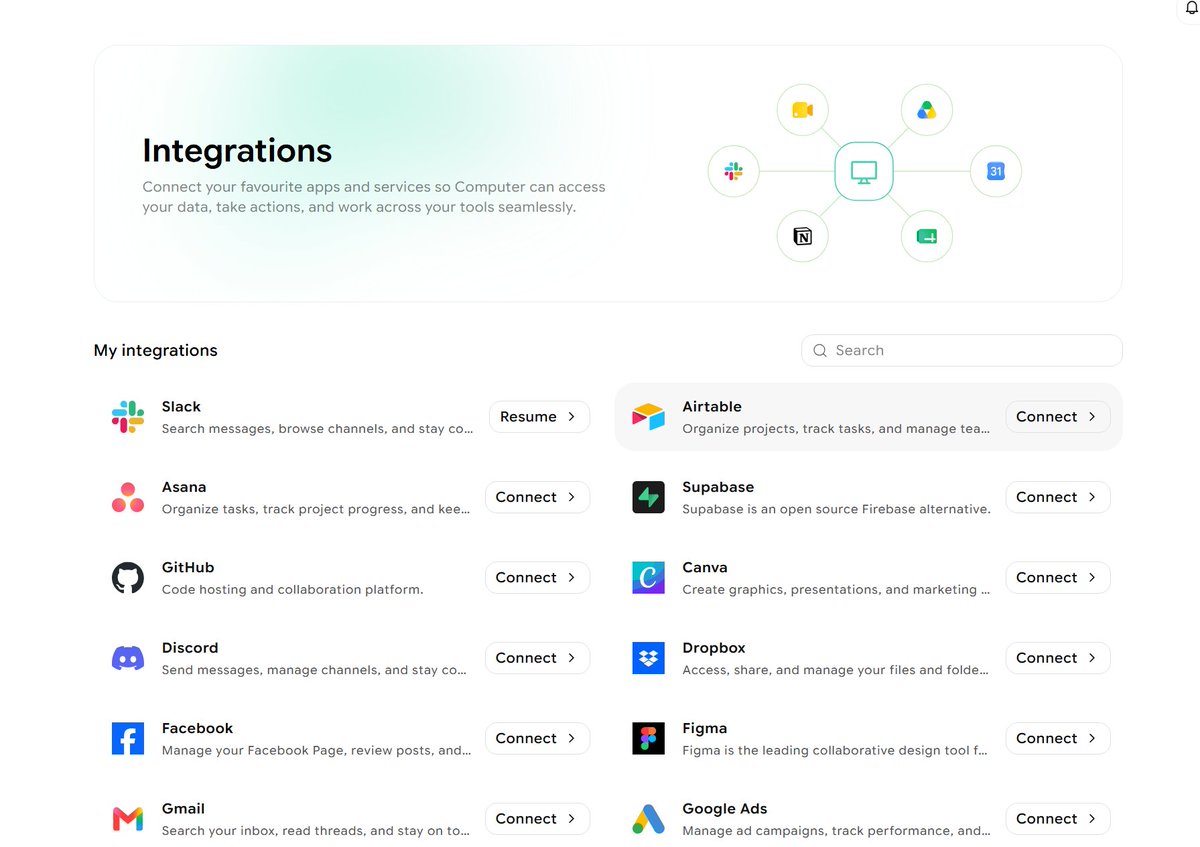 — "The whole list in one screen. Gmail and Google Docs came on during an earlier job. Everything else waits behind a single sign-in."
I had 2 of them on from an earlier job, Gmail and Google Docs. This time I turned on 4 more: Google Sheets, Google Drive, Slack, Google Calendar. Each one is a sign-in with the account I already use. No API key, no webhook, no middleman service holding my tokens.
The list also opens straight from the prompt bar, and the icons stay in the bar afterwards. Before I type a word I can see what this chat reaches.
 — "The picker drops out of the prompt bar itself, so the accounts a chat can reach sit in front of me before the first word."
The plan lives in a spreadsheet, the way it did before any of this.
 — "5 columns, 6 rows, 4 of them pending."
The columns: the scene, the format, the length, the publish date, the status. Row 2 says a kaiju walks out of the fog onto a neon street at night, 9:16, 15 seconds, live on the 26th.
That row is the brief. Nobody wrote a brief.
Then I typed this, once:
Open the Google Sheet named "Content plan" and take the first row with status pending.
Look in the Google Drive folder "Content plan assets" and use whatever brand references are in it.
Generate the video for that row's scene, in the format and length the row states.
Verify the finished file matches that format and length before it goes anywhere.
Then: upload it into that same Drive folder, post it in #creative on Slack with a spec check against the row, create a Google Calendar event on the publish date named after the scene, and set the row status to done.
Claude 5 Opus, Ultra tier. Then I went to make coffee.
The part worth watching is where one app ends and the next begins.
 — "The run, top to bottom. Two services close inside the first two lines."
The gap between those 2 lines is the one I used to fill by hand. It cost me a download, a folder, and the 40 seconds of remembering what I named the file last week.
It picked the video model itself. I never named one, in the prompt or anywhere else. The row said 9:16 and 15 seconds, and it chose something that could hold both.
Then it refused to trust the model.
> The model reports 9:16 and 15 seconds. Reading the file itself to confirm: 1080x1920, 15.0s, audio present.
A model accepting your parameters and the file on disk carrying them are 2 different claims. Every render I have shipped late came from believing the first one.
The file went back into the same Drive folder it took the references from, then into the channel.
 — "The file lands with its spec check attached, written against the columns of the row that started it."
The loop closes where it opened. That last step is what lets the whole thing run tomorrow without me.
One run is a demo. The plan refills every week.
So I put it on a timer. 4 fields.
Open the Google Sheet named "Content plan" and take every row with status pending whose publish date is within the next 3 days.
For each row: generate the video to the format and length in that row, verify the finished file against them, upload it to the Google Drive folder "Content plan assets", post it in #creative on Slack with a spec check, create a Google Calendar event on the publish date, then set the row status to done.
Skip any row already marked done.
Then send me a summary: which scenes went out, what spec each file came back with.
The connector icons sit inside that box too, so the scheduled job reaches the same 4 accounts the chat did.
Skip any row already marked done is the line doing the quiet work. Without it, Monday drops 4 identical kaiju into the channel.
The 9 steps are gone. 4 days a month came back.
I still open the video before I call it delivered. The connectors run on my own login, so a job reaches the accounts it needs and nothing else.
A row went in. A 15-second vertical file came out, filed where the references live, posted with its spec, dated in the calendar, and the row that started it now says done.
Between those, I typed once.
Related articles

How to Build a One-Person Company That Runs from Slack
content finds ideas for X and YouTube.
How I use Grok Bots to rank brands on AI answers that it feels illegal
Name this bot `CrowdReply - Scout`.

Turning Hermes + Slack Into 7 Figure Lead Lists
Building a lead list usually means opening a database, setting filters, exporting, and cleaning.