How to Build a One-Person Company That Runs from Slack

I'm going to show you how I run most of my day-to-day business through five Slack channels:
> content finds ideas for X and YouTube.
> projects keeps client work moving.
> outreach finds and researches consulting prospects.
> finance tracks outstanding invoices and the P&L.
> ads checks my ad accounts and flags what needs attention.
i still decide what gets published, sent, finalized, or spent.
the research, checking, and preparation happen before i arrive.
below, i will show you exactly how i set it up:
- the Slack structure and connected tools
- the five briefs running the day-to-day work
- how the assistant gets context across the business
- the memory and approval rules
- how to add each workflow without creating a mess
- the complete setup to copy at the end
What I Already Had
The tools were already in place.
Typefully can schedule X posts. Apify can scrape trend data. Notion can track client work. accounting software holds the P&L. Meta Ads Manager runs campaigns.
each tool already did its job well.
what the software did not have was the context i use to run the business.
how i write on X. which YouTube topics fit my channel. what i promised each client. who fits my consulting offers. which numbers matter in the P&L and ad accounts.
that knowledge lived across my head, Google Docs, Slack messages, and email.
the problem was that none of the tools could use that context together.
each one held a different piece of the business. before i could decide what to do next, i had to piece the full picture together myself.
that took hours every week.

the work between the tools
the useful version of an AI employee is not another chatbot waiting for a perfect prompt.
it is an assistant that understands the full picture across my content, client projects, pipeline, financials, and campaign data.
it does the prep. i still approve anything it sends or changes.
the assistant needs to do four things:
- read the current state from the tools you already use
- apply the relevant company rules
- prepare or complete the next piece of work
- return it somewhere you already check
once those four parts are reliable, work can move without me reopening the same five tools just to reconstruct what is happening.
getting it running in Slack
the fastest version i found is Viktor.
Viktor is an AI employee that works inside Slack or Microsoft Teams and connects to more than 3,200 tools.
i gave each part of the business its own channel:
- #x-youtube
- #client-projects
- #consulting-pipeline
- #finance
- #paid-growth
the channels are different views of the same business.
Viktor has access to the shared business context, connected tools, projects, and data. each channel gives me a clean place to work on one part of that picture.
the separation is for me, not for the assistant.
I can open #client-projects to review delivery, then move to #finance without explaining which client, contract, or invoice the discussion refers to again.
the context carries across the work. the conversations stay easy to follow.

here is how i use it across each part of the business.
1. X and YouTube
the content channel helps me find ideas for X and new topics for my YouTube channel.
it scans the topics and creators i follow, checks what i have already published, and looks for an angle i can add rather than repeating what is already moving.
pin my positioning, audience, writing rules, strongest X posts, published articles, YouTube archive, and the topics i want to own.
then give Viktor this brief:
Every weekday at 8:00, prepare the X and YouTube content package.

Use the pinned positioning, voice rules, X archive, YouTube archive, and current content priorities.

1. scan the connected X, YouTube, and source feeds for useful developments
2. identify ideas that fit the topics I cover on X
3. find new YouTube topics with clear evidence of audience interest
4. check whether I have covered each idea before
5. explain the angle I could add
6. verify important claims against primary sources

Return one Slack message with:
- 10 X ideas with a one-sentence angle for each
- the source and reason each idea matters now
- three YouTube topics
- the evidence of interest for each topic
- a possible title and angle for each video
- claims that still need verification

Do not publish or schedule anything.
the output is not supposed to write the content for me.
it removes the daily hunt for topics. when i open the channel, i have a researched list of X ideas and YouTube topics i can quickly accept, reject, or develop.
2. client projects
the projects channel keeps every consulting engagement current.
it checks what was promised, what changed, what the client owes me, what i owe the client, and what must happen before the next call.
pin the scope, deliverables, milestones, client contacts, meeting cadence, and definition of done for every engagement.
Every weekday at 16:30, review every active client engagement.

Use the connected project tracker, calendar, client Slack channels, meeting notes, and approved statements of work.

For each client:
1. compare the latest activity with the agreed scope and milestones
2. list deliverables completed since the last review
3. list anything I owe next
4. list inputs or decisions still owed by the client
5. flag deadlines, scope changes, or blockers
6. prepare the agenda for the next client call

Return:
- one status block per client
- my next deliverable and due date
- client inputs still outstanding
- risks requiring my decision
- next-call agenda

Do not contact the client, change scope, or move a deadline without approval.
this replaces the part of client delivery where i reread a week of messages before remembering what was promised and what needs to happen next.
3. consulting pipeline
the pipeline channel looks for companies that might need help with AI enablement or growth.
it looks for something concrete, such as a new AI initiative, a hiring push, a product launch, or a visible growth problem. then it suggests who i should contact and how i could approach them.
i give it both consulting offers, examples of good-fit clients, past results, disqualifiers, and outreach that has worked before.
Every Tuesday and Thursday at 9:00, find 10 consulting prospects.

Use the pinned criteria for the AI enablement and growth consulting offers.

For every prospect:
1. choose the offer that fits best
2. verify the company meets every required criterion
3. find a recent signal of an AI adoption or growth problem
4. identify the person who owns that problem
5. explain why the timing and offer fit
6. draft a short message using only verified information

Return a table with:
- company
- recommended offer
- buyer and role
- source links
- verified problem signal
- reason to contact them now
- proposed message

Do not add anyone to the CRM or send a message without approval.
i would rather review 10 companies with a verified consulting need than generate 500 names and pretend list size is pipeline.
4. finance
the finance channel covers only two things: outstanding invoices and the P&L.
it shows me who still owes money and what changed in revenue, costs, and profit.
pin the payment terms, client list, P&L categories, reporting period, and the threshold for a variance worth explaining.
Every Friday at 14:00, prepare the outstanding invoice and P&L review.

Use the connected invoicing and accounting records.

Review:
- overdue invoices
- invoices due in the next 7 days
- current-month revenue
- cost of delivery
- operating expenses
- operating profit
- material changes versus the previous month

Return:
- every outstanding invoice with amount and days overdue
- draft follow-ups for overdue invoices
- the current-month P&L
- the largest month-on-month changes
- entries or variances that need my review

Do not send follow-ups or change accounting records without approval.
the goal is to see unpaid invoices and the actual shape of the month in one Slack message.
5. paid growth
the paid growth channel reviews all my ad accounts on a schedule. i can also ask for a fresh review whenever i need one.
it checks spend, CPA, ROAS, CTR, CPM, and frequency against the targets for that account, then returns only the campaigns that need a decision.
i give it the target CPA or ROAS, attribution window, minimum spend before a decision, scaling rules, fatigue threshold, and daily budget limit for every account.
this allows me to get the same standard of analysis across every account without rebuilding the report each time.
Review every active campaign across my connected ad accounts on the agreed schedule.

Run the same review ad hoc whenever I ask.

Use the connected ad platforms and the pinned targets, decision thresholds, budget rules, and attribution notes for each account.

For each campaign:
1. report spend, conversions, CPA, ROAS, CTR, CPM, and frequency
2. compare the result with the target and previous 7-day period
3. confirm the campaign has enough spend or conversions for a decision
4. flag performance decline or creative fatigue
5. propose hold, pause, scale, or a new creative test

Return:
- account summary
- only campaigns that need a decision
- the metric and threshold that triggered the flag
- the exact change proposed
- the expected effect and main risk

Do not pause, launch, or change spend without approval.
this means i can stay focused on the strategy.
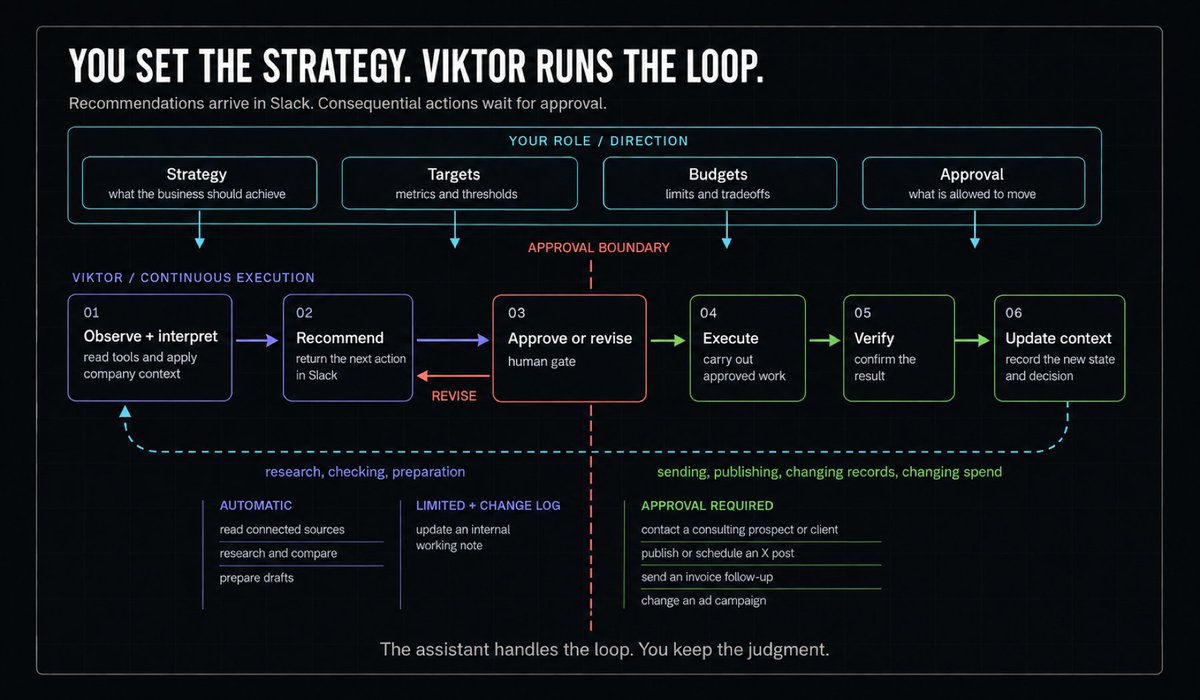
i set the targets, budgets, and rules. the assistant watches the accounts, recommends the next change, and executes it once i approve.

how i gave it the full picture
all five channels use the same assistant and shared understanding of the business.
one shared source of truth
the assistant needs one current picture of the business.
that includes my content archive, YouTube plans, consulting offers, active projects, client commitments, pipeline, invoice status, P&L, and campaign targets.
when a project changes, i update it once. the new information is available when we discuss delivery, finance, outreach, content, or paid growth.
access across the business
the value comes from letting the assistant connect information that normally sits in different tools.
a client launch can shape an X post. a project delay can explain an invoice. a campaign result can create a YouTube topic or change the next client recommendation.
full context does not mean unlimited authority.
the assistant can read enough to understand the business while still asking me before it sends, publishes, edits records, or changes spend.
a useful record of past work
the assistant needs enough memory to avoid repeating work and ignoring corrections.
it does not need an unlimited transcript of the company.
store durable facts such as approved definitions, completed actions, rejected approaches, and standing decisions. remove temporary discussion once it is no longer useful.
when it runs and where it stops
the schedule starts the work without a prompt.
the gate determines whether the work stops as a recommendation or can continue into another system.
the easiest rule is based on blast radius:
- read, research, compare, and draft can run automatically
- sending, publishing, finalizing records, and changing spend require approval
keep the context current
giving the assistant access to everything only helps if it can tell what is still true.
i separate the context into three buckets.
the connected tools hold the live state: current projects, scheduled content, open invoices, and active campaigns.
the shared files hold the durable context: offers, positioning, client scope, voice examples, targets, and playbooks.
the decision log holds the changes: what i approved, what i rejected, which rule changed, and why.
this keeps an old project note or campaign target from quietly overriding the latest information.
every important fact needs a source and a clear place where it gets updated.
rules that keep it useful
the briefs say what gets produced. these rules decide how far the work can move without me.
brief the deliverable
name the exact artifact you expect back.
“help with content” is open-ended. “return 10 sourced X ideas and three researched YouTube topics by 8:00” can be inspected.
set permissions by blast radius
do not choose between full access and no access.
let the assistant read widely enough to understand the business. keep consequential actions behind an approval gate until the output is consistently correct.
automatic: read connected sources, research and compare, and prepare drafts.
limited, with a change log: update an internal working note.
approval required: contact a consulting prospect or client, publish or schedule an X post, send an invoice follow-up, or change an ad campaign.
turn corrections into rules
when you reject an output, record why.
the useful correction is not “make this better.” it is “reject a prospect unless the source proves they meet all three required criteria.”
the next run should inherit the decision.
adding another part of the business
do not connect the entire business on the first afternoon.
start with the work that is frequent, easy to inspect, and expensive in attention.
X ideas and client status reviews are good starting points because the work stays internal and the output is simple to review.
run the brief manually until the result is useful. correct the context. add the permission gate. then put it on a schedule.
only add the next workflow when the current one produces useful work without you reminding it to begin.
the order is:
- choose one recurring piece of work
- connect the tools where its information already lives
- give the assistant the wider business context around it
- run it manually
- record corrections as rules
- set the approval boundary
- schedule it
- review whether it saved time
expand what the assistant can handle only after the current workflow is reliable.
copy this setup
if you want to copy the setup, start here.
foundation
- choose Slack or Microsoft Teams as the place where work returns
- connect only the tools required for the first job
- create one channel for X and YouTube, client delivery, consulting pipeline, finance, or paid growth
context
- write the assistant's responsibilities and approval boundaries
- pin the relevant consulting offer, client scope, voice examples, finance rules, or campaign thresholds
- include examples of accepted and rejected work
execution
- name the exact result the assistant must return
- specify the source systems it should inspect
- define the schedule
- define what requires approval
improvement
- review the result in a fixed window
- turn repeated corrections into standing rules
- remove outdated facts
- compare the time and cost with the value of the work produced
expansion
- add the next workflow only after the current one runs reliably
- keep the shared business context current as you add new tools
- keep prospecting, client messages, publishing, invoice follow-ups, and ad account changes behind approval
you already have the software.
your company knowledge is already there.
the missing part is simply an assistant that can understand both, work across your tools, and bring the next decision back to Slack.
Try free at @viktor_com. $100 in credits, no card. Full link in my first reply
follow @vibemarketer_ for more practical ai systems you can build and use inside a real business.
this article was created in partnership with Viktor.
Related articles

why obsessing over views is killing your faceless youtube revenue
the creator with 2 million views last month made $3,800.
How to Start a 6 Figure Faceless YouTube Channel (Full Breakdown)
I've helped over 400 people start profitable faceless youtube channels. i've ran over 50 channels myself. Generated over $4 MILLION by age 25. Worked with youtubers that have 10 million+ subscribers,…

How to Build a Faceless YouTube Affiliate Business From $0 - $40k in 2026
How to make money on your faceless youtube channel with affiliate before ever getting monetized