🚨 NEW Google Trends Feature Helps You Rank Faster in 5 Steps

If you want buyers from Google and social media, but:
↳ Every topic you find is already covered by bigger competitors.
↳ By the time you notice a trend, everyone else is already posting about it.
Then follow this playbook to use this NEW Google Trends feature to find what people are starting to search for in your industry.
Catch a topic early, while there are still few useful answers, and you could have an easier time ranking for it. You also get something timely to post about on social media, and potentially an idea for something new to sell.
This playbook shows you how to find those searches and decide which ones are worth pursuing.
Connect Distribb to Claude or Codex to automate the steps below.
The new feature is the fact that you can leave the keyword box empty. Google will show you rising searches in the category you choose. This category picker didn't exist before.
I'll use a skincare business as the example. We start with the category, find a product people are searching for, then decide what to write.
TL;DR
There's TIMELY content. And there's TIMELESS content. Timely content helps you ride trends while timeless content helps you with evergreen traffic. This playbook helps with both.
↳ Choose your country and business category.
↳ Find a rising search related to what you sell.
↳ Enter a product name to find more specific searches.
↳ Avoid topics people are losing interest in.
↳ Use AI to repeat the steps on a daily or weekly schedule.
The 5-step Google Trends playbook
Step 1: Choose your business category

Open Google Trends and go to Explore.
Example, for a skincare business selling to US customers:
↳ Leave "Add a search term" empty.
↳ Choose United States and Past 12 months.
↳ Open All categories, type "Skin," and choose Skin & Nail Care.
↳ Keep Web Search selected.
Google now shows searches in that category. You can find ideas without entering a keyword first.
Step 2: Find a rising search related to what you sell

Scroll down to Search queries and choose Rising.
In this example, "best hand creams for dry skin" appears first, marked Breakout.
That could be a useful topic for a shop selling hand cream. The person searching wants help choosing a product for dry skin.
↳ Keep searches your products or experience can help answer.
↳ Skip searches that have little to do with your business.
Breakout means growth above 5,000%. With Past 12 months selected, Google compares the last 12 months with the 12 months before that.
A huge percentage can start from very few searches. Check the topic before deciding to write about it.
Step 3: Find a more specific topic
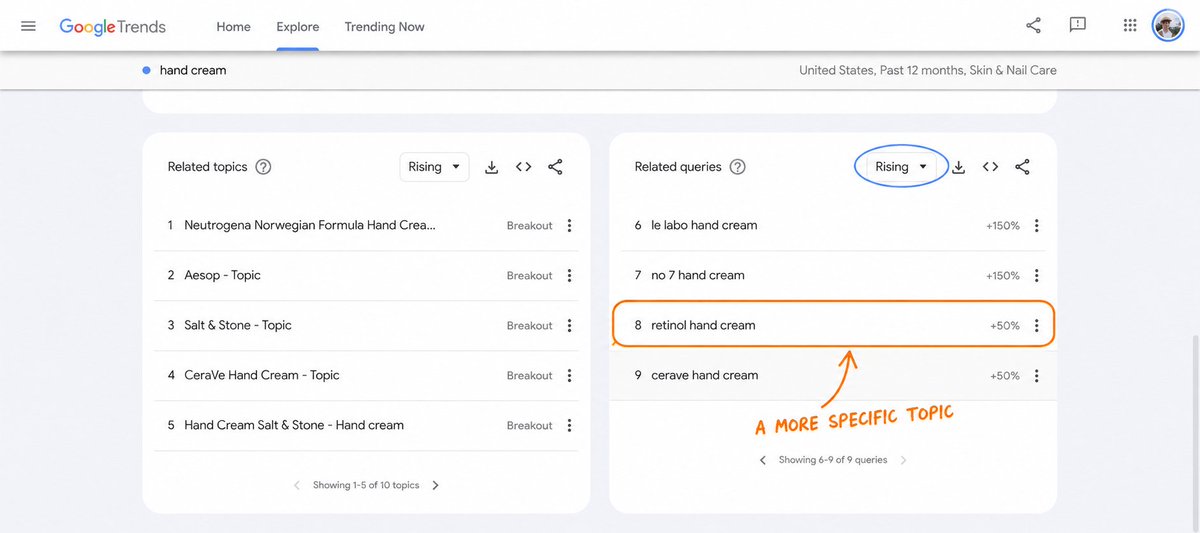
Example: enter "hand cream" at the top and choose Search term.
↳ Keep the same country, date range and category.
↳ Scroll down to Related queries and choose Rising.
↳ Check the next page of results too.
In this example, "retinol hand cream" appears on the second page with +50% growth.
If you sell retinol hand cream, you could write a comparison of the products you stock. If you don't, another search in the list may be a better fit.
Save the search term, growth percentage and settings so you can check them again later.
Step 4: Avoid topics people are losing interest in

Click "retinol hand cream" and change the date range to Past 5 years.
Look at the right side of the chart. Are people still searching for it, or did interest fall after a short spike?
This chart shows a large spike in 2026, followed by much lower interest.
I would investigate what happened around that spike before writing an article.
↳ If interest keeps falling, choose another topic.
↳ If it peaks at the same time each year, it may be seasonal. Plan your article before the next peak.
↳ If interest stays high or keeps growing, check the Google results and see what you could add.
Check the country and category before comparing charts. Google changed this example to All categories when I opened it.
The chart runs from 0 to 100, with 100 marking the highest interest. It doesn't show the number of searches.
Before writing, check whether you already have a page you could improve. For a hand-cream comparison, use the products you sell, explain their differences, and add your own photos and experience.
Step 5: Automate with AI (Optional)

You can have Claude or Codex repeat these steps every day or week, create content, and schedule outreach through Distribb.
First, connect your account:
↳ ChatGPT/Codex: add the SEO with Distribb plugin and connect your Distribb account. Select it in your task.
Use scheduled tasks in Claude Cowork or ChatGPT Work/Codex. The task needs browser access to check Google Trends and access to your Distribb project and website to publish content and het you backlinks automatically.
For journalist outreach, give them something useful to cite. That could be your own product test, a comparison, or a finding backed by data.
Distribb's Link Outreach currently focuses on authors of "best of" and "top tools" articles. Accelerator includes managed sending and follow-ups. The prompt also asks for journalists and checks whether your setup can schedule those pitches. If it can't, the agent saves the pitches and tells you what to do next.
Fill in the brackets, choose daily or weekly, and copy this prompt into your task:
Set up a recurring Google Trends, content and link outreach routine using my connected Distribb account.

Website: [YOUR WEBSITE]
Target country and language: [COUNTRY AND LANGUAGE]
Business category and products: [WHAT YOU SELL]
Schedule: [EVERY DAY AT 9 AM / EVERY MONDAY AT 9 AM]
Timezone: [YOUR TIMEZONE]
Mode: [DRAFTS FOR REVIEW / AUTOMATIC PUBLICATION AND OUTREACH]

Read my Distribb project, brand instructions, existing articles, content calendar and CMS connection. Ask only for missing setup details. Confirm my chosen publishing and outreach mode once and keep using it on future runs.

Check that the scheduled task has browser access, the Distribb connection and the tools it needs. Test one run in draft mode, then create the recurring task in this app's scheduler. Save my settings and the run instructions below; perform setup only once. Use this conversation's context where supported. Show me the saved task, schedule and next run time.

On each run:

First check articles and outreach left pending by previous runs. Once an article is live, continue its outreach without creating duplicate articles or campaigns.

1. Open Google Trends for my target country. Start with my business category and an empty keyword box. Inspect Rising queries for the past 12 months, then related queries for relevant products. Check the five-year chart for spikes and seasonality. Save the exact query, filters, capture date, displayed growth and source link. Never invent trend figures or treat the 0-100 chart as search volume.

2. Shortlist up to five relevant searches. Use Distribb keyword research to check volume and competition. Read current search results and my existing content. Choose one useful opportunity that fits what I sell. Update an existing page when appropriate. Skip new content if there is no worthwhile topic.

3. Create a complete article in my brand voice. Include a clear title, meta description, useful internal links and sources for factual claims. When the evidence supports it, include a finding or resource a journalist could cite. Use real research or product evidence; never invent tests, quotes or statistics.

4. Save the article in Distribb. In automatic mode, schedule publication through my connected CMS using an available calendar slot. Verify the saved article and publishing time. In review mode, leave it as a draft.

5. Find up to five journalists or relevant article authors whose recent coverage fits the story. Record their publication, a relevant article URL and verified public professional contact details. Draft a short, individual pitch explaining the useful finding and linking to my article. Check past outreach to avoid duplicate contacts.

6. In automatic mode, use Distribb's Link Outreach feature to schedule supported pitches and follow-ups after the article is live. Check the available connector tools and, where supported, the dashboard through the browser. If Link Outreach cannot accept these journalist prospects or queue this campaign, save the research and finished pitches and tell me the exact remaining action. Never report a draft as scheduled or a queued email as sent.

Keep a record of chosen topics, article IDs, publication URLs and outreach status for future runs. Report the topic selected, article status, publishing time, outreach status and any action needed from me. Stay quiet when nothing useful changed.
After setup, check the saved schedule and next run. Review the first article and pitches. If the task uses your local browser or files, keep the required computer and app running.
Run these five steps in order
↳ Choose your business category.
↳ Find a rising search related to what you sell.
↳ Find a more specific topic.
↳ Avoid topics people are losing interest in.
↳ Automate with AI.
These screenshots were captured on September 10, 2026. Results change with the date, country and category.
Connect Distribb to Claude or Codex to automate your content and outreach.
Thanks for reading.
Borja
Related articles

How I Make $20k/Month With Pixar Animations (and how you can too)
Every time I've made the most money in my life it came down to right time, right skill. AI Animations are exactly this to me right now

How to launch a one-person product (without destroying your life)
Over the last 5 years, I’ve helped launch products that went on to make multiple 7 figures in revenue per year.

the whop partner business model explained in 5 minutes...
every online business model is a trade between 3 things.