How to build a one-person agency using Grok Bot

You are running an SEO agency by yourself.
You find the clients. Read Search Console. Research keywords. Choose pages. Write briefs. Log into WordPress. Check results. Send reports.
Each new client adds revenue and another week of delivery.
Eventually, growth stalls because every useful action still waits for you.
Grok Bot changes that.
I use it like the director of a small agency made of Bots. It reviews every client, works out what deserves attention, coordinates the work, and brings me back the decisions that need a human.
I approve the work. The Bots do the boring 90%.
Before I turned this into a multi-client system, I ran the core workflow on a software company we were building in stealth.
The company reached $27,508 MRR.

I credit a ridiculous amount of that growth to Grok Bot.
It found search demand we were ignoring, chose the pages worth fixing, prepared the changes, and came back to measure what happened.
Across 90 days, Search Console recorded 52,103 clicks. Daily organic clicks sat around 300 to 350 for almost two months, then climbed to roughly 1,400.

The Bot did more than write.
It chose what to work on, used live data, prepared a real WordPress change, stopped for approval, and learned from the result.
That is a delivery system you can repeat across clients.
Below is the exact setup I would use to build a one-person SEO and GEO agency.
You can copy the Bot charters, client file, prompts, routines, approval rules, and reporting format.
Save this. You will use it more than once.
What Grok Bot actually is
Most people open Grok Bot, ask a question, read the answer, and leave.
That misses the useful part.
A Bot can have a job, its own context, connected tools, and recurring routines. It can return to the same client next week with a record of what happened this week.
You can also put several Bots in one group. One Bot coordinates the agency while specialists handle research, content, WordPress, and reporting.
The model is simple:
- You describe the role
- You connect the tools
- You show it the workflow
- You define where it must stop
- You schedule the job
- You return for decisions
For an SEO agency, the useful setup is one Agency Director above a few specialists.
Do not build the whole team yet. Start with one Director and one client.
Why this works for an agency
Most agency work is not difficult in isolation.
The hard part is doing it properly for every client, every week, without forgetting what was promised or mixing one client's context with another.
At five clients, you can keep most of it in your head.
At ten, your best strategist becomes a project manager.
At twenty, the agency either hires ahead of revenue or quietly gives every client less attention.
Grok Bot can hold the repetition:
- Check every client
- Find what changed
- Decide what deserves attention
- Prepare the smallest useful action
- Stop for approval
- Measure the result
- Write the update
- Remember the lesson
You keep the judgment, relationship, and responsibility.
That is the trade: less clicking, more deciding.
What you need
You only need four things to follow this guide:
- Grok Bot
- A WordPress site with Google Search Console
- One business outcome, such as demos, calls, trials, sales, or revenue
- Conqueror - https://conquerorapp.com/ - which gives Grok Bot the live SEO, GEO, Search Console, keyword, competitor, and WordPress tools used below
Conqueror has a seven-day trial for $0, then costs $39 per month.
If you want to build the exact workflow from this guide, open Conqueror in another tab and create your first project:
Connect one WordPress site and its Search Console account. You will use that project in Step 3.
Why this tool?
Grok Bot can coordinate the work, but it needs a reliable way to inspect live search data, research an opportunity, find the correct WordPress page, and prepare the change.
Conqueror handles that layer through MCP.
It also supports multiple projects, so the same agency system can move between client sites without relying on CSV exports and browser tabs.
Step 1: Hire the Agency Director
This is where most people go wrong.
A prompt is a request. A Bot is a role.
Name the Bot after a job someone could hold.
Mine would be Agency Director.
Then write the charter like you are briefing a new hire:
- What it owns
- What good work looks like
- Which sources it should trust
- What it must never do without asking
Paste this into the Bot's description:
You run delivery for my one-person SEO and GEO agency.
Your goal is to help every active client grow qualified organic traffic, demos, calls, trials, sales, or revenue. Traffic with no credible path to a customer is not a win.
For every client, use only that client's business context, approved claims, connected data, website, and work history. Never mix information between clients.
Every Monday, review the active client roster. Find the highest-impact credible opportunity for each client and return one short decision card per client.
Each decision card must include:
-
the evidence
-
why this opportunity comes first
-
the alternatives you rejected
-
the exact change you propose
-
the business outcome it could influence
-
the metric and date for checking the result
You may research, compare, draft, prepare WordPress changes, measure, and report.
Never publish, contact a client, change a live website, spend money, or make a claim on a client's behalf without my approval.
After an approved change goes live, record the baseline. Recheck it after 7 and 28 days. Save what happened as a rule for the next review.
Bots that have to ask before reading data are useless.
Bots that never ask before changing a client's website are risky.
The charter draws the line once, so you do not have to worry about it every day.
Step 2: Create the first client project
Open the Conqueror project you created earlier.
Connect the client's WordPress site and Google Search Console.
Set the business outcome before asking for SEO work.
Do not write:
> Get more traffic.
Write the action that matters:
- Book a demo
- Call the business
- Start a trial
- Buy a product
- Produce revenue
This changes which keywords and pages the Bot chooses.
A query with 2,000 searches can be worth more than one with 50,000 if the smaller one describes an expensive problem the client solves.
Step 3: Connect Conqueror to Grok Bot
Open the Agency Director and send this:
Connect a custom MCP server named Conqueror using this URL:
> https://winwith.conquerorapp.com/mcp
Complete the sign-in and confirm that Conqueror appears under the Bot's installed plugins.

The Agency Director can now use live Search Console, keyword, ranking, competitor, backlink, GEO, and WordPress tools.
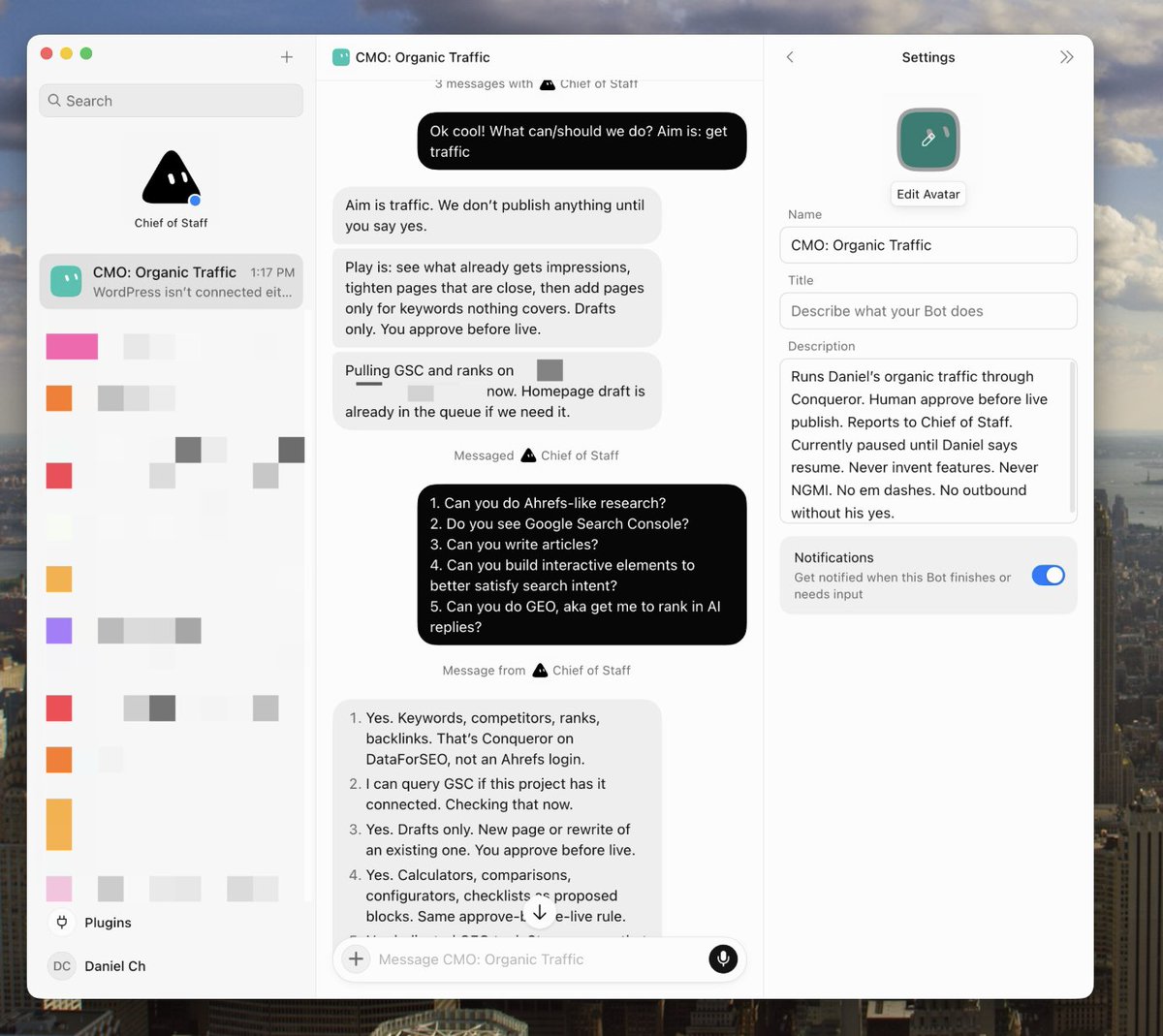
This is the part that turns the Bot into an operator.
Without Conqueror, it can tell you to improve a page.
With Conqueror, it can inspect the evidence, find the page, prepare the WordPress draft, monitor the ranking, and return later with the result.
If you have not created the project yet, start the Conqueror trial here:
https://conquerorapp.com/ai-agents/
Then come back after WordPress and Search Console are connected.
Step 4: Add one client file per business
Do not give the Bot one giant paragraph about the agency and assume it knows which facts belong to whom.
Every client gets a separate file.
Copy this:
CLIENT
[CLIENT NAME]

WEBSITE
[DOMAIN]

WHAT THE BUSINESS SELLS
[PRODUCTS OR SERVICES]

BEST CUSTOMERS
[WHO BUYS AND WHY]

PRIMARY BUSINESS OUTCOME
[DEMO / CALL / TRIAL / SALE / REVENUE]

HIGH-VALUE OFFERS
[OFFERS AND APPROXIMATE CUSTOMER VALUE]

PRIMARY CONVERSION PAGES
[URLS]

IMPORTANT MARKETS
[COUNTRIES / CITIES / INDUSTRIES]

TRUSTED DATA
[SEARCH CONSOLE / ANALYTICS / CRM / STRIPE / OTHER]

WORDPRESS RULES
[POST TYPES / BUILDER / SEO PLUGIN / APPROVAL REQUIREMENTS]

APPROVED CLAIMS AND PROOF
[CLAIMS, CASE STUDIES, SOURCES]

CURRENT PRIORITIES
[WHAT THE CLIENT CARES ABOUT NOW]

DO NOT
[RISKY ACTIONS / OFF-LIMIT TOPICS / REGULATED CLAIMS]
The client file prevents two expensive mistakes.
First, the Bot cannot confuse traffic with business value.
Second, facts and promises from one client do not leak into another client's work.
Step 5: Show it one complete job
Start with one existing page.
Do not ask for fifty articles.
Make the Bot prove it can choose the right work first.
Send this:
@Conqueror Open the project for [CLIENT].

Review the last 90 days of Search Console data and compare them with the previous 90 days.

Find up to five existing pages with credible business upside. Favor pages with meaningful demand, positions close enough to improve, and a clear path to [PRIMARY BUSINESS OUTCOME].

Reject searches with weak buying intent, mismatched geography, likely zero-click behavior, or no credible connection to the client's offer.

Choose one page. Inspect the live page, current search results, and strongest competing pages.

Return one decision card with:
- why this page comes first
- the source data
- the alternatives you rejected
- one proposed before-and-after change
- the metric that should move
- the customer action it could influence

Do not publish or edit the live website.
This is a real run from the earlier system.
Grok Bot used Conqueror to inspect 90 days of Search Console data, selected one opportunity, prepared a change, and waited for approval.
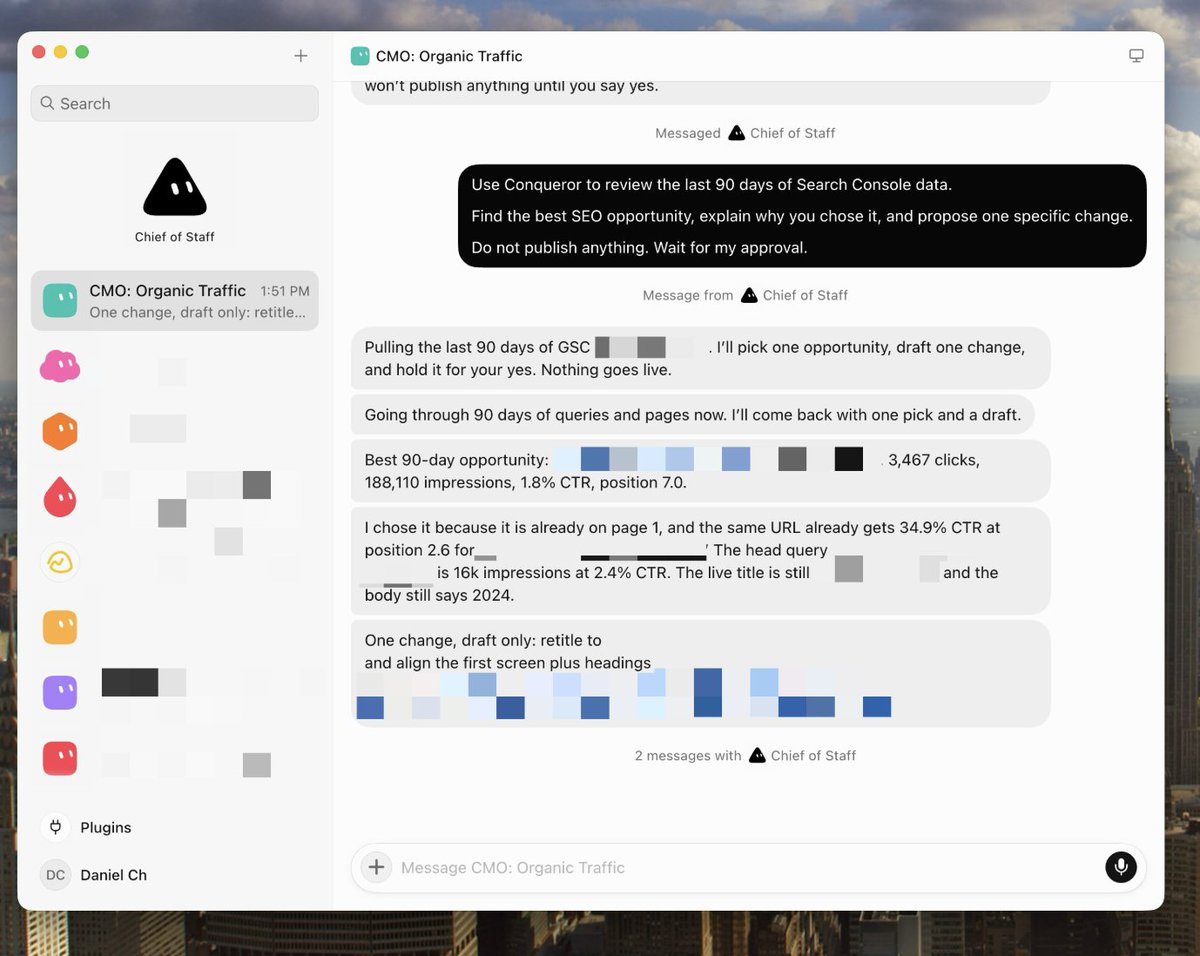
I can review that from my phone.
(At the beach hopefully 🏖️)
I can also disagree without opening six dashboards and rebuilding the analysis myself.
The decision card should use this format:
CLIENT
[CLIENT]

WHY NOW
[WHAT CHANGED OR WHAT OPPORTUNITY IS VISIBLE]

EVIDENCE
[SEARCH CONSOLE / RANKING / COMPETITOR / CONVERSION DATA]

WHY THIS CAN MATTER TO THE BUSINESS
[PATH FROM SEARCH TO DEMO / CALL / SALE / REVENUE]

REJECTED
[TEMPTING ALTERNATIVES AND WHY THEY LOST]

PROPOSED CHANGE
[EXACT BEFORE AND AFTER]

MEASURE
[PAGE / QUERY / CONVERSION METRICS AND CHECK DATE]

STATUS
Waiting for approval
The article is not the unit of work. The decision is.
Step 6: Save it as a recurring routine
One good recommendation is useful.
A system that repeats, measures, and remembers can run an agency.
Once the first job works, tell Grok Bot:
> Save the process we just used as a skill called Client Organic Growth Review. > > Include: > > - the trusted Conqueror and client sources > > - the prioritization rules > > - the decision-card format > > - the approval boundary > > - failure handling when live data is unavailable > > - the 7-day and 28-day measurement windows > > - the rule that publishing always requires human approval
Then create the Monday routine:
> Create a routine called Monday Agency Review. > > Every Monday at 9:00 AM: > > 1. Open the active client roster. > > 2. Confirm that current Conqueror, Search Console, and WordPress data are available for each client. Report failures instead of using old data. > > 3. Find up to three credible opportunities per client. > > 4. Recommend one opportunity per client based on business value, evidence, urgency, and fixability. > > 5. Return one decision card per client in a single approval queue. > > 6. Never publish, contact a client, or change a live website without approval. > > 7. For every approved change, save the baseline, exact diff, intended outcome, approval, and publication date. > > 8. Recheck the result after 7 and 28 days. > > 9. Prepare the five-sentence client update from the recorded work. > > 10. Flag important pages that need a three-month refresh schedule. > > Keep every client's context, sources, history, and recommendations separate.
Here is the Agency Director running that Monday review across five projects and returning one approval queue:

You can wake up on Monday to the agency's work already prioritized.
Your job is to approve it, challenge it, or send it back.
Step 7: Put the agency in one group chat
One Bot can run the first version.
Once the workflow is reliable, split it into specialists and put them in a group with the Agency Director.
These are the five Bots I would create.
1. Agency Director
Own the client roster and weekly approval queue.
Read every client's latest checkpoint. Set the priority, assign one owner, and make sure every action has evidence, a business outcome, an approval boundary, and a measurement date.
Escalate client communication, publishing, spending, conflicts, and risky claims. Handle the rest with the specialist Bots.
2. Opportunity Scout
Own SEO and GEO opportunity research through Conqueror.
Find existing pages worth improving, low-hanging commercial searches, lost rankings, stale winners, competitor gaps, and questions the company should answer in AI search.
Return no more than five candidates per client. Explain why the weaker candidates lost. Never draft content before the Agency Director chooses one.
3. Content and GEO Editor
Own page drafts and refreshes after an opportunity is approved.
Use the client's approved voice, claims, proof, internal links, and WordPress structure. Improve the page for the searcher first, then make its entities, answers, and evidence easy for Google and AI answer engines to understand.
Prepare drafts only. Never invent a fact, testimonial, result, or product capability.
4. WordPress Operator
Own reviewable WordPress execution through Conqueror.
Inspect the correct live page and prepare the smallest useful change. Return the exact before-and-after diff, affected blocks, baseline, and rollback note.
Create a draft when approved. Never update the live page without explicit human approval.
5. Client Reporter
Own measurement and client updates.
Recheck every approved change after 7 and 28 days. Compare it with the recorded baseline and connect the result to demos, calls, trials, sales, or revenue whenever the data exists.
Write five short sentences: what we found, why we chose it, what changed, what happened, and what comes next. Never report work that was not completed.
Open the group chat with this:
@Agency Director review the active client roster and choose the three clients with the most urgent or valuable work this week.
@Opportunity Scout use Conqueror to find up to five credible opportunities for each selected client. Keep every client's data and context separate.
@Content and GEO Editor wait until the Agency Director chooses one opportunity. Then prepare the focused draft.
@WordPress Operator prepare the exact WordPress change and return it for review. Do not publish.
@Client Reporter record the baseline now. Schedule the 7-day and 28-day checks after an approved change goes live.
Bring me one approval queue. Pull me in only for decisions, publishing, client communication, spending, or risky claims.
Give the group an objective, not a list of tiny clicks.
If you decompose every job yourself, you are still running project management.
You have only moved it into a chat box.
Three services the agency can run
The same delivery loop can power several offers.
1. Grow pages that already have demand
This is usually the easiest place to begin.
Conqueror gives Grok Bot the current Search Console, ranking, keyword, competitor, and page data.
The Bot finds pages that Google already understands but that are losing clicks, rankings, or conversions.
The agency improves one constraint, publishes after approval, and checks whether it helped.
That is far easier to sell than:
> We will publish eight blog posts.
2. Find low-hanging commercial pages
A young site should not fight a ten-year-old domain for every broad keyword.
The Opportunity Scout can use Conqueror to find narrower searches with real buying intent, then prepare comparison pages, service pages, integrations, landing pages, or useful tools.
The promise is not more words.
It is a page built around a problem that can create a customer.
3. Improve AI citations and GEO
Buyers now ask ChatGPT, Perplexity, and Google AI products which tools, services, or approaches they should choose.
Use this prompt:
@Conqueror
Review [PAGE URL] for its ability to appear and be cited in AI-generated answers.
Identify the commercial questions this page should answer and the company, product, category, and problem entities that must be clear.
Check whether the page:
-
answers the main question directly
-
makes the company and offer unambiguous
-
supports important claims with evidence
-
contains sections that can stand alone when quoted
-
covers the follow-up questions a serious buyer would ask
-
gives the reader a clear next step
Prepare one focused GEO improvement as a WordPress draft.
Do not publish it.
The agency can track citations, referral visits, demos, and revenue when the client's data allows it.
Make reporting automatic
Most agency reports are written after the work, which is why nobody enjoys making them.
Grok Bot already has the evidence, decision, draft, approval, and measurement.
The update can come from that record.
Copy this:
Write this week's client update for [CLIENT].
Use only the approved work log and current measurements.
In five short sentences, explain:
-
What opportunity we found
-
Why we chose it
-
What we changed
-
What happened, or when the result will be measured
-
What we recommend next
Use plain language. Do not mention internal prompts, model names, speculative wins, or work that was not completed.
The client sees what happened and why.
You do not spend Friday searching through browser history and turning activity into a story.
Refresh winning pages before they decay
An agency should not discover that a client's best page still says 2024 during a quarterly call in 2026.
Conqueror can schedule content refreshes.
I set important pages to be reviewed every three months.
Each run checks performance, current search results, stale facts, examples, headings, the opening, and thin sections.
It returns a new WordPress draft for approval instead of silently replacing the live page.
Copy this:
> @Conqueror > > Schedule a content refresh every three months for [CLIENT] on [PAGE URL], targeting [PRIMARY KEYWORD]. > > On each refresh: > > - check the current search results and the page's latest performance > > - update stale facts, examples, dates, and claims > > - improve weak keyword coverage, headings, the opening, and thin sections > > - keep the client's approved voice, facts, links, images, and WordPress structure > > - create a new draft and notify the agency when it is ready > > Do not publish anything without approval.
This gives every client a promise they can understand:
> Important pages get reviewed before they go stale.
My agency stack
People love a stack list.
So do I.
- Grok Bot: runs the roles, routines, group chat, memory, and approval queue
- Conqueror: gives the Bots real SEO research, Search Console, GEO, rank tracking, auto-refresh, and reviewable WordPress execution through MCP
- Google Search Console: shows queries, clicks, impressions, CTR, and position
- Google Analytics: shows what visitors do after the click
- The client's CRM or booking tool: shows demos, calls, trials, and opportunities
- Stripe or the client's revenue system: shows whether those actions became money
- WordPress: holds the live pages and approved drafts
- DataForSEO: supplies keyword, ranking, competitor, backlink, and search-result data through Conqueror
- Claude models: write and revise when a page needs content
- OpenAI's GPT Image 2: creates images when a page needs them
Conqueror:
I also like that I can bring my own AI and DataForSEO keys.
The agency pays the providers for what it uses instead of buying a large bundled research and AI subscription for every client.
The honest part
Do not hand a new Bot ten client websites and leave.
Anything touching live pages, private client data, legal claims, money, or external communication needs a boundary.
Start with reversible work:
- Read data
- Research opportunities
- Prepare drafts
- Compare versions
- Write reports
Watch the first runs closely.
Only expand authority after the Bot repeatedly:
- Uses the correct project
- Cites the correct evidence
- Follows the client file
- Stops where you told it to stop
The fastest way to ruin this system is to scale a bad workflow.
Your first 20 minutes
Do not finish this article and start designing a perfect Bot org chart.
Do this:
- Create one Agency Director in Grok Bot.
- Paste the charter from Step 1.
- Start a Conqueror project and connect one WordPress site plus Search Console: https://conquerorapp.com/
- Connect the MCP URL from Step 3.
- Complete the client file.
- Run the safe 90-day review.
- Approve one small, reversible change.
- Record the baseline and check it after 7 and 28 days.
When that loop works, add the next client.
Then add the specialist Bots.
That is how a one-person agency grows without quietly giving every new client less attention.
TLDR;
- Start with one Agency Director and one client
- Give Grok Bot a business outcome, not a request for more content
- Use Conqueror to connect live SEO, GEO, Search Console, and WordPress tools
- Keep one context file and one result history per client
- Make one decision card the unit of work
- LET THE ROBOT DO THE BORING 90%
- Keep publishing, spending, and client communication behind human approval
- Measure demos, calls, trials, sales, and revenue after the click
- Refresh important pages before they go stale
- Add specialist Bots only after the first delivery loop works
You do not need a twenty-person agency to give clients consistent attention.
You need a system that remembers the work, prepares the decision, and returns when it is time to measure.
If you want to copy this exact system, start Conqueror's seven-day trial:
https://conquerorapp.com/ai-agents/
Connect one WordPress site and Search Console, then paste the MCP URL from Step 3 into Grok Bot.
Do not build all five Bots first.
Get one real client decision card back.
That is the moment you know the agency can run this way.
Related articles

I told ChatGPT-6 Astra to do my SEO. It got me $27k MRR (full guide)
Connect a custom MCP server named Conqueror using this URL: [https://winwith.conquerorapp.com/mcp](https://winwith.conquerorapp.com/mcp)

Grok Bot for Business (Use These Templates Now)
Most people are talking about Grok Bot for recipes, travel, or admin work. Not enough people are talking about using it for business purposes.

How I use Grok Bots to rank brands on AI answers that it feels illegal
Name this bot `CrowdReply - Scout`.