How To Make Highly Converting TikTok Slideshows For Your App ( EASY MODE)

STEP BY STEP....
TikTok slideshows are the easiest form of organic marketing you can do for your app right now.
You don't need to show your face. You don't need expensive UGC creators. You don't need crazy editing skills.
And it works in almost any consumer app niche — fitness, looksmaxxing, nutrition, sports, dating, productivity, finance. The niche changes. The framework barely moves.
I've been using this exact system to grow my apps spending 10 minutes a day and $0. Below is the whole thing, start to finish. Steal it.

First, understand what you're actually building
Most founders treat TikTok like a lottery ticket. They post a few times, nothing goes viral, and they quit.
That's the wrong frame.
You're not trying to become a TikTok creator. You're building an acquisition funnel that happens to run on free distribution. Every slideshow is one cheap experiment feeding that funnel. Some will flop — that's fine. You just need to be consistent and you will win.
Keep that in mind for everything below.
1. Don't post from your app's main account
Create a separate TikTok account just for organic content.
Example if your in the Fitness Niche👇
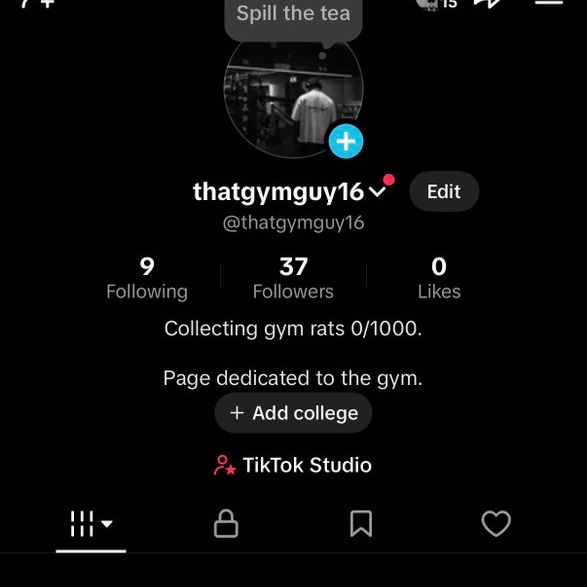
The goal is for the account to feel like a real niche content page — not a page where every post is obviously trying to sell an app.
- Building a fitness app? Build a fitness theme page.
- Building a baseball app? Build a baseball theme page.
- Building a looksmaxxing app? Build a looksmaxxing theme page.
Don't let every part of the profile scream your app's name. You want someone scrolling their For You Page to consume the slideshow like normal content first. The app comes later ( THIS IS KEY).
2. Don't guess what will go viral
This is the biggest mistake founders make — sitting down and trying to invent TikTok ideas from scratch.
Don't. TikTok has already told you what people in your niche want to watch and what performs well.
Search keywords related to your niche and study what's already winning. For my app Abmaxx( Abs app), I'll search things like:
- "easiest way to get abs"
- "how to get abs"
- "fat loss tips"
- "things killing your gains"
- "lower belly fat"''

Exmample: If your In a religion/spirituality niche, you'd search things like "5 strongest prayers" or "5 signs God is trying to speak to you."
Scroll until you find a slideshow with strong engagement, high views, and active comment section, and a recent post date — that's your signal.
You don't need to reinvent it. Copy that format almost exactly: same hook, same slide structure, just with your own images and CTA ( I get into this below)
And something to keep in mind aswell is that the hooks that consistently perform well for me across all niches are:
- "5 reasons why…"
- "Here's exactly why…"
- "5 things I wish I knew before…"
- "Stop doing this if you want…"
Simple hooks almost always beat clever ones. Make sure the hook actually gets people interested and makes them stop scrolling. All this advice means nothing if you dont have high quality hook for these slideshows.
3. Turn the hook into slides
Once you've found a hook/format you like, use ChatGPT to draft the slide texts to put on each slide. A prompt this simple works:
> "I'm creating a TikTok slideshow for [NICHE] with the hook '[HOOK].' Give me 5 slides, each under 25 words, that provide genuinely useful and actionable information."
Now you're editing instead of staring at a blank screen.
Don't blindly copy the output — rewrite anything that sounds robotic. Rules for each slide:
- One idea per slide
- Understandable in 1–2 seconds
- No paragraphs, no walls of text
People are swiping TikTok, not reading an essay.
4. Get the images from Pinterest
Go to Pinterest for images . Search your niche + "aesthetic":
- Fitness → "gym aesthetic"
- Social Platform → "friends aesthetic"
- Looksmaxxing → "looksmaxxing aesthetic"
- Baseball → "baseball aesthetic"
You get the idea.
Now find images that all share a similar visual style — this matters more than people think.
Your background images matter way more than people realize, and that's often why videos underperform. They need to look trustworthy and intentional. Five random images feel thrown together. Five images with the same aesthetic feel like an actual content page — and that's what keeps people from swiping away.
Also: always format images to fill the screen on TikTok, not cropped or letterboxed. Clean, full-screen visuals are non-negotiable.
5. Keep it short
Around 5–6 slides is what works me.
Your goal isn't to explain everything about the subject. Your goal is:

Every extra slide is another chance for someone to leave. Respect that.
6. CTA on slide 4 or 5
This is one of the most important parts.
Don't make slide 1 "DOWNLOAD MY APP!!!" — you instantly destroy everything that made the content feel organic.
Give value first, then introduce the product as part of the solution. I always put the CTA on slide 4. For My CTA slides I always include 2 app screenshots alongside the App Store screenshot showing the logo and name, so if a another one of my slideshows pops up on there fyp again, they will recognize the logo and more likely to buy the 2nd time.
Nobody buys hard CTAs. You need something subtle that doesn't feel like paid promotion. I'll write something like:
> "I've been using this app AbMaxx to help me finally lose lower belly fat."

The exact wording depends on your app, but the principle never changes: the CTA should feel like a continuation of the content, not an ad interrupting it. Phrases like "I've been using this app to help me…" or "this app helped me…" work far better than a direct pitch.
Test placement too — slide 4 works better for some niches, slide 5 for others.
7. Choose the right sound
Don't slap a random trending song over the slideshow.
The sound should match the aesthetic and emotion of the content. Look at what successful slideshow accounts in your niche are using right now , something that feels native to the content but still has momentum on TikTok.
The Sound has more of a impact than you think.
8. Keep hashtags simple
Use these every time, no matter the niche: #FYP #ForYouPage #Viral, plus your niche keyword(s) once or twice.
Here are some Finished product examples below I made for a Screen time blocking app, and Facebook.
9. Post 3–4 times a day, stay consistent
This is a volume game. When I'm aggressively testing a new account, I aim for roughly 3–4 posts per day.
Not because every slideshow will hit — most won't. You're trying to discover which combination of Hook + Topic + Visual + CTA works for your audience.
And when something does hit, don't sprint off to a completely new idea. Make variations. If "5 reasons you still don't have abs" performs well , then recreate simsialir ones:
- "5 mistakes stopping you from getting abs"
- "5 Things holding you back form getting abs"
- "4 things I stopped doing to finally see my abs"
You found demand. Squeeze the format before hunting for the next one.
New accounts also need to warm up. You're not going to magically hit 100k views out of nowhere. But if you're posting 2–4 times a day consistently for a few weeks, the algorithm starts to pick up your content and push it further.
10. How to tell if a video performed well (it's not just about views)
If the comments are full of questions like "what's this app?", "app name?", or "this app looks sick" — that's your signal.
That format is converting. Double down on it.

One thing founders should know
Slideshow traffic is sometimes lower-intent than creator-led content or paid acquisition. Don't panic if your install → paid conversion isn't identical across channels — that's normal.
What matters is the economics. If slideshows are generating huge amounts of essentially free distribution and still producing profitable customers, the channel can be incredibly valuable even at a lower conversion rate.
The mistake is optimizing purely for views. Optimize for customers.
🚨🚨🚨If your still struggling to scale your app, im accepting 3 more people this month for a 1 on 1 call 👉 https://linoleighton.com .
The whole system in one screen
- Create a niche content account (not your app's brand account)
- Research slideshow formats already winning in that niche
- Study the hooks instead of guessing
- Turn the concept into 5–6 short slides
- Use a consistent visual aesthetic
- Deliver value before you introduce the app
- Make the CTA feel natural, on slide 4 or 5
- Use niche-relevant sounds and simple metadata
- Post consistently and test at volume
- Double down on what drives installs and customers — not just views
You don't need every slideshow to hit. You need to find one repeatable format that consistently puts your app in front of the right people.
Once you find it, make variations until it stops working.
Then find the next one.
That's the game.
Related articles

The ULTIMATE Organic Marketing Guide For App Founders
I’m going into calorie deficit, fat loss, high protein meals, gym meals, restaurant calories, what I eat in a day, meal prep, macro tracking, cutting, bulking, low calorie snacks and whatever else st…

i analyzed 27 apps that went from zero to millions of views without spending a dollar on ads. they a
$0 to $80K MRR in 70 days. $0 to $200K MRR in 9 months

how to steal viral formats and make them work for your app
every viral format you saw on TikTok this week is a copy of something that worked last month.