I Burned $6k on TikTok Ads. Now I'm at €400+/Day With a €6.51 CPA. Here's the Exact Setup.

Before this setup, I burned around $6k on TikTok Ads without a single profitable day. Now I'm running at €400+/day with a €6.51 CPA — same app, same budget level, completely different result.
My first TikTok Ads article was about the technical side — getting attribution working so TikTok actually receives your data. If you haven't set that up yet, read that one first, because none of this matters if your signal is broken.
https://x.com/maxzrco/status/2067895797971083590?s=20
This article is the other half: the actual campaign setup.
Let me walk you through it.
Before you spend a single euro: the creative requirement
This is the part most people skip, and it's why their campaigns fail.
You need an organic format that already works. Ideally something that hit 100k+ views organically. That's your proof the hook and structure land with real people.
From that one winner, you create many variations — same hook, same structure, same flow, but new visuals, new music, slightly tweaked. (I'll write a full article on exactly how to do this — follow so you don't miss it.)
I'll recommend at least 6 creativ variation (from the winner) to start a campaign. More is better, so you can swap out the losers after a few days and feed in fresh ones to test.
Campaign structure
Keep it dead simple:
- Objective: App Promotion → App Install
- Always Smart+ campaign
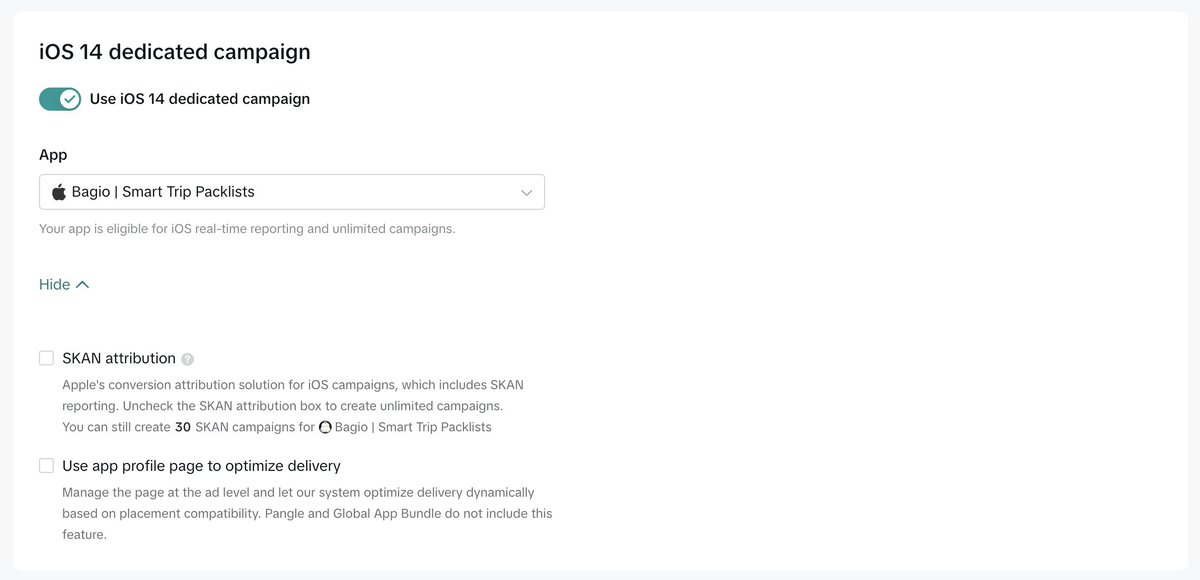
- ENABLE "iOS 14 Dedicated Campaign"
That's the skeleton. Now the details.

The real-time reporting requirement
Your app needs to be unlocked for iOS real-time reporting. Only then can you disable the SKAN toggle. I explained the full reasoning behind this, step by step, in my first article.
Not unlocked yet? Run a plain Install campaign for a few days to feed TikTok more data. After about 3–4 days you should get unlocked, and you'll see the confirmation text appear under your app in Ads Manager.
Budget: start small (yes, really)
Start with $30/day. No budget optimization.
Yes, $30. I did this myself on a tiny $30/day budget for the first 3 days. Once you have a few conversions and the algorithm starts learning, you slowly raise the budget. (A dedicated scaling article is coming - follow for all the free resources.)
If you have more budget available, you can start at $50/day. You'll collect more data and the algorithm learns a bit faster. But more budget is not a guarantee of success — don't assume throwing money at it fixes anything.
Ad group settings
- Goal → In-App Event: "Subscribe"
- Bid Strategy: Highest Volume (budget)
- Location: USA. Language: English. Everything else default.
On the USA point — this is non-negotiable for me. It's the best market for iOS apps. Don't try to be clever and start elsewhere. Start here.
Subscribe event — if it's not selectable yet, run an Install campaign for a few days to collect data until the event unlocks. Yes, you'll burn a few euros getting everything set up. You'll make it back faster than you think.


- Placements: turn off automatic. Disable Lemon8 and Pangle.
Ad settings (the detail checklist)
This is where the small stuff lives. Get every one of these right:
- DISABLE "Auto-Select Creative Assets"
- Add 6–12 ads (6 if your budget is under $100)
- Use ONLY "Download" or "Install" as your CTA
- Remove "Selling Points"
- DISABLE all "Automatic Enhancements"
- Destination: up to you — TikTok landing page or App Store page.

The short version
- Get a proven organic format first (100k+ views ideal), then make 6+ variations of it.
- Objective: App Promotion → App Install. Smart+. Enable iOS 14 Dedicated Campaign.
- Get unlocked for real-time reporting, then kill the SKAN toggle — delayed signal kills learning.
- Not unlocked? Run Install campaigns for ~3–4 days to collect data.
- Start at €30/day, no budget optimization. Scale slowly after conversions come in.
- Goal: Subscribe. Bid: Highest Volume. Location: USA. Language: English.
- Disable auto placements, Lemon8, Pangle.
- Disable Auto-Select Creative Assets + all Automatic Enhancements. CTA: Download/Install only.
Simple setup. Same setup every time. The details are everything.
I'm building in public — sharing every setup, every number, every fail. Scaling and creative-variation articles are coming next. Follow along so you don't miss them. 🚐
Related articles

i analyzed 27 apps that went from zero to millions of views without spending a dollar on ads. they a
$0 to $80K MRR in 70 days. $0 to $200K MRR in 9 months

how to steal viral formats and make them work for your app
every viral format you saw on TikTok this week is a copy of something that worked last month.

I went from $0 to $10K+ without spending a cent on ads (full guide)
I’m going to break down the exact process that took one of my apps from $0 to $10K+ using organic marketing.